Page 1 of 1

[0957] Floating texture over trees - Yamalia

Posted: 2010-12-26 03:58
by SnipeHunt
Don't know what the heck I was thinking.
This is from Yamalia, not Lashkar.
Will a courteous MOD please adjust the title.
Thanks in advance.


I have noticed this for a while and just decided that maybe it is not me. Wondering if maybe this has something to do with the lag I and alot of peeps get on this map?

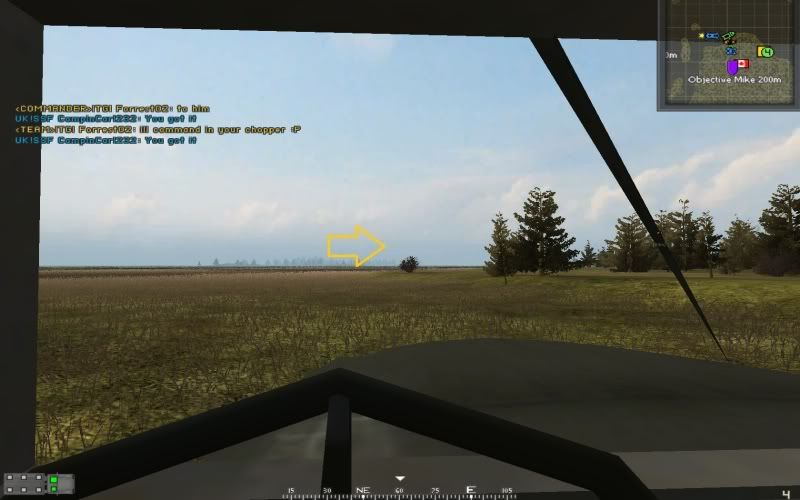
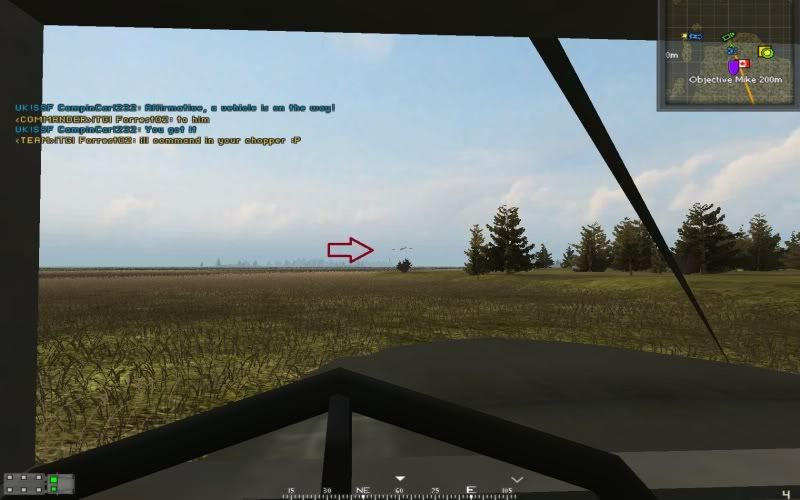
There is some stuff that can be seen at a distance. Looks like something at the very edge of the view distance, but when I get closer to examine it it disappears. Here are a few screenies.

WIN 7 32bit
GTX460
4GB ram
All settings on high, but AA off.

here some is
Image
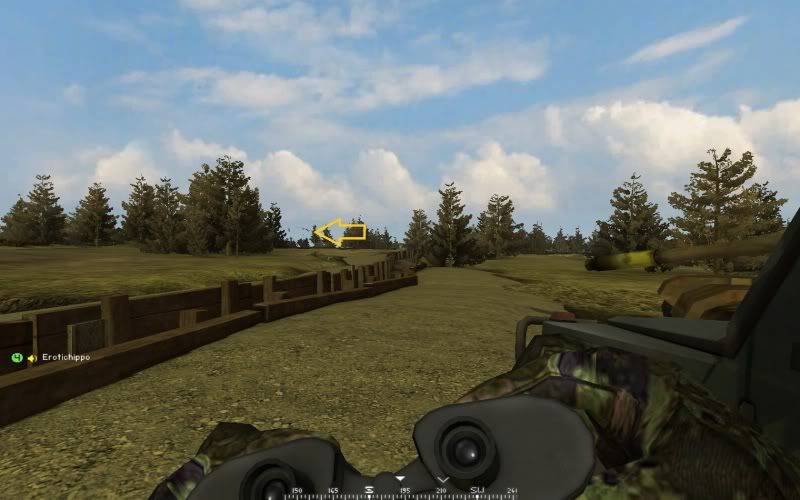
Now it disappears
Image
Here is more
Image

re: [0957] Floating texture over trees - Yamalia

Posted: 2010-12-26 04:14
by VapoMan
This a problem with quite a few trees, its caused by the distant LOD (the low quality version of the tree you see at distance).

re: [0957] Floating texture over trees - Yamalia

Posted: 2010-12-26 04:30
by SnipeHunt
There isn't a tree there. It is floating above a small bush on the first screenshot....
I know about the LOD stuff, this isn't it.

re: [0957] Floating texture over trees - Yamalia

Posted: 2010-12-26 04:40
by VapoMan
Bushes and trees are overgrowth, some types of bushes and some types of trees have this problem.

In your first picture you can see the bush looks low quality, its the distant LOD.
In the second picture the bush looks fine because you've moved closer.

So I would say that it is a problem with the distant LOD for that bush.

re: [0957] Floating texture over trees - Yamalia

Posted: 2010-12-26 04:58
by SnipeHunt
Why would the bush have an LOD that is two times as tall and an odd square shape.
But for the heck of it I'll look at it in the editor in a few...

re: [0957] Floating texture over trees - Yamalia

Posted: 2010-12-26 15:08
by Tim270
Looks like a 'Artifact' from the alpha channel.

re: [0957] Floating texture over trees - Yamalia

Posted: 2010-12-26 16:43
by Outlawz7
No Tim, it's an overgrowth atlas bug, something do with some offset/texture bleeding. Guess the atlas needs recompiling from scratch.

re: [0957] Floating texture over trees - Yamalia

Posted: 2010-12-26 16:53
by Tim270
Ah ok, didt know that stuff was all put in atlas.

Re: [0957] Floating texture over trees - Yamalia

Posted: 2010-12-27 06:51
by splatters
I get this too, most noticably on the trees (fir?) on Fools Road that all use the same texture and some grass undergrowth on Fallujah.

BTW, which atlas are those textures in? Does every map have their own overgrowth (and undergrowth) atlas or what?

Re: [0957] Floating texture over trees - Yamalia

Posted: 2010-12-27 09:00
by VapoMan
splatters wrote:I get this too, most noticably on the trees (fir?) on Fools Road that all use the same texture and some grass undergrowth on Fallujah.

BTW, which atlas are those textures in? Does every map have their own overgrowth (and undergrowth) atlas or what?
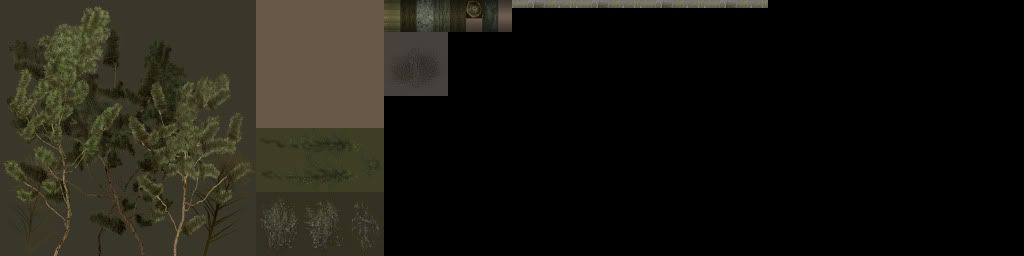
OvergrowthAtlas0.dds is a file that gets all the textures for the overgrowth in the map.

Yamalia's OvergrowthAtlas0.dds:
Image

Then there is OvergrowthAtlas.tai a textbased file that tells the game the coordinates in the dds file for the textures to go onto the right trees.

Yamalia's OvergrowthAtlas.tai:

Code: Select all

# mods/pr/levels\yamalia\overgrowth\OvergrowthAtlas.tai
# 
# 
# <filename>		<atlas filename>, <atlas idx>, <woffset>, <hoffset>, <width>, <height>
# 
# Texture <filename> can be found in texture atlas <atlas filename>, i.e.,
# <group><idx>.dds with texture coordinates boundary given by:
#   A = ( <woffset>, <hoffset> )
#   B = ( <woffset> + <width>, <hoffset> + <height> )
# 
# where coordinates (0,0) and (1,1) of the original texture map correspond
# to coordinates A and B, respectively, in the texture atlas.


objects/vegitation/pr/textures/pinebush_le.dds		levels\yamalia\overgrowth\OvergrowthAtlas0.dds, 0, 0, 0, 0.25, 1
objects/vegitation/pr/textures/camonet_lod.dds		levels\yamalia\overgrowth\OvergrowthAtlas0.dds, 0, 0.25, 0, 0.125, 0.5
objects/vegitation/asia/textures/ncpineleaf01lodde.dds		levels\yamalia\overgrowth\OvergrowthAtlas0.dds, 0, 0.25, 0.5, 0.125, 0.25
objects/vegitation/pr/textures/largebush_lod.dds		levels\yamalia\overgrowth\OvergrowthAtlas0.dds, 0, 0.25, 0.75, 0.125, 0.25
objects/vegitation/asia/textures/tile_ncbark01de_lod.dds		levels\yamalia\overgrowth\OvergrowthAtlas0.dds, 0, 0.375, 0, 0.125, 0.125
objects/vegitation/pr/textures/bush_branches_lod.dds		levels\yamalia\overgrowth\OvergrowthAtlas0.dds, 0, 0.375, 0.125, 0.0625, 0.25
objects/vegitation/pr/textures/wildgrasses02_lod.dds		levels\yamalia\overgrowth\OvergrowthAtlas0.dds, 0, 0.5, 0, 0.25, 0.03125
So im guessing that this is a problem in one of these two files, there could be some pixel bleeding or the coordinates are slightly off. But then wouldnt the problem be seen on the trees up close and far away. It only seems to be visable at a distance.