
[Help] Viewing PR models
-
Cheditor
- Posts: 2331
- Joined: 2009-03-01 14:35
[Help] Viewing PR models
When ever i enter the BF2 editor and select a PR model the 3 arrows appear but there is no model there. I have followed the BF2 editor set up tutorial. Anyone have something similiar to this?


-
Rhino
- Retired PR Developer
- Posts: 47909
- Joined: 2005-12-13 20:00
Re: [Help] Viewing PR models
make sure the client files of the vehicles are extracted as well as the server files.
also make sure your modmanager is setup correctly to load the vehicles.
also make sure your modmanager is setup correctly to load the vehicles.

-
Cheditor
- Posts: 2331
- Joined: 2009-03-01 14:35
Re: [Help] Viewing PR models
Ok will double check files tommorow when i get a chance. One quick question is i extracted the two object files, but after i leave them in the location i dont need to do anything else?
-
Cheditor
- Posts: 2331
- Joined: 2009-03-01 14:35
Re: [Help] Viewing PR models
Theres four files?
4. Getting your content ready
So now we have our basic mod setup but we still need to do some work before this can be usable by the editor.
First lets get the vBF2 Objects working with it. The easiest way in the current BF2 editor version is to do this:
1. go to: "C:\Program Files\EA GAMES\Battlefield 2\mods\pr_edit\objects\"
2. Select both the "Objects_client.zip" and the "Objects_server.zip" files, right click on them and click "Extract Here". This will take some time like above, and overwrite any files it asks you to.
Can only find client and server there :S. Also will get screen shots tommorow when i can as the editor is on another PC which is currently being used.
4. Getting your content ready
So now we have our basic mod setup but we still need to do some work before this can be usable by the editor.
First lets get the vBF2 Objects working with it. The easiest way in the current BF2 editor version is to do this:
1. go to: "C:\Program Files\EA GAMES\Battlefield 2\mods\pr_edit\objects\"
2. Select both the "Objects_client.zip" and the "Objects_server.zip" files, right click on them and click "Extract Here". This will take some time like above, and overwrite any files it asks you to.
Can only find client and server there :S. Also will get screen shots tommorow when i can as the editor is on another PC which is currently being used.
-
Rhino
- Retired PR Developer
- Posts: 47909
- Joined: 2005-12-13 20:00
Re: [Help] Viewing PR models
extracting the vbf2 models isn't going to help him see the PR models Jonny 
Besides, if everything is setup correctly it should load them strait from BF2 without having to unzip them.
Besides, if everything is setup correctly it should load them strait from BF2 without having to unzip them.
-
Rhino
- Retired PR Developer
- Posts: 47909
- Joined: 2005-12-13 20:00
Re: [Help] Viewing PR models
I do not have the vBF2 objects extracted into my pr_edit and I load them just fine from the bf2 mod folder.Jonny wrote:The PR ones do use some vBF2 textures though...
-
Tonnie
- Retired PR Developer
- Posts: 2014
- Joined: 2007-07-31 14:59
Re: [Help] Viewing PR models
i dont know if it would help or not but try extracting the
"objects_client_patch.zip"
"objects_server_patch.zip"
There both found in the objects folder of PR....
"objects_client_patch.zip"
"objects_server_patch.zip"
There both found in the objects folder of PR....
HangMan: BF2 Editor, it has very strict limitations memory wise, and crashes all the time. Its like a girl. Treat it with respect and take it slow and you'll get places. Rush and get ahead of yourself and it will turn around and punch you in the mouth
-
Rhino
- Retired PR Developer
- Posts: 47909
- Joined: 2005-12-13 20:00
Re: [Help] Viewing PR models
that's only if you have 0.86 installed
and then they are only tweaks, not much new stuff in there apart from the WZ551A
and then they are only tweaks, not much new stuff in there apart from the WZ551A
-
Tonnie
- Retired PR Developer
- Posts: 2014
- Joined: 2007-07-31 14:59
Re: [Help] Viewing PR models
Well i am out of ideas then...[R-DEV]Rhino wrote:that's only if you have 0.86 installed
and then they are only tweaks, not much new stuff in there apart from the WZ551A

HangMan: BF2 Editor, it has very strict limitations memory wise, and crashes all the time. Its like a girl. Treat it with respect and take it slow and you'll get places. Rush and get ahead of yourself and it will turn around and punch you in the mouth
-
Cheditor
- Posts: 2331
- Joined: 2009-03-01 14:35
Re: [Help] Viewing PR models
Ok i have got some screen shots of what i am experiencing. I am going to use my attempts at loading the British Warrior as an example.
http://img268.imageshack.us/img268/4056 ... prob15.png
Here are error messages i get from loading the models.
http://img268.imageshack.us/img268/7813 ... oimage.png
Here is what the model screen looks like. Note the BF2 models appear so there is no problem with reading them.
Also when you are in the object folders, C/programsfile/ea/bf2/mods/pr_edit/objects. Do you need to have the extracted files in there are can they be in an extra folder so it looks like. C/programsfile/ea/bf2/mods/pr_edit/objects/objects_client.
Heres a Screen Shot of what i mean.
http://img268.imageshack.us/img268/6709 ... rprob1.png
Also when ever i start the editor i get alot of red writing saying "ignoring ..." is that normal or could that be another problem?
http://img268.imageshack.us/img268/4056 ... prob15.png

Here are error messages i get from loading the models.
http://img268.imageshack.us/img268/7813 ... oimage.png

Here is what the model screen looks like. Note the BF2 models appear so there is no problem with reading them.
Also when you are in the object folders, C/programsfile/ea/bf2/mods/pr_edit/objects. Do you need to have the extracted files in there are can they be in an extra folder so it looks like. C/programsfile/ea/bf2/mods/pr_edit/objects/objects_client.
Heres a Screen Shot of what i mean.
http://img268.imageshack.us/img268/6709 ... rprob1.png

Also when ever i start the editor i get alot of red writing saying "ignoring ..." is that normal or could that be another problem?
-
Cheditor
- Posts: 2331
- Joined: 2009-03-01 14:35
Re: [Help] Viewing PR models
Ok many of the files are the same name, do i put both server and client folders in same thing or? For example both client and server have a soldier file.
-
Rhino
- Retired PR Developer
- Posts: 47909
- Joined: 2005-12-13 20:00
Re: [Help] Viewing PR models
yep.Jonny wrote:The many ignored errors are normal.
The files should not be in any object_client or object_server folders.
EDIT:
http://i242.photobucket.com/albums/ff79 ... bjects.jpg
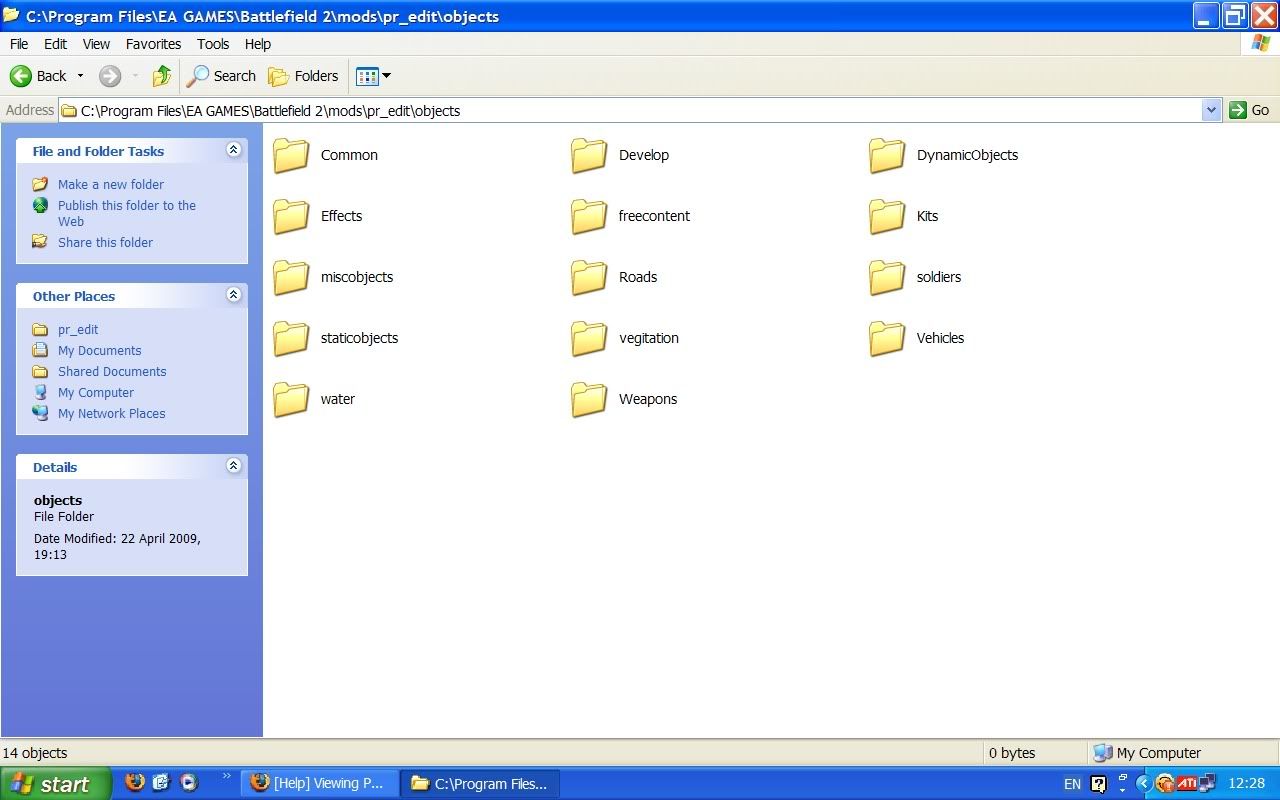
you first need to put the client files in the objects folder, then take the server files and extract them over the top of the client files, overwriting any files that already there.Cheditor wrote:Ok many of the files are the same name, do i put both server and client folders in same thing or? For example both client and server have a soldier file.
-
Cheditor
- Posts: 2331
- Joined: 2009-03-01 14:35
Re: [Help] Viewing PR models
Ahh i thinks i see where its gone wrong. I believe it was saying that when you extract each file there will be some duplicate files. I didnt see i had to extract over them. Will try this out and report with feed back.
-
Cheditor
- Posts: 2331
- Joined: 2009-03-01 14:35
Re: [Help] Viewing PR models
Ok got it all working, i found the problem was when i read the tutorial i extracted each individually and to their recommended place. Didnt realise i had to do it over the top, Thank you everyone who replied and gave me the help i needed.