
[Map] 2 Towns, Afghanistan (4km) [WIP]
-
Maxfragg
- Posts: 2122
- Joined: 2007-01-02 22:10
Re: [Map] 2 Towns, Afghanistan [WIP]
nice, Im just not really sure about the color of the walls
-
$pyker
- Posts: 623
- Joined: 2007-12-27 18:49
Re: [Map] 2 Towns, Afghanistan [WIP]
the colour is fine imo
Combined Offensive Mod
"You cannot invade the mainland United States. There would be a rifle behind every blade of grass." - Admiral Isoroku Yamamoto
-
sandgamer
- Posts: 71
- Joined: 2009-04-13 06:41
Re: [Map] 2 Towns, Afghanistan [WIP]
Actually, you can't see the colors !!!
its a max-render, always only one layer - and on most parts its showing only the detail-texture in the screens...so even if you see the color it lacks the details multiplied and vice verse...wait 4 an editor screen in a few minutes, i am currently fine tuning those colors
sg
its a max-render, always only one layer - and on most parts its showing only the detail-texture in the screens...so even if you see the color it lacks the details multiplied and vice verse...wait 4 an editor screen in a few minutes, i am currently fine tuning those colors
sg
-
sandgamer
- Posts: 71
- Joined: 2009-04-13 06:41
Re: [Map] 2 Towns, Afghanistan [WIP]
did a couple of simple-object test-exports to finalize the colors - besides the carpets burning a little its mostly sorted out: [screen shots taken in bf2editor @ bf2-daylight-setting without fog]
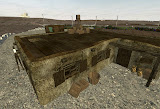
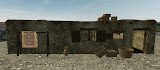
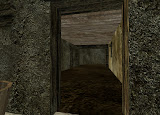
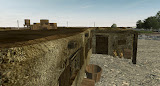
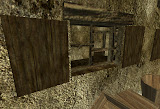
now we can talk
sg
now we can talk
sg
-
cyberzomby
- Posts: 5336
- Joined: 2007-04-03 07:12
Re: [Map] 2 Towns, Afghanistan [WIP]
Lookin sexy I'd say!
-
sandgamer
- Posts: 71
- Joined: 2009-04-13 06:41
Re: [Map] 2 Towns, Afghanistan [WIP]
a reference pic?
(my dear friend of long texts, your short question just totally confuses me...)
you should/propably are/be aware that the building was made from the "master-walls" i did some time ago, that i used then to assemble the model of the building (early version), that i now opened up again and modified according to your (much appreciated) advise, featuring some stuff i just (during the weekend) made up (carpet holders, boxes, basket) and stuff we all know from pr that i re-did
(honest recreation of the model! the afghan_pot is an almost 1:1 re-creation with a little variation on the top and different spacing between the "curves" but it is not just a re-skin or stolen ).
).
The features on the building (wood-construction @ door, window-blinds, wood sticking out of the building, variations on the roof-wall-top) are all inspired by the pr destroyable afghan statics, and the independent pr afghan / north afghan walls. You told me to look at them and i did... (took a few restarts to get the editor to load them - i didnt open them in max!) thats why the roofwall was just simple and basicly done when i did those early renders yesterday. then i looked how they where done by rhino and got my inspiration from them. (yes, i never actualy took a closer look at them until the weekend, because when i started the map, rhino told me not to use em, so i didnt bother with em )
So apart from me basically following your advice when i changed my old model and me adding in some new details (pr inspired) i just got a handful of pictures from the Gardez area showing some basic afgan static-styles, none of them even looking much like what i made as simple house model.
But lets not forget how it started: i ( <- mapper!) made a basic model in max for use on the map, you offerd me some advice on how it should be looking and where i could improve poly-counts, and i did that - it came out the way it did. So the building was inspired by my early building - i just dont think you want another picture of that And its not perfect in regards to what is propably a common building in that specific area of afghanistan, i just dont have that many pictures to help me with that. ( I dont hope you wanted a picture of them to make me look/feel bad ?)
Jonny - if there still is something you might want to see in regards to reference please let me know. Just i dont get what you want atm...but i'd love to put it up if i can.
*addition*
i got the early idea for the dimensions (12x12m) and the outer shape of this building from staring at a blurry google-maps-image and having a couple of drinks - you dont want a picture of that, do you?!
**
regarding the colors
i did a calibration on my monitor today (it was not the first time, but its been a year), and even though i had often checked my colors on a regularly calibrated device (@work, hehe) i was happy to see em with "safe" eyes now. "sexy" pretty much says it the way i wanted it!
sg
(my dear friend of long texts, your short question just totally confuses me...)
you should/propably are/be aware that the building was made from the "master-walls" i did some time ago, that i used then to assemble the model of the building (early version), that i now opened up again and modified according to your (much appreciated) advise, featuring some stuff i just (during the weekend) made up (carpet holders, boxes, basket) and stuff we all know from pr that i re-did
(honest recreation of the model! the afghan_pot is an almost 1:1 re-creation with a little variation on the top and different spacing between the "curves" but it is not just a re-skin or stolen
).The features on the building (wood-construction @ door, window-blinds, wood sticking out of the building, variations on the roof-wall-top) are all inspired by the pr destroyable afghan statics, and the independent pr afghan / north afghan walls. You told me to look at them and i did... (took a few restarts to get the editor to load them
- i didnt open them in max!) thats why the roofwall was just simple and basicly done when i did those early renders yesterday. then i looked how they where done by rhino and got my inspiration from them. (yes, i never actualy took a closer look at them until the weekend, because when i started the map, rhino told me not to use em, so i didnt bother with em )So apart from me basically following your advice when i changed my old model and me adding in some new details (pr inspired) i just got a handful of pictures from the Gardez area showing some basic afgan static-styles, none of them even looking much like what i made as simple house model.
But lets not forget how it started: i ( <- mapper!) made a basic model in max for use on the map, you offerd me some advice on how it should be looking and where i could improve poly-counts, and i did that - it came out the way it did. So the building was inspired by my early building - i just dont think you want another picture of that
And its not perfect in regards to what is propably a common building in that specific area of afghanistan, i just dont have that many pictures to help me with that. ( I dont hope you wanted a picture of them to make me look/feel bad ?)Jonny - if there still is something you might want to see in regards to reference please let me know. Just i dont get what you want atm...but i'd love to put it up if i can.
*addition*
i got the early idea for the dimensions (12x12m) and the outer shape of this building from staring at a blurry google-maps-image and having a couple of drinks - you dont want a picture of that, do you?!
**
regarding the colors
i did a calibration on my monitor today (it was not the first time, but its been a year), and even though i had often checked my colors on a regularly calibrated device (@work, hehe) i was happy to see em with "safe" eyes now. "sexy" pretty much says it
the way i wanted it!sg
Last edited by sandgamer on 2009-06-15 18:37, edited 1 time in total.
-
sandgamer
- Posts: 71
- Joined: 2009-04-13 06:41
Re: [Map] 2 Towns, Afghanistan [WIP]
well it took me ages to work out the lods and cols but now its finally finished:
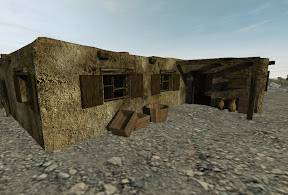
(sg_eamb2_12x12 | screen from bf2editor, daylight, no fog | lm'ed by editor w/ 2048 samplesize @ final)
jonny, once more i would like to point out that you have been a great help and inspiration for this model and my advances in modeling so far, so let me thank you for that!!!
stats for those that wanna know:
lod0=3460 polys*
(building with basic elements is about 50% of that, rest is boxes & baskets & pots)
lod1=2964** (+10m/low-setting)
lod2=1015 (+200m)
lod3=22 (+600m)
col0=3268
col1=22
col2=1485 (should be ok for navmesh if i did not miss anything during cleanup & optimization)
*pots smoothed
**pots not smoothed
sample size 512 (2mb): results ok, ~5mins time taken 2 render
sample size 2048 (112mb): results sexy, ~70mins time taken 2 render
*update*
oh and i removed the door to export it independently so i can use it all over the map and clone a destroyable one too.
sg
 latest update at bottom of post #1, older info's & updates in post #3
(sg_eamb2_12x12 | screen from bf2editor, daylight, no fog | lm'ed by editor w/ 2048 samplesize @ final)
jonny, once more i would like to point out that you have been a great help and inspiration for this model and my advances in modeling so far, so let me thank you for that!!!
stats for those that wanna know:
lod0=3460 polys*
(building with basic elements is about 50% of that, rest is boxes & baskets & pots)
lod1=2964** (+10m/low-setting)
lod2=1015 (+200m)
lod3=22 (+600m)
col0=3268
col1=22
col2=1485 (should be ok for navmesh if i did not miss anything during cleanup & optimization)
*pots smoothed
**pots not smoothed
sample size 512 (2mb): results ok, ~5mins time taken 2 render
sample size 2048 (112mb): results sexy, ~70mins time taken 2 render
*update*
oh and i removed the door to export it independently so i can use it all over the map and clone a destroyable one too.
sg
latest update at bottom of post #1, older info's & updates in post #3
Last edited by sandgamer on 2009-06-20 13:37, edited 1 time in total.
-
IronTaxi
- Retired PR Developer
- Posts: 4925
- Joined: 2006-05-31 12:56
Re: [Map] 2 Towns, Afghanistan [WIP]
good stuff...
a 512 sample is more than enough.. you wont really get away with even 512 samples all over a large map... more like 256..
another option of course is complete lightmapping in 3dsmax...
a 512 sample is more than enough.. you wont really get away with even 512 samples all over a large map... more like 256..
another option of course is complete lightmapping in 3dsmax...
-
marcoelnk
- Retired PR Developer
- Posts: 1581
- Joined: 2007-03-03 11:30
Re: [Map] 2 Towns, Afghanistan [WIP]
i dont know but the buildings texture looks too "surface like" to me. it more looks like a ground texture to me than a building one. i see that youre trying to make it look as it was build out of mud and such but i think you could improve that a bit.
my opinion , but the map and model itself is great.
my opinion , but the map and model itself is great.

-
IronTaxi
- Retired PR Developer
- Posts: 4925
- Joined: 2006-05-31 12:56
Re: [Map] 2 Towns, Afghanistan [WIP]
a higher res texture might be a good option.[R-CON]marcoelnk wrote:i dont know but the buildings texture looks too "surface like" to me. it more looks like a ground texture to me than a building one. i see that youre trying to make it look as it was build out of mud and such but i think you could improve that a bit.
my opinion , but the map and model itself is great.
can you post the texture up?
-
sandgamer
- Posts: 71
- Joined: 2009-04-13 06:41
Re: [Map] 2 Towns, Afghanistan [WIP]
now i am scared again
i used a 1024x768px texture as detail, and mapped it at
5,12m with tiling @ 1
5,12m with tiling @ 1
3,84m with tiling @ 1
so i thought i had them applied as "double-resolution" to look even better ...
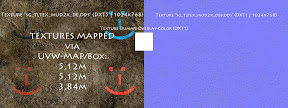
(click for full-res)
PLEASE comment!
sg
*update*
PS: lightmaps in max for me for sure, but there might be a day those buildings are out there for all mappers, and then they might wanna have samples.
*update2*
oh and the texture was labeled as a stone-texture on the site i found it
[... the link to the texture-site is lost - sorry]
i used a 1024x768px texture as detail, and mapped it at
5,12m with tiling @ 1
5,12m with tiling @ 1
3,84m with tiling @ 1
so i thought i had them applied as "double-resolution" to look even better ...
(click for full-res)
PLEASE comment!
sg
*update*
PS: lightmaps in max for me for sure, but there might be a day those buildings are out there for all mappers, and then they might wanna have samples.
*update2*
oh and the texture was labeled as a stone-texture on the site i found it
[... the link to the texture-site is lost - sorry]
Last edited by sandgamer on 2009-06-22 19:28, edited 2 times in total.
-
Hyperion
- Posts: 40
- Joined: 2008-09-14 17:33
Re: [Map] 2 Towns, Afghanistan [WIP]
Its better to use a "real" colortexture than a dummy texture. I agree with marcoeInc, the wall texture looks like a ground texture. Its too dark imo.
The texture resolution on the wood parts is much smaller than the walls.
Best textures on the web: [CG Textures] - The worlds largest free texture site ( check the \ Plaster \ Loam Walls category)
The texture resolution on the wood parts is much smaller than the walls.
Best textures on the web: [CG Textures] - The worlds largest free texture site ( check the \ Plaster \ Loam Walls category)
-
sandgamer
- Posts: 71
- Joined: 2009-04-13 06:41
Re: [Map] 2 Towns, Afghanistan [WIP]
thank you (Danke ) for the link Hyperion.
(searched for tileable textures as i am always lazy in image editing, but those are great to start off with)
sg
) for the link Hyperion.(searched for tileable textures as i am always lazy in image editing, but those are great to start off with)
sg
-
sandgamer
- Posts: 71
- Joined: 2009-04-13 06:41
Re: [Map] 2 Towns, Afghanistan [WIP]
* from post #1 update june 22. *
more static-stuff for gardez:
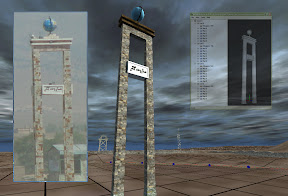
as it got shadows and dark fog applied please do not take it as a reference for the texture!
Sir IronTaxi,
thank you for your high level input, it is much appreciated.
However i am pretty happy that i got the stuff so far and i will have to leave it at that for the moment, in order to get my map done. (Remember RHINO telling me i had to improve my texturing right after he saw my 2-3 year old (first) statics ) Then again you guys got me to put all my current plans for the revision-2-reworks of my other models on hold. Not even i know what i will do next so lets wait and see
Thanks!
sg
latest update at bottom of post #1, older info's & updates in post #3
more static-stuff for gardez:
as it got shadows and dark fog applied please do not take it as a reference for the texture!
Sir IronTaxi,
thank you for your high level input, it is much appreciated.
However i am pretty happy that i got the stuff so far and i will have to leave it at that for the moment, in order to get my map done. (Remember RHINO telling me i had to improve my texturing right after he saw my 2-3 year old (first) statics
) Then again you guys got me to put all my current plans for the revision-2-reworks of my other models on hold. Not even i know what i will do next so lets wait and see Thanks!
sg
latest update at bottom of post #1, older info's & updates in post #3
Last edited by sandgamer on 2009-06-22 19:30, edited 1 time in total.
-
Rhino
- Retired PR Developer
- Posts: 47909
- Joined: 2005-12-13 20:00
Re: [Map] 2 Towns, Afghanistan [WIP]
you should really not use custom textures unless where you really have to... your brick texture is also over tiled, both will have a bad impact on performance.
Try not to make statics that are too "unique" to other statics around them and you wont have to make soo many custom textures or if you make custom textures ensure that its worth it ie, your making them for a new range of statics.
some dirt etc would be nice too.
Try not to make statics that are too "unique" to other statics around them and you wont have to make soo many custom textures or if you make custom textures ensure that its worth it ie, your making them for a new range of statics.
some dirt etc would be nice too.

-
sandgamer
- Posts: 71
- Joined: 2009-04-13 06:41
Re: [Map] 2 Towns, Afghanistan [WIP]
[R-DEV]IronTaxi & [R-DEV]Rhino,
[R-CON]marcoelnk,
& Hyperion
Again i wanna thank you guys for pressing some inspiration into me!
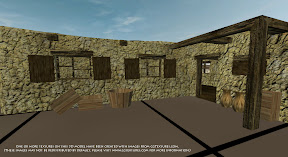
Not sure if i can satisfy you all with this rev3-test, but i want to hear your thoughts if you can (again) spare some time for me
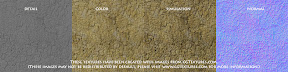
I came up with a new texture-set (color,detail,normal) for my statics:
I made em tile able and added some dirt onto the color, a "softer" copy of the original image. The detail is mostly gray, some smaller grained detailing for the close up that changes the overall color only a little. The normal is bumped up with parallax mapping. They are 512x512 and are applied 1px=1cm.
sg
_
One or more textures on this 3D model have been created with images from CGTextures.com. (These images may not be redistributed by default, please visit [CG Textures] - The worlds largest free texture site for more information.)
[R-CON]marcoelnk,
& Hyperion
Again i wanna thank you guys for pressing some inspiration into me!
Not sure if i can satisfy you all with this rev3-test, but i want to hear your thoughts if you can (again) spare some time for me
I came up with a new texture-set (color,detail,normal) for my statics:
I made em tile able and added some dirt onto the color, a "softer" copy of the original image. The detail is mostly gray, some smaller grained detailing for the close up that changes the overall color only a little. The normal is bumped up with parallax mapping. They are 512x512 and are applied 1px=1cm.
sg
_
One or more textures on this 3D model have been created with images from CGTextures.com. (These images may not be redistributed by default, please visit [CG Textures] - The worlds largest free texture site for more information.)
-
Rhino
- Retired PR Developer
- Posts: 47909
- Joined: 2005-12-13 20:00
Re: [Map] 2 Towns, Afghanistan [WIP]
tbh the textures are substandard.
For a start you should use very minimal (really best not to use any) lighting in a colour, detail etc texture. Let the engine, lightmaps etc handle the lighting.
In your colour texture you have put lighting into it (ie, the shadowy areas in the rocky wall) and looks really bad. Maybe a slight tiny bit would be ok but the bump map could handle it quite well on its own.
At the moment your detail texture is pretty pointless, you might as well be using a null detail texture and have the detail and colour in the same colour layer (ie, just a high rez colour) since they are exactly the same kinda pattern etc. The purpose of the detail layer is to add detail on a separate channel from the colour so it dose not need to look repetitive etc. Its hard to explain but check out other detail, colour etc textures. The best use you could use for a detail texture over your colour in this example would be to overlay a grity rock texture over, or to get rid of the rock outlines in the colour and just have a lowrez, yellowish colour and have the detail controlling all the rock outlines (but only very slightly, the bump should do most of the work here), grittiness etc.
Your bump for the most part looks ok but a little too deep for quite a bit of it.
I'm sure the other devs will be able to explain it better than I can but hope that helps.
For a start you should use very minimal (really best not to use any) lighting in a colour, detail etc texture. Let the engine, lightmaps etc handle the lighting.
In your colour texture you have put lighting into it (ie, the shadowy areas in the rocky wall) and looks really bad. Maybe a slight tiny bit would be ok but the bump map could handle it quite well on its own.
At the moment your detail texture is pretty pointless, you might as well be using a null detail texture and have the detail and colour in the same colour layer (ie, just a high rez colour) since they are exactly the same kinda pattern etc. The purpose of the detail layer is to add detail on a separate channel from the colour so it dose not need to look repetitive etc. Its hard to explain but check out other detail, colour etc textures. The best use you could use for a detail texture over your colour in this example would be to overlay a grity rock texture over, or to get rid of the rock outlines in the colour and just have a lowrez, yellowish colour and have the detail controlling all the rock outlines (but only very slightly, the bump should do most of the work here), grittiness etc.
Your bump for the most part looks ok but a little too deep for quite a bit of it.
I'm sure the other devs will be able to explain it better than I can but hope that helps.
-
sandgamer
- Posts: 71
- Joined: 2009-04-13 06:41
Re: [Map] 2 Towns, Afghanistan [WIP]
it does rhino, thanks.
(i looked at them but i just dont get it, despite knowing how they are supposed to work)
my problem, when i use a real color texture and detail one, the result is that when the model switches from lod1 to lod2 (no more detail channel) it gets very bright. maybe that's just normal but i don't know. i tried to avoid that.
i got the texture to look just the same with all the detail only on the detail-layer, but it leaves me with a very bright color that is hard to cover up in fog with long, clear view-distances and the wish to change to lower lods before the fog really starts to take action beyond 1000m (due to performance).
oh yeah the bump-map is way overdone, just wanted to mark out an extreme while i was working on it the original image is a (quite flat) loam wall.
and dont you ever worry about being honest, its what i need for input
sg
(i looked at them but i just dont get it, despite knowing how they are supposed to work)
my problem, when i use a real color texture and detail one, the result is that when the model switches from lod1 to lod2 (no more detail channel) it gets very bright. maybe that's just normal but i don't know. i tried to avoid that.
i got the texture to look just the same with all the detail only on the detail-layer, but it leaves me with a very bright color that is hard to cover up in fog with long, clear view-distances and the wish to change to lower lods before the fog really starts to take action beyond 1000m (due to performance).
oh yeah the bump-map is way overdone, just wanted to mark out an extreme while i was working on it
the original image is a (quite flat) loam wall.and dont you ever worry about being honest, its what i need for input
sg