
Hey guys is it possible for you guys to send me the cobra and apache screens
http://screenshot.xfire.com/screenshot/ ... e54b39.png
Like a transparent render of the missle/helfire cam ?
So i canadd them to any videos?
Dear Project Reality Devs
-
Yedya
- Posts: 28
- Joined: 2009-08-20 20:18
 Dear Project Reality Devs

Last edited by Yedya on 2009-08-20 20:42, edited 1 time in total.
-
e-Gor
- Retired PR Developer
- Posts: 3752
- Joined: 2006-03-06 22:40
Re: Dear Project Reality Devs
All the HUD images are in Battlefield 2\mods\pr\menu\menu_client.zip.
-
Alex6714
- Posts: 3900
- Joined: 2007-06-15 22:47
Re: Dear Project Reality Devs
You will need a photoshop app with .dds support. Paint.net for example.
It isn´t as simple as it seems because the compass tape is not the length you see on sceen, it is much longer so you will have to edit around a bit.
The hud is made up of various different textures its not just overlaying one, you will have to put many of them together to get the result you want.
It isn´t as simple as it seems because the compass tape is not the length you see on sceen, it is much longer so you will have to edit around a bit.
The hud is made up of various different textures its not just overlaying one, you will have to put many of them together to get the result you want.
"Today's forecast calls for 30mm HE rain with a slight chance of hellfires"
"oh, they're fire and forget all right...they're fired then they forget where the target is"
-
Yedya
- Posts: 28
- Joined: 2009-08-20 20:18
Re: Dear Project Reality Devs
Hmm alright i have alot of skill with Adobe Ps,so i can just get them in the PR directory?
-
Alex6714
- Posts: 3900
- Joined: 2007-06-15 22:47
Re: Dear Project Reality Devs
Well although I made the huds you probably want the devs permision to use them somewhere else, though being a video overlay I guess its ok?
Apache textures here:
menu_client.zip\HUD\Texture\Ingame\Vehicles\Icons\Hud\air\attack\Ah64a
Apache textures here:
menu_client.zip\HUD\Texture\Ingame\Vehicles\Icons\Hud\air\attack\Ah64a
"Today's forecast calls for 30mm HE rain with a slight chance of hellfires"
"oh, they're fire and forget all right...they're fired then they forget where the target is"
-
RememberTheAlamo
- Posts: 173
- Joined: 2009-02-12 00:58
Re: Dear Project Reality Devs
cool I could use that too
-
Yedya
- Posts: 28
- Joined: 2009-08-20 20:18
Re: Dear Project Reality Devs
Yea i would apreciate if you gave me premisson to use them,im making a BF2 movie and il be sure to put your name in credits as a PR dev.
Edit |WOW
Edit |WOW
I understand now,i open a few .dds all im getting is grey/white squares how will i get the full gunner cam hud? :/Alex6714 wrote:You will need a photoshop app with .dds support. Paint.net for example.
It isn´t as simple as it seems because the compass tape is not the length you see on sceen, it is much longer so you will have to edit around a bit.
The hud is made up of various different textures its not just overlaying one, you will have to put many of them together to get the result you want.
Last edited by Yedya on 2009-08-21 00:39, edited 1 time in total.
-
Alex6714
- Posts: 3900
- Joined: 2007-06-15 22:47
Re: Dear Project Reality Devs
What do you want to achieve though? Here is a quick throw together of the basic parts. Adding the fram in is easy enough, adding text in also but of course it would show constant range etc which might or might not look ok. If you want the lines all green then thats beyond me as that is modded in the hud setup filkes, I think there is a function in Photoshop that you can change it but I do not have it so I don´t know.
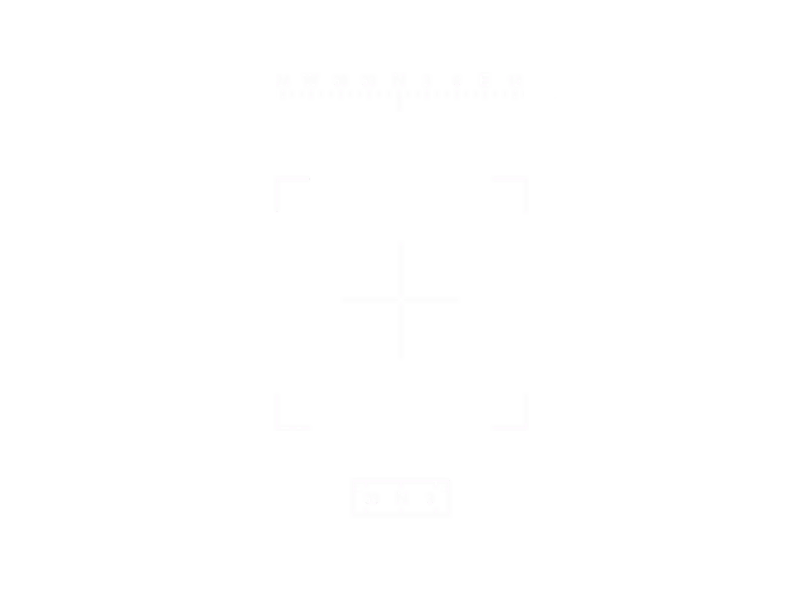
As you can see the lines are in white alpha which is later colour changed in the hud files but you just have to open each texture and piece them together how you want. They may be hard to see because of being in white so you could add a black layer beneath but whatever works.
As you can see the lines are in white alpha which is later colour changed in the hud files but you just have to open each texture and piece them together how you want. They may be hard to see because of being in white so you could add a black layer beneath but whatever works.
"Today's forecast calls for 30mm HE rain with a slight chance of hellfires"
"oh, they're fire and forget all right...they're fired then they forget where the target is"
-
Yedya
- Posts: 28
- Joined: 2009-08-20 20:18
Re: Dear Project Reality Devs
Oh man thats nice!So its hard to put them together yea?
Im going for something like this


Any idea what font?
Im going for something like this
Any idea what font?
-
Alex6714
- Posts: 3900
- Joined: 2007-06-15 22:47
Re: Dear Project Reality Devs
Here is a slightly better more or less realistic version then.

"Today's forecast calls for 30mm HE rain with a slight chance of hellfires"
"oh, they're fire and forget all right...they're fired then they forget where the target is"
-
McBumLuv
- Posts: 3563
- Joined: 2008-08-31 02:48
Re: Dear Project Reality Devs
If you can, you should also try inverting the colour in the video. It's pretty much how CA makes FLIR, albeit it's a fake representation, it looks like it to some degree 


-
Yedya
- Posts: 28
- Joined: 2009-08-20 20:18
Re: Dear Project Reality Devs
I fuckin love u <3 Thx man,what font is that?