
Theirs many programs free and professional:
Free- Blender, Gmax and many more you can also get trails of the prosessional
Professional- 3Ds Max(the most popular I think), cant remember the others (one has light in it's name)
Show your models thread...(IMAGE HEAVY)
-
derg
- Posts: 237
- Joined: 2009-03-17 21:07
Re: Show your models thread...(IMAGE HEAVY)
I finished the Highpoly model now, but unfortunately, I do not have enough RAM to render. When I try to render it a window pops up and tells me that I don't have enough memory for it. The final polygon count is at about 700,000 (2 Iterations @ TurboSmooth) and for render about 2,850,000 (3 Iterations @ TurboSmooth)
I have been working on this for about 5 days.
I'll try to post some renders (maybe without lightning).
@ Howitzer: I made the basic shape of the handguard and inserted some splines (select a ring and hit "connect") and then deleted just the polygon which were covering the holes on the reference image.
@ Derek: I'm using 3ds Max 9 and 2009. I'm quite happy because I get those programs when a new one is released. My father gets these programs from his job and I can use them at home. If you don't have my luck or the money, look for gmax! It's nearly the same as 3ds max but for free.
I have been working on this for about 5 days.
I'll try to post some renders (maybe without lightning).
@ Howitzer: I made the basic shape of the handguard and inserted some splines (select a ring and hit "connect") and then deleted just the polygon which were covering the holes on the reference image.
@ Derek: I'm using 3ds Max 9 and 2009. I'm quite happy because I get those programs when a new one is released. My father gets these programs from his job and I can use them at home. If you don't have my luck or the money, look for gmax! It's nearly the same as 3ds max but for free.
Last edited by derg on 2009-10-12 16:39, edited 1 time in total.
-
Sabre_tooth_tigger
- Posts: 1922
- Joined: 2007-06-01 20:14
Re: Show your models thread...(IMAGE HEAVY)
Cant you max out the virtual ram and leave it for a week
Maybe you need to change windows
Maybe you need to change windows
-
derg
- Posts: 237
- Joined: 2009-03-17 21:07
Re: Show your models thread...(IMAGE HEAVY)
I just rendered it without any lightning now. Rendering also worked when I didn't add the 'skylight' but it takes too much time...
This is the (unsmoothed) handguard for Howitzer:


I know it's not the most accurate G36 model. I forgot some details and the model is not the cleanest. But any critics are welcome, please!!
This is the (unsmoothed) handguard for Howitzer:


I know it's not the most accurate G36 model. I forgot some details and the model is not the cleanest. But any critics are welcome, please!!
-
Tim270
- PR:BF2 Developer
- Posts: 5166
- Joined: 2009-02-28 20:05
Re: Show your models thread...(IMAGE HEAVY)
Try the light tracer method, seems like it takes less time to render. (for comparable results)
YouTube - Light Tracer Rendering [HD] (3ds Max Tutorial) [annotations]
YouTube - Light Tracer Rendering [HD] (3ds Max Tutorial) [annotations]

-
DankE_SPB
- Retired PR Developer
- Posts: 3678
- Joined: 2008-09-30 22:29
Re: Show your models thread...(IMAGE HEAVY)
there are some rendering advices here in community modding section 1 2Tim270 wrote:Try the light tracer method, seems like it takes less time to render. (for comparable results)
YouTube - Light Tracer Rendering [HD] (3ds Max Tutorial) [annotations]
my current project


[R-DEV]Z-trooper: you damn russian bear spy ;P - WWJND?
-
derg
- Posts: 237
- Joined: 2009-03-17 21:07
Re: Show your models thread...(IMAGE HEAVY)
Thanks guys, but I try to render the rifle with this method. It only works if I don't add a skylight but it takes about 1,5 hours to render...
b2t: Nice work on that ?? What vehicle is this?
b2t: Nice work on that ?? What vehicle is this?
-
motherdear
- Retired PR Developer
- Posts: 2637
- Joined: 2007-03-20 14:09
Re: Show your models thread...(IMAGE HEAVY)
looks good danke, althought i would like a tri count, also it might be a bit dangerous having that many parts floating on the model without welding them to it. can cause serious Z fighting issues for the larger parts.
[R-DEV]OkitaMakoto: "Talking squad level tactics in bed is actually a little known aphrodisiac"
[R-CON]Pantera : "maybe you might learn that we are not super intelligent beings chained in UKF's basement being forced to work on this".
-
Z-trooper
- Retired PR Developer
- Posts: 4166
- Joined: 2007-05-08 14:18
Re: Show your models thread...(IMAGE HEAVY)
@ dergammla it is a MT-LB
@ MD, I know. Currently following the project but I havent had time to give detailed feedback yet.
@ MD, I know. Currently following the project but I havent had time to give detailed feedback yet.

"Without geometry, life is pointless"
-
DankE_SPB
- Retired PR Developer
- Posts: 3678
- Joined: 2008-09-30 22:29
Re: Show your models thread...(IMAGE HEAVY)
tri-count is somewhere between 8500-8700, as for z-figthing, thats why i asked for assistance from Z-trooper, so i can fix mistakes[R-CON]motherdear wrote:looks good danke, althought i would like a tri count, also it might be a bit dangerous having that many parts floating on the model without welding them to it. can cause serious Z fighting issues for the larger parts.
 . i exported it few times as simple staticmesh, it has some smoothing errors, but nothing floating(or how z-fight looks like?)
[R-DEV]Z-trooper: you damn russian bear spy ;P - WWJND?
-
motherdear
- Retired PR Developer
- Posts: 2637
- Joined: 2007-03-20 14:09
Re: Show your models thread...(IMAGE HEAVY)
okay sounds good man didn't know realize that you had asked Z to help my bad  but good work so far keep it up
didn't know realize that you had asked Z to help my bad but good work so far keep it up [R-DEV]OkitaMakoto: "Talking squad level tactics in bed is actually a little known aphrodisiac"
[R-CON]Pantera : "maybe you might learn that we are not super intelligent beings chained in UKF's basement being forced to work on this".
-
Tomato-Rifle
- Posts: 2091
- Joined: 2007-12-31 22:24

-
Rhino
- Retired PR Developer
- Posts: 47909
- Joined: 2005-12-13 20:00
Re: Show your models thread...(IMAGE HEAVY)
nice Danke but you need to connect all thous doors, hatches and pannnels etc fully onto the main hull otherwise your going to have lots of wasted texture space and worse you will also have loads of zfighting errors round thous bits.

-
DankE_SPB
- Retired PR Developer
- Posts: 3678
- Joined: 2008-09-30 22:29
Re: Show your models thread...(IMAGE HEAVY)
thx for your feedback guys
as for actual usage, pic worth a thousand of words

even americans are using it

yes, there are alot of them and they are still in service, all around the world, there are also tonns of modifications for it, if you believe this there are ~4800 of them only in RF[R-COM]162eRI wrote:Is the MT-LB still a lot use in the Russian army? It could be use for the MEC as well...
as for actual usage, pic worth a thousand of words

even americans are using it

i will get back to it when i'm finished with all details[R-DEV]Rhino wrote:nice Danke but you need to connect all thous doors, hatches and pannnels etc fully onto the main hull otherwise your going to have lots of wasted texture space and worse you will also have loads of zfighting errors round thous bits.
[R-DEV]Z-trooper: you damn russian bear spy ;P - WWJND?
-
manligheten
- Posts: 202
- Joined: 2007-03-25 21:01
Re: Show your models thread...(IMAGE HEAVY)
The planes which are close to one another seem to intermittently intersect. You'll see it first at some distance.DankE_SPB wrote: or how z-fight looks like?
The MTLB is insanely cool BTW. The badassest APC motor sound I know. It sounds much more dangerous than it is.
-
Z-trooper
- Retired PR Developer
- Posts: 4166
- Joined: 2007-05-08 14:18
Re: Show your models thread...(IMAGE HEAVY)
"Z-fighting" is a result of a limited depth buffer.
When rendering an image inside a 3d software you 'raytrace' it. This means that a large number of rays are shot out from the camera (through each pixel of the final image). These rays simulate real world light rays and can thus fairly accuratly simulate shadow, reflection, lights ect... In this environment z-fighting dosn't really happen (unless the resolution of the temp variables are really crappy)
In game graphics this is fundamentally different. Here everything is based on vertex lighting.
It also operates on a series of different 'buffers'.
One of these is called the 'depth buffer'. In this series of calculations it figures out the distance to each object(surface) in the scene. The surfaces with the smallest depth value is chosen to be displayed in the particular pixel. This is a good and fast way to 'render' geometry and this is true for all game engines (except a few prototype examples).
The problem with this is that it only has a resolution of 256 values. 0 being the closest thing and 255 being the furthest away.
Now if you are in a small environment and the furthest object is 10m away, then these 10m are divided into 256 equal parts. So every ~3,9cm there is a new 'depth level', but if your view is 700m then each level is ~2,7m apart. So surfaces on the same line of sight closer to eachother than 2,7m will 'fight' over the pixels there. That is the 'fight' part of 'z-fighting'... The "Z" comes from the depth. Usually the internal axis of the cameras has the z-axis point out into the screen (some has the y-axis).
These 0-256 can be represented by a greyscale image (really helpful for debugging!) here is an example. 0 is black (near) to 255 is white (far):

Example of Z-fighting:

For the artist:
Beware of having surfaces too close to eachother. Like in DankE's model above the doors are seperate objects layed on top of the main body. So the surfaces of the door and the big plane behind it are pretty close to eachother and since it is such a large area it will be very noticable.
The viewports inside your 3d software (like 3ds max) function the exact same way as game engines handle this, and if you zoom out you will start to see stuff flickering. This is why I try to make people take screenshots of their models rather than 'rendering' them.
You will also notice this in PR. When you are in a chopper or aircraft you will see stuff flickering on the ground.
Once I get the time I will do a proper article on a whole range of these subjects with artists in mind rather than going nuts with the technical details...
When rendering an image inside a 3d software you 'raytrace' it. This means that a large number of rays are shot out from the camera (through each pixel of the final image). These rays simulate real world light rays and can thus fairly accuratly simulate shadow, reflection, lights ect... In this environment z-fighting dosn't really happen (unless the resolution of the temp variables are really crappy)
In game graphics this is fundamentally different. Here everything is based on vertex lighting.
It also operates on a series of different 'buffers'.
One of these is called the 'depth buffer'. In this series of calculations it figures out the distance to each object(surface) in the scene. The surfaces with the smallest depth value is chosen to be displayed in the particular pixel. This is a good and fast way to 'render' geometry and this is true for all game engines (except a few prototype examples).
The problem with this is that it only has a resolution of 256 values. 0 being the closest thing and 255 being the furthest away.
Now if you are in a small environment and the furthest object is 10m away, then these 10m are divided into 256 equal parts. So every ~3,9cm there is a new 'depth level', but if your view is 700m then each level is ~2,7m apart. So surfaces on the same line of sight closer to eachother than 2,7m will 'fight' over the pixels there. That is the 'fight' part of 'z-fighting'... The "Z" comes from the depth. Usually the internal axis of the cameras has the z-axis point out into the screen (some has the y-axis).
These 0-256 can be represented by a greyscale image (really helpful for debugging!) here is an example. 0 is black (near) to 255 is white (far):
Example of Z-fighting:
For the artist:
Beware of having surfaces too close to eachother. Like in DankE's model above the doors are seperate objects layed on top of the main body. So the surfaces of the door and the big plane behind it are pretty close to eachother and since it is such a large area it will be very noticable.
The viewports inside your 3d software (like 3ds max) function the exact same way as game engines handle this, and if you zoom out you will start to see stuff flickering. This is why I try to make people take screenshots of their models rather than 'rendering' them.
You will also notice this in PR. When you are in a chopper or aircraft you will see stuff flickering on the ground.
Once I get the time I will do a proper article on a whole range of these subjects with artists in mind rather than going nuts with the technical details...
"Without geometry, life is pointless"
-
Kenny
- Posts: 261
- Joined: 2006-11-18 03:30
Re: Show your models thread...(IMAGE HEAVY)
Ok I decide to take on something a little bigger I chose the FN-FAL for its simple shape


It's still need alot of work but it's getting their
It's still need alot of work but it's getting their

-
Kenny
- Posts: 261
- Joined: 2006-11-18 03:30
Re: Show your models thread...(IMAGE HEAVY)
Ok this might be all I do tonight


it's getting along still need to do the cocking and fire selection mechanisms
then I need to optimize and smooth it as well as make the mag
it's getting along still need to do the cocking and fire selection mechanisms
then I need to optimize and smooth it as well as make the mag
-
motherdear
- Retired PR Developer
- Posts: 2637
- Joined: 2007-03-20 14:09
Re: Show your models thread...(IMAGE HEAVY)
normal map and AO bake proof of concept to myself
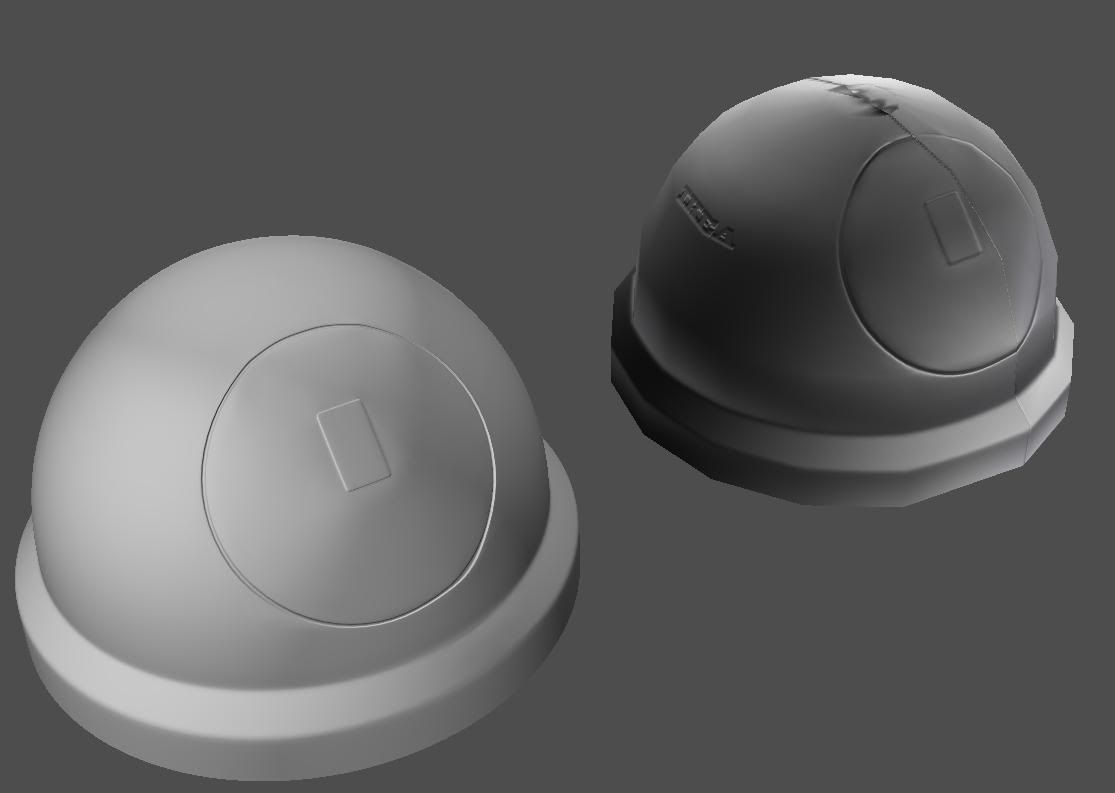
don't mind the rather obvious texture seam, it was a proof of concept and the uv was just a planar map basicly, quick and dirty and i only needed to edit it slightly to have no stretching of the texture.
don't mind the rather obvious texture seam, it was a proof of concept and the uv was just a planar map basicly, quick and dirty and i only needed to edit it slightly to have no stretching of the texture.
[R-DEV]OkitaMakoto: "Talking squad level tactics in bed is actually a little known aphrodisiac"
[R-CON]Pantera : "maybe you might learn that we are not super intelligent beings chained in UKF's basement being forced to work on this".