
This is the message my friend gets every other time he goes to start PR. it doesn't even begin to load, this comes up
I've been told before that you 'just' have to reinstall everything including BF2 and patches and core and levels.
there has to be a better solution than spending hours reinstalling this every other time you want to play.
we run almost identical rigs and I've never ever had this problem, we have identical installs as well.
can anyone figure out what this is? it is very frustrating... I'm sure he will have to quit playing altoghether soon as it is not convient to reinstall the game + PR.
after install it will run, the next day it will not.
"PR.exe has stopped working"/Fixed!
-
Ghost_1ll1
- Posts: 45
- Joined: 2009-09-13 01:39
re: "PR.exe has stopped working"/Fixed!
So nobody has any idea what causes this or how to fix it other than reinstalling everything?
-
Ghost_1ll1
- Posts: 45
- Joined: 2009-09-13 01:39
re: "PR.exe has stopped working"/Fixed!
I have searched for a solution and google searched this for one and have read just about everything on it and nothing other than reinstalling everything seems to be peoples answer...
I dont believe that's a valid fix when it will just happen again, can no one explain what is causing this or point me to the right thread that doesnt say reinstall everything and it will be fine b/c reinstalling it only temporarily fixes it.
I wonder how many people have quit due to this, can anyone else who had this problem confirm that reinstalling fixed it as i will reinstall for a third time and pray that it will be permanent.
Also to note, this isnt the only thing i have tried to do to fix it... should i just tell my friend he is sh-- outta luck?
I dont believe that's a valid fix when it will just happen again, can no one explain what is causing this or point me to the right thread that doesnt say reinstall everything and it will be fine b/c reinstalling it only temporarily fixes it.
I wonder how many people have quit due to this, can anyone else who had this problem confirm that reinstalling fixed it as i will reinstall for a third time and pray that it will be permanent.
Also to note, this isnt the only thing i have tried to do to fix it... should i just tell my friend he is sh-- outta luck?
-
Himalde
- Posts: 236
- Joined: 2007-10-02 06:37
re: "PR.exe has stopped working"/Fixed!
I get that message when i close my PR, so it doesn't really matter for me. Have you tried running it as administrator? If that doesn't help I can't help you.
BTW Posting 3 times within 30 minutes is no point (use the edit button) and have more patients then 14 minutes, please.
BTW Posting 3 times within 30 minutes is no point (use the edit button) and have more patients then 14 minutes, please.

Get PR-Mumble 1.0
RealityTeamwork
-
thepalerider
- Posts: 2226
- Joined: 2007-02-18 23:55
re: "PR.exe has stopped working"/Fixed!
When asking for help,
please remember to post your( friends):
O/S,
systems specks,
network setup
And a brief history before and after problem started.
Please describe when your CTD or problem hits and
what you have already tried.
The more info you can give the better your chance
of getting a quick answer back.
You don't have to write a book,
but your basic PC info is needed to help you.
Good luck
Find out what your friends shortcut 'target' and 'start in' windows have in them. Copy and paste them back in a post so we can see them.
please remember to post your( friends):
O/S,
systems specks,
network setup
And a brief history before and after problem started.
Please describe when your CTD or problem hits and
what you have already tried.
The more info you can give the better your chance
of getting a quick answer back.
You don't have to write a book,
but your basic PC info is needed to help you.
Good luck
Find out what your friends shortcut 'target' and 'start in' windows have in them. Copy and paste them back in a post so we can see them.
Last edited by thepalerider on 2009-12-02 16:52, edited 2 times in total.
"There's nothin' like a nice piece of hickory"
I play on TeamPlayersGaming where it's all about the teamwork.
I play on TeamPlayersGaming where it's all about the teamwork.
-
Twisted Helix
- Retired PR Developer
- Posts: 5145
- Joined: 2008-11-03 04:18
re: "PR.exe has stopped working"/Fixed!
The reason is that this is the easiest (in terms of technicality) way for the end user to fix the problem, with the least likely hood of causing more problems.I have searched for a solution and google searched this for one and have read just about everything on it and nothing other than reinstalling everything seems to be peoples answer...
Anyway ... need all your system information, including the directory paths to your BF2, your profiles folder and the install path that your registry entry says for BF2. Also need to know what .NET versions (and their full version number) that you have installed.
Were there any problems during the installation of PR ?
I have remoted into quite a few computers now to fix peoples problems ... and 100% of the time it has been because their computers are not functioning correctly, there are corrupted registry entries, or their MyDocuments folder is corrupted (this one is actually quite common on vista).
9 times out of 10 for these users ... a complete OS install is in order as the problems are not easily fixed ... they are at a system level. With a healthy technical knowlege of computers you can fix these things without reinstalling, but sometimes its just less complicated to bite the bullet and clean that machine.
Remember , a lean machine is a mean machine. 99% of PC problems arise from the junk that people install.
-
Drop_Deadx
- Posts: 317
- Joined: 2008-09-20 16:07
re: "PR.exe has stopped working"/Fixed!
I've been getting this too, I stopped playing for 2 months now and when I start it up it says this.
SPECS:
Manufacturer:
Dell Inc.
Processor:
Intel(R) Pentium(R) Dual CPU E2200 @ 2.20GHz (2 CPUs), ~2.2GHz
Memory:
3070MB RAM
Hard Drive:
500 GB
Video Card:
NVIDIA GeForce 8600 GT
Monitor:
Dell SE198WFP
Realtek High Definition Audio
Operating System:
Windows Vista™ Home Premium 32 Bit.
Like I said it never did this before until now.
SPECS:
Manufacturer:
Dell Inc.
Processor:
Intel(R) Pentium(R) Dual CPU E2200 @ 2.20GHz (2 CPUs), ~2.2GHz
Memory:
3070MB RAM
Hard Drive:
500 GB
Video Card:
NVIDIA GeForce 8600 GT
Monitor:
Dell SE198WFP
Realtek High Definition Audio
Operating System:
Windows Vista™ Home Premium 32 Bit.
Like I said it never did this before until now.

"Hell, these are Marines. Men like them held Guadalcanal and took Iwo Jima. Bagdad ain't shit."
-Marine Major General John F. Kelly
-
Twisted Helix
- Retired PR Developer
- Posts: 5145
- Joined: 2008-11-03 04:18
re: "PR.exe has stopped working"/Fixed!
Strange. Can you think of anything that you might have changed on your system ? ( I am assuming here that the pr.exe used to work for you before ? )
-
Drop_Deadx
- Posts: 317
- Joined: 2008-09-20 16:07
re: "PR.exe has stopped working"/Fixed!
Yea, I've been playing it for over a year now. The only change I made since I stopped playing was I installed Modern Warfare 2 but I don't assume that has anything to do with it. I have UAC turned off so I do have to run as admin ( I tried it anyways ).[R-DEV]Twisted Helix wrote:Strange. Can you think of anything that you might have changed on your system ? ( I am assuming here that the pr.exe used to work for you before ? )
I can't think of anything that it could be. Also, Pr_SP.exe doesn't work either.
BF2, Forgotten Hopes 2 work though so the problem has to be within pr. I tried uninstalling and reinstalling and I get the same problem.
"Hell, these are Marines. Men like them held Guadalcanal and took Iwo Jima. Bagdad ain't shit."
-Marine Major General John F. Kelly
-
Twisted Helix
- Retired PR Developer
- Posts: 5145
- Joined: 2008-11-03 04:18
re: "PR.exe has stopped working"/Fixed!
Well nothing has changed within the pr.exe, so it has to be one of two things I think. Either your MyDocuments folder where your profiles are kept has changed or is inaccessible for some reason (this happened to one user on vista that I know of .... its something to do with the symbolic linking) , or your BF2 directory has changed ?
If uninstalling and reinstalling does not help, it suggests that there may be an error in your registry so that when you reinstall it creates the same problem. The best thing to do is uninstall pr AND BF2, then clean the registry of any and all references to BF2 and PR. Then reinstall BF2, run it and reclaim your profiles. Then install PR and run.
This should sort any problems. If its still not working then it suggests that your .NET installation might either be the wrong one or it might be corrupted. Fixing this is a little more tricky, so try route 1 first.
If uninstalling and reinstalling does not help, it suggests that there may be an error in your registry so that when you reinstall it creates the same problem. The best thing to do is uninstall pr AND BF2, then clean the registry of any and all references to BF2 and PR. Then reinstall BF2, run it and reclaim your profiles. Then install PR and run.
This should sort any problems. If its still not working then it suggests that your .NET installation might either be the wrong one or it might be corrupted. Fixing this is a little more tricky, so try route 1 first.
-
Drop_Deadx
- Posts: 317
- Joined: 2008-09-20 16:07
re: "PR.exe has stopped working"/Fixed!
I just checked in My Documents and in the Battlefield 2 folder then in the Mods folder, there is no pr folder just fh2 and bf2.[R-DEV]Twisted Helix wrote:Well nothing has changed within the pr.exe, so it has to be one of two things I think. Either your MyDocuments folder where your profiles are kept has changed or is inaccessible for some reason (this happened to one user on vista that I know of .... its something to do with the symbolic linking) , or your BF2 directory has changed ?
If uninstalling and reinstalling does not help, it suggests that there may be an error in your registry so that when you reinstall it creates the same problem. The best thing to do is uninstall pr AND BF2, then clean the registry of any and all references to BF2 and PR. Then reinstall BF2, run it and reclaim your profiles. Then install PR and run.
This should sort any problems. If its still not working then it suggests that your .NET installation might either be the wrong one or it might be corrupted. Fixing this is a little more tricky, so try route 1 first.
Should there be a pr folder?
"Hell, these are Marines. Men like them held Guadalcanal and took Iwo Jima. Bagdad ain't shit."
-Marine Major General John F. Kelly
-
Twisted Helix
- Retired PR Developer
- Posts: 5145
- Joined: 2008-11-03 04:18
re: "PR.exe has stopped working"/Fixed!
Are you saying that in your ProgramFiles/EA Games/battlefield 2/mods/ folder that there is no folder called "pr" ?
Do you have a folder in mydocuments/Battlefield 2/Profiles ?
Do you have a folder in mydocuments/Battlefield 2/Profiles ?
-
Drop_Deadx
- Posts: 317
- Joined: 2008-09-20 16:07
re: "PR.exe has stopped working"/Fixed!
mydocuments/Battlefield 2/mods there is no pr.
in mydocuments/Battlefield 2/Profiles there are 5 folders, 0001, 0002, 0003, 0004, 0005. And 2 files, BattleCommoDefaultUserSettings.con, and Global.con
There IS one in the EA GAMES one though.
in mydocuments/Battlefield 2/Profiles there are 5 folders, 0001, 0002, 0003, 0004, 0005. And 2 files, BattleCommoDefaultUserSettings.con, and Global.con
There IS one in the EA GAMES one though.
"Hell, these are Marines. Men like them held Guadalcanal and took Iwo Jima. Bagdad ain't shit."
-Marine Major General John F. Kelly
-
Twisted Helix
- Retired PR Developer
- Posts: 5145
- Joined: 2008-11-03 04:18
re: "PR.exe has stopped working"/Fixed!
Thats fine then ... as no there should not be a pr folder in the mydocuments/battlefield 2 folder.
It sounds like your .NET instalation is not correct then.
Go to this folder here (or your equivalent) --> C:\WINDOWS\Microsoft.NET\Framework
And tell me what the contents are (a screenshot would be a good idea).
It sounds like your .NET instalation is not correct then.
Go to this folder here (or your equivalent) --> C:\WINDOWS\Microsoft.NET\Framework
And tell me what the contents are (a screenshot would be a good idea).
-
Drop_Deadx
- Posts: 317
- Joined: 2008-09-20 16:07
re: "PR.exe has stopped working"/Fixed!
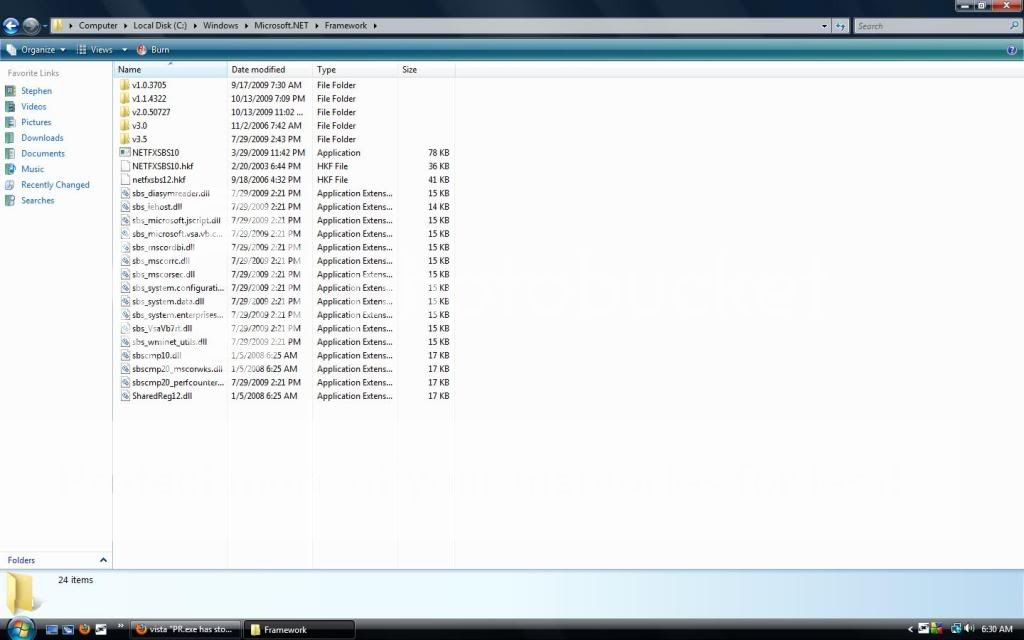
"Hell, these are Marines. Men like them held Guadalcanal and took Iwo Jima. Bagdad ain't shit."
-Marine Major General John F. Kelly
-
Twisted Helix
- Retired PR Developer
- Posts: 5145
- Joined: 2008-11-03 04:18
re: "PR.exe has stopped working"/Fixed!
Hmmm.. no thats all fine too. Curiouser and curiouser.
Ok ... what does the Start and Target boxes say in your PR shortcut ?
Ok ... what does the Start and Target boxes say in your PR shortcut ?
-
Slick82
- Posts: 7
- Joined: 2009-11-23 23:56
re: "PR.exe has stopped working"/Fixed!
myself and plenty others are also having this problem. i never got it with vista, but ever since i upgraded to 7 this has been happening to me. i've tried compatibility modes and admin privileges and the whole 9 yards and nothing has fixed it. it is obviously the .exe file.
-
Twisted Helix
- Retired PR Developer
- Posts: 5145
- Joined: 2008-11-03 04:18
re: "PR.exe has stopped working"/Fixed!
Slick82 wrote:i never got it with vista, but ever since i upgraded to 7 this has been happening to me.
This is a logical non-sequitur.it is obviously the .exe file.
Plus there are plenty of folks on Windows 7 who have it working.
Seems like it is therefore your system.
That is logical.
-
Slick82
- Posts: 7
- Joined: 2009-11-23 23:56
re: "PR.exe has stopped working"/Fixed!
it worked on vista before, but ever since i upgraded i've had this problem. i am running on a 64 bit system. could this be causing it?
if it isn't fixed soon i'll have to leave my clan on pr
if it isn't fixed soon i'll have to leave my clan on pr
-
Drop_Deadx
- Posts: 317
- Joined: 2008-09-20 16:07
re: "PR.exe has stopped working"/Fixed!
Target: C:\Program Files\EA GAMES\Battlefield 2\mods\pr\pr.exe
Start: C:\Program Files\EA GAMES\Battlefield 2\mods\pr
Start: C:\Program Files\EA GAMES\Battlefield 2\mods\pr
"Hell, these are Marines. Men like them held Guadalcanal and took Iwo Jima. Bagdad ain't shit."
-Marine Major General John F. Kelly