
your link for the google earth overlay didn't work for me but this one works fine for me maybe you can post it
http://www.google.nl/url?sa=t&source=web&ct=res&cd=1&ved=0CAcQFjAA&url=http%3A%2F%2Fwww.ambiotek.com%2Ftopoview%2Fsrtm41.kmz&ei=SyEJS-2iNpGy4QadutDSCw&usg=AFQjCNEk2v0qd6326XG3D6K-6ei3gkreQg&sig2=bAEkXt12GLMVbud00ocXpQ
How To Make Awesome Maps with DEM and GEO2 (Image Heavy)
-
Durkie
- Posts: 264
- Joined: 2009-01-12 08:10
Re: [Tutorial] How to make awsome maps with DEM and GEO2 [IMG HEAVY!]]
Last edited by Durkie on 2009-11-22 17:54, edited 2 times in total.
"Goddam it, you'll never get the Purple Heart hiding in a foxhole! Follow me!"
Captain Henry P. Jim Crowe
Captain Henry P. Jim Crowe
-
Durkie
- Posts: 264
- Joined: 2009-01-12 08:10
Re: [Tutorial] How to make awsome maps with DEM and GEO2 [IMG HEAVY!]]
I got a problem in the editor my terrain looks like this
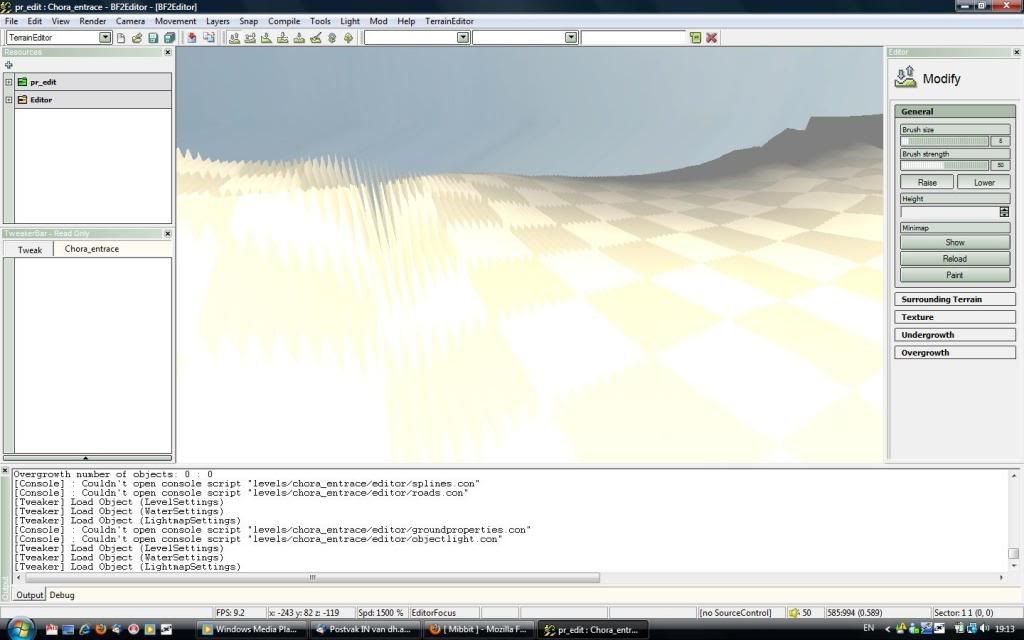
its ripples and looks like it don't fit into my editor space
does anybody knows how to get it fixed?
its ripples and looks like it don't fit into my editor space
does anybody knows how to get it fixed?
"Goddam it, you'll never get the Purple Heart hiding in a foxhole! Follow me!"
Captain Henry P. Jim Crowe
Captain Henry P. Jim Crowe
-
Zeno
- Posts: 3430
- Joined: 2008-09-07 14:16
Re: [Tutorial] How to make awsome maps with DEM and GEO2 [IMG HEAVY!]]
it might be a problem with the layers or channels or just that you have to use smooth tool in PS
-
Amok@ndy
- Retired PR Developer
- Posts: 5144
- Joined: 2008-11-27 22:13
Re: [Tutorial] How to make awsome maps with DEM and GEO2 [IMG HEAVY!]]
you get this issue if your PrimaryHeightmap.raw has not the correct size !
on a 1024x1024 it needs to be 1025x1025
on a 512x512 it needs to be 513x513
and so on ...
on a 1024x1024 it needs to be 1025x1025
on a 512x512 it needs to be 513x513
and so on ...

-
Durkie
- Posts: 264
- Joined: 2009-01-12 08:10
Re: [Tutorial] How to make awsome maps with DEM and GEO2 [IMG HEAVY!]]
I resized it to 1025x1025 pixels in Photoshop
"Goddam it, you'll never get the Purple Heart hiding in a foxhole! Follow me!"
Captain Henry P. Jim Crowe
Captain Henry P. Jim Crowe
-
Amok@ndy
- Retired PR Developer
- Posts: 5144
- Joined: 2008-11-27 22:13
Re: [Tutorial] How to make awsome maps with DEM and GEO2 [IMG HEAVY!]]
and did it work ?Durkie wrote:I resized it to 1025x1025 pixels in Photoshop
-
Durkie
- Posts: 264
- Joined: 2009-01-12 08:10
Re: [Tutorial] How to make awsome maps with DEM and GEO2 [IMG HEAVY!]]
no but I found the error in BF2 editor
Ignored Warning[Physics] : Heightmap filesize does not match expected size. 2101250 != 526338
Ignored Warning[Physics] : Heightmap filesize does not match expected size. 2101250 != 526338
"Goddam it, you'll never get the Purple Heart hiding in a foxhole! Follow me!"
Captain Henry P. Jim Crowe
Captain Henry P. Jim Crowe
-
Zeno
- Posts: 3430
- Joined: 2008-09-07 14:16
-
Durkie
- Posts: 264
- Joined: 2009-01-12 08:10
Re: [Tutorial] How to make awsome maps with DEM and GEO2 [IMG HEAVY!]]
I get the same error
Ignored Warning[Physics] : Heightmap filesize does not match expected size. 2097152 != 526338
Ignored Warning[Physics] : Heightmap filesize does not match expected size. 2097152 != 526338
"Goddam it, you'll never get the Purple Heart hiding in a foxhole! Follow me!"
Captain Henry P. Jim Crowe
Captain Henry P. Jim Crowe
-
Amok@ndy
- Retired PR Developer
- Posts: 5144
- Joined: 2008-11-27 22:13
Re: [Tutorial] How to make awsome maps with DEM and GEO2 [IMG HEAVY!]]
did you make some manual changes in your Heightmap.con ?
-
Durkie
- Posts: 264
- Joined: 2009-01-12 08:10
Re: [Tutorial] How to make awsome maps with DEM and GEO2 [IMG HEAVY!]]
not that I am aware off
"Goddam it, you'll never get the Purple Heart hiding in a foxhole! Follow me!"
Captain Henry P. Jim Crowe
Captain Henry P. Jim Crowe
-
thedare
- Posts: 44
- Joined: 2009-07-21 16:37
Re: [Tutorial] How to make awsome maps with DEM and GEO2 [IMG HEAVY!]]
slice doesnt work with 64 bit  aby other tools i could use instead?
can anyone do me a favour and slice it as i am getting nowhere with it
aby other tools i could use instead?can anyone do me a favour and slice it as i am getting nowhere with it
You do not have the required permissions to view the files attached to this post.
Last edited by thedare on 2009-12-06 21:09, edited 1 time in total.
-
Zeno
- Posts: 3430
- Joined: 2008-09-07 14:16
Re: [Tutorial] How to make awsome maps with DEM and GEO2 [IMG HEAVY!]]
T-paint have a slice function i think.. T-split?
-
thedare
- Posts: 44
- Joined: 2009-07-21 16:37
Re: [Tutorial] How to make awsome maps with DEM and GEO2 [IMG HEAVY!]]
ohh yeah forgot about that. should fix my problems. also you can avoid the problems in photoshop by import the image straight into geocontrol!
-
Amok@ndy
- Retired PR Developer
- Posts: 5144
- Joined: 2008-11-27 22:13
Re: [Tutorial] How to make awsome maps with DEM and GEO2 [IMG HEAVY!]]
i usually use a tutorial of Fenring (ForgottenHope2) to get my geocontrol terrain into bf2
the advantages are that i have also generated a matching surrounding terrain
the advantages are that i have also generated a matching surrounding terrain
-
Zeno
- Posts: 3430
- Joined: 2008-09-07 14:16
Re: [Tutorial] How to make awsome maps with DEM and GEO2 [IMG HEAVY!]]
teoreticaly you can import surrounding terrain to get real terrain in the out of bound areas with this tecnique 
[R-DEV]Ninja2dan: Not having a spotter is like masturbating with a cheese grater...mildly amusing at first, but generally painful and bloody in the end.
Thornehaw: If all this have been evidently true, Battlefield is a much scarier and dirtier than ever imagined. Not a conspiracy, but a possibility. If it is true, then trusting another is quite worrisome.
Thornehaw: If all this have been evidently true, Battlefield is a much scarier and dirtier than ever imagined. Not a conspiracy, but a possibility. If it is true, then trusting another is quite worrisome.
-
Katanama
- Posts: 36
- Joined: 2008-08-28 12:28
Re: [Tutorial] How to make awsome maps with DEM and GEO2 [IMG HEAVY!]]
Hey I am trying this out though I have two problems. First of all The area that I want to use is relatively flat and therefore I can not really Identify it in microdem, is there a way that I can get a city overlay or do some coordinates in microdem to find the exact place.
The second problem is that I don't have photo shop and haven't been able to find other programs that can work with RAW images. So how do I import the image directly to geocontrol like thedare said can be done haven't been able to figure it out.
The second problem is that I don't have photo shop and haven't been able to find other programs that can work with RAW images. So how do I import the image directly to geocontrol like thedare said can be done haven't been able to figure it out.
-
ComradeChaos
- Posts: 738
- Joined: 2010-01-27 20:45
Re: [Tutorial] How to make awsome maps with DEM and GEO2 [IMG HEAVY!]]
Can someone Slice my map, as I don't know how to work T-split.  ops:
ops:
The file is here: https://docs.google.com/uc?id=0B4Cg_rUs ... load&hl=en
ops:The file is here: https://docs.google.com/uc?id=0B4Cg_rUs ... load&hl=en
Last edited by ComradeChaos on 2010-03-07 18:53, edited 2 times in total.
-
dark_devil
- Posts: 1
- Joined: 2010-02-14 09:55
Re: [Tutorial] How to make awsome maps with DEM and GEO2 [IMG HEAVY!]]
I have the same issue when using photoshop
-
Outlawz7
- Retired PR Developer
- Posts: 17261
- Joined: 2007-02-17 14:59
Re: [Tutorial] How to make awsome maps with DEM and GEO2 [IMG HEAVY!]]
I had to download that SRTM 4.1 thing separately, you don't get it by downloading that overlay link 
Also MicroDEM doesn't work for me at all, what the hell are "DEM files" and whats with your data being saved as Flash AS file, while mine is .kml and can only be opened by Google Earth?
There is so much stuff not explained here.
Also MicroDEM doesn't work for me at all, what the hell are "DEM files" and whats with your data being saved as Flash AS file, while mine is .kml and can only be opened by Google Earth?
There is so much stuff not explained here.
