
cheers AlexWell I use the same OS, an x-fi fatal1ty & have no issues at all with bf2, can play it for hours & hours with no crashes etc etc so I'd say there isn't any inherant problem with bf2 when played on win 7 ultimate x64 with an x-fi card. I'm also using Daniel K's support pack 2.0.
Did you do the usual trick of making sure bf2 doesn't use the outdated openal that gets installed with the game (BF2OpenAL.DLL)? Copy wrap_aol.dll from the syswow64 folder to the bf2 installation folder & rename it to BF2OpenAL.DLL. That's all I did & like I say, bf2 works fine in my system, infact I can safely say it's one of the few games that's always worked without a hitch in Win 7 Ulti x64.
BSOD on Loading
-
Raider00657
- Posts: 16
- Joined: 2009-05-23 16:31
Re: BSOD on Loading
I thought it better to copy it over
-
KomradePedrovsk
- Posts: 72
- Joined: 2007-03-19 01:51
Re: BSOD on Loading
Hello I am also using an Auzentech X-Fi Forte. I am PedroMor in that thread you linked.Raider00657 wrote:Hey guys
I have the same problem but i am using an Auzentech Xfi Forte 7.1.
Their is a fix that may work but it didn't work for me.
It is definitaly to do with the creative hardware and running it on ultra high, you can run it on high or do the fix in this link,
WIN 7 Ult 64 + XFI + Battlefield 2 = BSOD - Creative Labs
hope it works for you, does anyone else know another fix?
cheers Alex
I get BSODs on FH2 and PR while running on X-Fi (using OpenAL) when loading new maps right at the time it's supposed to load the Sounds. Never really played BF2 for long periods as I don't play it much, so I don't know if it'd BSOD as well.
If I set in Audio Options for audio to be Hardware instead of Creative X-Fi I stop the BSODs but am losing sound from rear speakers. Only ALchemy was able to bring it back in that situation.
However I have found no ALchemy setting that didn't produce sounds hiccuping, crackling or glitching even with the latest ALchemy update... I don't know how many voice channels BF2 is supposed to use: 32? 64? 128? I guess I'll try 32 voice channels in ALchemy later.
Yes I've read that too, but he just mentions BF2. Who knows maybe the problem only surfaces in the mods because they have much more sounds and with more quality? I do notice I never BSOD if I keep loading the same map over and over again, since it always has the same sounds it doesn't need to load them again. But sometimes when loading a new one it BSODs right at the moment it starts loading Sounds after loading Objects.Raider00657 wrote:I thought it better to copy it over
cheers AlexWell I use the same OS, an x-fi fatal1ty & have no issues at all with bf2, can play it for hours & hours with no crashes etc etc so I'd say there isn't any inherant problem with bf2 when played on win 7 ultimate x64 with an x-fi card. I'm also using Daniel K's support pack 2.0.
Did you do the usual trick of making sure bf2 doesn't use the outdated openal that gets installed with the game (BF2OpenAL.DLL)? Copy wrap_aol.dll from the syswow64 folder to the bf2 installation folder & rename it to BF2OpenAL.DLL. That's all I did & like I say, bf2 works fine in my system, infact I can safely say it's one of the few games that's always worked without a hitch in Win 7 Ulti x64.
I've tried the wrap_oal.dll trick, but didn't help. Right now I'm trying the same trick but with a different file - ct_oal.dll, which I've found in a folder in my Windows folder.
-
bad_nade

- Support Technician
- Posts: 1499
- Joined: 2008-04-06 18:26
- Location: Finland
Re: BSOD on Loading
BF2 1.5 patch updated that file already. While you can still update it manually, I doubt that there will be any improvements.KomradePedrovsk wrote:I've tried the wrap_oal.dll trick, but didn't help. Right now I'm trying the same trick but with a different file - ct_oal.dll, which I've found in a folder in my Windows folder.
http://blogs.battlefield.ea.com/bf2_2142/archive/2009/08/27/battlefield-2-update-v1-50-is-almost-here.aspx
Battlefield Blog wrote:- Updated BF2OpenAL.dll from version 1.1.1.0 to version 2.1.8.1
-
KomradePedrovsk
- Posts: 72
- Joined: 2007-03-19 01:51
Re: BSOD on Loading
The one in the system folders is even more recent - 2.2.0.5. But yeah it didn't do anything, I still get BSODs in Creative X-Fi mode... I just wish there was a way to keep surround sound with Hardware mode that didn't involve using ALchemy...clueless_noob wrote:BF2 1.5 patch updated that file already. While you can still update it manually, I doubt that there will be any improvements.
Battlefield Blog
-
bad_nade
- Support Technician
- Posts: 1499
- Joined: 2008-04-06 18:26
- Location: Finland
Re: BSOD on Loading
Have you already tried to drop sound quality from Ultra to High, which retains hardware acceleration and only disables EAX 5 effects?
-
KomradePedrovsk
- Posts: 72
- Joined: 2007-03-19 01:51
Re: BSOD on Loading
You mean leave it at Creative X-Fi mode but audio quality set to High instead of Ultra High? Yes, still BSOD'ed after a couple of map loadings.clueless_noob wrote:Have you already tried to drop sound quality from Ultra to High, which retains hardware acceleration and only disables EAX 5 effects?
Also even 32 channels in ALchemy is still giving sound bugs... ffs I'm all out of ideas now.
Last edited by KomradePedrovsk on 2010-01-10 13:12, edited 1 time in total.
-
Raider00657
- Posts: 16
- Joined: 2009-05-23 16:31
Re: BSOD on Loading
BF2 is not supported by Alchemy as creative say it is already supported, as shown here,
Games
anyone else got a fix coz i'm still getting the page fault BSOD
cheers
Alex
Games
anyone else got a fix coz i'm still getting the page fault BSOD
cheers
Alex
-
KomradePedrovsk
- Posts: 72
- Joined: 2007-03-19 01:51
Re: BSOD on Loading
I've already explained in detail why I am using ALchemy for Battlefield 2 over the Creative forums but I guess I'll explain it here as well...:Raider00657 wrote:BF2 is not supported by Alchemy as creative say it is already supported, as shown here,
Games
anyone else got a fix coz i'm still getting the page fault BSOD
cheers
Alex
Yes BF2 is already supported to use OpenAL and X-Fi, but that's if you run in those specific modes (Creative X-Fi, the mode that causes the BSOD).
So what if you use Hardware mode (no BSODs and no X-Fi)? You lose 3D surround sound (at least I do, as sound that is supposed to come from the rear start playing on the front speakers), just like games that DO require ALchemy for 3D surround sound to work properly.
I was able to recover 3D surround sound with ALchemy even on Hardware mode, but can't find any setting that doesn't give sound glitches. Guess that's because this game shouldn't need ALchemy to begin with, but it DOES when it's giving you damn BSODs for running your X-Fi card in the mode it's supposed to be used - Creative X-Fi mode.
If anyone has any idea at all how do I get Hardware Mode + 3D Surround sound without using ALchemy I would be very grateful.
EDIT:
Going to try this: https://www.realitymod.com/forum/f27-pr ... ost1138492
I had installed version 2.0, but not the 2.14.0025.
If that doesn't work I'm going to start exiting the game each time a round ends and get back in the game right after. I have a feeling it may be the driver is having trouble flushing the sounds from the previous map. But it could be trouble loading the sounds too. If the latter it won't help obviously.
Last edited by KomradePedrovsk on 2010-01-10 15:43, edited 2 times in total.
-
illidur
- Posts: 521
- Joined: 2009-05-13 12:36
Re: BSOD on Loading
is there anybody who has ultra high working without random bsod or map loading? i have a x-fi titanium and it just random bluescreens and thats not good. creative sux
-
bad_nade
- Support Technician
- Posts: 1499
- Joined: 2008-04-06 18:26
- Location: Finland
Re: BSOD on Loading
No. I mean like this:KomradePedrovsk wrote:You mean leave it at Creative X-Fi mode but audio quality set to High instead of Ultra High?

-
Mr.Hyde
- Posts: 196
- Joined: 2009-06-17 17:04
Re: BSOD on Loading
Yeah, I do.illidur wrote:is there anybody who has ultra high working without random bsod or map loading? i have a x-fi titanium and it just random bluescreens and thats not good. creative sux
Audio Renderer : Creative X-Fi
Sound Quality: Ultra High
EAX: Enabled
I have a Creative SB X-Fi XtremeGamer.
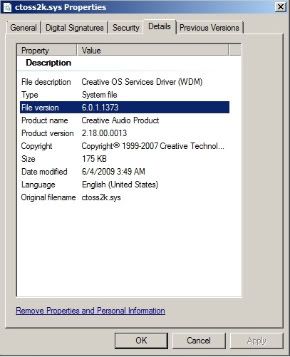
Driver version is 6.0.1.1373. It's a recomended download from Win7 update(x64). Never had this problem.
Can someone look in the windows Application logs and confirm these BSODs are infact caused from Creative sound cards?
"Any society that would give up a little liberty for security deserve neither and will lose both" ~Benjamin Franklin
-
KomradePedrovsk
- Posts: 72
- Joined: 2007-03-19 01:51
Re: BSOD on Loading
Yeah I tried that. I stop BSODing when I do that, but sounds from the rear are all playing in my front speakers. Meaning it goes from 5.1 to 2.1 when I do that. And the only way to regain 5.1 surround at the same time the Audio Renderer is set to Hardware is to use ALchemyclueless_noob wrote:No. I mean like this:
Hmm. Could you please go to C:/Windows/system32/drivers and check the version of the ctoss2k.sys you are using? Thanks.Mr.Hyde wrote:Yeah, I do.
Audio Renderer : Creative X-Fi
Sound Quality: Ultra High
EAX: Enabled
I have a Creative SB X-Fi XtremeGamer.
Driver version is 6.0.1.1373. It's a recomended download from Win7 update(x64). Never had this problem.
Can someone look in the windows Application logs and confirm these BSODs are infact caused from Creative sound cards?
The fact I don't BSOD when I set Audio Renderer to Hardware and the fact the BSOD'ing only happens when it's about to load the Sounds of a new map seems to be enough to understand the cause of the them. But here's the analysis of a minidump (as you'll see ctoss2k.sys, a file driver from Creative, is the culprit):
Code: Select all
*******************************************************************************
*                                                                             *
*                        Bugcheck Analysis                                    *
*                                                                             *
*******************************************************************************

PAGE_FAULT_IN_NONPAGED_AREA (50)
Invalid system memory was referenced.  This cannot be protected by try-except,
it must be protected by a Probe.  Typically the address is just plain bad or it
is pointing at freed memory.
Arguments:
Arg1: ffffffff820b4000, memory referenced.
Arg2: 0000000000000000, value 0 = read operation, 1 = write operation.
Arg3: fffff80002890882, If non-zero, the instruction address which referenced the bad memory
	address.
Arg4: 0000000000000005, (reserved)

Debugging Details:
------------------


Could not read faulting driver name

READ_ADDRESS: GetPointerFromAddress: unable to read from fffff80002a41080
 ffffffff820b4000

FAULTING_IP:
nt!MmProbeAndLockPages+112
fffff800`02890882 410fb601        movzx   eax,byte ptr [r9]

MM_INTERNAL_CODE:  5

CUSTOMER_CRASH_COUNT:  1

DEFAULT_BUCKET_ID:  VISTA_DRIVER_FAULT

BUGCHECK_STR:  0x50

PROCESS_NAME:  BF2.exe

CURRENT_IRQL:  0

TRAP_FRAME:  fffffa601e90d540 -- (.trap 0xfffffa601e90d540)
NOTE: The trap frame does not contain all registers.
Some register values may be zeroed or incorrect.
rax=000000000000000a rbx=0000000000000000 rcx=0000000000000000
rdx=000000000000000a rsi=0000000000000000 rdi=0000000000000000
rip=fffff80002890882 rsp=fffffa601e90d6d0 rbp=fffffa601e90d850
 r8=fffffa800c2415b0  r9=ffffffff820b4000 r10=0000000000000011
r11=0000000000000000 r12=0000000000000000 r13=0000000000000000
r14=0000000000000000 r15=0000000000000000
iopl=0         nv up ei ng nz ac pe nc
nt!MmProbeAndLockPages+0x112:
fffff800`02890882 410fb601        movzx   eax,byte ptr [r9] ds:5530:ffffffff`820b4000=??
Resetting default scope

LAST_CONTROL_TRANSFER:  from fffff800028d4a46 to fffff80002874450

STACK_TEXT:
fffffa60`1e90d458 fffff800`028d4a46 : 00000000`00000050 ffffffff`820b4000 00000000`00000000 fffffa60`1e90d540 : nt!KeBugCheckEx
fffffa60`1e90d460 fffff800`02872fd9 : 00000000`00000000 fffffa80`0b0dd2d0 00000000`00000000 ffffffff`ffffffff : nt! ?? ::FNODOBFM::`string'+0x2c42d
fffffa60`1e90d540 fffff800`02890882 : fffffa80`07438490 fffffa60`1e90dc20 fffffa80`0a1f0158 fffff800`02895bae : nt!KiPageFault+0x119
fffffa60`1e90d6d0 fffffa60`03548dd2 : fffffa80`0c241580 00000000`00000000 fffff800`00000002 ffffffff`820b4000 : nt!MmProbeAndLockPages+0x112
fffffa60`1e90d7d0 fffffa80`0c241580 : 00000000`00000000 fffff800`00000002 ffffffff`820b4000 00000000`00000000 : ctoss2k+0x5dd2
fffffa60`1e90d7d8 00000000`00000000 : fffff800`00000002 ffffffff`820b4000 00000000`00000000 fffffa60`0343ac3e : 0xfffffa80`0c241580


STACK_COMMAND:  kb

FOLLOWUP_IP:
ctoss2k+5dd2
fffffa60`03548dd2 ??              ???

SYMBOL_STACK_INDEX:  4

SYMBOL_NAME:  ctoss2k+5dd2

FOLLOWUP_NAME:  MachineOwner

MODULE_NAME: ctoss2k

IMAGE_NAME:  ctoss2k.sys

DEBUG_FLR_IMAGE_TIMESTAMP:  4a66eca9

FAILURE_BUCKET_ID:  X64_0x50_ctoss2k+5dd2

BUCKET_ID:  X64_0x50_ctoss2k+5dd2

Followup: MachineOwner
----------
Mr.Hyde
- Posts: 196
- Joined: 2009-06-17 17:04
Re: BSOD on Loading
I'll take a look at your dump
EDIT: Out of curiosity, are you guys that are having the BSOD using any 3rd party communication software while playing PR?
EDIT: EDIT: I would like to see the DxDiag reports of those that are still having the problems with BSOD from the ctoss2k.sys
Last edited by Mr.Hyde on 2010-01-11 14:45, edited 2 times in total.
"Any society that would give up a little liberty for security deserve neither and will lose both" ~Benjamin Franklin
-
KomradePedrovsk
- Posts: 72
- Joined: 2007-03-19 01:51
Re: BSOD on Loading
Thanks for the info on the ctoss2k.sys. The one I am using is 6.0.1.1400.Mr.Hyde wrote:
I'll take a look at your dump
EDIT: Out of curiosity, are you guys that are having the BSOD using any 3rd party communication software while playing PR?
I just got my hands on a 6.0.1.1283 version though (from http://forums.creative.com/t5/Sound-Bla ... 516189E379), which still hasn't given me any BSODs so far, but didn't play that much.
Will play further to see if it helped or not. If not I'd like to give your file a try if you don't mind uploading it somehow. Thanks!
As for 3rd party communications no, I'm not using any.
EDIT:
Well it seems for some reason I needed to shutdown my PC completely or disable/enable my sound card for the new ctoss2k.sys to take effect. Needless to say using this older ctoss2k.sys (6.0.1.1283) didn't help since it wasn't specifically for my card (Auzentech X-Fi Forte) and I had to place back the 6.0.1.1400 version.
I also managed to get a version the same as yours but didn't work neither (was for SBXFI, not FORTE, so I guess those who have my card are out of luck).
Conclusion:
People with SB X-Fi cards were having problems but managed to fix them by installing older versions of ctoss2k.sys (6.0.1.1373). Auzentech X-Fi Forte owners have problems because it uses a recent ctoss2k.sys (6.0.1.1400) and there is no old ctoss2k.sys that is compatible for it

If only someone made those older versions compatible for the Forte I think it could help... If only...
Last edited by KomradePedrovsk on 2010-01-27 03:01, edited 3 times in total.
-
Dr Rank
- PR:BF2 Developer
- Posts: 2765
- Joined: 2006-11-11 15:05
Re: BSOD on Loading
This is all I've got so far from creative tech support:
Is that the version of Alchemy you've tried KomradePedrovsk? Although I did play a couple of rounds a few days ago having tried the chkdsk thing but not having tested it and I was able to load a second map for the first time. Need to test it more on a local loading new maps, I'll let you guys know if anything more comes of that.Thank you for writing in to Creative Support Services; I appreciate the
opportunity to assist you.
With regards to your concern, you can try downloading the Creative
ALchemy 1.41.00 that will work properly on Windows 7 operating system.
To install the application
1. Please visit this website at: Creative Worldwide Support
2. Download the ALMY_PCVTAPP_LB_1_41_00.exe file onto your local hard
disk.
3. Close all other Windows applications.
4. Double-click the downloaded file.
5. Follow the instructions on the screen.
In case you need any clarification, please do not hesitate to contact us
again. Thank you.


-
KomradePedrovsk
- Posts: 72
- Joined: 2007-03-19 01:51
Re: BSOD on Loading
Yes but that's just ALchemy. It would be best if we didn't even have to use it. I have to resort to ALchemy to have 5.1 surround in Hardware mode (this mode gives no BSODs).[R-DEV]Dr Rank wrote:This is all I've got so far from creative tech support:
Is that the version of Alchemy you've tried KomradePedrovsk? Although I did play a couple of rounds a few days ago having tried the chkdsk thing but not having tested it and I was able to load a second map for the first time. Need to test it more on a local loading new maps, I'll let you guys know if anything more comes of that.
However I'd like to be able to use Creative X-Fi mode without the BSODing, while keeping 5.1 surround.
In any case I've tried that ALchemy version (1.41) and I still get glitched or crackling sounds. I guess it's because it wasn't meant to be used with BF2, since it's supposed to already officialy support Creative X-Fi to begin with (which unfortunately gives BSOD sometimes when loading new maps).
And regarding map loading I can sometimes load 3 different maps as well, but when the next map is with the same sides fighting each other but on a different setting I notice on the loading screen that the game skips loading "Sounds". Probably because no sounds are different, since it's the same sides it's the same voices, which are already cached from the previous map.
In my opinion the BSODs are caused by a failure on the driver's part (ctoss2k.sys), to clear the sound cache and write over the new sounds.
-
Lan
- Posts: 358
- Joined: 2008-10-26 02:15
Re: BSOD on Loading
I must be childish because i let out a little snigger when i read this, i did a fresh install of xp recently on my laptop all drivers up to date and no programs running in the background and i get this same thingMr.Hyde wrote:
I'll take a look at your dump
-
sprint113
- Posts: 113
- Joined: 2009-12-08 03:45
Re: BSOD on Loading
I've also been having this problem.
I don't recall having this problem with previous versions of PR on this machine, but then again, 0.86 came out shortly after building this machine IIRC. Playing hours of vBF2 doesn't cause any (BSOD) problems.
BSOD occurs after loading and spawning in. Everything will be fine until a new sound initializes, like someone hops into a hmmvee or someone talks on VOIP, which will then loop and crash. Every time it BSOD, it is right after a sound initializes. Sometimes it takes longer for the problem to manifest, like 2 minutes into a round.
Vista x64 with X-Fi xtremegamer
Ran memtest, dskchk, antivirus, reinstalled BF2/PR.
Tried the current Creative X-fi driver and a previous version I had on my XP machine.
Also tried DanielK's driver, and currently re-trying it since last time, I may not have properly cleaned the driver out before reinstalling the drivers.
I don't recall having this problem with previous versions of PR on this machine, but then again, 0.86 came out shortly after building this machine IIRC. Playing hours of vBF2 doesn't cause any (BSOD) problems.
BSOD occurs after loading and spawning in. Everything will be fine until a new sound initializes, like someone hops into a hmmvee or someone talks on VOIP, which will then loop and crash. Every time it BSOD, it is right after a sound initializes. Sometimes it takes longer for the problem to manifest, like 2 minutes into a round.
Vista x64 with X-Fi xtremegamer
Ran memtest, dskchk, antivirus, reinstalled BF2/PR.
Tried the current Creative X-fi driver and a previous version I had on my XP machine.
Also tried DanielK's driver, and currently re-trying it since last time, I may not have properly cleaned the driver out before reinstalling the drivers.
-
jaheenan77
- Posts: 3
- Joined: 2010-01-14 08:36
Re: BSOD on Loading
I have tried to install project reality on my new laptop with windows 7 several times, when i installed battlefield 2 i did not have to go through a patching process and i assume it autmatically got me 1.5, when i installed pr 0.87 core and pr0.87 levels and open the desktop shortcut, i get this error message, i have tried reinstalling,uninstalling and am currently downloading the torrents for the core and levels again. Any help or advice would be appreciated
You do not have the required permissions to view the files attached to this post.
-
KomradePedrovsk
- Posts: 72
- Joined: 2007-03-19 01:51
Re: BSOD on Loading
Don't think that has anything to do with Creative X-FI BSODs. You should probably start your own thread..jaheenan77 wrote:I have tried to install project reality on my new laptop with windows 7 several times, when i installed battlefield 2 i did not have to go through a patching process and i assume it autmatically got me 1.5, when i installed pr 0.87 core and pr0.87 levels and open the desktop shortcut, i get this error message, i have tried reinstalling,uninstalling and am currently downloading the torrents for the core and levels again. Any help or advice would be appreciated