
Hi!!!
I need help to importing models to bf2 by PoE2 tool!!!
Please give me some manuals about import(what need to import LODs,COLs etc)
And how i can code this moddels.
P.s Am work on russian and chinise missles and bomb for jets!!!Someone know about this??For me(am beginnner moddeller) - this is real head pain!
thx
[Help] Importing models on bf2 by PoE2 Tools and Codding!
-
samogon100500
- Posts: 1134
- Joined: 2009-10-22 12:58
-
Amok@ndy
- Retired PR Developer
- Posts: 5144
- Joined: 2008-11-27 22:13
Re: [Help]Importing models on bf2 by PoE2 Tools and Codding!
do you already have installed the Poe2 tools ?
then maybe check out the hierarchy collection of bfeditor.org
3ds/gmax Model Hierarchy Collection (56k Warning) - Official BF Editor Forums
then maybe check out the hierarchy collection of bfeditor.org
3ds/gmax Model Hierarchy Collection (56k Warning) - Official BF Editor Forums

-
samogon100500
- Posts: 1134
- Joined: 2009-10-22 12:58
Re: [Help]Importing models on bf2 by PoE2 Tools and Codding!
thx,am try find someone!
p.s how i can make hierarchy?
p.s how i can make hierarchy?
Last edited by samogon100500 on 2010-01-20 05:02, edited 1 time in total.

-
Hauteclocque
- Retired PR Developer
- Posts: 3312
- Joined: 2008-10-02 17:55
Re: [Help]Importing models on bf2 by PoE2 Tools and Codding!
I will explain it to you this afternoon  3PM (GMT+1)
3PM (GMT+1)
-
Hauteclocque
- Retired PR Developer
- Posts: 3312
- Joined: 2008-10-02 17:55
Re: [Help]Importing models on bf2 by PoE2 Tools and Codding!
Well, first you need to create dummy boxes in 3DSMAX, as much as you need them.
I don't know how work COLS, but for geom0, geom1, etc and lod0,1, etc, you have to create a "dummy" Just create one centered on your object (be sure that the pivots are properly set), and clone it to have all the boxes on the same place.
You need as well to create a root using the pointhelper tool. (follow the link amokandy gave you, it explains it)
Rename all the dummies so as to have something which looks like the hierarchies of the link (I guess you will set up the projectile hierarchy for your missiles)
When all the boxes, points are created, you need to set up the hierarchy.
I will take this example from the link :
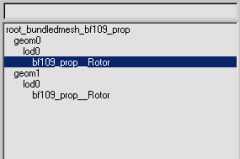
To set up this hierarchy, you have to click on "select by name" (it's easier than clicking manually one object, even more when they are all on the same place)
In my example, you need to first click on bf109_prop-rotor, you then click on select, then click on "select and link", open again "select by name" and click on lod0. You need then to click on "select and move".
You have now linked both the elements. Return "to select by name", click on "display hierarchy", bf109... should be the child of lod0.
Apply that to the other objects, make lod0 the child of geom0 and geom0 the child of root..etc.
I hope that helps you, I haven't said everything about the subject (and I'm still learning :mrgreen
Follow this tut as well, it's in English and doesn't have pics, but it helped me a lot :
Gmax - Exporting a weapon [Very image heavy!] - Official BF Editor Forums
It's for gmax, but the PoE tools work the same way with 3DSMAX.
I don't know how work COLS, but for geom0, geom1, etc and lod0,1, etc, you have to create a "dummy" Just create one centered on your object (be sure that the pivots are properly set), and clone it to have all the boxes on the same place.
You need as well to create a root using the pointhelper tool. (follow the link amokandy gave you, it explains it)
Rename all the dummies so as to have something which looks like the hierarchies of the link (I guess you will set up the projectile hierarchy for your missiles)
When all the boxes, points are created, you need to set up the hierarchy.
I will take this example from the link :
To set up this hierarchy, you have to click on "select by name" (it's easier than clicking manually one object, even more when they are all on the same place)
In my example, you need to first click on bf109_prop-rotor, you then click on select, then click on "select and link", open again "select by name" and click on lod0. You need then to click on "select and move".
You have now linked both the elements. Return "to select by name", click on "display hierarchy", bf109... should be the child of lod0.
Apply that to the other objects, make lod0 the child of geom0 and geom0 the child of root..etc.
I hope that helps you, I haven't said everything about the subject (and I'm still learning :mrgreen
Follow this tut as well, it's in English and doesn't have pics, but it helped me a lot :
Gmax - Exporting a weapon [Very image heavy!] - Official BF Editor Forums
It's for gmax, but the PoE tools work the same way with 3DSMAX.
-
Amok@ndy
- Retired PR Developer
- Posts: 5144
- Joined: 2008-11-27 22:13
Re: [Help]Importing models on bf2 by PoE2 Tools and Codding!
usually if you have installed the PoE tools you can open up in Max in the headbar -> BF2 -> Utilties
and on the top right there is an box with wizzards which will create you an hierarchie just select all ojbects and press the wizzard button
and on the top right there is an box with wizzards which will create you an hierarchie just select all ojbects and press the wizzard button
-
Hauteclocque
- Retired PR Developer
- Posts: 3312
- Joined: 2008-10-02 17:55
Re: [Help]Importing models on bf2 by PoE2 Tools and Codding!
I didn't know that tool...
Does it set up the pivots as well ?
Does it set up the pivots as well ?
-
DankE_SPB
- Retired PR Developer
- Posts: 3678
- Joined: 2008-09-30 22:29
Re: [Help]Importing models on bf2 by PoE2 Tools and Codding!
as far as i know, no, it do not change them in any way[R-COM]Hauteclocque wrote:I didn't know that tool...
Does it set up the pivots as well ?

[R-DEV]Z-trooper: you damn russian bear spy ;P - WWJND?
-
Hauteclocque
- Retired PR Developer
- Posts: 3312
- Joined: 2008-10-02 17:55
Re: [Help]Importing models on bf2 by PoE2 Tools and Codding!
Ok, so this tool gives you the basic hierarchy, but you need to tweak it separating the different parts of the mesh for the lod0, and replacing the mesh with another for the lod1.
And you have still the more exhausting task (for me), adjusting the pivots...
Do you know how to export Danke ?
Would you be able to export a weapon ?
Just asking, exporters are scarce in this forum...
And you have still the more exhausting task (for me), adjusting the pivots...
Do you know how to export Danke ?
Would you be able to export a weapon ?
Just asking, exporters are scarce in this forum...
-
DankE_SPB
- Retired PR Developer
- Posts: 3678
- Joined: 2008-09-30 22:29
Re: [Help]Importing models on bf2 by PoE2 Tools and Codding!
nope, just making 1st baby-steps in it[R-COM]Hauteclocque wrote: Do you know how to export Danke ?
Would you be able to export a weapon ?
Just asking, exporters are scarce in this forum...
[R-DEV]Z-trooper: you damn russian bear spy ;P - WWJND?
-
samogon100500
- Posts: 1134
- Joined: 2009-10-22 12:58

-
Hauteclocque
- Retired PR Developer
- Posts: 3312
- Joined: 2008-10-02 17:55
Re: [Help]Importing models on bf2 by PoE2 Tools and Codding!
It looks so
Only one thing, be sure you don't need a lod1 for a missile (I think you need to make one).
Import an existing missile and check if there is a lod1 in the hierarchy.
Only one thing, be sure you don't need a lod1 for a missile (I think you need to make one).
Import an existing missile and check if there is a lod1 in the hierarchy.
-
samogon100500
- Posts: 1134
- Joined: 2009-10-22 12:58
Re: [Help]Importing models on bf2 by PoE2 Tools and Codding!
Lod1 visible on 100-150m or biggest?[R-COM]Hauteclocque wrote:It looks so
Only one thing, be sure you don't need a lod1 for a missile (I think you need to make one).
Import an existing missile and check if there is a lod1 in the hierarchy.
i think 6-sided cylinder are nice for them or need more sides(8 etc)?
and last question - what geom request lods?
-
Hauteclocque
- Retired PR Developer
- Posts: 3312
- Joined: 2008-10-02 17:55
Re: [Help]Importing models on bf2 by PoE2 Tools and Codding!
Link the lod1 to the geom1, it should be fine.
-
samogon100500
- Posts: 1134
- Joined: 2009-10-22 12:58
Re: [Help]Importing models on bf2 by PoE2 Tools and Codding!
Aim120 no have lod1!!!They have geom0>lod0 and geom1>lod0[R-COM]Hauteclocque wrote:Link the lod1 to the geom1, it should be fine.
________________
P.s how i can make decal mesh??
Last edited by samogon100500 on 2010-01-20 18:45, edited 2 times in total.