

Anti-Aliasing?
-
Viperelite
- Posts: 110
- Joined: 2009-08-25 18:57
Anti-Aliasing?
Can someone help me to get AA working. Ive tried the In game settings and it always reverts to none. And Nvidia CP doesn't have the force option for Battlefield 2.
-
Arnoldio
- Posts: 4210
- Joined: 2008-07-22 15:04
Re: Anti-Aliasing?
Try setting everything to highest, leave AA alone, click apply, restart the game, just rev the AA up and apply again..thats how it worked at me...

Orgies beat masturbation hands down. - Staker
-
DesmoLocke
- Posts: 1770
- Joined: 2008-11-28 19:47
Re: Anti-Aliasing?
Do you make sure to restart the game after changing video settings?
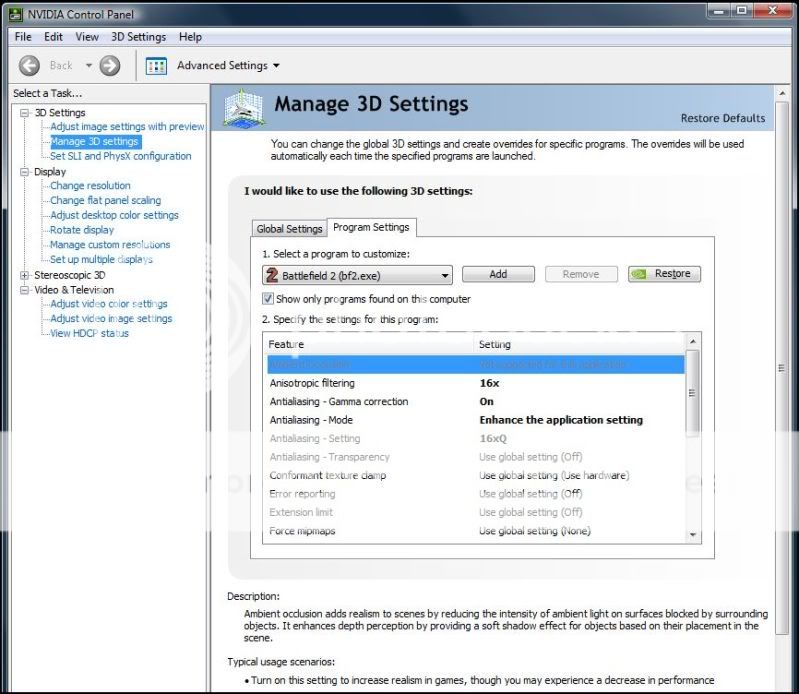
Sure it does. I just wish Ambient Occlusion was supported with BF2.Viperelite wrote: And Nvidia CP doesn't have the force option for Battlefield 2.


-
Viperelite
- Posts: 110
- Joined: 2009-08-25 18:57
Re: Anti-Aliasing?
Nope. That wont work either.... 
-
Viperelite
- Posts: 110
- Joined: 2009-08-25 18:57
Re: Anti-Aliasing?
you proved my point. Thats Enhance the application setting. Not Override any application setting. And it doesn't work for me.DesmoLocke wrote:Do you make sure to restart the game after changing video settings?
Sure it does. I just wish Ambient Occlusion was supported with BF2.
Edit: What Card and Driver revision are you using?
-
crokojot
- Posts: 122
- Joined: 2008-01-05 00:10
Re: Anti-Aliasing?
Dont use nvidia program.Make sure you got application controlled AA at nvidia control panel .Then turn AA in Bf2...must work
-
DesmoLocke
- Posts: 1770
- Joined: 2008-11-28 19:47
Re: Anti-Aliasing?
You can have AA at x0 in the BF2 settings and still enhance it. You can only override AA if BF2 didn't support AA.
-
Viperelite
- Posts: 110
- Joined: 2009-08-25 18:57
Re: Anti-Aliasing?
I realize this. But the problem is it doesn't enhance it. It is no different with enhanced 16xQ than it is with 0.DesmoLocke wrote:You can have AA at x0 in the BF2 settings and still enhance it. You can only override AA if BF2 didn't support AA.
The problem is that it is not working at all.
-
Viperelite
- Posts: 110
- Joined: 2009-08-25 18:57
Re: Anti-Aliasing?
No. That does not work. I click 8X. It says please restart the game. I do. And again. Its back to none.crokojot wrote:Dont use nvidia program.Make sure you got application controlled AA at nvidia control panel .Then turn AA in Bf2...must work
-
snooggums
- Posts: 1093
- Joined: 2008-01-26 06:33
Re: Anti-Aliasing?
If the AA is forced on in the nVidia drivers options then the game itself must be set to no AA for the override to work. Works for me after finding this out.
-
Viperelite
- Posts: 110
- Joined: 2009-08-25 18:57
Re: Anti-Aliasing?
Yes but that is how mine is. Ive tried enabling in game AA but it always reverts to off. So it should work. But doesn't.snooggums wrote:If the AA is forced on in the nVidia drivers options then the game itself must be set to no AA for the override to work. Works for me after finding this out.
-
Nitneuc
- Posts: 490
- Joined: 2007-09-16 08:39
Re: Anti-Aliasing?
Have you tried to manually tweak your video options ?
Go to MyDocuments\Battlefield 2\Profiles\Default, open the "video" file, replace the "off" with "8Samples" (to get in-game AA x8 ) for the line "VideoSettings.setAntialiasing".
Save.
Do the same thing for MyDocuments\Battlefield 2\Profiles\0001
Try.
Go to MyDocuments\Battlefield 2\Profiles\Default, open the "video" file, replace the "off" with "8Samples" (to get in-game AA x8 ) for the line "VideoSettings.setAntialiasing".
Save.
Do the same thing for MyDocuments\Battlefield 2\Profiles\0001
Try.
Many thanks to everyone involved in the making of the best videogaming experience ever !
-
badmojo420
- Posts: 2849
- Joined: 2008-08-23 00:12
Re: Anti-Aliasing?
Do you force a resolution? I've found that i will have to set my resolution to a normal one in settings, set all settings to high(except AA) restart BF2, change AA to 8x, then quit bf2, add in the line to force a custom resolution, then start it again. And it works.
Or just do the manual text editor way like Nitneuc said.
Or just do the manual text editor way like Nitneuc said.
-
Spearhead
- Retired PR Developer
- Posts: 1785
- Joined: 2007-06-01 00:53
Re: Anti-Aliasing?
Just found this thread in google when trying to find a tool I used for my anti-aliasing needs. I have used the nHancer tool to enable my anti-aliasing in BF2. I turned of AA in BF2 settings but forced it with nHancer.
I mainly did this because some shaders did not work when I enabled AA in BF2. (Mainly near death shader). With the workaround everything works out fine.
I mainly did this because some shaders did not work when I enabled AA in BF2. (Mainly near death shader). With the workaround everything works out fine.

-
Konfusion2113
- Posts: 103
- Joined: 2008-05-03 07:37
Re: Anti-Aliasing?
does anyone know if setting up the graphics custom settings in nvidia control panel is effected by whether or not u have bf2.exe or pr.exe selected? or are they the same?
-
bad_nade

- Support Technician
- Posts: 1498
- Joined: 2008-04-06 18:26
- Location: Finland
Re: Anti-Aliasing?
All pr.exe do is move around couple of files and start bf2.exe, so you will have both of them running during game play. But all graphic related settings should be applied to bf2.exe if possible.Konfusion2113 wrote:does anyone know if setting up the graphics custom settings in nvidia control panel is effected by whether or not u have bf2.exe or pr.exe selected? or are they the same?