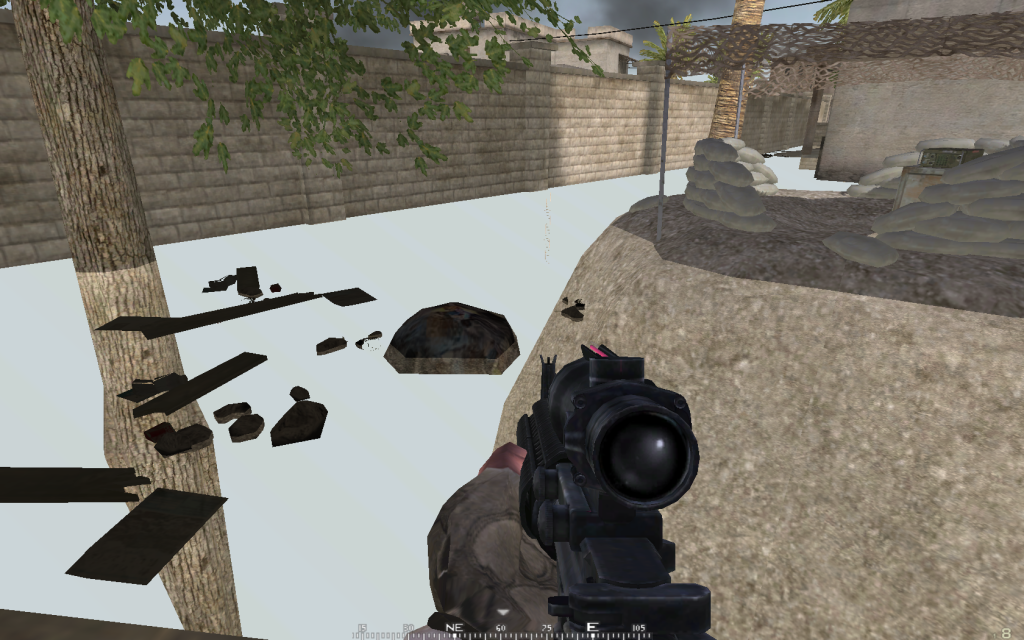
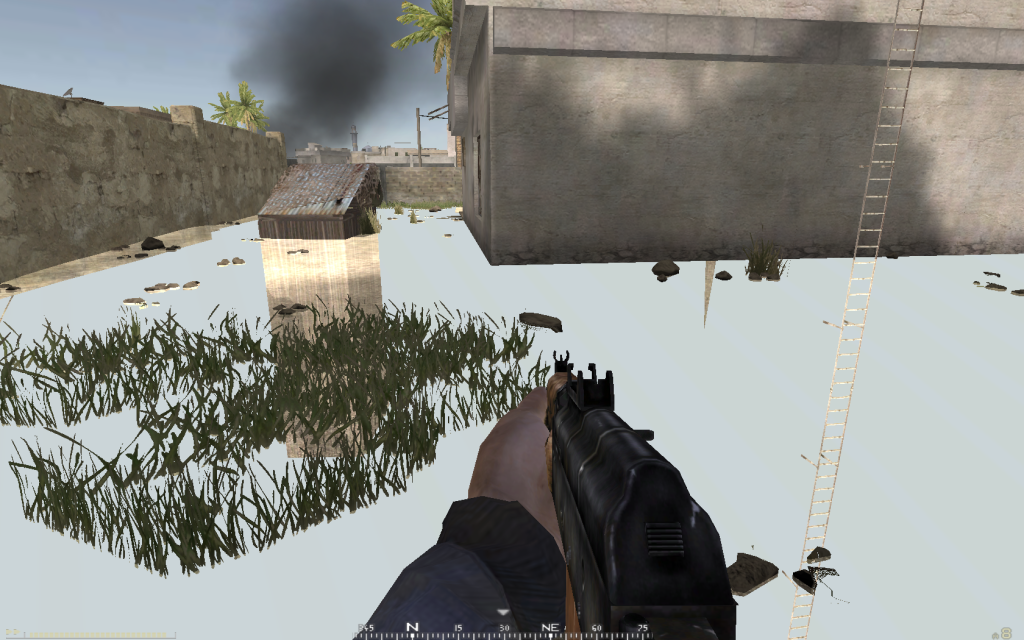
Load into server but cant see ground texture

Help and support regarding PR:BF2 installation and in-game issues
Post Reply
Ubi
Posts: 5
Joined: 2010-02-09 06:33

Load into server but cant see ground texture

Post by Ubi »

Hey so i just DL the game for the first time. and just to start off i LOVE the mod very much.
Ok now to the issue.

Usually (Something around 3 outta 5 five times or more) i start up the game and load into a server i get this texture error where it doesnt show the ground texture. everything else is visible. i have to log out, exit the game and restart a time or two or three or four before it comes back. it doesnt seem to help if i switch to another server. the problem seems to only be fixed when i restart the game.

now im running Windows 7 with a radion 4870, core 2 duo, 4 gigs ram. i know that usually games have a compatibility issues with win7 so i tried the compatibility with XP Service pack 3, Vista Service pack 2, and of course win7.

help me please i would love to play your terrific game without the fear of landing the wrong dice roll each time i load in.
Thanks much guys :)

PS
I'm at work right now so im not able to post any pictures but is soon as i get on a play tonight or tomorrow i can post some images of the issue.

**Update**
Here are the images i said that i would post regarding the issue:
http://i493.photobucket.com/albums/rr30 ... een002.png
http://i493.photobucket.com/albums/rr30 ... een003.png
Dr_Tubesteak
Posts: 172
Joined: 2007-03-09 00:44

Re: Load into server but cant see ground texture

Post by Dr_Tubesteak »

I've seen you've moved the post but try here for help to your problem:

Invisible ground textures - BF2S Forums

See the bottom post.
SnipingCoward
Posts: 2326
Joined: 2007-12-31 22:40

Re: Load into server but cant see ground texture

Post by SnipingCoward »

on WIN7 you do not need to run it in compat mode, however some say the had to run it as administrator

this problem can be due to overheating of your gfx card and/or out-dated drivers

keeping drivers up-to-date can give you a performance boost, reduce heat and stop problem like this
get the latest drivers now!

do you have this problem with vbf2 too? did vbf2 work before on your machine, different/same OS? what have you changed since it last worked?
are there other side effects occurring simultaniously? i.e. flickering, sudden reboots?
Got a PROBLEM? Check this: PR:BF2 Installation Guide

Got a common QUESTION? check here first: PR:BF2 FAQ, MUMBLE FAQ

"Hello, IT! ... Yes, have you tried turning it on and off again?"
Ubi
Posts: 5
Joined: 2010-02-09 06:33

Re: Load into server but cant see ground texture

Post by Ubi »

Wow thanks for the link.
If anyone was wanted to know the fix summed up it is as follows

The fix is under compatibility check "disable visual themes", "disable desktop composition", "disable scaling on high DPI settings" just for (as he says) Kicks. :-D

thanks much for the effort and prompt help.
:)
Cheers
Ubi
Posts: 5
Joined: 2010-02-09 06:33

Re: Load into server but cant see ground texture

Post by Ubi »

SnipingCoward wrote:on WIN7 you do not need to run it in compat mode, however some say the had to run it as administrator

this problem can be due to overheating of your gfx card and/or out-dated drivers

keeping drivers up-to-date can give you a performance boost, reduce heat and stop problem like this
get the latest drivers now!

do you have this problem with vbf2 too? did vbf2 work before on your machine, different/same OS? what have you changed since it last worked?
are there other side effects occurring simultaniously? i.e. flickering, sudden reboots?
Ok so to the guy that posted before my quote. the Fix did not end up working sadly.
Now to answer the quote.

I tried updating my drivers (Yes a new one was availible) and after restarting i came back to find that it did not in fact fix my issue. my computer is heavily ventilated so over heating isnt the issue. have a nice thermaltake tower with ginormous fans... yes that is a technical term :wink: .
Before my update to Win 7 my BF2 was working just fine. never had this issue. infact i dont think i have this issue with BF2 after i updated to win7 either. no sudden reboots. but there is a flicker after the game is done loading into the server. but that happens weather or not i get this texture issue. then after im done playing and exit the game and return to the desktop i get the "Doing" sound for a system error but nothing pops up. its strange.
so alas my issue is still unresolved.
Hope someone has some ideas of what could be wrong.

Hope to hear back.

~Ubi

*Update*
Just tried playing as admin and that didnt work either : (
Last edited by Ubi on 2010-02-12 10:36, edited 1 time in total.
SnipingCoward
Posts: 2326
Joined: 2007-12-31 22:40

Re: Load into server but cant see ground texture

Post by SnipingCoward »

the "doing" sound (even double) when you exit bf2 is perfectly normal
flickering after map load does not sound normal to me

try turning off anti-aliasing (ingame and in CCC) - i remember some ppl having issues when its on

did you try reinstalling bf2/pr yet? (simply repatching bf2 with 1.41 and 1.5 might help too)

as of now i have no clue how to fix it i am just guessing, sry
Got a PROBLEM? Check this: PR:BF2 Installation Guide

Got a common QUESTION? check here first: PR:BF2 FAQ, MUMBLE FAQ

"Hello, IT! ... Yes, have you tried turning it on and off again?"
wookimonsta
Posts: 681
Joined: 2008-08-31 13:16

Re: Load into server but cant see ground texture

Post by wookimonsta »

I had the same problem, including the flicker. The flicker is a win7 problem. Basically, BF2 can't run at the same time as Win7s shiny themes, so just set the theme to Windows 7 Basic (alot of seethrough stuff goes away), and the flicker stops. The flicker is what happens when Windows 7 switches from its usual theme to the basic one during the game.

For the ground texture, run bf2cleanser (or whatever its called), that fixed it for me.
daggeTeo
Posts: 1
Joined: 2011-02-14 10:34

Re: Load into server but cant see ground texture

Post by daggeTeo »

Hello fellow gamers,

This is my solution (I hope it is permanent, will update if not)

I had the same issue with the ground texture, not being able to see the ground. This would come and go.

One thing that worked temporarly was simply switching the windows theme to Windows Basic and turning of transparency.

Also setting the AA to off seems to help.

Other things I tried before that:
Update graphic driver, this worked the first time I encountered the problem. Unfortunatly the error then came back.
Rebooting game
Rebooting computer
Change graphic settings (AA specifically)
Cleaning cache (with Bf2 cleaner)
Running the game as admin
Also I tried Ubi's solution to no avail :
"The fix is under compatibility check "disable visual themes", "disable desktop composition", "disable scaling on high DPI settings" just for (as he says) Kicks."

I hope this is helpful for others with the same problem.

/daggeTeo
Last edited by daggeTeo on 2011-03-20 11:00, edited 1 time in total.
Post Reply

Return to “PR:BF2 Support”