Trojan War.

Discussion on Computer Software & Operating Systems
Post Reply
EazyCurrE
Posts: 182
Joined: 2009-05-31 15:32

Trojan War.

Post by EazyCurrE »

I don't know if this forum helps with these kinds of things but here it goes:

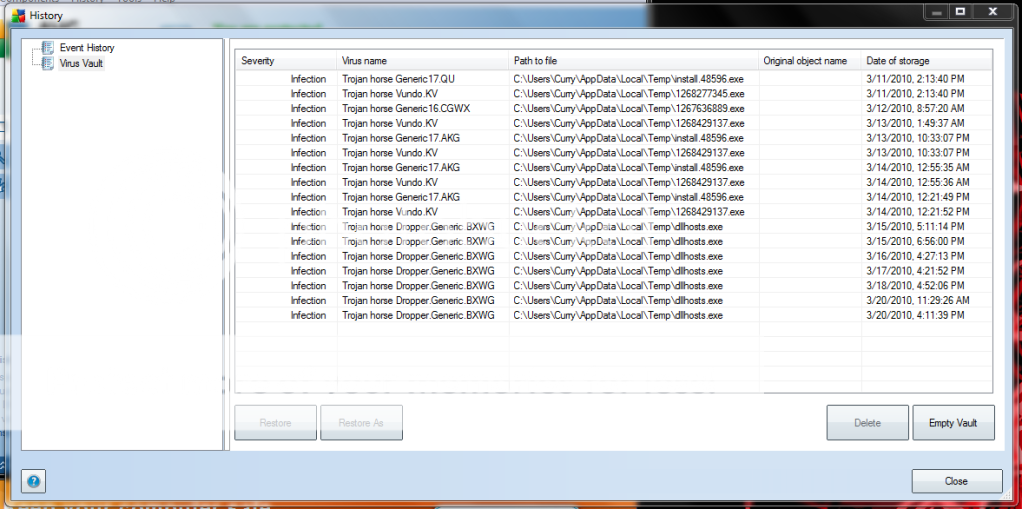
Ive had these Trojans for a few weeks, but now the damage they are doing is in my face. Double-click on anything and it will take 5 minutes to open, and in the meantime everything else will go unresponsive. Logging off takes equally as long. I know from virus scans that my winlogon.exe is infected. Thing is, the scans are unable to remove it completely and I can't find them myself.
On the 14th I poked around in my registry and deleted a string that looked suspicious, and my current Trojan activity dropped off to nothing:
Image
....Until I logged on the 15th and dllhost.exe shows up. No idea what to do about this one.

I also ran Prevx, which came up with this:
Image
The ones with X's I'm pretty/kinda sure I took care of myself, but I'm stuck on the circled ones. I went into each of those directories and couldn't find any file or folder named winlogon. I have show hidden files and folders on. Thanks in advance.

Edit: To make this more relevant, it won't let me play PR! > :D
Image
VoXiNaTiOn
Posts: 1644
Joined: 2008-07-26 15:15

Re: Trojan War.

Post by VoXiNaTiOn »

Mates PC was buggered beyond belief with Viruses, I found that forcibly installing Avast! Free Edition (Another story) and running the boot scan it managed to clear up enough of the **** so I could get Adaware, MalwareBytes, Spybot S&D, CCleaner and Norton360 (Have to purchase I'm afraid) to run which then cleared up the rest.


It's basically a game of grab every anti-virus you can and run them, its a hassle but tends to work.


Worst comes to worst you're re-installing Windows.


Hope this helps, let us know how you get on.
Image
SnipingCoward
Posts: 2326
Joined: 2007-12-31 22:40

Re: Trojan War.

Post by SnipingCoward »

The problem why the trojan cannot be removed is probably because the files in question are in use and thus locked for access. There is a tool named "unlocker" Unlocker - Free software downloads and software reviews - CNET Download.com that can release the lock and thus enable other programs like the anti-vir to modify/fix them.
Another way ofcourse is like VoX said with a pre-windows scan. Alternatively you could connect the infected HDD to another PC and have that one scan it (since it will not be booted from files will not be blocked). Beware of the risk of spreading the trojan/virus though (i.e. make sure to delete any "autorun.inf" files, if there are any, from root directories and don't run any executables from the infected drive).

But generally I recommend a fresh reinstall. You should make a backup after that installation too. So you can easily revert if something similar happens again. My favourit backup tool is RSJ.
Got a PROBLEM? Check this: PR:BF2 Installation Guide

Got a common QUESTION? check here first: PR:BF2 FAQ, MUMBLE FAQ

"Hello, IT! ... Yes, have you tried turning it on and off again?"
Darkpowder
Posts: 1527
Joined: 2006-08-30 22:00

Re: Trojan War.

Post by Darkpowder »

For malware /trojans.
I swear by either NOD32 or Kapersky.

For Free try:
Hitman Pro 3.5 - Home - SurfRight (cloud computing malware scanner) - very very good against TDSS rootkits and other nasty ones.
Or Malwarebytes (or both) - Malwarebytes

I'm presuming you have looked at the specific removal instructions for the infection you have on symantec or one of the other reputable sites.
Of course be careful what non-standard AV software you DL and the sites that offer "advice" on it.

If you get stuck, PM me or find me on X-fire i do this stuff for a living.

Above all, if you have a rootkit i would recommend you rebuild your machine if you use your machine for anything commercial / business and v important stuff, otherwise trust the cloud computing Hitman Pro. I have seen good success with this.
EazyCurrE
Posts: 182
Joined: 2009-05-31 15:32

Re: Trojan War.

Post by EazyCurrE »

Hey guys, sorry I took so long getting back on this. My friend let me on to this bizarre little program called McAfee Stinger. Nobody seems to know about it. It's free. When I used it, I was out of options and I took no chances. I downloaded, ran it, it scanned for a few hours ( I have 750 GB of stuff :S), when it finished i turned off my PC, unplugged it/replugged it, and turned it back on. = Problem Solved. What amazed me about McAfee Stinger is its minimalist interface. It looks like a fail product, it doesn't even show you any results, but I promise this is the solution to any malware/trojans you encounter. I have been running smoothly ever since.

Thanks for all your help and concern.
Image
Post Reply

Return to “Software”