
Hey all, question here for anyone who has ever done a dual boot.
Was having a look at the Ubuntu download site (intending to run Ubuntu in a VM just to experiment really) and came across this page.
Download Ubuntu Windows Installer | Ubuntu
From the looks of it, it's an installer that gives you a dual boot setup all from within Windows.
So here are my questions:
- What are the chances of the install going wrong and me ending up with no Vista installation?
- How easy is it to remove a dual boot?
- Anyone done this before?
I would burn it to a DVD and install normally, however I don't have any laying about (As the .iso is so small, would a CD work?), or would it be advisable to use the disk as a sort of fail-safe method?
Cheers, Vox.
Ubuntu Dual Boot
-
Deadfast
- Retired PR Developer
- Posts: 4611
- Joined: 2007-07-16 16:25
Re: Ubuntu Dual Boot
I have no experience with this myself and would suggest you use the old school method of installing it from the live CD session.
Oh and I did say CD, the installation is just under 700MB
Oh and I did say CD, the installation is just under 700MB
-
SnipingCoward
- Posts: 2326
- Joined: 2007-12-31 22:40
Re: Ubuntu Dual Boot
Burning on a CD should work. You could always give it a try if the ISO is not compatible with CD your burning software will notify you about it.
Since you are about to install another OS you will have to clear up some disk space and maybe repartition your disk. This is where the HDD and or Vista partition can take damage/get lost. Chances are actually pretty high and it is generally adviced to get a backup of your system going. I tend to use RSJ HD Image Creator (v2.02) for that purpose as its free and creates ISOs that I will later burn to bootable DVD.
Once repartitioning worked and didn't cause any obstruction you should be set with installing Ubuntu. From here on chances of smashing your Vista are pretty low unless you fiddle around with your Vista filesystem when in Ubuntu.
Removing the Dual-Boot can be as easy and painless as removing a startup entry from "msconfig.msc" / your boot.ini. However restoring the filesystem back to your old partioning setup is again what can cause dataloss.
I recommend using Vistas built-in partitioning tool as I had alot of trouble when using Linux (gparted) in combination with NTFS.
If you are having trouble with data loss after Linux repartitioned your FS you should use chkdsk to clean up the NTFS partition.
Since you are about to install another OS you will have to clear up some disk space and maybe repartition your disk. This is where the HDD and or Vista partition can take damage/get lost. Chances are actually pretty high and it is generally adviced to get a backup of your system going. I tend to use RSJ HD Image Creator (v2.02) for that purpose as its free and creates ISOs that I will later burn to bootable DVD.
Once repartitioning worked and didn't cause any obstruction you should be set with installing Ubuntu. From here on chances of smashing your Vista are pretty low unless you fiddle around with your Vista filesystem when in Ubuntu.
Removing the Dual-Boot can be as easy and painless as removing a startup entry from "msconfig.msc" / your boot.ini. However restoring the filesystem back to your old partioning setup is again what can cause dataloss.
I recommend using Vistas built-in partitioning tool as I had alot of trouble when using Linux (gparted) in combination with NTFS.
If you are having trouble with data loss after Linux repartitioned your FS you should use chkdsk to clean up the NTFS partition.
Got a PROBLEM? Check this: PR:BF2 Installation Guide
Got a common QUESTION? check here first: PR:BF2 FAQ, MUMBLE FAQ
"Hello, IT! ... Yes, have you tried turning it on and off again?"
Got a common QUESTION? check here first: PR:BF2 FAQ, MUMBLE FAQ
"Hello, IT! ... Yes, have you tried turning it on and off again?"
-
VoXiNaTiOn
- Posts: 1644
- Joined: 2008-07-26 15:15
Re: Ubuntu Dual Boot
I have a blank 30GB partition for this very use pretty much, so looks like I'm all set.
Cheers for the advice guys, burning .iso now and will let you know how it goes.
Cheers for the advice guys, burning .iso now and will let you know how it goes.

-
VoXiNaTiOn
- Posts: 1644
- Joined: 2008-07-26 15:15
Re: Ubuntu Dual Boot
Ok, good news is I'm posting this from Ubuntu, bad news is it refuses to install fully and complains about "No root file system set" or something along those lines.
Will have to have a further play another time, Linux is quite nice actually.
Will have to have a further play another time, Linux is quite nice actually.
-
Deadfast
- Retired PR Developer
- Posts: 4611
- Joined: 2007-07-16 16:25
Re: Ubuntu Dual Boot
You have to set mount point for the system partition to /
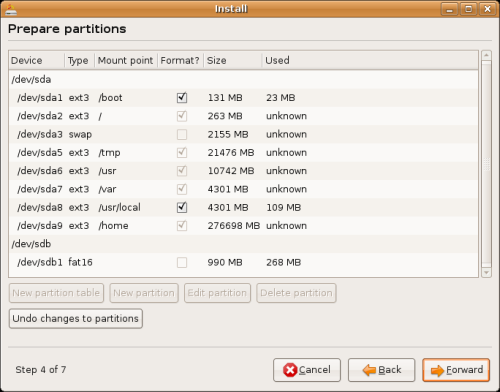
See /dev/sda2.
See /dev/sda2.
-
manti111
- Posts: 22
- Joined: 2009-04-08 19:26
Re: Ubuntu Dual Boot
Forget Wubi, use a spare partition instead and apply Deadfast's trick. You do need swap space, provided you have enough RAM ( > 1GB). Otherwise split the parition into a main parition for Ubuntu and a swap partition about 1GB to 2GB.
The data of the CD is compressed using Squashfs, the installed size is ~4GB. If you do not have multiple hard drives, especially mixed SATA and IDE, GRUB should be autoconfigured properly. The correct notition is guessed by using whatever the Linux kernel called it, but Linux and GRUB sometimes disagree (On my pc when using Gentoo, /dev/sdc? is (hd1,?) for GRUB, c in sdc stands for 3rd and 1 in grub stands for 2nd, so they disagree). I have 2 SATA disks and one IDE disk.
The data of the CD is compressed using Squashfs, the installed size is ~4GB. If you do not have multiple hard drives, especially mixed SATA and IDE, GRUB should be autoconfigured properly. The correct notition is guessed by using whatever the Linux kernel called it, but Linux and GRUB sometimes disagree (On my pc when using Gentoo, /dev/sdc? is (hd1,?) for GRUB, c in sdc stands for 3rd and 1 in grub stands for 2nd, so they disagree). I have 2 SATA disks and one IDE disk.
-
VoXiNaTiOn
- Posts: 1644
- Joined: 2008-07-26 15:15
Re: Ubuntu Dual Boot
Ah, cheers Deadfast, will try that later when I get a spare moment.
Manti - I had a 30GB partition that I cleared and then made a 4GB swap partition and then a 26GB files/OS one. I have 2 hard drives and this install was being attempted on the second one (320GB, 30GB for Ubuntu and 290 for Windows), could this cause a problem?
Cheers for all the help guys.
Manti - I had a 30GB partition that I cleared and then made a 4GB swap partition and then a 26GB files/OS one. I have 2 hard drives and this install was being attempted on the second one (320GB, 30GB for Ubuntu and 290 for Windows), could this cause a problem?
Cheers for all the help guys.
-
manti111
- Posts: 22
- Joined: 2009-04-08 19:26
Re: Ubuntu Dual Boot
I forgot to notice Ubuntu uses UUID's. These always stay unique and the same no mather how Linux and Grub think, so it should work.