
[HELP] Roads have no color/are all white

Making or wanting help making your own asset? Check in here
Post Reply
ChiefRyza
Posts: 620
Joined: 2008-06-29 07:37

[HELP] Roads have no color/are all white

Post by ChiefRyza »

Having this problem in the BF2 Editor and I have no idea how to fix it. I've tested it on other maps and it isn't happening, and I've searched and searched but can't find the answer or even someone else with the same problem.

Basically, every road I try to make, no matter which texture is used, ends up having no color in it like so: Image
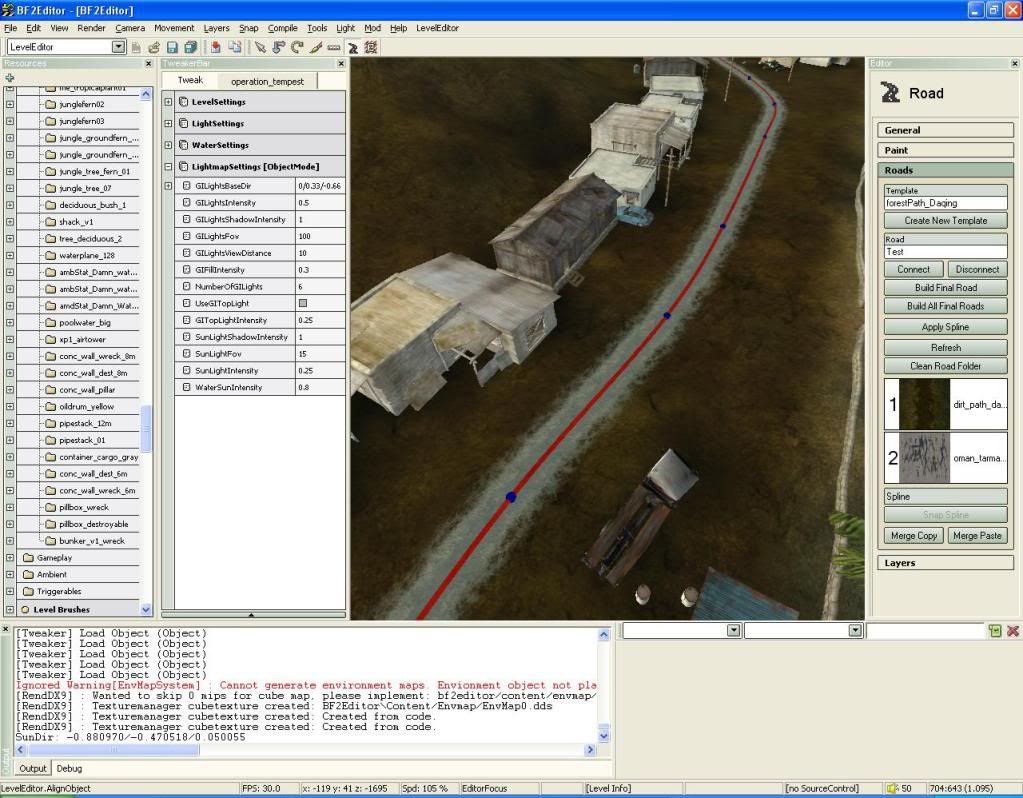
I've tested it on other maps in the editor, and when placing roads they all have color. So I'm really no sure what I am doing wrong. Thus it only occurs on my map Operation Tempest.


Edit: This is not happening in game, but it also means I don't know how the roads will look before I put them together. Very confusing....
Last edited by ChiefRyza on 2010-07-09 07:12, edited 2 times in total.


Current project: Operation Tempest
AFsoccer
Retired PR Developer
Posts: 4289
Joined: 2007-09-04 07:32

Re: [HELP] Roads have no color/are all white

Post by AFsoccer »

I have an idea of what might be happening Ryza... especially if it occurs on just one type of road. Find the road template itself (not the road) in the list of road templates. Click on the name (i.e. "forestPath_Daqing") and check the settings. I don't have the editor open right now for reference, but there is a setting on each template that changes how visible the top texture is.

1 = completely hides the bottom texture (usually cracks)
0 = bottom texture shows through

Most roads are about .85 so you might want to check and see if somehow this got changed. Making the change there will change every road that uses the template.
Amok@ndy
Retired PR Developer
Posts: 5144
Joined: 2008-11-27 22:13

Re: [HELP] Roads have no color/are all white

Post by Amok@ndy »

Maybe its caused by your SKY.CON check your fog settings
Image
Post Reply

Return to “PR:BF2 Community Modding”