
I have a CTD on the latest release of pr after about 5-10 mins of playing right up to 30-1hr.
It crashes me to desktop with no error or warning.
Its really annoying me and I would like a solution to fix this.
------------------------------------------------------------------------
PC Specs:
Processor: Intel Quad Core CPU Q6600 @ 2.40GHz 2.40GHz
Memory (RAM): 4.00GB
Windows Vista 32 bit
PS: I also have the Burning Sands memory.dll error if that is relavant.
[0957] CTD out of the blue
-
goguapsy
- Posts: 3688
- Joined: 2009-06-06 19:12
Re: CTD out of the blue
AFAIK that's an issue they are looking at (mass-CTD: odds are you were not the only one to CTD at that moment).
For the memory.dll error, apparently your PC is running out of memory. Here is what a DEV suggested:
GoGuapsy
For the memory.dll error, apparently your PC is running out of memory. Here is what a DEV suggested:
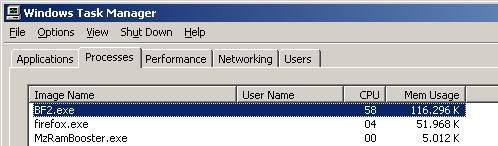
Hope I helped,'[R-DEV wrote:AfterDune;1286677']Tonight I installed a free RamBooster, a little program that cleans up and optimizes memory.
So, PR was running with its regular 1.3+ GB of memory usage. I start up the tool, let it optimize my memory every 5 minutes or so and when I checked the BF2 process in my task manager...............:
Maaaaaaan!
I've been playing for like 45 minutes now and memory is between 100MB and 250MB....
Try it out, see what it does for you?
GoGuapsy
Guys, when a new player comes, just answer his question and go on your merry way, instead of going berserk! It's THAT simple! 
 [/CENTER]
[/CENTER]-
UNSTOPPABLE_BADASS
- Posts: 18
- Joined: 2010-10-08 19:21
Re: CTD out of the blue
Hello,
Try deleting everything in this folder, this is your cache for graphic settings and such. I deleted them and now I crash less faster. I still crash tho, but everyone is crashing.
Also see this thread:
https://www.realitymod.com/forum/f26-pr ... e-ctd.html
Try deleting everything in this folder, this is your cache for graphic settings and such. I deleted them and now I crash less faster. I still crash tho, but everyone is crashing.
Code: Select all
C:\Documents and Settings\USERNAME\My Documents\Battlefield 2\mods\bf2\cachehttps://www.realitymod.com/forum/f26-pr ... e-ctd.html
