PR Mumble sends other programms to speakers

Help and support regarding PR:BF2 installation and in-game issues
Post Reply
Durkie
Posts: 264
Joined: 2009-01-12 08:10

PR Mumble sends other programms to speakers

Post by Durkie »

I always play with headphones on but when I start up Mumble all my other programms send there sound output over my speakers and I can only hear mumble on my headset :confused:

How can is stop my computer from doing that :? :
"Goddam it, you'll never get the Purple Heart hiding in a foxhole! Follow me!"
Captain Henry P. Jim Crowe
SnipingCoward
Posts: 2326
Joined: 2007-12-31 22:40

Re: PR Mumble sends other programms to speakers

Post by SnipingCoward »

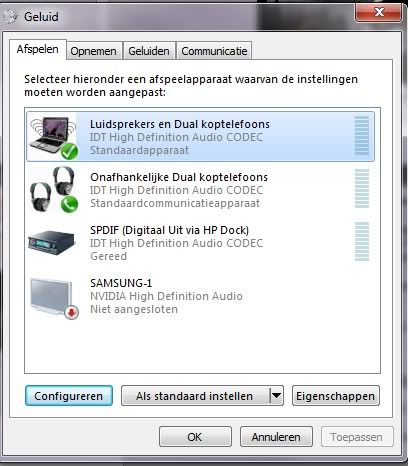
Your headphones are probably set as "Default Communication Device". Win7 recognizes mumble as a communication application. Try setting your headphones as "Default Device" as well.
- Right click on speaker icon (lower right corner)
- click "Playback devices"
- right click "Headphones" (or what ever your headphones are called)
- click "Set as Default device"

an alternative is to get a Y-Cable (1 male, 2 female; usually 3.5mm). And thus hook up speakers and headphones to a single "line out".
Got a PROBLEM? Check this: PR:BF2 Installation Guide

Got a common QUESTION? check here first: PR:BF2 FAQ, MUMBLE FAQ

"Hello, IT! ... Yes, have you tried turning it on and off again?"
Durkie
Posts: 264
Joined: 2009-01-12 08:10

Re: PR Mumble sends other programms to speakers

Post by Durkie »

Bump I just had to reinstall my laptop and now the problem has returned.

The alternative with the Y cable don't work because the speakers are integrated in my laptop.
Image

This is how my playback devices screen looks like after I have set my headphones to default device. I have already turned of that mumble can use the headphones exclusively.

please help
"Goddam it, you'll never get the Purple Heart hiding in a foxhole! Follow me!"
Captain Henry P. Jim Crowe
Post Reply

Return to “PR:BF2 Support”
