
Is there a way to run Project Reality in Debug Mode?
I have finishes what I wanted to mod on the game but once in a while the game crashes to desktop. I want to figure out as to why. It never gives me any Message, it just crashes to desktop. It usually happens between 10-15 minutes of game play. So it must be something that is not being used often in the game that causes it to crash. Something that comes on once in a while. Like I said I don't know what it is. I want to figure it out.
[Help] Debug Mode
-
VapoMan
- Retired PR Developer
- Posts: 1139
- Joined: 2009-05-29 07:11
Re: Debug Mode Help
Create a new PR shortcut, right click>properties, and add this to the end of the target line
That will start it in windowed mode, in windowed mode usually an error box will come up when the game crashes.
You can change the numbers 800 and 600, if you want to run in a larger resolution.
EDIT: the target line should look like this (depending on where PR is installed)
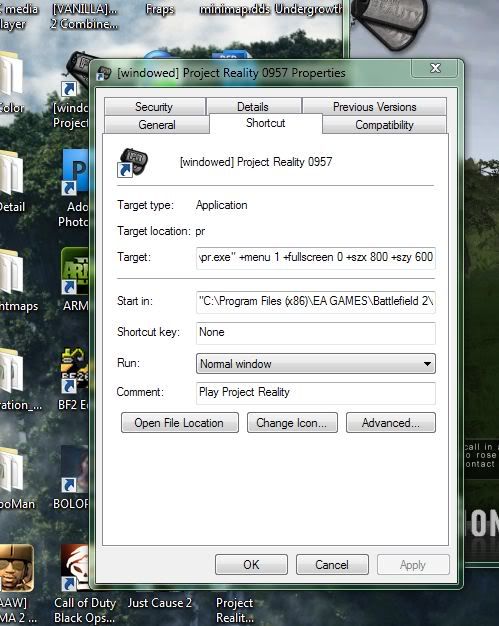
Code: Select all
+menu 1 +fullscreen 0 +szx 800 +szy 600You can change the numbers 800 and 600, if you want to run in a larger resolution.
EDIT: the target line should look like this (depending on where PR is installed)
Code: Select all
"C:\Program Files (x86)\EA GAMES\Battlefield 2\mods\pr\pr.exe" +menu 1 +fullscreen 0 +szx 800 +szy 600
Last edited by VapoMan on 2010-11-22 02:27, edited 2 times in total.
 "Eight glorious sides and eight stunning angles!"
-
temexter
- Posts: 397
- Joined: 2009-11-23 15:50
Re: Debug Mode Help
Some error messages are shown in windowed mode.
Debug mode is run with executable bf2_r.exe:
Command in shortcut is like:
For .957 you need also this fix: https://www.realitymod.com/forum/f388-pr-bf2-community-modding/89691-help-bf2_r-exe-crashes-0-957-a.html#post1475471
Debug mode is run with executable bf2_r.exe:
Command in shortcut is like:
Code: Select all
"Path to bf2"\BF2_r.exe +modPath mods/"your mod dir" +restart 1 +menu 1 +fullscreen 0 +developer 1 +ignoreAsserts 1
Last edited by temexter on 2010-11-22 03:43, edited 1 time in total.


-
Amok@ndy
- Retired PR Developer
- Posts: 5144
- Joined: 2008-11-27 22:13
Re: Debug Mode Help
usually sth causing a crash after 15mins is a vehicle/object that is spawning delayed
delete all vehicles from your GPO.con and try it again maybe it helps
delete all vehicles from your GPO.con and try it again maybe it helps

-
clondicke
- Posts: 64
- Joined: 2010-06-19 09:04
Re: Debug Mode Help
I found out what was causing it, it is the original buildings that I have left in the GPO.com such as the radar and the control building. What is the control building called for the pr game, I can't find them in the files I have extracted.