

hey guys, I have a couple things that i need help with. Also just an FYI, i did use the search function and used google. Also checked the BFEditor forums.
Anyways here are the issues.
1.) My friends map has textures that destroy vehicles. His ground is all textured, but when he drives vehicles on them he periodically takes damage, and the vehicle is destroyed in about 1-2 minutes of constant driving.
2.) My friends map has issues with kits. We would like to be able to request ANY number of ANY kits, regardless of people on the team or in the server. (It is a training map). How would we go about this? Also he tried placing kits with the editor, but when we get ingame we cant actually see the kit bags. Although when we walk to where they are, we run into them, but they are just invisible.
3.) Somewhat linked to Q #2, i seen a forum here with a small tut on how to change what is inside of a kit, although when searching i cannot find it. Basically like how to remove smoke grenades and put in NVG as an example.
4.) On my map i am having a little bit of overgrowth problem. I've seen this one on here too, but i cant find it either. My overgrowth (trees) when on the side of a hill, will not stand straight up, but rather at about a 45 degree angle. Anybody know how to fix?
Thank you in advance for your responses.
[Help] BF2 Editor
-
Amok@ndy
- Retired PR Developer
- Posts: 5144
- Joined: 2008-11-27 22:13
Re: [HELP] BF2 Editor
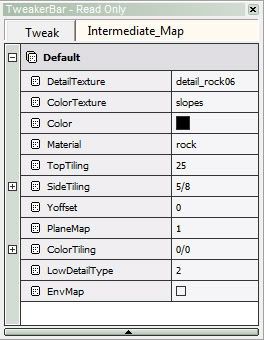
1) you need to assign materials to your texture layers
2) you need to spawn the kits as ObjectSpawners
3) google
4) set NormalScale to 0 on your Overgrowth materials
2) you need to spawn the kits as ObjectSpawners
3) google
4) set NormalScale to 0 on your Overgrowth materials

-
AFsoccer
- Retired PR Developer
- Posts: 4289
- Joined: 2007-09-04 07:32
Re: [HELP] BF2 Editor
Try picking a material for each of your six terrain types.'Omega-[1TF wrote:;1413399']
1.) My friends map has textures that destroy vehicles. His ground is all textured, but when he drives vehicles on them he periodically takes damage, and the vehicle is destroyed in about 1-2 minutes of constant driving.
Check this out: Overgrowth And Perpindiculer Trees? - Official BF Editor Forums4.) On my map i am having a little bit of overgrowth problem. I've seen this one on here too, but i cant find it either. My overgrowth (trees) when on the side of a hill, will not stand straight up, but rather at about a 45 degree angle. Anybody know how to fix?
-
Omega-[1TF]
- Posts: 27
- Joined: 2009-05-22 05:12
Re: [HELP] BF2 Editor
Thanks much guys. tried a new texture because the one I was using was glitched. Changed the value just as it said and it worked. Thank you very much.
And for the question 3, i tried google. Check this out.
Also, the objectspawners doesnt work for that. Aw well.
Anybody got a link to the thread or know how to set as many of any kits? Its for a training map. Tnx in advance
Thanks again Amok@ndy and AFSoccer
And for the question 3, i tried google. Check this out.
When i searched it though it came up with kits that are being used in different mods and such. I'll have to try askin on the BFEditor site.hey guys, I have a couple things that i need help with. Also just an FYI, i did use the search function and used google. Also checked the BFEditor forums.
Also, the objectspawners doesnt work for that. Aw well.
Anybody got a link to the thread or know how to set as many of any kits? Its for a training map. Tnx in advance
Thanks again Amok@ndy and AFSoccer
Last edited by Omega-[1TF] on 2010-08-14 01:23, edited 2 times in total.
-
Sniperdog
- Retired PR Developer
- Posts: 1177
- Joined: 2009-02-27 00:06
Re: [HELP] BF2 Editor
To do this first you need to understand something. Every weapon that goes into a kit is a handheld weapon, and every handheld weapon can only exist in one weapon slot, which is defined by the code.'Omega-[1TF wrote:;1413399']3.) Somewhat linked to Q #2, i seen a forum here with a small tut on how to change what is inside of a kit, although when searching i cannot find it. Basically like how to remove smoke grenades and put in NVG as an example.
In the standard smoke grenade weapon (hgr_smoke) you will see in the tweak file that it will always be in the 6th weapon slot because it has the line:
Code: Select all
ObjectTemplate.itemIndex 6Code: Select all
ObjectTemplate.itemIndex 7You can see kit layouts in the kits server archive the code for all the kits in the game. As an example take a look at the mec_rifleman kit, in the mec directory.
This code halfway down, is what defines the handheld weapons to be accessible in the kit:
Code: Select all
rem -------------------------------------
ObjectTemplate.addTemplate kni_knife
ObjectTemplate.addTemplate klappspaten
ObjectTemplate.addTemplate mecrif_g3scope
ObjectTemplate.addTemplate f1grenade
ObjectTemplate.addTemplate hgr_smoke
ObjectTemplate.addTemplate ammokit
ObjectTemplate.addTemplate binocular
ObjectTemplate.addTemplate medikit_dressing_arab
ObjectTemplate.addTemplate hgr_incendiary
rem -------------------------------------So kni_knife has the index 1 in its file, klappspaten (the shovel) has the index 2, and so on until you get to 9.
Say you wanted to add the night vision goggles (slot 7) to the above kit. The quickest way to do it would be to take out the binoculars (also slot 7 if you look at its code) and replace it with the nvg's like this:
Code: Select all
rem -------------------------------------
ObjectTemplate.addTemplate kni_knife
ObjectTemplate.addTemplate klappspaten
ObjectTemplate.addTemplate mecrif_g3scope
ObjectTemplate.addTemplate f1grenade
ObjectTemplate.addTemplate hgr_smoke
ObjectTemplate.addTemplate ammokit
ObjectTemplate.addTemplate nvg
ObjectTemplate.addTemplate medikit_dressing_arab
ObjectTemplate.addTemplate hgr_incendiary
rem -------------------------------------To do that you would have to first duplicate the nvg's into an indentical handheld weapon but which resides in weapon slot 7. You can't just change the number in the original nvg's because there might be other kits which use the nvg's and it would mess up the weapons load out for those kits.
To duplicate you simply drag nvg.con and nvg.tweak to your desktop, rename them to nvg_slot6.con and nvg_slot6.tweak respectively and bring them back into the archive in the same place. Then you would want to go into these two files themselves and use the replace function in notepad to replace every instance of nvg with nvg_slot6. After you replace you want to then go back into the tweak and change the following instances of nvg_slot6 back to nvg:
Code: Select all
ObjectTemplate.animationSystem1P Objects/Weapons/Handheld/nvg_slot6/AnimationSystem1p.inc
ObjectTemplate.animationSystem3P Objects/Weapons/Handheld/nvg_slot6/AnimationSystem3p.incCode: Select all
ObjectTemplate.animationSystem1P Objects/Weapons/Handheld/nvg/AnimationSystem1p.inc
ObjectTemplate.animationSystem3P Objects/Weapons/Handheld/nvg/AnimationSystem3p.incThe big three you should always need to check for are:
(In examples imagine you are replacing TANK with AWESOME_TANK)
-Geometries
eg:
Code: Select all
ObjectTemplate.geometry TANKeg:
Code: Select all
ObjectTemplate.setCollisionMesh TANKeg:
Code: Select all
ObjectTemplate.vehicleHud.miniMapIcon "Ingame\Vehicles\Icons\Hud\land\TANK\crosshair.tga"Code: Select all
ObjectTemplate.soundFilename "objects/vehicles/land/TANK/sounds/boom.wav"You ofcourse also need to change the kit index
Code: Select all
ObjectTemplate.itemIndex 7Code: Select all
ObjectTemplate.itemIndex 6Hopefully that helped you and any others who may need to do something like that in the future.


Will Stahl aka "Merlin" in the Squad community
-
Omega-[1TF]
- Posts: 27
- Joined: 2009-05-22 05:12
Re: [HELP] BF2 Editor
Thank you VERY much Sniperdog. This really helps me, and i am positive it will help more. In detail and makes sense.
More questions,
I know you can edit skins of vehicles, weapons, and statics using photoshop, and i've seen how to do them, but here is the question. If i edit a billboard lets say, and add it to my map, it also has to be installed to the clients objects folder right? And if so, would this possibly make their copy of PR incompatible with the rest of the servers due to modified content? (punkbuster i should say)
We also have been working on a V-22 (Found one and been trying to bring it to USMC detail levels). If this is added to the map, and the clients files, same thing with compatibility issues? I believe i found something saying this the other day on the BFEditor forums.
And as per our training map, we are trying to be able to set it, so that you may request any kit at any time, no matter how many people are in the server or squad, I've seen the post here before, but i cannot find even using search feature. Can anybody point me in the right direction please?
More questions,
I know you can edit skins of vehicles, weapons, and statics using photoshop, and i've seen how to do them, but here is the question. If i edit a billboard lets say, and add it to my map, it also has to be installed to the clients objects folder right? And if so, would this possibly make their copy of PR incompatible with the rest of the servers due to modified content? (punkbuster i should say)
We also have been working on a V-22 (Found one and been trying to bring it to USMC detail levels). If this is added to the map, and the clients files, same thing with compatibility issues? I believe i found something saying this the other day on the BFEditor forums.
And as per our training map, we are trying to be able to set it, so that you may request any kit at any time, no matter how many people are in the server or squad, I've seen the post here before, but i cannot find even using search feature. Can anybody point me in the right direction please?
Last edited by Omega-[1TF] on 2010-08-15 03:31, edited 2 times in total.
-
Sniperdog
- Retired PR Developer
- Posts: 1177
- Joined: 2009-02-27 00:06
Re: [HELP] BF2 Editor
You can actually set your custom skin in a objects_client.zip in your maps folder. This is done in al basrah, look there for an example. You need to make sure you add the file to the clientarchives.con file within the server.zip of that level (again look at al basrah for reference).'Omega-[1TF wrote:;1415010']I know you can edit skins of vehicles, weapons, and statics using photoshop, and i've seen how to do them, but here is the question. If i edit a billboard lets say, and add it to my map, it also has to be installed to the clients objects folder right? And if so, would this possibly make their copy of PR incompatible with the rest of the servers due to modified content? (punkbuster i should say)
I believe you can add a vehicle in the same way I told you to add the texture above. In this case the files will be defined in the serverarchives.con in the server.zip archive.'Omega-[1TF wrote:;1415010']
We also have been working on a V-22 (Found one and been trying to bring it to USMC detail levels). If this is added to the map, and the clients files, same thing with compatibility issues? I believe i found something saying this the other day on the BFEditor forums.
There are python commands that allow this in the uncompiled python of PR which can be found in python/game/realityconfig_nnn.py'Omega-[1TF wrote:;1415010']
And as per our training map, we are trying to be able to set it, so that you may request any kit at any time, no matter how many people are in the server or squad, I've seen the post here before, but i cannot find even using search feature. Can anybody point me in the right direction please?
Open the file you want and change the settings you need to change, coop for a dedicated coop, local for a local server, and private for a normal dedicated server. Any time you change any public python settings for a dedicated server remember that as per the PR Server License agreement you have to password your server.
Will Stahl aka "Merlin" in the Squad community
-
Omega-[1TF]
- Posts: 27
- Joined: 2009-05-22 05:12
Re: [HELP] BF2 Editor
Ok few more issues here. On my map, i have no combat area, and it has water (Will water level damage?)
^
After i spawn about 3-5 seconds i take continuous damage, its happening on both of my spawnpoints, one is on a russian ship, one is on an air base (see Qinling airbase).
There are also random patches on the map where i take extreme damage (And it is not material as those are set). You guys know anything about this?
Also the terrain size is the largest one, and at distance some of the terrain just disappears (4 Km)
^
After i spawn about 3-5 seconds i take continuous damage, its happening on both of my spawnpoints, one is on a russian ship, one is on an air base (see Qinling airbase).
There are also random patches on the map where i take extreme damage (And it is not material as those are set). You guys know anything about this?
Also the terrain size is the largest one, and at distance some of the terrain just disappears (4 Km)
-
Amok@ndy
- Retired PR Developer
- Posts: 5144
- Joined: 2008-11-27 22:13
Re: [HELP] BF2 Editor
'Omega-[1TF wrote:;1461803']After i spawn about 3-5 seconds i take continuous damage, its happening on both of my spawnpoints, one is on a russian ship, one is on an air base (see Qinling airbase).
you need to add a combat area cause the default CombatArea is 2048/2048 but for a 4km map you need 4096/4096
'Omega-[1TF wrote:;1461803']Also the terrain size is the largest one, and at distance some of the terrain just disappears (4 Km)
create a tmp.con in your mapfolder and add this line to it:
Code: Select all
terrainCuller.setUseStitchedLods 0-
Omega-[1TF]
- Posts: 27
- Joined: 2009-05-22 05:12
Re: [HELP] BF2 Editor
Thanks Amok@ndy, gonna give it a shot and i'll tell you if it worked. The editor seems to mysteriously find or create more shit for me to jump through ya know? lol
-
Omega-[1TF]
- Posts: 27
- Joined: 2009-05-22 05:12
Re: [HELP] BF2 Editor
Hey that worked, TYVM.
I have water issues (which i thought was just editor, but it is ingame too)
The water should have waves/ripples and what not, but instead it is a constant solid blue. Also my map will be a night map so i need to get the water realistic looking, then dark.
My overgrowth also does not appear until i am probably 100M ish away. Need to fix that too.
And also, on vBF2:SF there was the green night vision for when you are infantry, and when you are flying helos there was a red grainy looking night vision. How can i make it so the US Team has the green nightvision and the OPFOR has the grainy looking one? I dont just mean in vehicles, but for both factions to have the specific NV.
I have water issues (which i thought was just editor, but it is ingame too)
The water should have waves/ripples and what not, but instead it is a constant solid blue. Also my map will be a night map so i need to get the water realistic looking, then dark.
My overgrowth also does not appear until i am probably 100M ish away. Need to fix that too.
And also, on vBF2:SF there was the green night vision for when you are infantry, and when you are flying helos there was a red grainy looking night vision. How can i make it so the US Team has the green nightvision and the OPFOR has the grainy looking one? I dont just mean in vehicles, but for both factions to have the specific NV.
-
Amok@ndy
- Retired PR Developer
- Posts: 5144
- Joined: 2008-11-27 22:13
Re: [HELP] BF2 Editor
for your water you need to generate a Envmap0.dds and put it into /your mapfolder/water/Envmap0.dds
Last edited by Amok@ndy on 2010-10-10 22:56, edited 1 time in total.
-
AFsoccer
- Retired PR Developer
- Posts: 4289
- Joined: 2007-09-04 07:32
Re: [HELP] BF2 Editor
Some of your questions can be answered by looking at this site:
Official BF Editor Forums -> BF2 Community Tutorials
They have more tutorials than found on the PR list and are extremely helpful. I would highly recommend
http://www.bfeditor.org/forums/index.php?showtopic=8729
and
http://www.bfeditor.org/forums/index.php?showtopic=11740
Official BF Editor Forums -> BF2 Community Tutorials
They have more tutorials than found on the PR list and are extremely helpful. I would highly recommend
http://www.bfeditor.org/forums/index.php?showtopic=8729
and
http://www.bfeditor.org/forums/index.php?showtopic=11740
-
Unmanned
- Posts: 79
- Joined: 2010-02-07 08:09
Re: [HELP] BF2 Editor
why placement (for swimming pool, etc. 30x30) water looks like constant blue solid? default water is ok.
-
VapoMan
- Retired PR Developer
- Posts: 1139
- Joined: 2009-05-29 07:11
Re: [HELP] BF2 Editor
It will look like that in the editor but ingame it should (I have had problems in the past) be fine.Unmanned wrote:why placement (for swimming pool, etc. 30x30) water looks like constant blue solid? default water is ok.
 "Eight glorious sides and eight stunning angles!"
-
AFsoccer
- Retired PR Developer
- Posts: 4289
- Joined: 2007-09-04 07:32
Re: [HELP] BF2 Editor
@unmanned: Have you lightmapped the water plane? Click on it to select it then go to "compile" in the tool bar; then select lightmaps --> generate lightmaps. When the window pops up click on "trace selected" and "medium", then generate. Editor will take a minute or so to lightmap it. Then you'll need to go back to compile --> lightmaps --> generate atlas lilghtmaps. After you re-start editor, the water shouldn't look blue anymore.
Hope that helps.
Hope that helps.