
Hi,
Just got a new router netgear DGN1000 from virgin media and for some reason i can not log into my BF2 account on vanilla but i can on PR and i cant join any game server on PR... however i can connect to CSS servers...
Virgin wont help me as it 'nothing to do with them' and Netgear really didnt understand me at all (if you get what i mean).
Anyone got any ideas?
Thanks
New router won't connect to BF2
-
SuperArmy
- Posts: 578
- Joined: 2007-10-12 18:16

-
Valleyforge3946
- Posts: 210
- Joined: 2009-12-09 18:53
Re: new router wont connect to BF2
Unfortunately the only way to go now is manual trouble shooting. Your Router should have some advanced settings. you'll have to log in to your router and change your Port fowarding rules. I had a Dlink Router that did the same thing. i fixed it for BF2 but BFBC@ and BF1943 wont stay logged in. i get kicked from the server after 1 minute in both. Lol. i'll repost back with explicit instructions, see if i can help you out. 
You can find such required ports on google or if you have the original book that the cd came in.
You can find such required ports on google or if you have the original book that the cd came in.
SiŁeńŤĤŨňŤeŘ
-
SuperArmy
- Posts: 578
- Joined: 2007-10-12 18:16
Re: new router wont connect to BF2
i have found the ports needed for BF2 and tried the PFconfig program to auto do it as there a lot and it says it cant do it as i can only have 10 entries and BF2 needs 11
Last edited by SuperArmy on 2011-06-26 14:08, edited 2 times in total.
-
Orford
- Posts: 856
- Joined: 2009-06-17 15:41
Re: new router wont connect to BF2
I have virgin is it the "super hub" if so you need to turn off IP flood detection and port scan detection in the services section under firewall. The router is almost paranoid when it comes to blocking games.
-
SuperArmy
- Posts: 578
- Joined: 2007-10-12 18:16
Re: new router wont connect to BF2
*NwA*Orford wrote:I have virgin is it the "super hub" if so you need to turn off IP flood detection and port scan detection in the services section under firewall. The router is almost paranoid when it comes to blocking games.
i had already turned off the port scan detection but i cant find any IP flood detection.
-
Vista
- Posts: 1282
- Joined: 2011-04-30 10:36
Re: New router won't connect to BF2
I know this can be kinda obvius but can you change your router back?
-
SuperArmy
- Posts: 578
- Joined: 2007-10-12 18:16
Re: New router won't connect to BF2
i did try that but i cant get it to turn the wireless on or even connect to the control panel... will give it another bash soon
ok opened these ports in my router ... but it still does not work
Service Name Ports
1 BF2(TCP) 4711
2 BF2.1(TCP) 27901
3 BF2.2(TCP) 28910
4 BF2.3(TCP) 29900
5 BF2.4(TCP) 299
6 BF2.5(UDP) 1500 - 4999
7 BF2.6(UDP) 16567
8 BF2.7(UDP) 27900
9 BF2.8(UDP) 29900
ok opened these ports in my router ... but it still does not work
Service Name Ports
1 BF2(TCP) 4711
2 BF2.1(TCP) 27901
3 BF2.2(TCP) 28910
4 BF2.3(TCP) 29900
5 BF2.4(TCP) 299
6 BF2.5(UDP) 1500 - 4999
7 BF2.6(UDP) 16567
8 BF2.7(UDP) 27900
9 BF2.8(UDP) 29900
Last edited by SuperArmy on 2011-06-27 16:08, edited 1 time in total.
-
Psyrus
- Retired PR Developer
- Posts: 3841
- Joined: 2006-06-19 17:10
Re: New router won't connect to BF2
Things to try:
1) Turn off all firewall thingos from your new router
2) Put your main computer in as a DMZ (most routers have this capability)
1) Turn off all firewall thingos from your new router
2) Put your main computer in as a DMZ (most routers have this capability)
-
SuperArmy
- Posts: 578
- Joined: 2007-10-12 18:16
Re: New router won't connect to BF2
For the DMZ it asks for an IP 192.168.0.x what should i put in place of the x?
as for the firewall not sure if i can 'turn it off'
this is all i can find on it and i cant edit it
Inbound Services
# - Enable - Service Name - Action - LAN Server IP address - WAN Users - Log
Default - Yes -Any - BLOCK Always - Any - Any - Never
as for the firewall not sure if i can 'turn it off'
this is all i can find on it and i cant edit it
Inbound Services
# - Enable - Service Name - Action - LAN Server IP address - WAN Users - Log
Default - Yes -Any - BLOCK Always - Any - Any - Never
-
Psyrus
- Retired PR Developer
- Posts: 3841
- Joined: 2006-06-19 17:10
Re: New router won't connect to BF2
- Hit "Windows key"(next to left alt)+rSuperArmy wrote:For the DMZ it asks for an IP 192.168.0.x what should i put in place of the x?
- Type cmd -> hit Enter
- Type "ipconfig /all" -> Hit enter
- Search for IP that starts with 192.168.0. then figure out which number your computer has been assigned by the DHCP server (router)
- Put this number into the DMZ
- Apply, save router settings
- Restart router and verify settings stuck
- Try BF2
Here is a link to the relevant page of your manual. For these kinds of things I'd hope you can look it up in future yourselfSuperArmy wrote:as for the firewall not sure if i can 'turn it off'
this is all i can find on it and i cant edit it
Wireless-N 150 ADSL2+ Modem Router DGN1000 User Manual
Hint: If you hit "Configuring ADSL Settings", you've gone too far.
-
SuperArmy
- Posts: 578
- Joined: 2007-10-12 18:16
-
Psyrus
- Retired PR Developer
- Posts: 3841
- Joined: 2006-06-19 17:10
Re: New router won't connect to BF2
Really? So your DMZ'd computer wouldn't connect to a server?SuperArmy wrote:ok i have tried all that now but no luck
That's not promising
 ??:
??:Anyway it's 3am and I need sleep, good luck for now! I'll brainstorm some other stuff you can try overnight.
-
SuperArmy
- Posts: 578
- Joined: 2007-10-12 18:16
Re: New router won't connect to BF2
thanks for your help!
iv got someone else helping me too... hopefully it will work soon!
iv got someone else helping me too... hopefully it will work soon!
-
SuperArmy
- Posts: 578
- Joined: 2007-10-12 18:16
-
Mad-Mike
- Posts: 3137
- Joined: 2008-01-25 13:21
Re: New router won't connect to BF2
Let me know if you find a solution with this, Im with virgin and I can connect to pr on most servers but some overseas servers like PR VBIOS Server kicks me and I know its my router.
But I dont have any drivers with my router so I dont know how to access any files to edit them.
This is my router....
[pic of google, buts its the same]
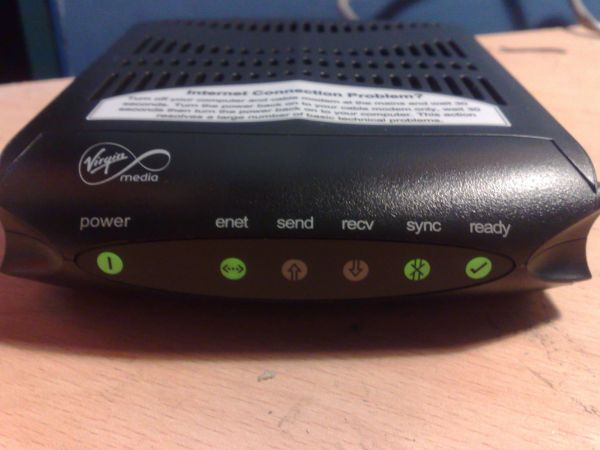
This is my troubles in full detail...
Link....(click)
But I dont have any drivers with my router so I dont know how to access any files to edit them.
This is my router....
[pic of google, buts its the same]
This is my troubles in full detail...
Link....(click)
-
SnipingCoward
- Posts: 2326
- Joined: 2007-12-31 22:40
Re: New router won't connect to BF2
Did you check your windows firewall yet? Maybe BF2.exe is not getting the "public" privilege.
Desktop search for "Allow a program through Windows Firewall".
Look for BF2.exe and PR.exe and check if both get "Private" and "Public" access.
Desktop search for "Allow a program through Windows Firewall".
Look for BF2.exe and PR.exe and check if both get "Private" and "Public" access.
Got a PROBLEM? Check this: PR:BF2 Installation Guide
Got a common QUESTION? check here first: PR:BF2 FAQ, MUMBLE FAQ
"Hello, IT! ... Yes, have you tried turning it on and off again?"
Got a common QUESTION? check here first: PR:BF2 FAQ, MUMBLE FAQ
"Hello, IT! ... Yes, have you tried turning it on and off again?"
-
Mad-Mike
- Posts: 3137
- Joined: 2008-01-25 13:21
Re: New router won't connect to BF2
Done that, allowed bf2.exe and pr.exe, still getting kicked after 10 minutes or so,,, 
-
Psyrus
- Retired PR Developer
- Posts: 3841
- Joined: 2006-06-19 17:10
Re: New router won't connect to BF2
You definintely need to borrow a modem/router from a friend and chuck it into your setup (or take your PC to their house to test, whichever is more convenient for the both of you) so that you can eliminate which of the two components is causing the issue.Mad-Mike wrote:Done that, allowed bf2.exe and pr.exe, still getting kicked after 10 minutes or so,,,
If it works with your friend's router in the setup, then yours is the issue and you can choose whether to continue battling it or throwing 50-80 pounds on a new router (billion or something). If it has the same issue whilst connected through your friend's router, then you know it's a software (or unlikely hardware) issue on your computer's side of the equation
-
Orford
- Posts: 856
- Joined: 2009-06-17 15:41
Re: New router won't connect to BF2
Mike thats a modem not a router, Virgin give out the super hub for new 30meg customers thats how I got mine. Its a router mode, combo. I have the same as the op and Virgin call it the "Super Hub".
You cannot just plug in another modem as the "super Hubs" MAC addres is registers to your account with Virgin, if you try another modem your account will lock and you would hav to phone virgin and tell they why asking them to unlock it.
Here is the version your hub should be running on Hardware Version 2.00 Software Version V5.5.2R26 you can find that on the first page of the advanced section. I know Virgin had some issues with the Hubs when they first came out. The firewall was paranoid. It has been reported that DMZ dosnt work on old software versions. The GUI and software that virgin use on there hubs is there own, flashed over netgears firmware and made with netgears help. Buggie has hell.
.If you have done all the above PC in DMZ, forwarded all the ports for BF2 to your local ip (182.168 etc) Then I can only assume its some thing on your PC that is causing the issue.
If your sure its not your PC try the virgin super hub help forum they take a few days to respond but we forced them to open up the steam ports on the virgin network as they were traffic managing them at night and we couldnt play games over steam with out huge lagg.
Fibre optic broadband (cable) - Help & Support Forum
You cannot just plug in another modem as the "super Hubs" MAC addres is registers to your account with Virgin, if you try another modem your account will lock and you would hav to phone virgin and tell they why asking them to unlock it.
Here is the version your hub should be running on Hardware Version 2.00 Software Version V5.5.2R26 you can find that on the first page of the advanced section. I know Virgin had some issues with the Hubs when they first came out. The firewall was paranoid. It has been reported that DMZ dosnt work on old software versions. The GUI and software that virgin use on there hubs is there own, flashed over netgears firmware and made with netgears help. Buggie has hell.
.If you have done all the above PC in DMZ, forwarded all the ports for BF2 to your local ip (182.168 etc) Then I can only assume its some thing on your PC that is causing the issue.
If your sure its not your PC try the virgin super hub help forum they take a few days to respond but we forced them to open up the steam ports on the virgin network as they were traffic managing them at night and we couldnt play games over steam with out huge lagg.
Fibre optic broadband (cable) - Help & Support Forum
-
Mad-Mike
- Posts: 3137
- Joined: 2008-01-25 13:21
Re: New router won't connect to BF2
I have recently just upgraded to virgin 30mb, theyre sending me a new hub out not sure what but hopefully it will solve my problem. If not I will sure to check their forums out and ask questions as i know its defo not my pc.