
Fraps and Project Reality
-
Bluedrake42
- Posts: 1933
- Joined: 2009-07-23 17:52
Fraps and Project Reality
I've been having trouble using fraps to record PR games lately. I'll record about an hour worth of gameplay and then randomly I'll start getting fps drops lower then 1 frame. It's really starting to tick me off, cause I can record Forgotten Hope 2 games fine. But for PR just randomly fraps will start screwing up. When I stop fraps I shoot back up to 80 fps or higher, and then turn it on and it almost seizes the game (after working flawlessly for hours). I have more then enough space left on my hard drive every time. So any ideas why the hell its doing this??
-
dbzao
- Retired PR Developer
- Posts: 9381
- Joined: 2006-06-08 19:13
Re: Fraps and Project Reality
I get that sometimes as well. I think it's related to memory or pagefile swapping.
"There's always one more bug." - Lubarsky's Law of Cybernetic Entomology
-
Bluedrake42
- Posts: 1933
- Joined: 2009-07-23 17:52
Re: Fraps and Project Reality
Should I lower my resolution or settings or something?
-
Mad-Mike
- Posts: 3137
- Joined: 2008-01-25 13:21
Re: Fraps and Project Reality
Fraps and any other game recording program do this. Its really annoying and also when you have recorded like a 2 minute video on fraps, the file is like 6GB  which is stupidly big for a 2 minute video.
I remember once, When I recorded a full round of PR. It took like 400GB of my hard drive.
which is stupidly big for a 2 minute video.I remember once, When I recorded a full round of PR. It took like 400GB of my hard drive.
-
Psyrus
- Retired PR Developer
- Posts: 3841
- Joined: 2006-06-19 17:10
Re: Fraps and Project Reality

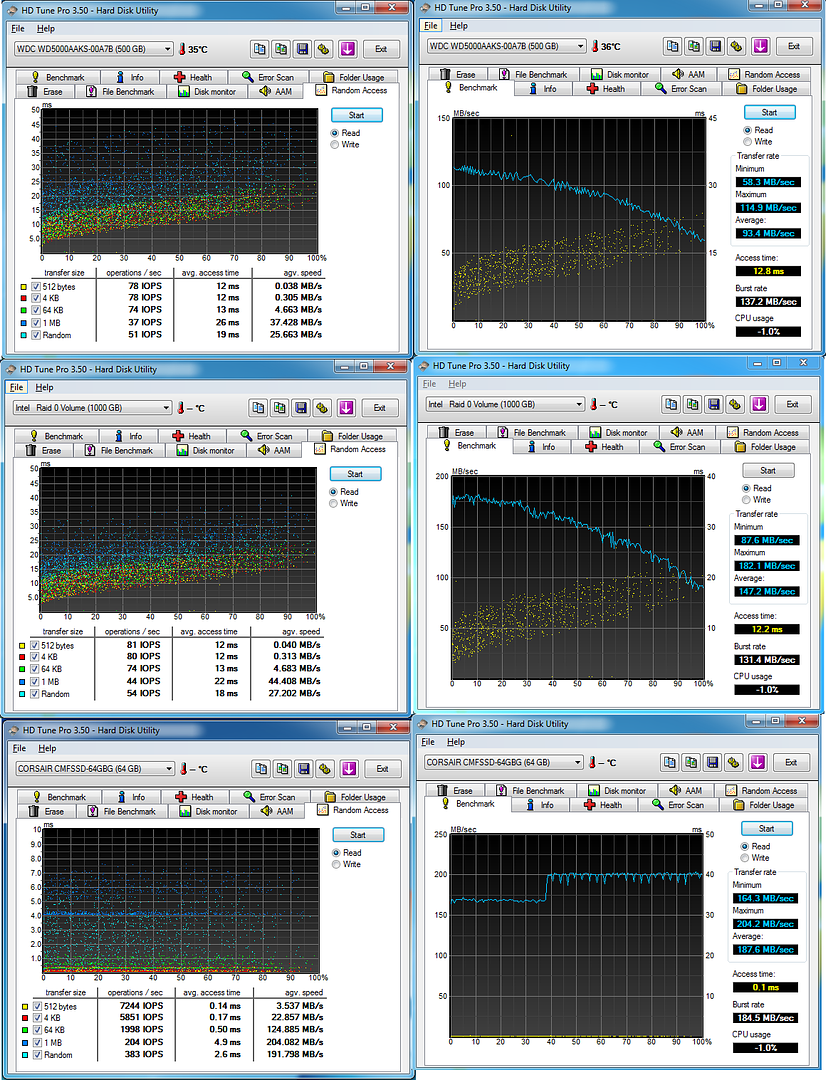
The way to go IMO. 2x500gb in raid0. It gives you a great independent 'drive' to dump to with much better read/write speeds than just a single drive.
http://i235.photobucket.com/albums/ee94 ... D-Perf.png
Once I had my Fraps dump separated from my OS/PR drive, I stopped experiencing the slowdowns that you are speaking of.
-
Bluedrake42
- Posts: 1933
- Joined: 2009-07-23 17:52
Re: Fraps and Project Reality
are you saying I have to buy some new hard drives? or did I misunderstand
-
Psyrus
- Retired PR Developer
- Posts: 3841
- Joined: 2006-06-19 17:10
Re: Fraps and Project Reality
I'm not saying you have to do anythingBluedrake42 wrote:are you saying I have to buy some new hard drives? or did I misunderstand
 Although I willl say that I agree with the pagefile/swaps happening. I assume your fraps dump and your pagefile (and conceivably OS) are all running off the same big drive? If you separate the fraps dump from the OS HDD activity, I believe it will help your performance, but I can't guarantee it so if you don't already have a spare HDD to test with, don't go rushing out to spend $50-90 on a drive when it may not solve your issue.
 I was merely pointing out the setup that I used rather effectively. YMMV as always.
-
Bluedrake42
- Posts: 1933
- Joined: 2009-07-23 17:52
Re: Fraps and Project Reality
ah kk, gotchya, I'll see if I can find my external with a sata connectionPsyrus wrote:I'm not saying you have to do anything
I was merely pointing out the setup that I used rather effectively. YMMV as always.
-
saXoni
- Posts: 4180
- Joined: 2010-10-17 21:20
Re: Fraps and Project Reality
I'll steal your thread a bit, Bluedrake!
I play PR on high when I'm not recording. If I am recording, my FPS drops to 10-25 on most of the maps. Are there any stuff I should turn off/set down a bit?
Thanks,
saX.
I play PR on high when I'm not recording. If I am recording, my FPS drops to 10-25 on most of the maps. Are there any stuff I should turn off/set down a bit?
Thanks,
saX.
-
Valleyforge3946
- Posts: 210
- Joined: 2009-12-09 18:53
Re: Fraps and Project Reality
It depends on your hardware and what your recording @. Lowering resolution can help but not much. PR as we all know is not the most optimized of games so... it comes down to your HDD and CPU. Either Record on an HDD SDD that your os is not running on or you can try halfing the resolution of your videos. If your already playing at a low resolution.. dont do that unless you dont care about quality.saXoni wrote:I'll steal your thread a bit, Bluedrake!
I play PR on high when I'm not recording. If I am recording, my FPS drops to 10-25 on most of the maps. Are there any stuff I should turn off/set down a bit?
Thanks,
saX.
SiŁeńŤĤŨňŤeŘ
-
dbzao
- Retired PR Developer
- Posts: 9381
- Joined: 2006-06-08 19:13
Re: Fraps and Project Reality
One thing you could try and see if it helps is to put BF2 and Fraps on different CPU cores.
"There's always one more bug." - Lubarsky's Law of Cybernetic Entomology
-
Acemantura
- Posts: 2463
- Joined: 2007-08-18 06:50
 <--
<--
-
saXoni
- Posts: 4180
- Joined: 2010-10-17 21:20
Re: Fraps and Project Reality
How do I do that, exactly? I'm not that good with computers.[R-DEV]dbzao wrote:One thing you could try and see if it helps is to put BF2 and Fraps on different CPU cores.
I'll give you my specs:
Operating System
MS Windows 7 Home Premium 64-bit SP1
CPU
Intel Core 2 Duo E7400 @ 2.80GHz
Wolfdale 45nm Technology
RAM
4.0GB Dual-Channel DDR2 @ 399MHz (5-5-5-1

Motherboard
ASUSTeK Computer INC. P5QPL-AM (LGA775)
Graphics
BenQ G2420HDB (1920x1080@60Hz)
LEN L193pC (1280x1024@60Hz)
ATI Radeon HD 5700 Series
Hard Drives
488GB Seagate ST3500418AS ATA Device (SATA)
Optical Drives
ATAPI iHAS124 Y ATA Device
DTSoftBusCd00
Audio
Logitech G35 Headset
Thanks,
saX.
-
sharpie
- Posts: 1434
- Joined: 2009-11-08 03:41
Re: Fraps and Project Reality
Sax, try turning off shadows and lowering terrain. That helped me a lot when i had a crappier graphics card. Should help you a bit when recording 
"Tom I think you have influenced the combat effectiveness of this team! Everyone has gone full potato."~Foxxyfrost
[DM]P*Funk: its like a funk guitar seminar up in that *****
K_Rivers-"...everything is broken in your country,"
RinWarZip: Your butthurt is like cold september morning by the seashore for me. Refreshing. Pepper mint.
-
SnipingCoward
- Posts: 2326
- Joined: 2007-12-31 22:40
Re: Fraps and Project Reality
You can set the affinity of a process to a set of cores.
How To Set Processor Affinity To An Application In Windows 7,Vista,XP
If you want to set the priority of a process you can do that one, but to have it permanently you will need a 3rd party tool afaik.
How To Set Processor Affinity To An Application In Windows 7,Vista,XP
If you want to set the priority of a process you can do that one, but to have it permanently you will need a 3rd party tool afaik.
Got a PROBLEM? Check this: PR:BF2 Installation Guide
Got a common QUESTION? check here first: PR:BF2 FAQ, MUMBLE FAQ
"Hello, IT! ... Yes, have you tried turning it on and off again?"
Got a common QUESTION? check here first: PR:BF2 FAQ, MUMBLE FAQ
"Hello, IT! ... Yes, have you tried turning it on and off again?"