I need some help picking ram..

Post Reply
CookieGuy
Posts: 9
Joined: 2012-01-01 01:37

I need some help picking ram..

Post by CookieGuy »

I am trying to upgrade my computer, it's not so great right now, I just want to speed it up a little, maybe get a new processor or even a new graphic card later on; but right now I'm focusing on RAM, cause I want to see if getting more ram will affect my gameplay speed: Battlefield 2(Project reality)

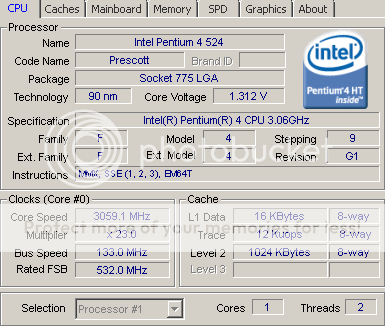
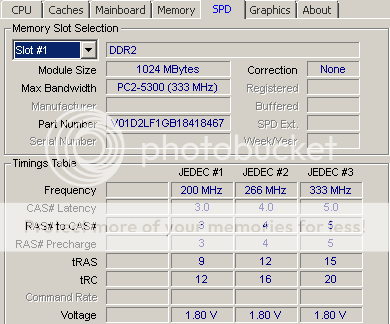
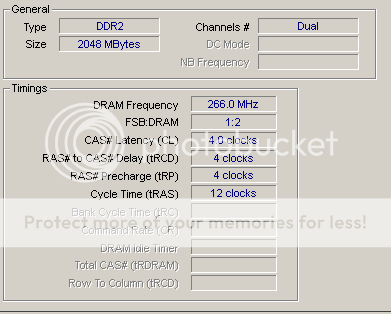
Right now here are pictures of my specs... what you think at first, and could you tell me what kind of ram I need?
Would this be okay? To replace one of the 1GB ram slots... Link: INTEGRAL PC3-10600 DDR3-1333 SODIMM RAM Memory Module - 2GB | Laptop Memory/SODIMM | pcworld


Here's my specs
Image
My current ram :( There's 2 the same in 2 different sockets)
Image


Also, it has some other 2 slots left... When I checked the SPD 2 more slots left... What are the for? My 2 current ram slots are occupied in yellow slot... The other 2 that aren't are in red, what are they? Can I place extra ram in there too? Once again I'm new to this... Explanation would be extremely appreciated!

If I bought that RAM thingy, how much would it speed up my PC? I'm new to this shit, don't troll me please, I already upgraded the graphic card that my friend gave me, it was 4 times better than the last ;) this PC is 5 years old for me, dunno when made, maybe even older :L but it's time to upgrade, so help me out please!
Ninja2dan
Retired PR Developer
Posts: 2213
Joined: 2007-10-29 03:09

Re: I need some help picking ram..

Post by Ninja2dan »

In the second image you can see that the currently installed memory is a DDR2 with 1GB RAM. DDR2 is not compatible with DDR or DDR3, so you'll need to stick with the same DDR2 format. That memory slot is also clocking at 333 MHz, which is the I/O Bus clock speed. Because you didn't list your specific motherboard model, I'm not sure what your max rated memory rating is or the maximum capacity your board supports. If you are stating that you have two identical sticks installed, then you most likely already have 2GB total (2x1).

When you are upgrading your RAM, it's preferred to replace all RAM at once with a paired set. This isn't required, and many people ignore this "guideline" in order to maintain a minimal cost. But considering how cheap RAM is now, you should be able to find a paired set of sticks for a good price.

You could buy one more 1GB module, for a total of 3GB, but you'd want to make sure the additional stick is identical to those installed. You could also add another 2x1 paired set, but running a 32-bit O/S will max out slightly below the 4GB mark.

One other thing to consider is that some boards ONLY support paired memory. The two yellow slots would be set 1, and the two red slots are for set 2. Placing a single stick in one set of slots will often cause memory errors. It just depends on the board, which is why identifying it would greatly help in figuring things out.


Your best bet to get the most effective and accurate feedback is to either list your motherboard information or the computer make/model. If you're unable to acquire that information, you can simply stick with the same class of memory that's currently installed and just bump up to larger sticks.

It also appears that the memory you linked to is for laptop RAM. Is your PC a desktop or laptop? I ask because I wasn't aware they made laptops with socket 775 support.
Image
MaSSive
Posts: 4502
Joined: 2011-02-19 15:02

Re: I need some help picking ram..

Post by MaSSive »

If you can please provide you motherboard model so we can assist you in making right choice. Most likely this is desktop not a laptop, and you need DDR2 ram. Red and yellow slots are for dual channel RAM setup, meaning that not all your modules need to be exactly same type, but in order to activate dual channel support modules installed in yellow slots must be identical ( in size, make, frequency and latency ), and same thing is for red slots. It is not needed for all of modules to be exact the same but is recommended for compatibility.

Your best choice would be to get brand new modules and sell those old ones. Size and type of modules that you need is highly dependent on you motherboard model, so as I said post that please.

Only thing I can tell you now is that you need DDR2 type of ram like this one, but not necessarily exact.
As for price, I see that ddr2 is quite pricy atm.
Image
CATA4TW!

"People never lie so much as before an election, during a war, or after a hunt."
"God has a special providence for fools, drunks, and the United States of America."
― Otto von Bismarck
Ninja2dan
Retired PR Developer
Posts: 2213
Joined: 2007-10-29 03:09

Re: I need some help picking ram..

Post by Ninja2dan »

One thing to note is that some manufacturers will label a PC2-5300 module as PC2-5400 instead.

One option I could recommend based on the information already provided would be this memory. Priced at around $50 plus shipping for 4GB (2x2).

Another option is to go 2x this set, also a total of 4GB (4x1) using all four slots. The price is slightly higher if you do doubles, at around $27 per pair plus shipping.

Considering that you already have a 2x1 setup, it might just be cheaper and easier to buy the second 2x1 pair above and add those to your "red slots". But again, you'd want to confirm that your motherboard will properly support it.


The modules that Massive listed are PC2-6400, which are clocked a bit faster than what you have currently installed. Before you try upgrading to a higher clock speed, you'll need to confirm that your motherboard supports it. If you can't find your motherboard specs, go with an identical speed as to what is currently installed.


I should also note that prices and availability of modules will vary based on where you purchase from.
Image
CookieGuy
Posts: 9
Joined: 2012-01-01 01:37

Re: I need some help picking ram..

Post by CookieGuy »

Thank you all so much for all the help!

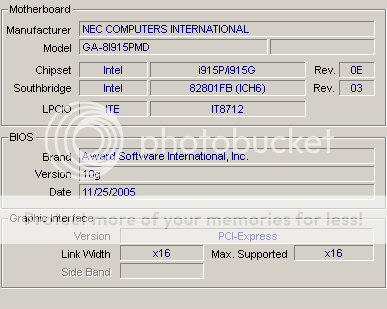
I found the mother board details and information pictures are right here:
Image
Image
Image


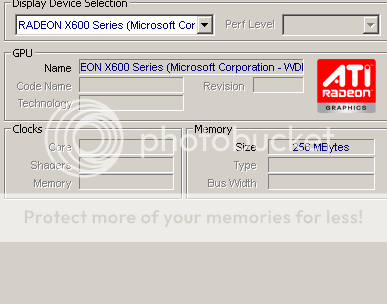
Also, what do you think about the graphic card? Radeon 600x? It's the current one I got, I ran this game with all low perfectly in a small map(old maps), but when I try big ones like felujah west, iron eagle, pavlov bay, vadso city I get ALLOT of lag and slutters/CTD's...

I know this not a really good graphic card, but I was thinking of buying this one.. Would this fit in my current PC with the listed above specs'?: PNY GT 520 PCI-E Graphics Card - 1GB | Graphics Cards | pcworld
And how good/better will this run? Maybe all high? ^_^ that would be awesome, cause I never experienced such high settings, and that's why I try to upgrade RAM to try to stop the lag first... Cause I heard it could be RAM issue... And also Graphic issue... I am saving up money to buy all this, but it still wont be soon, maybe in like 2 months to save that up myself..

And BTW this is a desktop... I don't know what I'm looking at :S thank you once again! I really want to make this game run fast and smooth for me, because this is the only game I enjoy right now! :)


I have found his ram: http://www.elara.ie/productdetail.aspx? ... ECE1441688

It's really cheap, and I would most likely buy a pair of these if it would fit... Would it? And would it be good idea?
And if it's not trouble, would you be able to search that site that would be capable with my PC please? Would be much appreciated!

What about this as well?: http://www.elara.ie/productdetail.aspx? ... MME3427513
It's 4gb RAM but it's DDR3, is my mother board only compatible with DDR2? :/
Last edited by CookieGuy on 2012-01-04 12:20, edited 2 times in total.
Ninja2dan
Retired PR Developer
Posts: 2213
Joined: 2007-10-29 03:09

Re: I need some help picking ram..

Post by Ninja2dan »

That's the NEC/Gigabyte GA-8I915P-MD mobo, which is an Intel 915, Socket 775, Micro ATX. Your board will support a maximum of 4GB RAM.

As for your video card, that's one of the first PCI-E models to hit the market. It's old, it's slow, it should be burned and buried. It's rated at only 256MB, and nowadays Solitaire requires more graphic memory than that. My suggestion would be to get a 1GB card. A 512MB card will let you play certain games with all settings on minimum, but you'll still see stutter/lag and might find that some games won't run at all. Besides, you should be able to find a 1024MB (1GB) card for nearly the same price as a 512MB. The card you linked should work fine in your system, but it appears to be one of the more generic models so don't expect pimped performance.

As for the RAM module you linked, it's not compatible. Again, you linked a module that is designed for laptops and not desktops. And no, DDR3 is not backwards compatible with DDR2. You MUST use DDR2 PC2-5300/5400 or PC2-4200 modules in your system.

Using the site you provided, you should consider something such as this set. It's a paired 2GB (2x1) set that you can install into your "red slots", and combined with your currently-installed memory will boost your system to the maximum supported 4GB.


Another thing I noticed, is that PCWorld site is charging more than the Elara site for the same video card, the PNY GT520. PCW is charging 89.99, Elara is only 49.20 (see this link).
Image
CookieGuy
Posts: 9
Joined: 2012-01-01 01:37

Re: I need some help picking ram..

Post by CookieGuy »

'[R-DEV wrote:Ninja2dan;1715085']That's the NEC/Gigabyte GA-8I915P-MD mobo, which is an Intel 915, Socket 775, Micro ATX. Your board will support a maximum of 4GB RAM.

As for your video card, that's one of the first PCI-E models to hit the market. It's old, it's slow, it should be burned and buried. It's rated at only 256MB, and nowadays Solitaire requires more graphic memory than that. My suggestion would be to get a 1GB card. A 512MB card will let you play certain games with all settings on minimum, but you'll still see stutter/lag and might find that some games won't run at all. Besides, you should be able to find a 1024MB (1GB) card for nearly the same price as a 512MB. The card you linked should work fine in your system, but it appears to be one of the more generic models so don't expect pimped performance.

As for the RAM module you linked, it's not compatible. Again, you linked a module that is designed for laptops and not desktops. And no, DDR3 is not backwards compatible with DDR2. You MUST use DDR2 PC2-5300/5400 or PC2-4200 modules in your system.

Using the site you provided, you should consider something such as this set. It's a paired 2GB (2x1) set that you can install into your "red slots", and combined with your currently-installed memory will boost your system to the maximum supported 4GB.


Another thing I noticed, is that PCWorld site is charging more than the Elara site for the same video card, the PNY GT520. PCW is charging 89.99, Elara is only 49.20 (see this link).
I can see now, thank you so much for your help, sir!

What would you say the performance would be, if I applied the RAM only? Would I be able to run this game flawlessly on all low settings until I get that graphic card? Without any lags or stutters?
And by paired you mean, it has 2 sticks that I can apply into each red slot? If so, aren't they 2gb each? wouldn't that make it 6gb ram in total? Or I'm mistaken and in total it is 2gb? I'm confused a little, thanks for your help once again.

And yes, I noticed the prices are rather amazingly different... I wonder why PCworld charge like 30 extra euro... That's a massive difference... I'm glad I found this site, it seems to be helping me out allot!

And one more thing, did you catch any other graphic cards, that could run BF2 better? At same price or maybe lower? (I'm fetching all money by myself, my parents(only mother I got) isn't so supportive towards me getting new stuff for this computer, there-fore - I gotta say I need money for something else, like food etc ;) ) but I really want to upgrade my computer, as I'm really interested in this game; and am hoping to support this community in a way in a future just like you do or anyone else!

I'm playing project reality for 1 week and 3 days in total right now, and am having tons of fun playing this game.

Sorry for my lack of knowledge, this is all confusing, and this would be my first time buying this stuff, and I don't want to spend money on something that wouldn't be compatible with my system...

Thank you for all your help!


Edit:

I have found another graphical card, that I maybe would be able to invest into: http://www.elara.ie/productdetail.aspx? ... MMEM310892

How better would this be, sir? - or would it not make any differences?
I would like a graphic card that would do good in all high settings in BF2 project reality, and does the RAM affect performance of the graphic card?
Last edited by CookieGuy on 2012-01-04 14:54, edited 1 time in total.
Ninja2dan
Retired PR Developer
Posts: 2213
Joined: 2007-10-29 03:09

Re: I need some help picking ram..

Post by Ninja2dan »

CookieGuy wrote:What would you say the performance would be, if I applied the RAM only? Would I be able to run this game flawlessly on all low settings until I get that graphic card? Without any lags or stutters?
It's hard for me to see how your performance would be overall after the upgrades, compared to your current performance. Other factors such as HDD capacity and speed, HDD and RAM fragmentation, running processes, etc all come into play as factors of system performance. In general though, increasing your GPU and RAM will give you a decent performance boost, but won't magically enable to you play all the newest titles.
And by paired you mean, it has 2 sticks that I can apply into each red slot? If so, aren't they 2gb each? wouldn't that make it 6gb ram in total? Or I'm mistaken and in total it is 2gb? I'm confused a little, thanks for your help once again.
"Paired" memory, aka Dual Channel, are sets of memory modules (RAM) that are of the exact same make/model/speed/etc and usually made at the same time (same lot #/etc), and sold as a pair/set. When you see a 2GB DC paired set, they are talking about a 2x1 set, or 2x 1GB modules. Those that I linked for you are such modules, two sticks of paired 1GB.

You currently have 2x1 installed (in your "yellow slots"), and by adding another similar 2x1 paired set into your "red slots" you'll have a total of 4x1 modules, or 4x 1GB for a total of 4GB RAM, the max supported for your motherboard.
And one more thing, did you catch any other graphic cards, that could run BF2 better? At same price or maybe lower?
Based on the age of your system, the motherboard, etc you probably can't do much better than a 1GB GPU (Video card). I would highly recommend you not go with anything below that, nor should you waste money trying to go higher. As for PCI-E 1024MB (1GB) GPUs they will come in 3 flavors: Budget/Generic, Standard, and Pimp. Your budget/generic models get the job done, but you get what you pay for. Standard models are those that perform a little better than the budget models, but not good enough to compete with the higher-end units. And the "Pimp" models are the ones that look so damn good you'll bust a nut during a game's opening sequence (I've seen high-end 1GB cards selling for over $1000 as an example).
I have found another graphical card, that I maybe would be able to invest into: Buy Online - SAPPHIRE TECHNOLOGY RADEON HD 6570 1GB DDR3 P 11191-00-20G- from Elara Online Ireland

How better would this be, sir? - or would it not make any differences?
I would like a graphic card that would do good in all high settings in BF2 project reality, and does the RAM affect performance of the graphic card?
The only major difference between those two cards (the one linked above and the one linked in previous post) is that one is ATI and the other is Nvidia. Both are rated at 1GB VRAM, both have the same ports, both use DDR3, both have the same max res, etc. But the Nvidia (GeForce GT520) is showing 810 MHz core clock speed, while the ATI Radeon HD 6570 is only showing 650 MHz.

You won't see a huge difference in the performances of either card, although the Nvidia might perform just a wee bit better. I've also seen several games that have issues with ATI drivers. So just looking at the specs, I'd suggest the PNY model over the Sapphire. Not to mention, the PNY is about 20 cheaper (Euro?).


As for running games in high settings, that's just not going to happen with your PC no matter what RAM and video card you buy. Newer games or those with high system requirements will require better processors, RAM, video, etc. You'll basically need to get a new PC. You can still run games with the upgrades mentioned above, but don't expect to compete with some $4000 USD new system.


My advice, get a new video card first. Your 2GB of RAM isn't "bad", but by today's standards, a 256MB video card is like having a monochrome monitor or using a 1200 baud modem.

Image
Beee8190
Posts: 473
Joined: 2011-08-26 13:40

Re: I need some help picking ram..

Post by Beee8190 »

Heya cookieguy, that graphic xard is quite overpriced and while RAM might help a little, you really be (so) much better off to build a new system.
Heck even laptop within like 400Eur would be put to better use than invest in old machine.
Is PR-BF2 the only game you're playing though?
CookieGuy
Posts: 9
Joined: 2012-01-01 01:37

Re: I need some help picking ram..

Post by CookieGuy »

Okay, thanks again!

I have seen a video of gameplay of a guy using that PNY GeForce GT 520 1GB graphics card, he was playing crisis 2 on good quality settings(playable at least), would I be able to run crisis 2? If I am wouldn't that mean I would be able to set BF2 settings to all high? And get a smooth run? Or would it still not be good enough?


I am also getting bugged down since I can't buy anything fro elavar.ie or what ever, because it needs to be online purchased, I thought I could go to that shop location( I live quite close to it) but they do not accept cash payment by hand. Nor mail.

Ill have to try to see some other options, but only one that I got is that fucked up expensive shop called PCworld :/ i'll try to contact my friend he's a tech guy and knows allot of shops I think...
Beee8190
Posts: 473
Joined: 2011-08-26 13:40

Re: I need some help picking ram..

Post by Beee8190 »

I have to say its not all just down to GFX unfortunately.
To play crisis with some decent visuals / medium, you need fast DDR3 ram, sata HDD etc..

Elara is piece of **** mate, check -

Komplett.ie

Pixmania.ie

Amazon

overclockers.co.uk

:wink:
CookieGuy
Posts: 9
Joined: 2012-01-01 01:37

Re: I need some help picking ram..

Post by CookieGuy »

Could I get a link to some sata HDD components? That you think will help me gain better performance, that will work correctly with that graphic card.

A upgrade that would enchance my gameplay in BF2 would work (Project reality) really good...

Wouldn't I be able to run this game (BF2 :P R) all on high smoothly with that graphic card and maybe even upgrading the ram to my max capability (4gb)
I'll try to get the graphic card first, and see how it goes before maxing out my comp'.

And tbh, I don't know what's wrong with Elara, they sound promising; and what would be wrong with their products? I don't think they would be broken, so yes... I wouldn't have problem waiting few days to go pick it up.

It's quite close to where I live... IS there anything I should know about Elara, instead of just saying it's a piece of ****? :P
Last edited by CookieGuy on 2012-01-04 17:11, edited 2 times in total.
Post Reply

Return to “General Technical Support”