
Hello all. I'm getting a 60gb SSD for my OS, and main games. I have absolutely no idea what I'm doing.
Things I need to know:
What do I need to "prep" my PC
Do I need extra cables to instal it?
How to tell if my PC can "take it" (If I can actually install it into my case)
Thanks, L4L17
SSD, Things to know;How to
-
Lacrosse4Life17
- Posts: 272
- Joined: 2011-02-12 16:16
SSD, Things to know;How to
How hard would you play today, if you couldn't tomorrow?
-
LITOralis.nMd
- Retired PR Developer
- Posts: 5658
- Joined: 2010-04-10 16:15
Re: SSD, Things to know;How to
Lots of scenarios, I will give you a link to a good overview if you'll answer some questions.
First thing I want to tell you, just keep this in mind as you eventually do this:
1. turn off your PC. unplug it. open it up.
2. plug your new SSD in with a SATA cable.
3. plug in your pc. reboot your PC.
4. Let windows install the SSD drivers automatically in the "Found New Hardware wizard".
This way you have the SSD drivers installed in your OS partition.
A bunch of questions:
1. what is your current OS?
2. do you have your current OS installation disk?
3. how big is your primary partition? (usually your C: drive)
4. DO you want to transfer your current OS to your SSD?
OR
5. Do you want to do a clean install of your OS on your SSD?
6. Do you own any disk imaging software?
7. DO you have more than one partition or HDD or do you have external storage to hold any files/music/documents etc temporarily?
Basically, you did right by asking first to plan this out,
As per physically placing the SSD in your computer case, check to see if you bought an SSD with an adapter kit or not. It's just a piece of plastic that has the exterior dimensions and screw holes of a regular HDD and the interior seat to screw in the SSD. SSD has no moving parts so just about any cheap plastic adapter works as there are no vibrations.
You can buy them very cheap, companies like Bytecc sell them for under $7 Or less,
random example:
Bytecc
Internal 2.5" HDD/SSD Mounting Kit For 3.5" Drive Bay or Enclosure
Micro Center - Bytecc Internal 2.5" HDD/SSD Mounting Kit For 3.5" Drive Bay or Enclosure BRACKET-35225
First thing I want to tell you, just keep this in mind as you eventually do this:
1. turn off your PC. unplug it. open it up.
2. plug your new SSD in with a SATA cable.
3. plug in your pc. reboot your PC.
4. Let windows install the SSD drivers automatically in the "Found New Hardware wizard".
This way you have the SSD drivers installed in your OS partition.
A bunch of questions:
1. what is your current OS?
2. do you have your current OS installation disk?
3. how big is your primary partition? (usually your C: drive)
4. DO you want to transfer your current OS to your SSD?
OR
5. Do you want to do a clean install of your OS on your SSD?
6. Do you own any disk imaging software?
7. DO you have more than one partition or HDD or do you have external storage to hold any files/music/documents etc temporarily?
Basically, you did right by asking first to plan this out,
As per physically placing the SSD in your computer case, check to see if you bought an SSD with an adapter kit or not. It's just a piece of plastic that has the exterior dimensions and screw holes of a regular HDD and the interior seat to screw in the SSD. SSD has no moving parts so just about any cheap plastic adapter works as there are no vibrations.
You can buy them very cheap, companies like Bytecc sell them for under $7 Or less,
random example:
Bytecc
Internal 2.5" HDD/SSD Mounting Kit For 3.5" Drive Bay or Enclosure
Micro Center - Bytecc Internal 2.5" HDD/SSD Mounting Kit For 3.5" Drive Bay or Enclosure BRACKET-35225
-
Lacrosse4Life17
- Posts: 272
- Joined: 2011-02-12 16:16
Re: SSD, Things to know;How to
Thanks for your reply, LITOralis.nMd.
My current OS is Windows 7. I do not currently have the OS installation disk. My main partition is my C: drive. I am planning to do a clean install of Windows 7. I have Deamon tools if that's what you mean my disk imaging, and I only have one partition ATM.
The SSD that I am getting does come with a bracket or what ever it's called.
My current OS is Windows 7. I do not currently have the OS installation disk. My main partition is my C: drive. I am planning to do a clean install of Windows 7. I have Deamon tools if that's what you mean my disk imaging, and I only have one partition ATM.
The SSD that I am getting does come with a bracket or what ever it's called.
How hard would you play today, if you couldn't tomorrow?
-
Kwalc297
- Posts: 178
- Joined: 2011-05-02 01:15
Re: SSD, Things to know;How to
I would now advice to buy a 60GB SSD for OS and games. I have windows 7, BF2/PR, ARMA/PR and BF3 on my 120GB SSD and im at around 102GB

-
Lacrosse4Life17
- Posts: 272
- Joined: 2011-02-12 16:16
Re: SSD, Things to know;How to
Shit. Do I need any cords?
How hard would you play today, if you couldn't tomorrow?
-
MaSSive
- Posts: 4502
- Joined: 2011-02-19 15:02
Re: SSD, Things to know;How to
You should have those on you PSU. Its Sata power connector and looks like thisLacrosse4Life17 wrote:Shit. Do I need any cords?

Which drive are you getting exactly? Can you post a link to it? You might need one more Sata data cable, since I dont think you will get one with the drive.
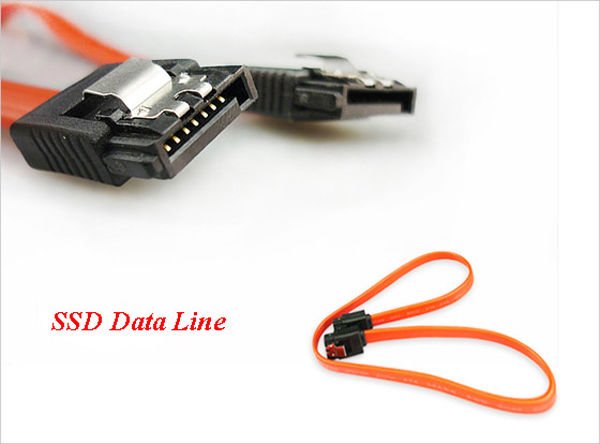
Its basically simple sata data cable, disregard ssd on image.

CATA4TW!
"People never lie so much as before an election, during a war, or after a hunt."
"God has a special providence for fools, drunks, and the United States of America."
― Otto von Bismarck
― Otto von Bismarck
-
Lacrosse4Life17
- Posts: 272
- Joined: 2011-02-12 16:16
Re: SSD, Things to know;How to
I have that, but do I need any others?'[R-COM wrote:MaSSive;1724932']You should have those on you PSU. Its Sata power connector and looks like this
How hard would you play today, if you couldn't tomorrow?
-
whatshisname55
- Posts: 955
- Joined: 2010-07-16 03:05
Re: SSD, Things to know;How to
Plug it in like you would your HDD, they use the exact same cables.
-
Lacrosse4Life17
- Posts: 272
- Joined: 2011-02-12 16:16
Re: SSD, Things to know;How to
How hard would you play today, if you couldn't tomorrow?
-
MaSSive
- Posts: 4502
- Joined: 2011-02-19 15:02
Re: SSD, Things to know;How to
I cant see the bracket I hope youre sure it comes with one. That thing is small in size like laptop hdd 2,5" and in case you dont have the mounting bracket you cant install it.
As for cables, check if you have spare data cable. If you're removing old sata drive then you certainly have one, if not check you mobo box if you saved it. If you dont have get one.
CATA4TW!
"People never lie so much as before an election, during a war, or after a hunt."
"God has a special providence for fools, drunks, and the United States of America."
― Otto von Bismarck
― Otto von Bismarck
-
Lacrosse4Life17
- Posts: 272
- Joined: 2011-02-12 16:16
Re: SSD, Things to know;How to
So. If I don't have a bracket, what will happen? I mean... I'll just duck tape the stupid thing to my case...[R-COM]MaSSive wrote:I cant see the bracket I hope youre sure it comes with one. That thing is small in size like laptop hdd 2,5" and in case you dont have the mounting bracket you cant install it.
How hard would you play today, if you couldn't tomorrow?
-
MaSSive
- Posts: 4502
- Joined: 2011-02-19 15:02
Re: SSD, Things to know;How to
Lacrosse4Life17 wrote:So. If I don't have a bracket, what will happen? I mean... I'll just duck tape the stupid thing to my case...
This will give you the idea about size

If bracket is not supplied with drive, Litoralis already posted solution
http://www.microcenter.com/single_product_results.phtml?product_id=0328852
or this one
http://www.amazon.com/SILVERSTONE-SDP08 ... y_e_text_b
http://www.microcenter.com/single_product_results.phtml?product_id=0328852
CATA4TW!
"People never lie so much as before an election, during a war, or after a hunt."
"God has a special providence for fools, drunks, and the United States of America."
― Otto von Bismarck
― Otto von Bismarck
-
whatshisname55
- Posts: 955
- Joined: 2010-07-16 03:05
Re: SSD, Things to know;How to
You don't have to mount a hard drive, you don't have to mount anything in your case. If you want it to be secure though, then you better mount it. If you're too cheap to buy mounting hardware then by all means, tape it down, it will be fine if you don't mind how ridiculous it looks.
Check your case accessories too, some cases come with SSD mounting brackets.
Check your case accessories too, some cases come with SSD mounting brackets.
-
Lacrosse4Life17
- Posts: 272
- Joined: 2011-02-12 16:16
Re: SSD, Things to know;How to
Don't care about looks... BREAK OUT THE DUCK TAPE!whatshisname55 wrote:You don't have to mount a hard drive, you don't have to mount anything in your case. If you want it to be secure though, then you better mount it. If you're too cheap to buy mounting hardware then by all means, tape it down, it will be fine if you don't mind how ridiculous it looks.
Check your case accessories too, some cases come with SSD mounting brackets.
How hard would you play today, if you couldn't tomorrow?
-
Mad-Mike
- Posts: 3137
- Joined: 2008-01-25 13:21
Re: SSD, Things to know;How to
Sorry for the late reply but please tell me you have not bought this yet..... 
I bought the OCZ Technology 60 GB Agility 3 SATA III Solid State Drive when I first built my PC and I had nothing but trouble with it. Even though my Motherboard was SATA III compatible and I was using a SATA III cable. I got lots of issues with the drive including not running the right read/write speeds, overheating and causing my PC to BSOD
After trying everything to get it to work(even tryed a SATA II cable) I gived up and did some search on google about it and it seems I wasnt the only one. Lots of people was having the same issue especialy BSOD and apparently it was somthing to do with the manufacters fault. I quicky got on the phone to who I bought it from and sent the piece of sh#t back.
Since then, they might have fixed the issues but who knows. Let us know?
I bought the OCZ Technology 60 GB Agility 3 SATA III Solid State Drive when I first built my PC and I had nothing but trouble with it. Even though my Motherboard was SATA III compatible and I was using a SATA III cable. I got lots of issues with the drive including not running the right read/write speeds, overheating and causing my PC to BSOD
After trying everything to get it to work(even tryed a SATA II cable) I gived up and did some search on google about it and it seems I wasnt the only one. Lots of people was having the same issue especialy BSOD and apparently it was somthing to do with the manufacters fault. I quicky got on the phone to who I bought it from and sent the piece of sh#t back.
Since then, they might have fixed the issues but who knows. Let us know?