
Building a new gaming PC
-
MaSSive
- Posts: 4502
- Joined: 2011-02-19 15:02
Re: Building a new gaming PC
Good build I have no objections. One advice though is to go with quality motherboard, dont ever save your money on it. Its the base of all, hence the motherboard.

CATA4TW!
"People never lie so much as before an election, during a war, or after a hunt."
"God has a special providence for fools, drunks, and the United States of America."
― Otto von Bismarck
― Otto von Bismarck
-
Heskey
- Posts: 1509
- Joined: 2007-02-18 03:30
Re: Building a new gaming PC
Hey guys,
Got all the stuff (still waiting on the GFX card though)
Quick question about case cooling...
My case has a 1x 200mm intake fan at the front, and a 1x 120mm exhaust fan at the back, with space for 2x 120mm fans (or 1x 200mm) fan on the roof. I opted for 2x 120mms and I'm wondering which way these should be blowing air.
I've put them in (not finished building yet) as intakes to help cool the CPU cooler fins, but my brother thinks I should have one in and one out to help balance the amount of air intake/outtake. Threads online seem to suggest (in general, not specific to my case) that all top and rear fans are exhausts to create 'negative pressure'. This sounds most sensible to me?
Any advice?
Got all the stuff (still waiting on the GFX card though)
Quick question about case cooling...
My case has a 1x 200mm intake fan at the front, and a 1x 120mm exhaust fan at the back, with space for 2x 120mm fans (or 1x 200mm) fan on the roof. I opted for 2x 120mms and I'm wondering which way these should be blowing air.
I've put them in (not finished building yet) as intakes to help cool the CPU cooler fins, but my brother thinks I should have one in and one out to help balance the amount of air intake/outtake. Threads online seem to suggest (in general, not specific to my case) that all top and rear fans are exhausts to create 'negative pressure'. This sounds most sensible to me?
Any advice?
-
LITOralis.nMd
- Retired PR Developer
- Posts: 5658
- Joined: 2010-04-10 16:15
Re: Building a new gaming PC
" all top and rear fans are exhausts to create 'negative pressure'."
I would set the top fans as exhaust in your situation.
Sapphire 11199-03-20G HD7870 blows the hot air out the back of the PC case, which generally means you want to set top fans as exhaust.

YOU PROBABLY WANT TO USE THE SET UP C IN THIS PICTURE.
arctic-cooling-freezer-7-pro-rev-2, put the fan on the bottom , set it to point the fan exhaust to the TOP of the case, with the CPU cooler fan blowing through the CPU cooler fins, then the 2x120MM case fans on top will pull that hot air exhaust right out of the case. Should create a very good "push pull" cooling system.
I would set the top fans as exhaust in your situation.
Sapphire 11199-03-20G HD7870 blows the hot air out the back of the PC case, which generally means you want to set top fans as exhaust.
YOU PROBABLY WANT TO USE THE SET UP C IN THIS PICTURE.
arctic-cooling-freezer-7-pro-rev-2, put the fan on the bottom , set it to point the fan exhaust to the TOP of the case, with the CPU cooler fan blowing through the CPU cooler fins, then the 2x120MM case fans on top will pull that hot air exhaust right out of the case. Should create a very good "push pull" cooling system.
-
Heskey
- Posts: 1509
- Joined: 2007-02-18 03:30
Re: Building a new gaming PC
Ah. Unfortunately I've already applied the CPU fan as per the manual, blowing towards the single rear exhaust. But as heat rises, two exhausts at the top could still be beneficial to me?
I'll take a look at my case in a moment, but as far as I recall I wasn't able to screw the CPU fan in a configuration pointing top or bottom; only left or right.
I also don't have any cooling gel to reapply the direction of the CPU fan; the pre-applied gel will have already been used between its current standard facing (fig B.)
I'll take a look at my case in a moment, but as far as I recall I wasn't able to screw the CPU fan in a configuration pointing top or bottom; only left or right.
I also don't have any cooling gel to reapply the direction of the CPU fan; the pre-applied gel will have already been used between its current standard facing (fig B.)
-
Heskey
- Posts: 1509
- Joined: 2007-02-18 03:30
Re: Building a new gaming PC
Mayday, mayday.
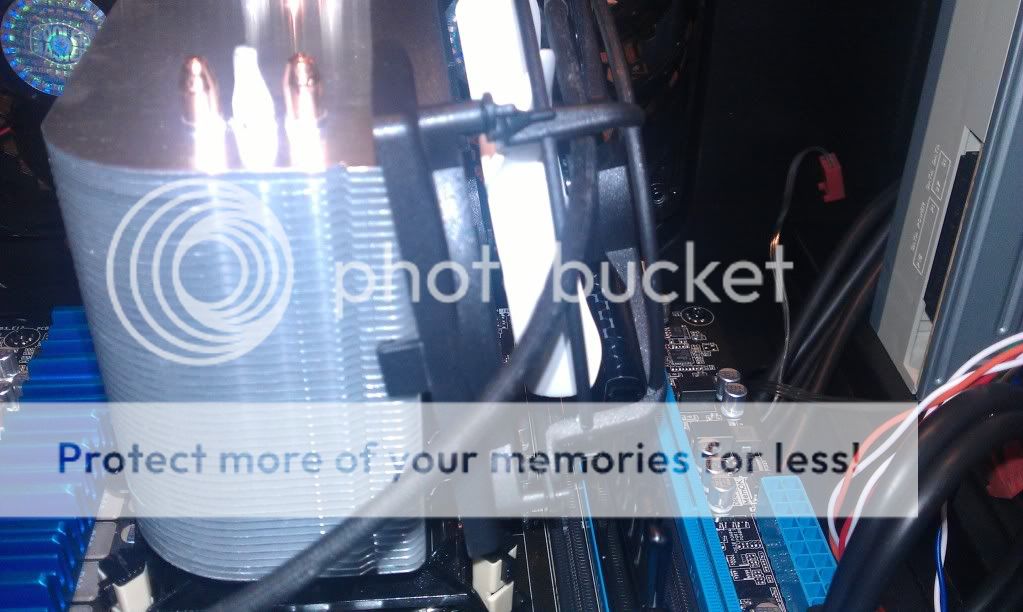
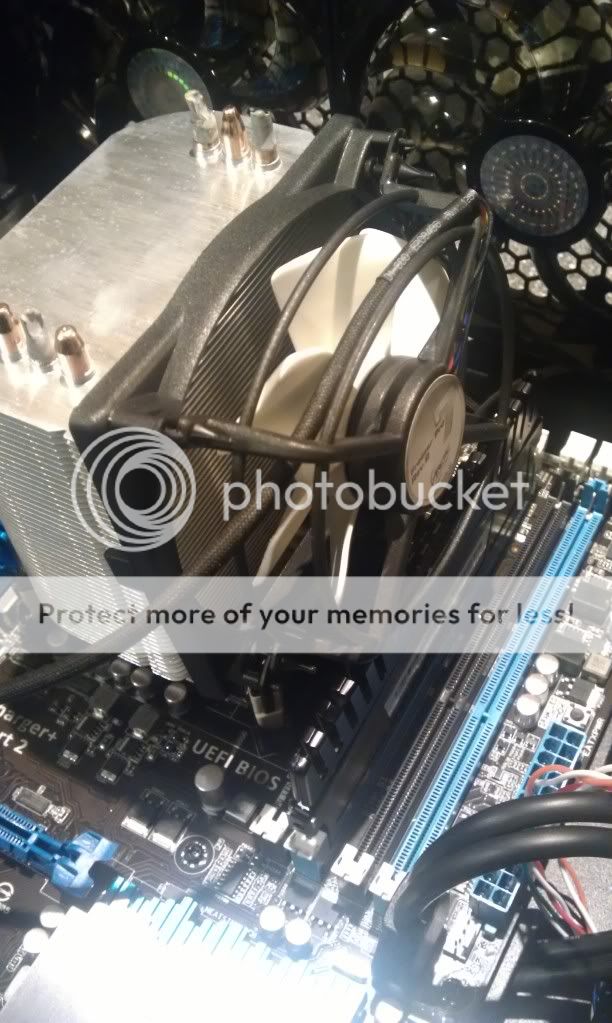
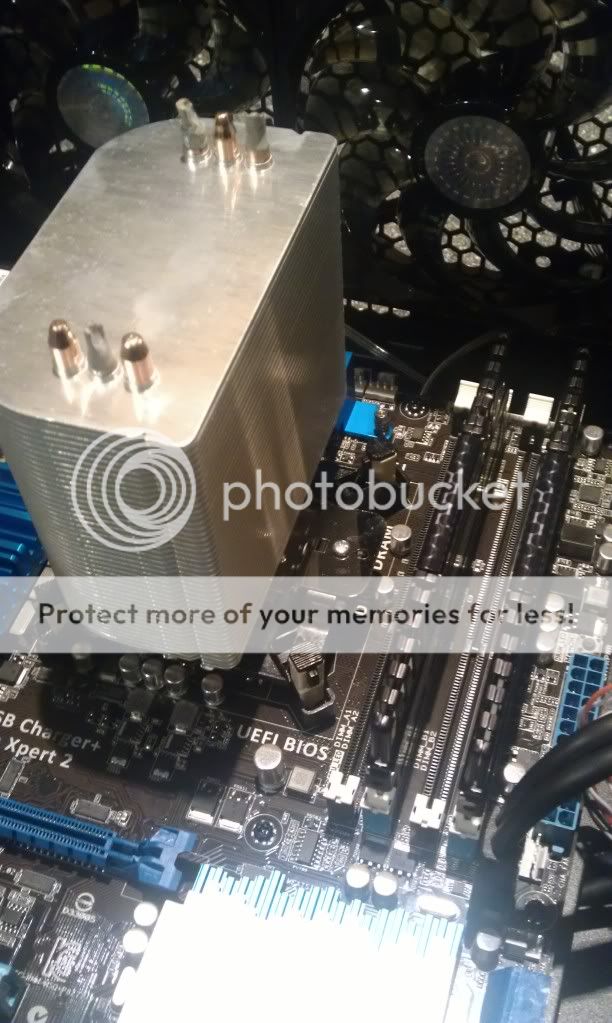
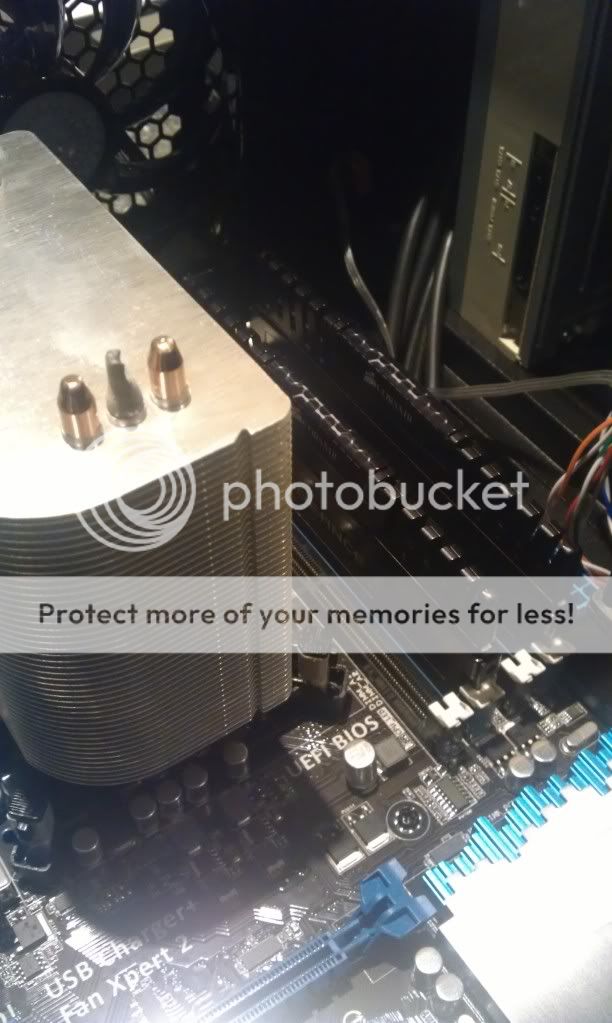
I've turned the two top fans into exhausts as suggested, but have found on inputting the RAM, that the CPU cooler fan is so big it covers RAM slots one AND two, meaning I can't use both my sticks in the correctly aligned RAM bays.
I may have to see if I can turn the CPU cooler 90o as you've suggested and have it blowing towards the two top exhaust fans; but I'm not sure if the sides of the cpu cooler are small enough to not affect the RAM bays; or if in this configuration the fan will cover the GPU slot.
Here's some photos:

For now, building of my PC is dead; and I was hoping to get it all installed tomorrow on my only day off in 8 days, but that won't happen now =[
My brother is going to come and see where I'm upto with it either tomorrow or over the weekend, but without more thermal paste it's unlikely we can move the CPU fan yet =[
I've turned the two top fans into exhausts as suggested, but have found on inputting the RAM, that the CPU cooler fan is so big it covers RAM slots one AND two, meaning I can't use both my sticks in the correctly aligned RAM bays.
I may have to see if I can turn the CPU cooler 90o as you've suggested and have it blowing towards the two top exhaust fans; but I'm not sure if the sides of the cpu cooler are small enough to not affect the RAM bays; or if in this configuration the fan will cover the GPU slot.
Here's some photos:
For now, building of my PC is dead; and I was hoping to get it all installed tomorrow on my only day off in 8 days, but that won't happen now =[
My brother is going to come and see where I'm upto with it either tomorrow or over the weekend, but without more thermal paste it's unlikely we can move the CPU fan yet =[
Last edited by Heskey on 2012-07-25 23:51, edited 1 time in total.
-
LITOralis.nMd
- Retired PR Developer
- Posts: 5658
- Joined: 2010-04-10 16:15
Re: Building a new gaming PC
I believe the correct Brit term for this is "Bollocks!"
You have learned a valuable (and not particularly expensive) lesson my friend,
The lesson: always rough out the components placements before
1. applying thermal compound,
2. installing flimsy plastic clips, or
3. connecting front panel wiring.
Grab some thermal compound tomorrow or on the weekend and for Heaven's sake don't stay up all night worrying about it.
ON a serious note, it's not good to have an electrical motor (the fan motor) in contact with the RAM.-
Also, it's really not good to have a constant source of vibration, (the fan itself), rattling the RAM.
IMHO you should stop now and cut your losses for the night, a syringe of thermal compound costs maybe 8 quid.
You have learned a valuable (and not particularly expensive) lesson my friend,
The lesson: always rough out the components placements before
1. applying thermal compound,
2. installing flimsy plastic clips, or
3. connecting front panel wiring.
Grab some thermal compound tomorrow or on the weekend and for Heaven's sake don't stay up all night worrying about it.
ON a serious note, it's not good to have an electrical motor (the fan motor) in contact with the RAM.-
Also, it's really not good to have a constant source of vibration, (the fan itself), rattling the RAM.
IMHO you should stop now and cut your losses for the night, a syringe of thermal compound costs maybe 8 quid.
-
LITOralis.nMd
- Retired PR Developer
- Posts: 5658
- Joined: 2010-04-10 16:15
Re: Building a new gaming PC
On second thought, if you have some zipties or rubber bands on hand, you can move the fan to the opposite side and just ghetto-rig it for tonight so you can test your system components.
Be careful with the ArticCooling Fan grills, they are really flimsy and if you snap more than two it's going to rattle. I have fixed mine using SuperGlue and other Epoxies made for plastic to plastic adhesion, just stuff I had laying around the garage.
Be careful with the ArticCooling Fan grills, they are really flimsy and if you snap more than two it's going to rattle. I have fixed mine using SuperGlue and other Epoxies made for plastic to plastic adhesion, just stuff I had laying around the garage.
-
Q2M100
- Posts: 166
- Joined: 2010-06-21 15:48
Re: Building a new gaming PC
A thinner fan may do the trick. Keep this as an available option just in case the 90? doesn't work.
-
Heskey
- Posts: 1509
- Joined: 2007-02-18 03:30
Re: Building a new gaming PC
I've removed the fan overnight, so it's just a towerblock of fins - my brother is coming round in an hour or two to help me rotate the cpu cooler and wire the case/psu =]
-
Q2M100
- Posts: 166
- Joined: 2010-06-21 15:48
-
Heskey
- Posts: 1509
- Joined: 2007-02-18 03:30
Re: Building a new gaming PC
Little progress update:
The CPU cooler/fan has been rotated 90o and is now blowing towards the two exhaust (now) fans at the roof. There's enough space for the RAM now, and I don't think it blocks the first PCI-E slot (though it doesn't matter too much as I'm not getting 2 GPUs).
We've wired up all the case (not tidy yet) to see if it works. It does; and I've installed Win 7 to the SSD. I've not hooked up the HDD up yet via adata cable because I forgot I have 2 more in the box.
I have however found that one stand-peg in the case is under that 'ASUS' laballed heatsink thing though; I didn't think this would be a problem but my friend Tom has warned me this could make contact with the rear of the MOBO and short circuit it... SO, my to-do list tomorrow night is (bearing in mind I still don't have my GPU yet, but may do tomorrow):
1.) Unplug all cables from the MOBO
- Unscrew the MOBO
- Remove any additional stand pegs from under the MOBO, where they don't correspond with a hole on top (this will give me another stand peg for that missing corner, yay!)
- Screw the MOBO back in.
- Power the MOBO back up.
2.) Hook HDD up to AsMedia 3.0 6GB terminal using re-found data cables.
3.) Hook SSD and Disk Drive to 3.0 6GB terminal using currently in-place data cables.
4.) Close up PC and await arrival of GFX card before transferring anything onto the HDD, or installing anything.
The CPU cooler/fan has been rotated 90o and is now blowing towards the two exhaust (now) fans at the roof. There's enough space for the RAM now, and I don't think it blocks the first PCI-E slot (though it doesn't matter too much as I'm not getting 2 GPUs).
We've wired up all the case (not tidy yet) to see if it works. It does; and I've installed Win 7 to the SSD. I've not hooked up the HDD up yet via adata cable because I forgot I have 2 more in the box.
I have however found that one stand-peg in the case is under that 'ASUS' laballed heatsink thing though; I didn't think this would be a problem but my friend Tom has warned me this could make contact with the rear of the MOBO and short circuit it... SO, my to-do list tomorrow night is (bearing in mind I still don't have my GPU yet, but may do tomorrow):
1.) Unplug all cables from the MOBO
- Unscrew the MOBO
- Remove any additional stand pegs from under the MOBO, where they don't correspond with a hole on top (this will give me another stand peg for that missing corner, yay!)
- Screw the MOBO back in.
- Power the MOBO back up.
2.) Hook HDD up to AsMedia 3.0 6GB terminal using re-found data cables.
3.) Hook SSD and Disk Drive to 3.0 6GB terminal using currently in-place data cables.
4.) Close up PC and await arrival of GFX card before transferring anything onto the HDD, or installing anything.
-
LITOralis.nMd
- Retired PR Developer
- Posts: 5658
- Joined: 2010-04-10 16:15
Re: Building a new gaming PC
IMHO I agree with Tom on the mobo standoff, it can theoretically short your equipment.
it takes 10 minutes to fix, do it right now, do it once and be done with it.
Congrats, enjoy, send pics.
it takes 10 minutes to fix, do it right now, do it once and be done with it.
Congrats, enjoy, send pics.
-
Heskey
- Posts: 1509
- Joined: 2007-02-18 03:30
Re: Building a new gaming PC
Hi all,
A little update on where I'm upto - some good and kinda unknown news.
The good news is I removed any unnecessary stand-screws, and now have every available MOBO hole screwed in and secure. I've also screwed in the WiFi-GO! card for shits and giggles incase I ever use it.
I've also rewired the case (not zip-cabled yet 'til I get the GPU in) to be as little mess as possible which has made the CPU temp between 25-30oC on idle.
The bad news is:
1.) Sometimes on startup I get a long bleep, and then 4 short bleeps (othertimes I just have a short blip from the wifi card I think, and it boots without issue).
2.) On start-up, the BOOT_DEVICE_LED led is red until I skip the bios screen and go to 'Starting Windows'
3.) My WD 1TB 6GB HDD isn't being recognised in My Computer, despite being recognised in the BIOS, Boot Order Menu, and the initial 'American Megatrends' startup screen.
4.) I have a 'CPU Fan Error!', where the fan RPM is jumping from 700RPM - 56784RPM randomly.
5.) My Corsair Vengeance DDR3-1600MHz RAM is being read as 1333MHz.
---
When I start up the PC for the first time after putting in the power cable, I'm greeted with a black screen with the AMERICAN MEGATRENDS logo on it, and the following information verbatim:
In relation to issue #2, Could this be related to the 2 ASMedia 6GB ports on the MOBO? My friend's understanding and as per the manual is that these two ports are for 'DATA drives only'. I tried my HDD in there and the red light appeared; I thought perhaps it was incompatible, however even in the regular SATA 6GB port, moving the DVD-RW to a SATA 3GB port, the light still comes on when turning on the PC until I get to the 'Starting Windows' screen where the Windows logo flies in.
In relation to issue #3, I didn't have the HDD connected to the MOBO via a data cable when installing Windows 7; could it be that the HDD hasn't been formatted and thus recognised then? I couldn't find anywhere in the BIOS to format the drive, though it was recognised in the boot order (but not the drag and drop boot priority)
In relation to issue #4, the fan is spinning normally to my human eye, and I read somewhere a few minutes ago somewhere about limiting the fan speed to 600mhz to make the error reading disappear?
In relation to issue #5, I read somewhere when panicing that the 'Vengeance 1600MHz runs at 1333MHz by default but can be overclocked to run at 1600Mhz' - that seems daft to me, but is this the case, and I don't need to panic?
Any and all help appreciated!
ADDED: Please see this, and this screenshot re HDD not appearing in My Computer but being recognised.
I tried to load the PC with the Windows 7 disk in to see if I could format the drive that way; and although the drive appears with some 980GB to spare, any format button is greyed out.
A little update on where I'm upto - some good and kinda unknown news.
The good news is I removed any unnecessary stand-screws, and now have every available MOBO hole screwed in and secure. I've also screwed in the WiFi-GO! card for shits and giggles incase I ever use it.
I've also rewired the case (not zip-cabled yet 'til I get the GPU in) to be as little mess as possible which has made the CPU temp between 25-30oC on idle.
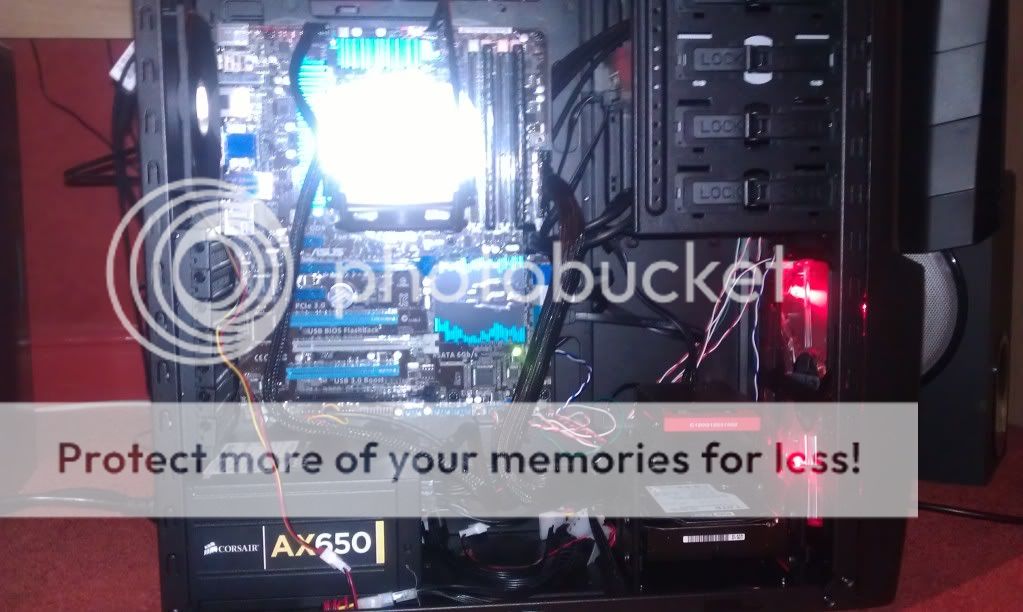
The bad news is:
1.) Sometimes on startup I get a long bleep, and then 4 short bleeps (othertimes I just have a short blip from the wifi card I think, and it boots without issue).
2.) On start-up, the BOOT_DEVICE_LED led is red until I skip the bios screen and go to 'Starting Windows'
3.) My WD 1TB 6GB HDD isn't being recognised in My Computer, despite being recognised in the BIOS, Boot Order Menu, and the initial 'American Megatrends' startup screen.
4.) I have a 'CPU Fan Error!', where the fan RPM is jumping from 700RPM - 56784RPM randomly.
5.) My Corsair Vengeance DDR3-1600MHz RAM is being read as 1333MHz.
---
When I start up the PC for the first time after putting in the power cable, I'm greeted with a black screen with the AMERICAN MEGATRENDS logo on it, and the following information verbatim:
In relation to issue #1, I think this directly relates to issue #2/AMIBIOS(C) 2012 American Megatrends, Inc.
ASUS P8Z77-V ACPI BIOS Revision 0906
CPU: Intel(R) Core(TM) i5-3570K CPU @ 3.40GHz
Speed: 3400MHz
Total Memory: 8192MB (DDR3-1333)
USB Devices total: 0 Drive, 0 Keyboard, 1 Mouse, 2 Hubs
Detected ATA/ATAPI Devices...
SATA Port1: Corsair Force GT
SATA Port2: WDC WD1002FAEX-00Z3A0
SATA Port4: Optiarc DVD RW AD-72615
CPU Fan Error!
Press F1 to Run SETUP
In relation to issue #2, Could this be related to the 2 ASMedia 6GB ports on the MOBO? My friend's understanding and as per the manual is that these two ports are for 'DATA drives only'. I tried my HDD in there and the red light appeared; I thought perhaps it was incompatible, however even in the regular SATA 6GB port, moving the DVD-RW to a SATA 3GB port, the light still comes on when turning on the PC until I get to the 'Starting Windows' screen where the Windows logo flies in.
In relation to issue #3, I didn't have the HDD connected to the MOBO via a data cable when installing Windows 7; could it be that the HDD hasn't been formatted and thus recognised then? I couldn't find anywhere in the BIOS to format the drive, though it was recognised in the boot order (but not the drag and drop boot priority)
In relation to issue #4, the fan is spinning normally to my human eye, and I read somewhere a few minutes ago somewhere about limiting the fan speed to 600mhz to make the error reading disappear?
In relation to issue #5, I read somewhere when panicing that the 'Vengeance 1600MHz runs at 1333MHz by default but can be overclocked to run at 1600Mhz' - that seems daft to me, but is this the case, and I don't need to panic?
Any and all help appreciated!
ADDED: Please see this, and this screenshot re HDD not appearing in My Computer but being recognised.
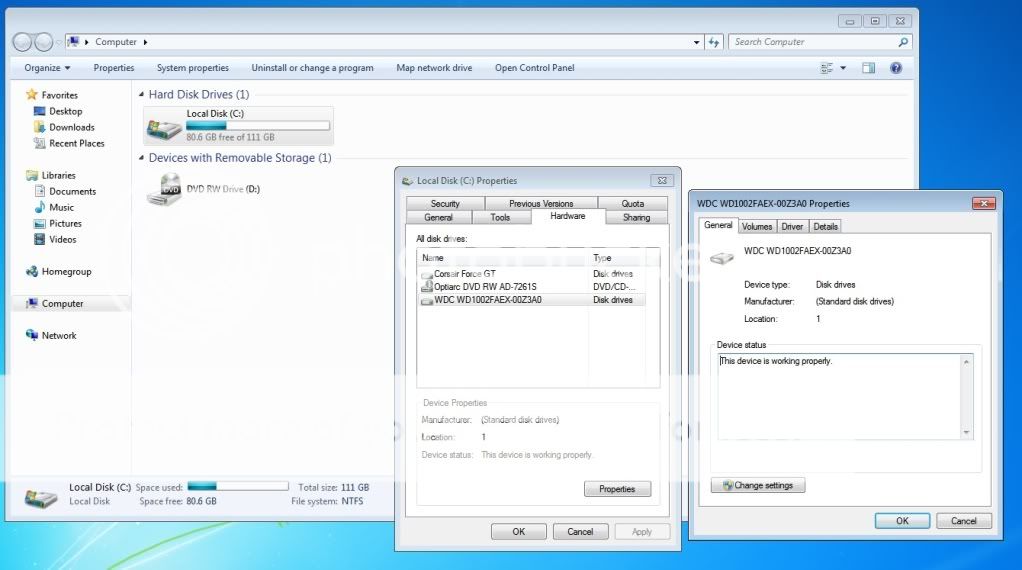
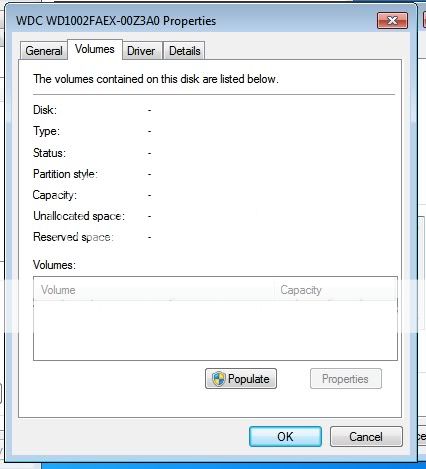
I tried to load the PC with the Windows 7 disk in to see if I could format the drive that way; and although the drive appears with some 980GB to spare, any format button is greyed out.
Last edited by Heskey on 2012-07-27 22:39, edited 1 time in total.
-
Heskey
- Posts: 1509
- Joined: 2007-02-18 03:30
Re: Building a new gaming PC
No worries Exiled, thanks for your quick-time.
I'm just about to set off to work myself, but a mini-update for you is that I've followed your instruction regarding the HDD and it's been formatted; 931GB free-space (bit poo for a 1TB drive, surely?), and now sits next to my C: in My Computer! =]
However it still doesn't appear on boot priority list (is this because it knows my SSD HAS windows, and the DVD-RW COULD have windows in it, but it knows the HDD doesn't?), and I still get a BOOT_DEVICE_LED light on until I get to the 'Starting Windows' screen.
My brother suggested something old-skool, that this may be because the computer doesn't know which of my Drives is the MASTER or SLAVE due to pins on the rear of the HDD. I noticed these pins, a small 8-block configuration of male copper pins, however in none of the boxes I have (inc. the HDD box itself) did I come across a little box to put onto these pins.
Off to work now - hopefully I can sort all this over the next few days; it's getting there! (I'm posting off it right now, to be fair!)
I'm just about to set off to work myself, but a mini-update for you is that I've followed your instruction regarding the HDD and it's been formatted; 931GB free-space (bit poo for a 1TB drive, surely?), and now sits next to my C: in My Computer! =]
However it still doesn't appear on boot priority list (is this because it knows my SSD HAS windows, and the DVD-RW COULD have windows in it, but it knows the HDD doesn't?), and I still get a BOOT_DEVICE_LED light on until I get to the 'Starting Windows' screen.
My brother suggested something old-skool, that this may be because the computer doesn't know which of my Drives is the MASTER or SLAVE due to pins on the rear of the HDD. I noticed these pins, a small 8-block configuration of male copper pins, however in none of the boxes I have (inc. the HDD box itself) did I come across a little box to put onto these pins.
Off to work now - hopefully I can sort all this over the next few days; it's getting there! (I'm posting off it right now, to be fair!)
-
Cossack
- Posts: 1689
- Joined: 2009-06-17 09:25
Re: Building a new gaming PC
About RAM. Vengeance use XMP profiles, so for first safe boot up, mobo adjust your RAM to safe clock speeds. Go to BIOS and somewhere in it should be option - XMP profile ON/OFF. Turn it on and RAM should adjust to 1600MHz.
(Maybe I'm wrong, this is just a guess, because never had chance to work with new BIOS and XMP profiles)
About 1TB - For manufacturer 1TB is 1000GB, 1GB - 1000 MB and so on. But actually it is 1TB - 1024GB. This is in the market for long time - problem about missing GB's, and there is nothing you can do about it
(Maybe I'm wrong, this is just a guess, because never had chance to work with new BIOS and XMP profiles)
About 1TB - For manufacturer 1TB is 1000GB, 1GB - 1000 MB and so on. But actually it is 1TB - 1024GB. This is in the market for long time - problem about missing GB's, and there is nothing you can do about it

-
Heskey
- Posts: 1509
- Joined: 2007-02-18 03:30
Re: Building a new gaming PC
My brother has sent me this link about the light: BOOT_DEVICE_LED on ASUS P8Z68-V Pro
And I found this link about the fan: Just Built New CPU. Asus Mobo Say CPU Fan Error on Boot, but FAN is Running?
I'll oc the ram when the rest of the pc is sorted.
So 931gb is about right for 1tb? That sucks. My 120gb SSD is 111gb, 80.9gb now that windows is installed on it = /
Also, any input on the slave/master HDD pin issue?
And I found this link about the fan: Just Built New CPU. Asus Mobo Say CPU Fan Error on Boot, but FAN is Running?
I'll oc the ram when the rest of the pc is sorted.
So 931gb is about right for 1tb? That sucks. My 120gb SSD is 111gb, 80.9gb now that windows is installed on it = /
Also, any input on the slave/master HDD pin issue?
-
Cossack
- Posts: 1689
- Joined: 2009-06-17 09:25
Re: Building a new gaming PC
Heskey - you can change boot priority by dragging the icons in boot menu.
Anyway - BIOS walkthrough Asus P8Z77-V UEFI BIOS
Anyway - BIOS walkthrough Asus P8Z77-V UEFI BIOS
-
LITOralis.nMd
- Retired PR Developer
- Posts: 5658
- Joined: 2010-04-10 16:15
Re: Building a new gaming PC
Is your CPU_FAN_1 a 3 pin or 4 pin connector on the mobo?
Does your CPU FAN have a 3 pin or 4 pin connector?
There is a software workaround, download speedfan from almico Download SpeedFan - Access temperature sensor in your computer
Find tutorial, or poke about, and set speedfan to start at windows boot, and set a manual speed for the CPU_FAN_1 .
OR
The BIOS for the Asus P8Z77-V UEFI might have a manual fan speed limit option, IDK if it does, but some ASUS BIOS do.
OR
Turn OFF the Fan Warning in BIOS, this is not a good solution cause if other fans die, you won't know, could hypothetically burn out your hardware.
Does your CPU FAN have a 3 pin or 4 pin connector?
There is a software workaround, download speedfan from almico Download SpeedFan - Access temperature sensor in your computer
Find tutorial, or poke about, and set speedfan to start at windows boot, and set a manual speed for the CPU_FAN_1 .
OR
The BIOS for the Asus P8Z77-V UEFI might have a manual fan speed limit option, IDK if it does, but some ASUS BIOS do.
OR
Turn OFF the Fan Warning in BIOS, this is not a good solution cause if other fans die, you won't know, could hypothetically burn out your hardware.