
So last week I played quite a lot of PR, having a great time doing so. But then it suddenly starts doing the 'Invalid CD-Key' shit.
I followed a lot of the suggested help to no avail, eventually giving up and re-installing both BF2 and PR.
Tried again today, and now this happens:
The first server I try and join I get a 'Failed to connect to server' message.
Then, the next time I try and join PR just shuts down and i'm back at the desktop, with no message or reasoning as to why.
Help?
I must re-state that I was able to play PR several times before, so I don't know why it's doing this and i'm completely confused as to why it's doing it.
PR just turns off when I try and join servers
-
LITOralis.nMd
- Retired PR Developer
- Posts: 5658
- Joined: 2010-04-10 16:15
Re: PR just turns off when I try and join servers
If you grabbed a cracked or widely used key last week, it couldhave been gobally banned this week. If so, go buy a valid keyt for 10 quid.
Here is how to get the info needed to start fixing the problem otherwise:
Edit your PR shortcut and ( what AfterDune said ) put this in it
If you start in windowed mode and it CTDs, a Message will pop up telling you the problem. Take a screenshot or write this down and post it to this thread.
Here is how to get the info needed to start fixing the problem otherwise:
Edit your PR shortcut and ( what AfterDune said ) put this in it
Code: Select all
Code:
"D:\Program Files\Battlefield 2\mods\pr\pr.exe" +restart +menu 1 +fullscreen 0 +szx 1280 +szy 720
Dont just copy paste this, but adjust to your install location. Make sure you dont omit quotation marks or it wont work. -
Rob606
- Posts: 10
- Joined: 2012-09-09 22:12
Re: PR just turns off when I try and join servers
I legitimately bought BF2 on Steam, fear not. I bought it specifically to play this mod, in fact.
Anyway I'm not sure what you're suggesting I do with my pr.exe to do the '+restart +menu 1 +fullscreen 0 +szx 1280 +szy 720' thing. Could you give me more advice on how I add those settings?
Anyway I'm not sure what you're suggesting I do with my pr.exe to do the '+restart +menu 1 +fullscreen 0 +szx 1280 +szy 720' thing. Could you give me more advice on how I add those settings?
-
LITOralis.nMd
- Retired PR Developer
- Posts: 5658
- Joined: 2010-04-10 16:15
Re: PR just turns off when I try and join servers
Welcome to the PR community,
First, find your BF2 directory inside your steamapps directory:
Default on win7x64
C:\Program Files\Steam\steamapps\common\battlefield 2\pr\pr.exe
Right click on the PR.exe, Send to Desktop(create shortcut)
Go back to your desktop, right click on the new PR shortcut, click properties.
It should look something like this:
"C:\Program Files\Steam\steamapps\common\battlefield 2\PR\PR.exe"
You need to make it look like this:
"C:\Program Files\Steam\steamapps\common\battlefield 2\PR\PR.exe" +restart +menu 1 +fullscreen 0 +szx 1280 +szy 720
Notice the exact location of the quotation marks.
Notice there is a space between PR.exe" and +restart .
Must be exactly the same for this to work.
And again,
If you start in windowed mode and it CTDs, a Message will pop up telling you the problem. Take a screenshot or write this down and post it to this thread.
---------------------------
Second line of troubleshooting:
Also, you need to do this in proper order
1. Install BF2 through steam.
2. Update BF2 through steam.
3. start vanilla BF2 through steam.
- 4. create a user account and login
- 5. Join a vanilla online server
- 6. Adjust your video settings now for convenience.
7. shut down BF2.
8. Try the PR shortcut on your desktop you just edited above.
keep us posted, we'll get you up and running,
First, find your BF2 directory inside your steamapps directory:
Default on win7x64
C:\Program Files\Steam\steamapps\common\battlefield 2\pr\pr.exe
Right click on the PR.exe, Send to Desktop(create shortcut)
Go back to your desktop, right click on the new PR shortcut, click properties.
It should look something like this:
"C:\Program Files\Steam\steamapps\common\battlefield 2\PR\PR.exe"
You need to make it look like this:
"C:\Program Files\Steam\steamapps\common\battlefield 2\PR\PR.exe" +restart +menu 1 +fullscreen 0 +szx 1280 +szy 720
Notice the exact location of the quotation marks.
Notice there is a space between PR.exe" and +restart .
Must be exactly the same for this to work.
And again,
If you start in windowed mode and it CTDs, a Message will pop up telling you the problem. Take a screenshot or write this down and post it to this thread.
---------------------------
Second line of troubleshooting:
Also, you need to do this in proper order
1. Install BF2 through steam.
2. Update BF2 through steam.
3. start vanilla BF2 through steam.
- 4. create a user account and login
- 5. Join a vanilla online server
- 6. Adjust your video settings now for convenience.
7. shut down BF2.
8. Try the PR shortcut on your desktop you just edited above.
keep us posted, we'll get you up and running,
-
Rob606
- Posts: 10
- Joined: 2012-09-09 22:12
Re: PR just turns off when I try and join servers
Okay I tried the first set of troubleshoot help, and the same thing happened again (1st try = connection to the server has been lost, 2nd = CTD) and no error message appeared, at all.
I followed the second option, and I couldn't even join a server on normal BF2, I got the connection to server has been lost error.
I assure you that my laptop ran this and was able to connect to several servers (on both PR and BF2) last week. This issue has popped up since the CD Key problem it presented itself with.
I followed the second option, and I couldn't even join a server on normal BF2, I got the connection to server has been lost error.
I assure you that my laptop ran this and was able to connect to several servers (on both PR and BF2) last week. This issue has popped up since the CD Key problem it presented itself with.
-
LITOralis.nMd
- Retired PR Developer
- Posts: 5658
- Joined: 2010-04-10 16:15
Re: PR just turns off when I try and join servers
This is the two known ways to fix this, :
1:
quick test:
Battlefield 2 - Invalid CDKey Fix - Page 13 - Steam Users' Forums
1. which OS, and is it 32 or 64 bit?
2. Did your current installation of VBF2 and/or PR work at any time? Did it work before Dec 30th and not after Jan 1st? (ON Dec 31 Steam put out a mini update for BF2 that wrecked PR, but we have a quick fix) . This is important, let us know.
3. installed through steam? If using Vista, 7, 8 or Server2008, are you running steam as an admin, are you running PR as an admin? You need to run both as admins from now on.
If you answered yes to question 2, follow this:
Steam Support
Steam
Troubleshoot and How-To's
How To's
Verifying Game Cache Files (GCF)
https://support.steampowered.com/kb_art ... -QEUH-3335
** go to your steam>bf2>Properties, and on the updates tab does it say "Allways keep this game up to date"?
If not, Select that option. If it is, click on the local files tab and click the one saying "Verify Integrety of Game Cache"
4. After checking above, did steam update BF2?
5. If after running the Verification you get no errors, respond back here.
6. Use a checksum program to make sure your PR installation files are not corrupted:
free checksum program: MD5 Checker - Free software downloads and software reviews - CNET Download.com
MD5 hashes: https://www.realitymod.com/forum/f27-pr ... ashes.html
7. If your steam game files cache AND your installation files come back without errors, you can do a full uninstall of PR, uninstall BF2, reboot, reinstall BF2, update BF2 on steam, install PR, and you should be good to go.
2:
1:
quick test:
Battlefield 2 - Invalid CDKey Fix - Page 13 - Steam Users' Forums
IF all fails [Windows 7 and Windows Vista Solution]
Open up regedit (Win + R, type "regedit" and hit the enter). Browse to the registry keys of Battlefield 2. On 32-bit systems, this is HKEY_LOCAL_MACHINE\SOFTWARE\Electronic Arts\EA Games\Battlefield 2\. On 64-bit systems, it's HKEY_LOCAL_MACHINE\SOFTWARE\Wow6432Node\Electronic Arts\EA Games\Battlefield 2\.
Inside Battlefield 2 , you should see ergc.
Then there is one value inside that folder.
It says x9392AND-SO-ON.
Go to steam and right click Battlefield 2 and click View Game cd key
and copy it.
Paste it after the x9392.
Do the same with Special Forces.
Use dotDev's installscript.vdf found here http://germandarknes.net/content/BF2FixdotDev.zip
4. Play Game
Need some info to help you out:
1. which OS, and is it 32 or 64 bit?
2. Did your current installation of VBF2 and/or PR work at any time? Did it work before Dec 30th and not after Jan 1st? (ON Dec 31 Steam put out a mini update for BF2 that wrecked PR, but we have a quick fix) . This is important, let us know.
3. installed through steam? If using Vista, 7, 8 or Server2008, are you running steam as an admin, are you running PR as an admin? You need to run both as admins from now on.
If you answered yes to question 2, follow this:
Steam Support
Steam
Troubleshoot and How-To's
How To's
Verifying Game Cache Files (GCF)
https://support.steampowered.com/kb_art ... -QEUH-3335
** go to your steam>bf2>Properties, and on the updates tab does it say "Allways keep this game up to date"?
If not, Select that option. If it is, click on the local files tab and click the one saying "Verify Integrety of Game Cache"
4. After checking above, did steam update BF2?
5. If after running the Verification you get no errors, respond back here.
6. Use a checksum program to make sure your PR installation files are not corrupted:
free checksum program: MD5 Checker - Free software downloads and software reviews - CNET Download.com
MD5 hashes: https://www.realitymod.com/forum/f27-pr ... ashes.html
7. If your steam game files cache AND your installation files come back without errors, you can do a full uninstall of PR, uninstall BF2, reboot, reinstall BF2, update BF2 on steam, install PR, and you should be good to go.
2:
'[R-COM wrote:LITOralis.nMd;1719265']Soupersteve0,
quick test:
Battlefield 2 - Invalid CDKey Fix - Page 13 - Steam Users' Forums
Need some info to help you out:
1. which OS, and is it 32 or 64 bit?
2. Did your current installation of VBF2 and/or PR work at any time? Did it work before Dec 30th and not after Jan 1st? (ON Dec 31 Steam put out a mini update for BF2 that wrecked PR, but we have a quick fix) . This is important, let us know.
3. installed through steam? If using Vista, 7, 8 or Server2008, are you running steam as an admin, are you running PR as an admin? You need to run both as admins from now on.
If you answered yes to question 2, follow this:
Steam Support
Steam
Troubleshoot and How-To's
How To's
Verifying Game Cache Files (GCF)
https://support.steampowered.com/kb_art ... -QEUH-3335
** go to your steam>bf2>Properties, and on the updates tab does it say "Allways keep this game up to date"?
If not, Select that option. If it is, click on the local files tab and click the one saying "Verify Integrety of Game Cache"
4. After checking above, did steam update BF2?
5. If after running the Verification you get no errors, respond back here.
6. Use a checksum program to make sure your PR installation files are not corrupted:
free checksum program: MD5 Checker - Free software downloads and software reviews - CNET Download.com
MD5 hashes: https://www.realitymod.com/forum/f27-pr ... ashes.html
7. If your steam game files cache AND your installation files come back without errors, you can do a full uninstall of PR, uninstall BF2, reboot, reinstall BF2, update BF2 on steam, install PR, and you should be good to go.
'[R-DEV wrote:Deadfast;703027']
Following the previous troubleshooting guide focused on general game launching problems, I have written this one. It's focused on those who cannot join any multiplayer server thanks to the error you see above.
As many mistakenly think, this error is mostly not caused by illegal copy of the game. If you are so unlucky to end up with this error your Windows registry key containing your game CD-key is damaged.
The usual recommended fix for this problem is complete reinstall of the game. Even though it will fix the problem it's not necessary to go that far. All you have to do is edit a single value in your registry.
Instructions:
- Download and run the BF2 Invalid CD-key Fixer
- Requires .NET Framework 3.5
- Must be run as administrator
- Enter your CD key
- Press Fix
-----------------------------------------------------------------------------------------------------
Alternative method...
- Instructions:
- Press Windows key + R (or alternatively go to Start > Run)
- Write the following into the opened window: regedit and hit ENTER
- Create a registry backup in case something goes wrong (see Restore registry section for instructions on how to restore):
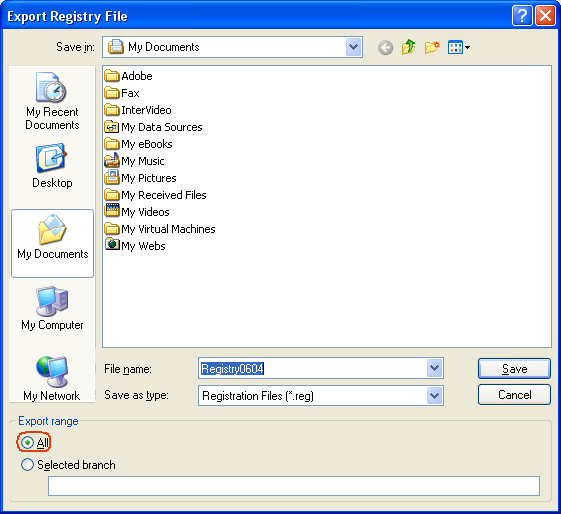
File > Export... > select All in Export Range (see below for image) > name it, select a location and Save
- Browse through the keys (key is the "folder" you can see in tree to the left of the window) to:
* HKEY_LOCAL_MACHINE\SOFTWARE\Electronic Arts\EA Games\Battlefield 2\ergc (you can always see where you are located on the bottom of the registry editor window)- If you have followed the path specified above you should be able to see a registry value called (Default) in the right part of the window
- Double-click on the value to open its editor
- Delete everything after x9392 (first 5 digits)
- Now enter your CD-key (behind the x9392) without dashes or spaces
If your CD-key would be ABCD-0123-EFGH-4567-IJKL you would write it as ABCD0123EFGH4567IJKL
Then the complete line would look like: x9392ABCD0123EFGH4567IJKL- Once you're done entering the code simply click on OK, close the registry editor window and you should be all set to play the game again
* The path for 64bit versions of Windows (Vista x64 and XP x64 editions) is different:
HKEY_LOCAL_MACHINE\SOFTWARE\Wow6432Node\Electronic Arts\EA Games\Battlefield 2\ergc
The rest of the guide is not affected.- Subsection: Restore registry
aka something went wrong and now my Windows is messed up...
First of all, don't panic.
If you were following the instructions closely and you still have the registry backup then the fix can't be easier:
- Locate the registry backup file (*.reg)
- Double-click on the file
- Confirm registry import and all overwrite prompts
- You registry will be restored to their previous state (before changing the registry value, so you have to retry to make the game work)
- Disclaimer:
I, nor anybody else, hold any responsibility for any possible hardware or software damage (how unlikely that might be) caused by following these instructions.

-
Rob606
- Posts: 10
- Joined: 2012-09-09 22:12
Re: PR just turns off when I try and join servers
Okay, I tried the regedit solution again (Last time, before I re-installed I didn't have the ergc folder) and changed the x9392 thing.
I started up PR. First server I join I get the 'Can't connect' error message. Second time it begins to load a map! Hopefully this is a permanent solution so I thank you for your help!
If it makes a difference now, my OS is Windows 7 64bit
I started up PR. First server I join I get the 'Can't connect' error message. Second time it begins to load a map! Hopefully this is a permanent solution so I thank you for your help!
If it makes a difference now, my OS is Windows 7 64bit
-
AfterDune
- Retired PR Developer
- Posts: 17094
- Joined: 2007-02-08 07:19
Re: PR just turns off when I try and join servers
First time you connect to any server will always get you the "can't connect" message. It's a punkbuster bug so it seems. Most of us have that  .
.
.