

[Weapon] Bren L4A4 LMG (PR:F) [WIP]
-
Rhino
- Retired PR Developer
- Posts: 47909
- Joined: 2005-12-13 20:00
-
Rhino
- Retired PR Developer
- Posts: 47909
- Joined: 2005-12-13 20:00
Re: [Weapon] Bren L4A4 LMG (PR:F) [WIP]
Looking good overall.
Firstly some little things I missed from before:
If you look hear, bottom right of the stock you can see the smoothing isn't in line with the left side, where its smoothing onto the bottom.

For some reason these faces here are smoothing on SG1 and SG2, need to be just SG2.

also these faces where not on the correct SG either:

and this:


face on the top not smoothing properly:

One thing I missed from before was you don't need these verts inside the barrel:


Front of the barrel too:


These edges are all wrong, got this prob all the way round:


don't need this vert under front sight:


don't need these either:

What shape do you want these block's sides to be? They need their tris designated otherwise they could be multiple shapes...


Don't need this kinda structure inside the mag, waste of tris. Can have it as I did it before with just a ^ basically as the player isn't going to see the sides being cut off for the split sec the bottom of the mag is in view, especially with a good texture in there:


Don't need this vert inside the mag either:

We can also now delete some of the faces off the rounds that we are sure are 1, not going to be seen or 2, needed (much) for the smoothing of the faces that can be seen, like these ones:


Don't go too overboard on this however, your not saving any UV/Texture space, only tris. Can do more if you feel like it but I've just done the top of that top one and I wouldn't do anything to the very bottom one, and very, and just the very top face of the one above it

Don't need this bottom face on the mag release catch:

Don't need these two verts:


Since the inside is smaller than the outside you can get away with collapsing every other edge and no one will notice the difference, especially since this is very smooth to start with and the faces are now on the inside the same size as the outside:


I would lower this bottom face a bit more since your slightly endanger of it showing up in the animations, will take up a bit more UV space for the same rez but better than showing the bottom face. You could perhaps also delete that bottom face now its low enough but I would keep it just encase since its only 2 tris, but on the UVs, that bottom face I would make really small (basically just making it as big as you can using up any free space you have on your UV but make it one of the last things you pack into the UV) while keeping the side walls much larger:

And ye other than that, think its all good now
Probably missed a few things mind you so keep your eyes open while you UV but think its now ready to UV
Will PM you the new version with all of the fixes above.
Firstly some little things I missed from before:
If you look hear, bottom right of the stock you can see the smoothing isn't in line with the left side, where its smoothing onto the bottom.
For some reason these faces here are smoothing on SG1 and SG2, need to be just SG2.
also these faces where not on the correct SG either:
and this:
face on the top not smoothing properly:
One thing I missed from before was you don't need these verts inside the barrel:
Front of the barrel too:
These edges are all wrong, got this prob all the way round:
don't need this vert under front sight:
don't need these either:
What shape do you want these block's sides to be? They need their tris designated otherwise they could be multiple shapes...
Don't need this kinda structure inside the mag, waste of tris. Can have it as I did it before with just a ^ basically as the player isn't going to see the sides being cut off for the split sec the bottom of the mag is in view, especially with a good texture in there:
Don't need this vert inside the mag either:
We can also now delete some of the faces off the rounds that we are sure are 1, not going to be seen or 2, needed (much) for the smoothing of the faces that can be seen, like these ones:
Don't go too overboard on this however, your not saving any UV/Texture space, only tris. Can do more if you feel like it but I've just done the top of that top one and I wouldn't do anything to the very bottom one, and very, and just the very top face of the one above it
Don't need this bottom face on the mag release catch:
Don't need these two verts:
Since the inside is smaller than the outside you can get away with collapsing every other edge and no one will notice the difference, especially since this is very smooth to start with and the faces are now on the inside the same size as the outside:
I would lower this bottom face a bit more since your slightly endanger of it showing up in the animations, will take up a bit more UV space for the same rez but better than showing the bottom face. You could perhaps also delete that bottom face now its low enough but I would keep it just encase since its only 2 tris, but on the UVs, that bottom face I would make really small (basically just making it as big as you can using up any free space you have on your UV but make it one of the last things you pack into the UV) while keeping the side walls much larger:
And ye other than that, think its all good now
Probably missed a few things mind you so keep your eyes open while you UV but think its now ready to UV
Will PM you the new version with all of the fixes above.

-
Hulabi
- Posts: 2277
- Joined: 2009-08-08 22:15
Re: [Weapon] Bren L4A4 LMG (PR:F) [WIP]
Rhino, do you have some program to quickly upload such a massive amount of screenshots or do you really just do it all by hand?
-
Rhino
- Retired PR Developer
- Posts: 47909
- Joined: 2005-12-13 20:00
Re: [Weapon] Bren L4A4 LMG (PR:F) [WIP]
Hyperdesktop - Simple, fast screenshot sharing!
newest versions are kinda buggy, can't right click upload screenshots like you use to be able to do with it without it trying to reinstall itself...
I use to use the ImageShack QuickShot before this which was basically the same thing, until IS decided no longer to support it and it stopped working with their servers, + imgur is much better than IS
newest versions are kinda buggy, can't right click upload screenshots like you use to be able to do with it without it trying to reinstall itself...
I use to use the ImageShack QuickShot before this which was basically the same thing, until IS decided no longer to support it and it stopped working with their servers, + imgur is much better than IS
-
{ZW}C-LOKE
- Posts: 202
- Joined: 2012-11-26 20:13
Re: [Weapon] Bren L4A4 LMG (PR:F) [WIP]
Just a little update here. Haven't had much time since my last posting. Trying to catch up with schoolwork, but should be picking this back up either later tonight, or tomorrow. Until then, I have a couple of questions in the UVW unwrap dept.
So here is something I'm experimenting with. I'm trying to save UV space by combining like faces. You'll see what I'm talking about from the two screens I'm about to share. But first, I have a question:
As an example, I'd like to share with you the unwrap of just the magazine. When I first go to unwrap, it gives me a template like so:
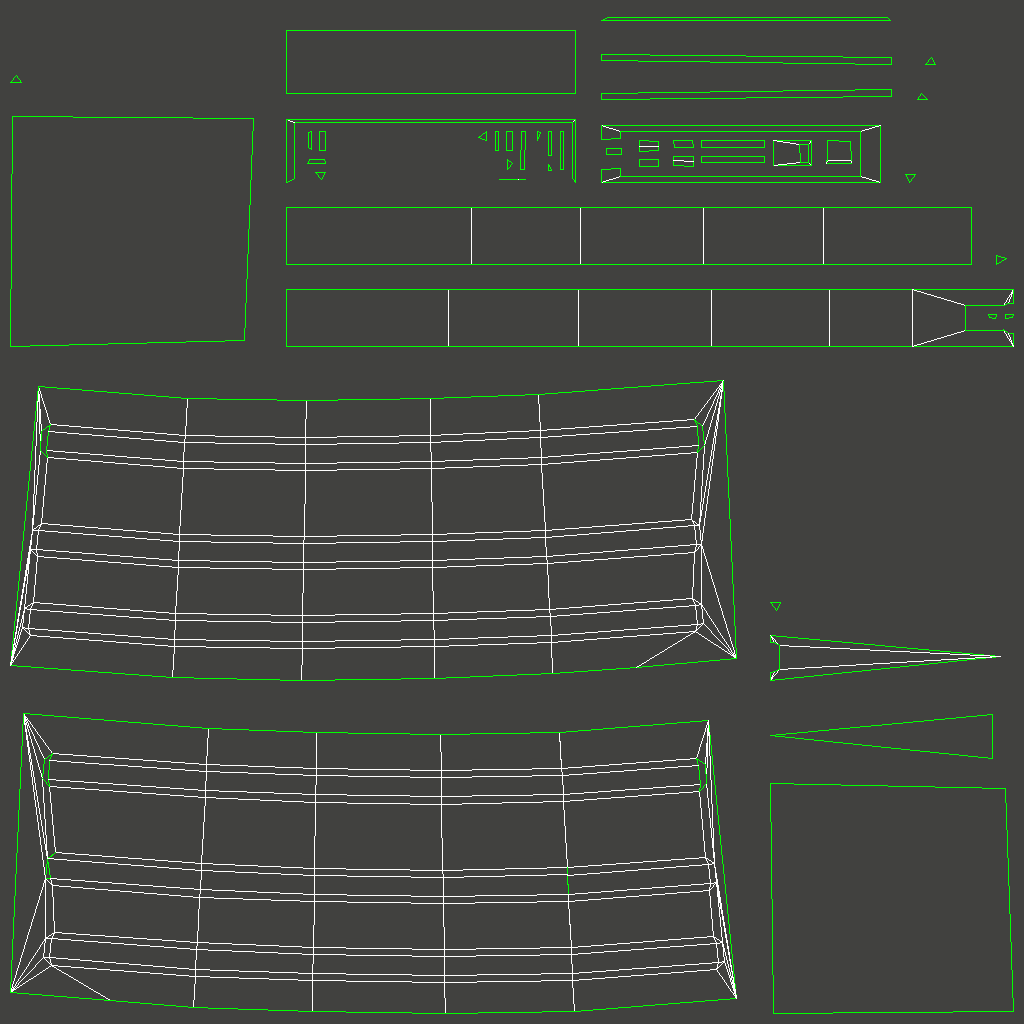
I understand the defects in this: some of the polys are not square, wasted uv space, etc.
I've optimized (and I'm wondering if this is right/OK) these polys to look like this:
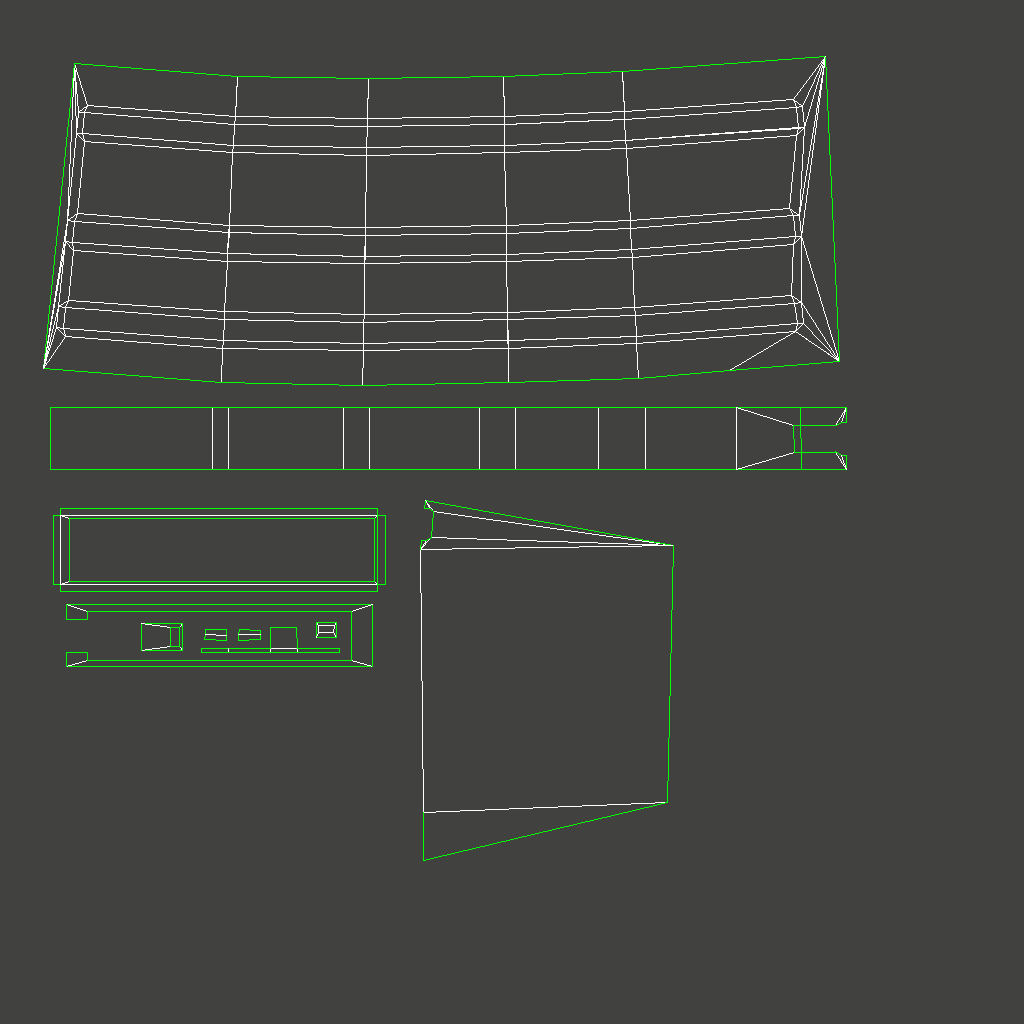
My question is this:
Do you see any problems with the way that the mag's UVW's have been optimized in the second picture, i.e., combining like faces to save UVW space?
Given, this is just the mag. The copy that I'm working on has the uvw's NON-normalized (Saved). I've done just the mag so far. After a complete multiObjectsUnwrap, these will of course be correct scale proportionally to the other objects, UVWs packed tighter, etc.
My biggest question is do you see anything wrong with consolidating UVW space like this (the ones combined are asymmetrically equivalent to their opposite on the model, not to mention opposite facing, thus only one is seen at a given perspective view time in-game/staring at the model).
Also, a question about shading groups. Was there something mentioned about having to break/detach edge verts on edges where there are two convening shading groups?
So here is something I'm experimenting with. I'm trying to save UV space by combining like faces. You'll see what I'm talking about from the two screens I'm about to share. But first, I have a question:
As an example, I'd like to share with you the unwrap of just the magazine. When I first go to unwrap, it gives me a template like so:
I understand the defects in this: some of the polys are not square, wasted uv space, etc.
I've optimized (and I'm wondering if this is right/OK) these polys to look like this:
My question is this:
Do you see any problems with the way that the mag's UVW's have been optimized in the second picture, i.e., combining like faces to save UVW space?
Given, this is just the mag. The copy that I'm working on has the uvw's NON-normalized (Saved). I've done just the mag so far. After a complete multiObjectsUnwrap, these will of course be correct scale proportionally to the other objects, UVWs packed tighter, etc.
My biggest question is do you see anything wrong with consolidating UVW space like this (the ones combined are asymmetrically equivalent to their opposite on the model, not to mention opposite facing, thus only one is seen at a given perspective view time in-game/staring at the model).
Also, a question about shading groups. Was there something mentioned about having to break/detach edge verts on edges where there are two convening shading groups?

-
Rhino
- Retired PR Developer
- Posts: 47909
- Joined: 2005-12-13 20:00
Re: [Weapon] Bren L4A4 LMG (PR:F) [WIP]
overlapping common UVs is fine if 1, your not baking (if you are it becomes a bit problematic, but not impossible, also keep in mind baking the AO maps ie, shadows onto your textures even if your not baking normals etc) and 2, there is nothing that is or needs to be drastically different between the two textures. For overlapping both sides of the mag, I don't see any problems with it, as your only going to see one side at a time so your not going to easily notice both sides have the same exact scratches etc, they both have the same lighting from the AO maps and generally, all ok there
So ye, overlapping UVs is a good move in general as you save a lot of UV space and means you can have high rez UVs for the stuff you've got, with the same sized texture map
Smoothing groups are also fine as they are, the export script will do that bit.
So ye, overlapping UVs is a good move in general as you save a lot of UV space and means you can have high rez UVs for the stuff you've got, with the same sized texture map
Smoothing groups are also fine as they are, the export script will do that bit.
-
Rhino
- Retired PR Developer
- Posts: 47909
- Joined: 2005-12-13 20:00
-
{ZW}C-LOKE
- Posts: 202
- Joined: 2012-11-26 20:13
Re: [Weapon] Bren L4A4 LMG (PR:F) [WIP]
Yes Rhino, sorry about the long periods of silence... School is really kicking my asterisk (*) lately...
So I have UVW unwrapped all of the childed objects to the base. Those elements are done. I'm currently in the process of UVW unwrapping the base. In total, I'd say I'm about 85% done UVW unwrapping the whole model, maybe 90-93/94. I have over three-quarters of the base UVW unwrapped. The base is a complicated piece of geometry. I'm instead using UVW mapping add modifier on selected polys, then a UVW unwrap modifier on top of that. After I finish each section, I collapse all on the stack and select the next group of polys. This allows me to take sections of the one object, in this case, the geometrically complicated "base" as it's known in the hierarchy tree so far, and unwrap in managed sections. As I go to UVW unwrap, I end up with tris and quads that are part of a larger piece of geometry I'd just as soon like to UVW unwrap as one whole slice of geometry (for texturing) completely unattached to anything. This is painstakingly time consuming to find the offending polygon's location and weld it back in place. All of this is of course well before I go to run the MultiObjectsUnwrap script, and then pack the UVWs and rip a template.
There have been a couple of geometrical errors in the model, like unnecessary polys, a couple of rogue isolated vertices, and a couple of locations that were not fully/properly welded. Those errors were in part found by UVW unwrapping and seeing small errors in the flattened geometry; which is good, because they somehow got missed on the couple of passes that I had done, on top of checking while I work. In cases like this, I would have to collapse-all the stack, go in, do my dirty edits, then apply another UVW mapping add on selected polys, then add another UVW unwrap modifier on top of that. If I didn't do it this way, the modifiers on the stack would be irrelevant/not save correctly, because the geometry had changed since the modifiers were put on the stack! Took me a while to figure that out, btw, but that was back in 2006, different modifiers, and the camel of course.
To be honest, I had no idea that I could do it like that; I though all there was was UVW unwrap modifier, but this does the whole object. Pretty messy for the base. It was through experimentation styles that I was able to figure out how to selectively target specific sub-geometry of the objects and unwrap them separately through the use of the UVW mapping add/UVW unwrap modifier stack! SO not to break my arm patting myself on the back or anything, but, MEDIC!
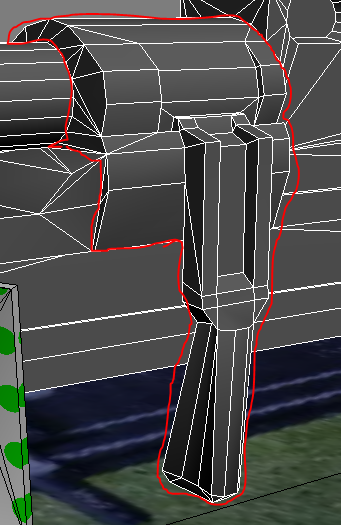
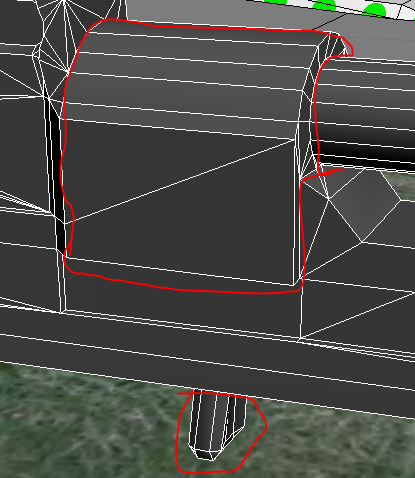
The only parts that are left to UVW unwrap in the whole model are the pistol grip, the buttstock, and:
The issue isn't the difficulty/motivation to do it; I WANT to do it, and it's not that hard. My problem is school. This class is really demanding of me right now at this particular juncture in time.
EDIT: For all objects other than the base, I've been using just a UVW unwrap modifier, non-normalized flattening, 45 degree. It's the base solely that I've been using the UVW mapping add on selected polys / UVW unwrap modifier combo. I've also been checking my work as I go, adding just a UVW unwrap modifier to the base and looking to make sure this is working, which it is.
Can't say for sure when I'll have the time to finish this, but hopefully by the end of the week I'm well on my way texturing. I will of course give an update once I have the unwrap finished, and a packed UVW template to share, before even going there.
So I have UVW unwrapped all of the childed objects to the base. Those elements are done. I'm currently in the process of UVW unwrapping the base. In total, I'd say I'm about 85% done UVW unwrapping the whole model, maybe 90-93/94. I have over three-quarters of the base UVW unwrapped. The base is a complicated piece of geometry. I'm instead using UVW mapping add modifier on selected polys, then a UVW unwrap modifier on top of that. After I finish each section, I collapse all on the stack and select the next group of polys. This allows me to take sections of the one object, in this case, the geometrically complicated "base" as it's known in the hierarchy tree so far, and unwrap in managed sections. As I go to UVW unwrap, I end up with tris and quads that are part of a larger piece of geometry I'd just as soon like to UVW unwrap as one whole slice of geometry (for texturing) completely unattached to anything. This is painstakingly time consuming to find the offending polygon's location and weld it back in place. All of this is of course well before I go to run the MultiObjectsUnwrap script, and then pack the UVWs and rip a template.
There have been a couple of geometrical errors in the model, like unnecessary polys, a couple of rogue isolated vertices, and a couple of locations that were not fully/properly welded. Those errors were in part found by UVW unwrapping and seeing small errors in the flattened geometry; which is good, because they somehow got missed on the couple of passes that I had done, on top of checking while I work. In cases like this, I would have to collapse-all the stack, go in, do my dirty edits, then apply another UVW mapping add on selected polys, then add another UVW unwrap modifier on top of that. If I didn't do it this way, the modifiers on the stack would be irrelevant/not save correctly, because the geometry had changed since the modifiers were put on the stack! Took me a while to figure that out, btw, but that was back in 2006, different modifiers, and the camel of course.
To be honest, I had no idea that I could do it like that; I though all there was was UVW unwrap modifier, but this does the whole object. Pretty messy for the base. It was through experimentation styles that I was able to figure out how to selectively target specific sub-geometry of the objects and unwrap them separately through the use of the UVW mapping add/UVW unwrap modifier stack! SO not to break my arm patting myself on the back or anything, but, MEDIC!
The only parts that are left to UVW unwrap in the whole model are the pistol grip, the buttstock, and:
The issue isn't the difficulty/motivation to do it; I WANT to do it, and it's not that hard. My problem is school. This class is really demanding of me right now at this particular juncture in time.
EDIT: For all objects other than the base, I've been using just a UVW unwrap modifier, non-normalized flattening, 45 degree. It's the base solely that I've been using the UVW mapping add on selected polys / UVW unwrap modifier combo. I've also been checking my work as I go, adding just a UVW unwrap modifier to the base and looking to make sure this is working, which it is.
Can't say for sure when I'll have the time to finish this, but hopefully by the end of the week I'm well on my way texturing. I will of course give an update once I have the unwrap finished, and a packed UVW template to share, before even going there.
Last edited by {ZW}C-LOKE on 2013-01-08 10:24, edited 4 times in total.
Reason: I'm an airheady scatterbrained flip flop with terrible organizational skills and a complete lack of articulation.
Reason: I'm an airheady scatterbrained flip flop with terrible organizational skills and a complete lack of articulation.
-
{ZW}C-LOKE
- Posts: 202
- Joined: 2012-11-26 20:13
Re: [Weapon] Bren L4A4 LMG (PR:F) [WIP]
Just a little update here...
UVW unwrap is done. Just finished it. Still needs to be packed and I have to figure out what else I can combine and what I can't.
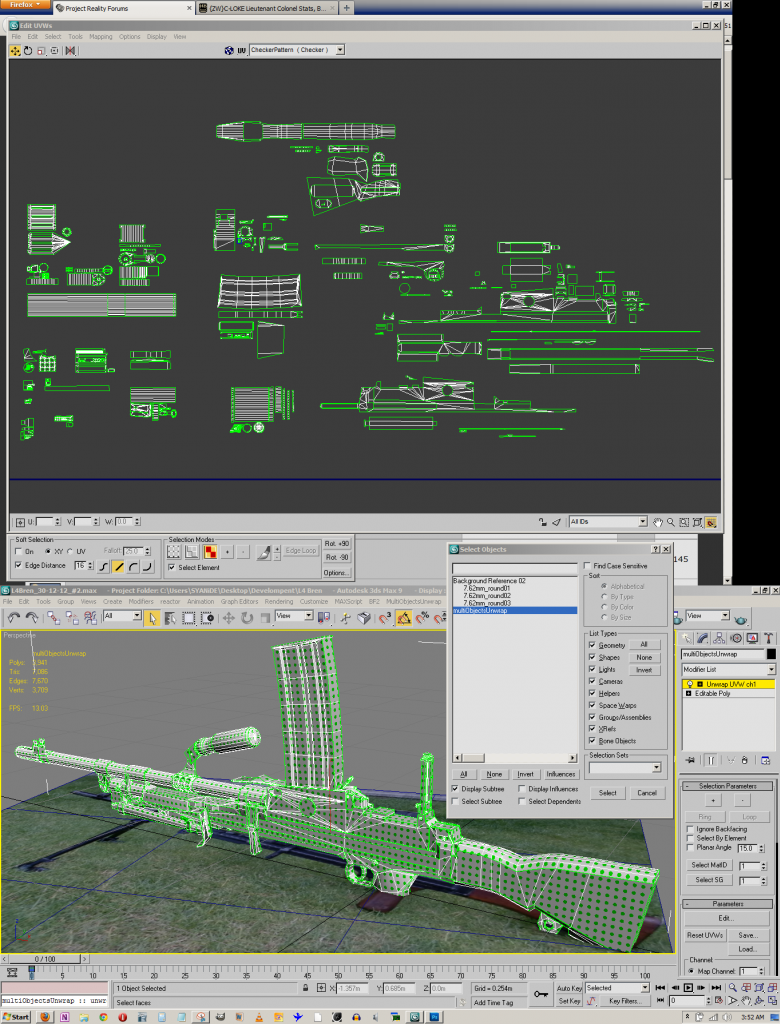
But for now, I'm going to sleep. I'm more tired than, shit I don't know, but I'm beat.
UVW unwrap is done. Just finished it. Still needs to be packed and I have to figure out what else I can combine and what I can't.
But for now, I'm going to sleep. I'm more tired than, shit I don't know, but I'm beat.
-
Rhino
- Retired PR Developer
- Posts: 47909
- Joined: 2005-12-13 20:00
Re: [Weapon] Bren L4A4 LMG (PR:F) [WIP]
Awesome, sorry I totally forgot to get back to you on your last bit, will do tomoz
-
{ZW}C-LOKE
- Posts: 202
- Joined: 2012-11-26 20:13
Re: [Weapon] Bren L4A4 LMG (PR:F) [WIP]
No biggie... Post #110 is probably far more relevant/interesting anyways, so just skip it. Whole lot of babbling for nothing. UVW unwrap is done now, and I'm crashing. I'll pack it in the next couple of days, and share a packed UVW template. Maybe get some feedback on that first before I start texturing.
-
Rhino
- Retired PR Developer
- Posts: 47909
- Joined: 2005-12-13 20:00
-
{ZW}C-LOKE
- Posts: 202
- Joined: 2012-11-26 20:13
Re: [Weapon] Bren L4A4 LMG (PR:F) [WIP]
Ok, so I've packed the UVWs. Maybe I should explain a bit...
First of all, I've sent you a PM with a download link for two things:
1. The updated Bren scene, packed UVWs, unwrap UVWs modifier still on the stack, not yet collapsed (nor has it been since before I started packing. Just saved is all).
2. A 2048^2 .jpg of the UVW template, because my photosharing site does not post to forums larger than 1024x?, but we'll see.
Also note, the UVWs are set up for 2048^2 right now in the scene. This is so that I can do higher def texturing, export from photoshop in 1024^2, and change the UVWs back to 1024^2 after all the photoshop work is done. Right now, I plan on using the .psd from the photoshop Bren template/dds as the material that is assigned to the model, so that when I work on the texturing, I can just save in Photoshop and it will update in 3ds max; so that I can visually watch what I'm doing in max while I texture. I will of course change it back to 1024^2 after I have a .dds that works.
A couple of notes.
First of all, there is one piece of geometry that spans the entire length of the template. This would be the righthand-side of the weapon. So there was little I could do to scale up anymore, unless I wanted to have a seam over where the cocking handle travels into the buttstock.
Second, there are several small "pits" where the polys were so small, or the locations so obscure, I figured I could just dump them all into these pits and texture them that way. In case that doesn't work out for certain polys, (i.e., when I go to do normals, shade, AO occlusion, alpha) I also have quite a bit of space left over so that I can just move the troubled polys out of these pits and continue on. I anticipate there will probably be a couple, if not at least one (?), we'll see. There were a couple of areas or polys where I got brave, but we'll see how that works out.
Third, part of that empty space will eventually be used for LOD3, farther down the road.
Here is an imageshare of the UVW template, in .jpg (yes I know, the photoshop work will need to be done in .png)
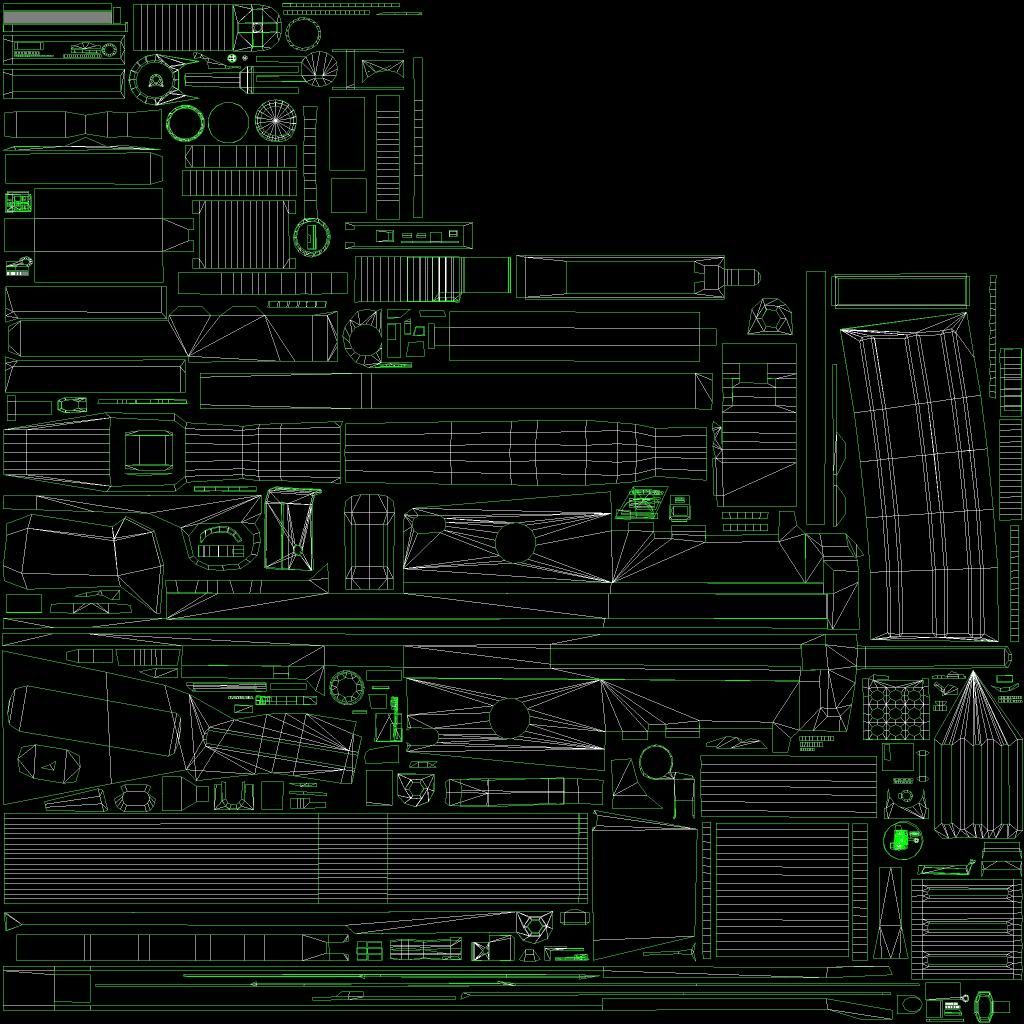
PM sent just in case!
First of all, I've sent you a PM with a download link for two things:
1. The updated Bren scene, packed UVWs, unwrap UVWs modifier still on the stack, not yet collapsed (nor has it been since before I started packing. Just saved is all).
2. A 2048^2 .jpg of the UVW template, because my photosharing site does not post to forums larger than 1024x?, but we'll see.
Also note, the UVWs are set up for 2048^2 right now in the scene. This is so that I can do higher def texturing, export from photoshop in 1024^2, and change the UVWs back to 1024^2 after all the photoshop work is done. Right now, I plan on using the .psd from the photoshop Bren template/dds as the material that is assigned to the model, so that when I work on the texturing, I can just save in Photoshop and it will update in 3ds max; so that I can visually watch what I'm doing in max while I texture. I will of course change it back to 1024^2 after I have a .dds that works.
A couple of notes.
First of all, there is one piece of geometry that spans the entire length of the template. This would be the righthand-side of the weapon. So there was little I could do to scale up anymore, unless I wanted to have a seam over where the cocking handle travels into the buttstock.
Second, there are several small "pits" where the polys were so small, or the locations so obscure, I figured I could just dump them all into these pits and texture them that way. In case that doesn't work out for certain polys, (i.e., when I go to do normals, shade, AO occlusion, alpha) I also have quite a bit of space left over so that I can just move the troubled polys out of these pits and continue on. I anticipate there will probably be a couple, if not at least one (?), we'll see. There were a couple of areas or polys where I got brave, but we'll see how that works out.
Third, part of that empty space will eventually be used for LOD3, farther down the road.
Here is an imageshare of the UVW template, in .jpg (yes I know, the photoshop work will need to be done in .png)
PM sent just in case!
-
lucky.BOY
- Posts: 1438
- Joined: 2010-03-03 13:25
Re: [Weapon] Bren L4A4 LMG (PR:F) [WIP]
I think you should have all your 3rd person geometry o separate texture, no?
https://www.realitymod.com/forum/f189-m ... apons.html
https://www.realitymod.com/forum/f189-m ... apons.html
-
Rhino
- Retired PR Developer
- Posts: 47909
- Joined: 2005-12-13 20:00
Re: [Weapon] Bren L4A4 LMG (PR:F) [WIP]
I'll give you feedback on this tomoz but there is quite a bit that needs fixing at first glance.

Ye, lod3 should be on its own sheet, shouldn't be on the 1st person sheet, worst place for it, especially taking up that much space if you ignored the fact that this texture shouldn't be loaded by anyone not holding the gun which it would be loaded by everyone if it was used in lod3lucky.BOY wrote:I think you should have all your 3rd person geometry o separate texture, no?
https://www.realitymod.com/forum/f189-m ... apons.html
-
{ZW}C-LOKE
- Posts: 202
- Joined: 2012-11-26 20:13
Re: [Weapon] Bren L4A4 LMG (PR:F) [WIP]
Oh yeah, you're right on this... I guess I missed that memo!lucky.BOY wrote:I think you should have all your 3rd person geometry o separate texture, no?
https://www.realitymod.com/forum/f189-m ... apons.html
That makes sense... It's cool, just give me a couple of pointers or ideas of what I should do here and I'll giver her a go.[R-DEV]Rhino wrote: Ye, lod3 should be on its own sheet, shouldn't be on the 1st person sheet, worst place for it, especially taking up that much space if you ignored the fact that this texture shouldn't be loaded by anyone not holding the gun which it would be loaded by everyone if it was used in lod3
-
Rhino
- Retired PR Developer
- Posts: 47909
- Joined: 2005-12-13 20:00
Re: [Weapon] Bren L4A4 LMG (PR:F) [WIP]
lol, forgot about this again! Will get some feedback to you right after I finish this IED
-
lucky.BOY
- Posts: 1438
- Joined: 2010-03-03 13:25
Re: [Weapon] Bren L4A4 LMG (PR:F) [WIP]
You can always use rectangular UV sheet, like 1024x2048, i think, if one cluster is too long for a square sheet.
-
Rhino
- Retired PR Developer
- Posts: 47909
- Joined: 2005-12-13 20:00
Re: [Weapon] Bren L4A4 LMG (PR:F) [WIP]
Ye that's what I was thinking too would be best for this weaponlucky.BOY wrote:You can always use rectangular UV sheet, like 1024x2048, i think, if one cluster is too long for a square sheet.
Anyways not going to give you feedback today, will try and give you some tomoz