[Menu] New/Improved HUDs (PR:F) [WIP]

Making or wanting help making your own asset? Check in here
Post Reply
Rhino
Retired PR Developer
Posts: 47909
Joined: 2005-12-13 20:00

Re: [Menu] New/Improved HUDs (PR:F) [WIP]

Post by Rhino »

Those look to me like Mirage 2k HUDs or close to it, at least the modern version of the Mirage HUDs and not the old Mirage III HUDs, but I haven't 100% confirmed that the old Mirage III HUD is yellow and like I've shown it, but even so, think its a nice base to work on :)
Moszeusz6Pl wrote:You mean that I should make 2 separates HUDs, for two separates weapons, one for radar and second for locking and firing?
No it should be part of the weapon HUD, not another HUD, you said something about having conflict HUDs inside a HUD etc.
Moszeusz6Pl wrote:Missle lock range is limited nor the HUD or weapon, but by projectile. eg ObjectTemplate.seek.maxDistLock 2200 in am39_exocet.tweak
Ye, what I meant by weapon but you are right, it is technically the projectile. But afaik the range the lock boxes come up on the HUD is limited by the HUD no?
Moszeusz6Pl wrote:If I would have to add text under Range, I would have to change 32x32 texture to 128x128, don't think it's cost-effective for such small thing. I can add "locked" text on bottom of the screen, much cheaper in resources.
No its not if you have to do that. Any other way you can think of having both distance meter and the locked text on at the same time? Possibly just screw the locked text, or have the locked text on some other part of the HUD?

Also that reminds me of another idea I had about the HUDs which was to give a visual HUD warning when you where being locked, rather than just a sound, possibly a big red "locked" or something box in the bottom right or something? very low priority but might be worth looking into :)
Image
Moszeusz6Pl
Retired PR Developer
Posts: 939
Joined: 2010-06-24 13:41

Re: [Menu] New/Improved HUDs (PR:F) [WIP]

Post by Moszeusz6Pl »

[R-DEV]Rhino wrote: No it should be part of the weapon HUD, not another HUD, you said something about having conflict HUDs inside a HUD etc.
If you look closer at first screenshoot, you will see that there are 2 triangles on target, one is from Radar, and second from locking system
I fixed it by making all three lock icon the same size, as you can see at second picture. So technically they are 2 parts of HUD, which looks like one.
Image
Image
[R-DEV]Rhino wrote: Ye, what I meant by weapon but you are right, it is technically the projectile. But afaik the range the lock boxes come up on the HUD is limited by the HUD no?
I didn't found any line in HUD setting, witch value about 3000, so its probably using map view distant, must check on other maps.

[R-DEV]Rhino wrote: No its not if you have to do that. Any other way you can think of having both distance meter and the locked text on at the same time? Possibly just screw the locked text, or have the locked text on some other part of the HUD?
As I said before I can make a locked text somewhere on the screen, but it will be in the same place, no mater where target is.

[R-DEV]Rhino wrote: Also that reminds me of another idea I had about the HUDs which was to give a visual HUD warning when you where being locked, rather than just a sound, possibly a big red "locked" or something box in the bottom right or something? very low priority but might be worth looking into :)
It was done in vanillia, so it should be possible.

Edit: I was looking into making EXOCET locking after pressing LRMB, but it would work properly only when where was just one secondary weapon, so I will make normal EXOCET HUD.

Image
Rhino
Retired PR Developer
Posts: 47909
Joined: 2005-12-13 20:00

Re: [Menu] New/Improved HUDs (PR:F) [WIP]

Post by Rhino »

Moszeusz6Pl wrote:If you look closer at first screenshoot, you will see that there are 2 triangles on target, one is from Radar, and second from locking system
I fixed it by making all three lock icon the same size, as you can see at second picture. So technically they are 2 parts of HUD, which looks like one.
http://s8.postimage.org/3nndvj3t1/bf2_2 ... 130751.png
http://s13.postimage.org/uw49bcquv/bf2_ ... 162919.png
Sounds good, providing their isn't a conflict between the locked and non-locked symbols.

But is this how the AtG missile HUD on the Su-25 worked which was the old Mirage's Exocet HUD?
Moszeusz6Pl wrote:I didn't found any line in HUD setting, witch value about 3000, so its probably using map view distant, must check on other maps.
In theory, the lock boxes can't be seen past the View Distance of a map so if the value is grater than the VD, then it will just be limited to the map's VD.

Moszeusz6Pl wrote:As I said before I can make a locked text somewhere on the screen, but it will be in the same place, no mater where target is.
Ye, that should be fine :)

Moszeusz6Pl wrote:It was done in vanillia, so it should be possible.
Yep, what I was thinking too.

Moszeusz6Pl wrote:Edit: I was looking into making EXOCET locking after pressing LRMB, but it would work properly only when where was just one secondary weapon, so I will make normal EXOCET HUD.
You could make it so that when you switch to the Exocet weapon, that you then go straight into the Exocet HUD/Radar Screen, which is basically the same as what CA did iirc, rather than triggering it via clicking the RMB or w/e like on an Attack chopper.
https://www.youtube.com/watch?v=DaQwiLk3Nt8&t=01m40s

For normal flight view you would just use weapon 1 (radar off) or 2 (R550s) which would be normal HUDs :)
Image
Moszeusz6Pl
Retired PR Developer
Posts: 939
Joined: 2010-06-24 13:41

Re: [Menu] New/Improved HUDs (PR:F) [WIP]

Post by Moszeusz6Pl »

I manage do get Lock warning and Missile Locked text working

Image
Image

This double triange on second screenshoot is because he pooped flares.
Where should I put this two texts?

Image
Rhino
Retired PR Developer
Posts: 47909
Joined: 2005-12-13 20:00

Re: [Menu] New/Improved HUDs (PR:F) [WIP]

Post by Rhino »

Nice work :)

I think both sets of text should go on the right under altitude, with locked being on the top, maybe "Target Locked" or something, and the locked warning under it, at basically the same height area as the cannon and missile names are :)
Image
Moszeusz6Pl
Retired PR Developer
Posts: 939
Joined: 2010-06-24 13:41

Re: [Menu] New/Improved HUDs (PR:F) [WIP]

Post by Moszeusz6Pl »

Finally I managed to understand what cause HUD showing enemy outside lock range.

Normally you add line

Code: Select all

hudBuilder.setObjectMarkerNodeWeapon 		1
to HUD marked, so it's linked with weapon, and is showing targets within lock range, and showing locked target. If you forget or didn't add this line, HUD marker won't know about weapon, so it won't show locking, and will show enemies to lock distance.

I have changed Russian text in Altitude and Speed Boxes to Spanish.

Image
Image

Also made new EXOCET Hud based on Glimmerman video.

Image
Image
Image

I am thinking about removing minimap from this view. I didn't add any navigation instruments here, because it's designed to be used only when locking.
I will change text from EXOCET to EXOCET ANTi-SHIP or EXOCET ANTi-SHIP MISSLE, since there is enought space for it.

Also HUD for A4 is nearly done, so prepare next jets.

Edit:
Finished A4:
Image
Image

Edit2:
Fixed EXOCET MISSLES:
Image
Last edited by Moszeusz6Pl on 2013-01-06 17:17, edited 3 times in total.

Image
Rhino
Retired PR Developer
Posts: 47909
Joined: 2005-12-13 20:00

Re: [Menu] New/Improved HUDs (PR:F) [WIP]

Post by Rhino »

Very nice :)

One thing thou, if its english, you've spelt Missile incorrectly, Its MISSILE not MISSLE but but then we go back to the problem of it should be a Spanish HUD.

Anti-Ship Missile in Spanish from what I can tell is: Misiles Antibuque

But ye, might just be worth just having "AM39 EXOCET" instead, but w/e you choose :)

Very nice work so far! :D
Image
Glimmerman
Retired PR Developer
Posts: 3237
Joined: 2007-08-14 11:12

Re: [Menu] New/Improved HUDs (PR:F) [WIP]

Post by Glimmerman »

Shouldn't it just say: AM-39 ??
Sidewinders are called AIM-9 in the HUD for the same reason IMO
Rhino
Retired PR Developer
Posts: 47909
Joined: 2005-12-13 20:00

Re: [Menu] New/Improved HUDs (PR:F) [WIP]

Post by Rhino »

Not a problem with the weapons name, that's the same for every language (its a French name for starters translated is "Flying Fish" and its name is pretty well known as an Anti-Ship missile so best way we can get that across to all languages that it is an Anti-Ship missile is via the missiles name IMO.

Reason why its just "AIM-9" on normal huds is mainly space etc but this HUD doesn't have that problem.
Image
Moszeusz6Pl
Retired PR Developer
Posts: 939
Joined: 2010-06-24 13:41

Re: [Menu] New/Improved HUDs (PR:F) [WIP]

Post by Moszeusz6Pl »

Damn i, I saw this text a lot of time for many years, but saw this 'i' about 2 or 3 days ago, in one of BF2 errors :lol:

I think that it will be better, if this Anti-Ship will be in English, so players will know how to use it.

I also called AA missiles shortly, but when I have more space there, I thought that I can give full missile name, so players will know that they should use it on ship, not on Air or Ground target.

Waiting for references for next jets.

Image
Rhino
Retired PR Developer
Posts: 47909
Joined: 2005-12-13 20:00

Re: [Menu] New/Improved HUDs (PR:F) [WIP]

Post by Rhino »

Moszeusz6Pl wrote:Waiting for references for next jets.
Oh missed the bit where you said you had finished the A-4, but uhhh, you still need to do its sight which needs to be part of the HUD:
Image
Image
Moszeusz6Pl
Retired PR Developer
Posts: 939
Joined: 2010-06-24 13:41

Re: [Menu] New/Improved HUDs (PR:F) [WIP]

Post by Moszeusz6Pl »

I thought that you meant the sights will be modeled, but ok, I will do this.

Image
Rhino
Retired PR Developer
Posts: 47909
Joined: 2005-12-13 20:00

Post by Rhino »

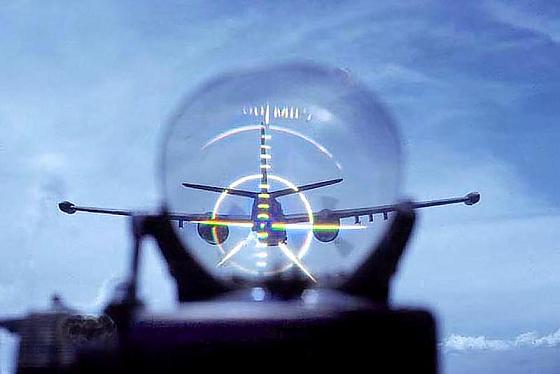
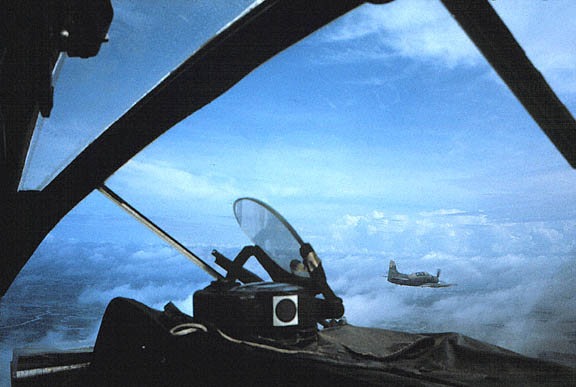
Na I was explaining how it is in r/l, ie, it isn't a working HUD like on modern jets, its just a static image reflected up in front of the pilot, like this one from a WW2 Spitfire:
Image

The best way for us to show it however is though the ingame HUD :)

EDIT: BTW, just looking up refs for the A-1H gunsight and found that its actually the exact same gunsight the A-4 uses, just in yellow so if you need any more refs for the A-4, here they are, will go into more detail for the A-1H later :)
Image
Image
Image
Last edited by Rhino on 2013-01-06 19:37, edited 1 time in total.
Image
Rhino
Retired PR Developer
Posts: 47909
Joined: 2005-12-13 20:00

Re: [Menu] New/Improved HUDs (PR:F) [WIP]

Post by Rhino »

Right I've added the A-1H HUD info to the OP for ya :)

One big thing I forgot to mention is that you need to write down all the GUI indexes you make into a list that we can merge into our GUI Indexes list, like the one I posted in the OP so we do not have conflicting HUD GUI Indexes later on. Please confirm you've got this message, and are doing this :)

Cheers!
Image
Moszeusz6Pl
Retired PR Developer
Posts: 939
Joined: 2010-06-24 13:41

Re: [Menu] New/Improved HUDs (PR:F) [WIP]

Post by Moszeusz6Pl »

Yes I am updating my own GUIIndex list whole time. For now I have added this Indexes:

Code: Select all

680 - Mirrage3ea AA & CANNON
681 - Mirrage3ea AA2 & CANNON
682 - Mirrage3ea BOMBS & CANNON
683 - Mirrage3ea EXOTEC & CANNON
684 - Mirrage3ea Flares & CANNON
685 - Mirrage3ea AA & RADAR & CANNON
685 - Mirrage3ea AA2 & RADAR & CANNON

690 - A4C BombS & CANNON
690 - A4C Flares & CANNON

Image
Hauteclocque
Retired PR Developer
Posts: 3312
Joined: 2008-10-02 17:55

Re: [Menu] New/Improved HUDs (PR:F) [WIP]

Post by Hauteclocque »

Just a detail but it's Mirage and not Mirrage. ;)

Looks pretty good, do you plan to rework other PR plane HUDs after your work on PR:F ?
Image
Rhino
Retired PR Developer
Posts: 47909
Joined: 2005-12-13 20:00

Post by Rhino »

gdgd, but it seems that some IDs come up twice, like both A4C Boimbs and Flares using 690, and 685 used twice?

EDIT: Right I've added the Harrier HUDs also to my OP and cleaned it up a bit :D
Last edited by Rhino on 2013-01-07 04:45, edited 1 time in total.
Image
AncientMan
Retired PR Developer
Posts: 5111
Joined: 2007-05-22 07:42

Re: [Menu] New/Improved HUDs (PR:F) [WIP]

Post by AncientMan »

Rhino just mentioned this thread to me...

For example, this image:
http://s1.postimage.org/nwk31kmqn/bf2_2 ... 180114.png

I really hope you're doing it properly where you can just use a single line texture, then duplicate, rotate and resize it around the hud, instead of it being a massive oversized 800x600px texture that's 98% wasted space... It's a massive problem we have with the hud at the moment, and if you're going to be doing this, it's best to do it properly from the start... Even with other slightly more complex images, try and make them as small as possible in size, or if there's lots of wasted space, try splitting up the image and rotating it so it fits better into an atlas texture sheet (empty space is bad!)

Code: Select all

hudBuilder.setNodePos			x y
hudBuilder.setNodeSize			w h
hudBuilder.setPictureNodeRotation	d
While I'm on the topic, textures also need to be tga images for putting in the hud atlas. If the texture is massive (and it's actually required to be massive), like, larger than 64x64px, then it should be left as a .dds image outside of the atlas, however you need to make sure it's correctly sized to a power of 2 dimension (ie, 2px, 4, 8, 16, 32, 64, 128, 256, 512, etc), and NO mipmaps! However, if it's a very common texture, it should be put in the atlas regardless of size.
Image
Moszeusz6Pl
Retired PR Developer
Posts: 939
Joined: 2010-06-24 13:41

Re: [Menu] New/Improved HUDs (PR:F) [WIP]

Post by Moszeusz6Pl »

[R-DEV]Hauteclocque wrote:Just a detail but it's Mirage and not Mirrage. ;)

Looks pretty good, do you plan to rework other PR plane HUDs after your work on PR:F ?
I might do this after finishing this one if you want, but probably after exams.
[R-DEV]Rhino wrote:gdgd, but it seems that some IDs come up twice, like both A4C Boimbs and Flares using 690, and 685 used twice?
Yes, my bad. Correct one

Code: Select all

680 - Mirage3ea AA & CANNON
681 - Mirage3ea AA2 & CANNON
682 - Mirage3ea BOMBS & CANNON
683 - Mirage3ea EXOTEC & CANNON
684 - Mirage3ea Flares & CANNON
685 - Mirage3ea AA & RADAR & CANNON
686 - Mirage3ea AA2 & RADAR & CANNON

690 - A4C BombS & CANNON
691 - A4C Flares & CANNON
'[R-DEV wrote:AncientMan;1851665']

For example, this image:
http://s1.postimage.org/nwk31kmqn/bf2_2 ... 180114.png

I really hope you're doing it properly where you can just use a single line texture, then duplicate, rotate and resize it around the hud, instead of it being a massive oversized 800x600px texture that's 98% wasted space... It's a massive problem we have with the hud at the moment, and if you're going to be doing this, it's best to do it properly from the start... Even with other slightly more complex images, try and make them as small as possible in size, or if there's lots of wasted space, try splitting up the image and rotating it so it fits better into an atlas texture sheet (empty space is bad!)

Code: Select all

hudBuilder.setNodePos			x y
hudBuilder.setNodeSize			w h
hudBuilder.setPictureNodeRotation	d
While I'm on the topic, textures also need to be tga images for putting in the hud atlas. If the texture is massive (and it's actually required to be massive), like, larger than 64x64px, then it should be left as a .dds image outside of the atlas, however you need to make sure it's correctly sized to a power of 2 dimension (ie, 2px, 4, 8, 16, 32, 64, 128, 256, 512, etc), and NO mipmaps! However, if it's a very common texture, it should be put in the atlas regardless of size.
I didn't know about this Rotate function, didn't saw it in any other PR code. Was doing it like other crosshairs, so massive 1024x1024 texture, will rework it. Was using round numbers whole time. Didn't know about this tga too, will rework it.

Image
Post Reply

Return to “PR:BF2 Community Modding”