
[Menu] New/Improved HUDs (PR:F) [WIP]
-
Arc_Shielder
- Retired PR Developer
- Posts: 1621
- Joined: 2010-09-15 06:39
Re: [Menu] New/Improved HUDs (PR:F) [WIP]
You're the spanish dude here Linx, but are you making the literal translation of the words "Missile Locked" rather than the military term?
-
Rhino
- Retired PR Developer
- Posts: 47909
- Joined: 2005-12-13 20:00
Re: [Menu] New/Improved HUDs (PR:F) [WIP]
Ye don't worry about that, can move the camera to fix it. How dose it look on the A-4?Moszeusz6Pl wrote:I scaled crosshair to 128x128, but as you can see in the screenshoot, whent it's centered, left top part is outside ring, while there is still space in bottom part.

ummm, not sure about that one tbh. From a realism POV, yes, it should be removed but from a gameplay POV, not so sure as while the weapons can't lock onto the targets, the lasers can be used for aircraft to find targets.Moszeusz6Pl wrote:I have also removed laser lockboxes from A1H and A4C, since they can't use it, and it's weird to see them on Atlantic Convoyer.
sounds fine, as long as the radar versions of the same HUD do have the distance to target stillMoszeusz6Pl wrote:I didn't add range finder to non Radar part of HUDs, since I think that jet's without Radar shouldn't see range to target, and I don't think jets with radar will be used on any map, where lockdistance is greater than viewdistance, so I think that there is no need to have it rendered twice


-
Moszeusz6Pl
- Retired PR Developer
- Posts: 939
- Joined: 2010-06-24 13:41
Re: [Menu] New/Improved HUDs (PR:F) [WIP]
Ok, so I have added them back[R-DEV]Rhino wrote: ummm, not sure about that one tbh. From a realism POV, yes, it should be removed but from a gameplay POV, not so sure as while the weapons can't lock onto the targets, the lasers can be used for aircraft to find targets.
)
Here is screenshoot of A4. I manage to make ALT boxes less transparent, so this 1 in front of altitude is much less visible.


I have started working on Harriers HUDs, this is current stage:


Yes, I know that altitude is displayed incoretly, will fix it.
This triangle in BOMB HUD is placeholder. Should I make only circle with dot in the middle, or make it connected with crosshair?
This rocket HUD looks a bit weird, I think I will increase size of this circle, to make it looks better.
Compass is for now from Tornado, should I use one Harrier used before?
I am not sure about lines on left and right, it doesn't have any purpose so I am thinking about removing it, since in references there are some bars showing, which is not used ingame. Also it's not on all references, so it's that important.
Btw. Do you know that you can destroy Atlantic Conveyor with one Mirage_as run? You need to sacrifice the jets itself, but still it's possible to take it down.
Edit. Updated GUI indexes. I run out of space for jet's HUDs so I put Harrier's after 610
Code: Select all
612 - HARRIER AA & CANNON
613 - HARRIER AA RADAR & CANNON
614 - HARRIER BOMBS & CANNON
615 - HARRIER ROCKETS & CANNON
616 - HARRIER AGM & CANNON
617 - HARRIER FLARES & CANNON

680 - Mirage3ea AA & CANNON
681 - Mirage3ea AA2 & CANNON
682 - Mirage3ea BOMBS & CANNON
683 - Mirage3ea EXOTEC & CANNON
684 - Mirage3ea Flares & CANNON
685 - Mirage3ea AA & RADAR & CANNON
686 - Mirage3ea AA2 & RADAR & CANNON

690 - A4C BombS & CANNON
691 - A4C Flares & CANNON

694 - A1H HYDRA & CANNON
695 - A1H BOMBS & CANNON
696 - A1H NAPALM & CANNON
697 - A1H FLARES & CANNON

-
Rhino
- Retired PR Developer
- Posts: 47909
- Joined: 2005-12-13 20:00
Re: [Menu] New/Improved HUDs (PR:F) [WIP]
Nice start
A-4 HUD looks good, although if you can bring the text back down to its normal transparency level, just leaving the border being solid?
Harrier HUD Crosshair I would make a bit smaller, right now quite a large area inside making it a bit hard to aim with. Also is it correctly centred? in the rocket HUD pic, the rocket HUD dashes are slightly lower than this crosshair? http://s2.postimage.org/k0qiarxa1/bf2_2 ... 210916.png

A-4 HUD looks good, although if you can bring the text back down to its normal transparency level, just leaving the border being solid?
Harrier HUD Crosshair I would make a bit smaller, right now quite a large area inside making it a bit hard to aim with. Also is it correctly centred? in the rocket HUD pic, the rocket HUD dashes are slightly lower than this crosshair? http://s2.postimage.org/k0qiarxa1/bf2_2 ... 210916.png
The circle with dot in the middle needs to be connected to the crosshair like in this vid here: HUD Fighter Jet bombing runs and dogfights Lee Bivens - YouTubeMoszeusz6Pl wrote:This triangle in BOMB HUD is placeholder. Should I make only circle with dot in the middle, or make it connected with crosshair?
Ye, they need to be quite a bit bigger than the crosshair and same format as the rest of the HUD if your going to go for this hard HUD view, right now rocket dashes are quite faint. Also keeping in mind the main crosshair needs to be a bit smaller, but dashes still need to be a bit bigger, and also, both need to be centred to the HUD.Moszeusz6Pl wrote:This rocket HUD looks a bit weird, I think I will increase size of this circle, to make it looks better.
Tornado one is better but might be worth making a new one based on this ref (main ref for all the harrier HUDs btw) since neither fit it very well: http://theaviationist.com/wp-content/up ... 7_1280.jpgMoszeusz6Pl wrote:Compass is for now from Tornado, should I use one Harrier used before?
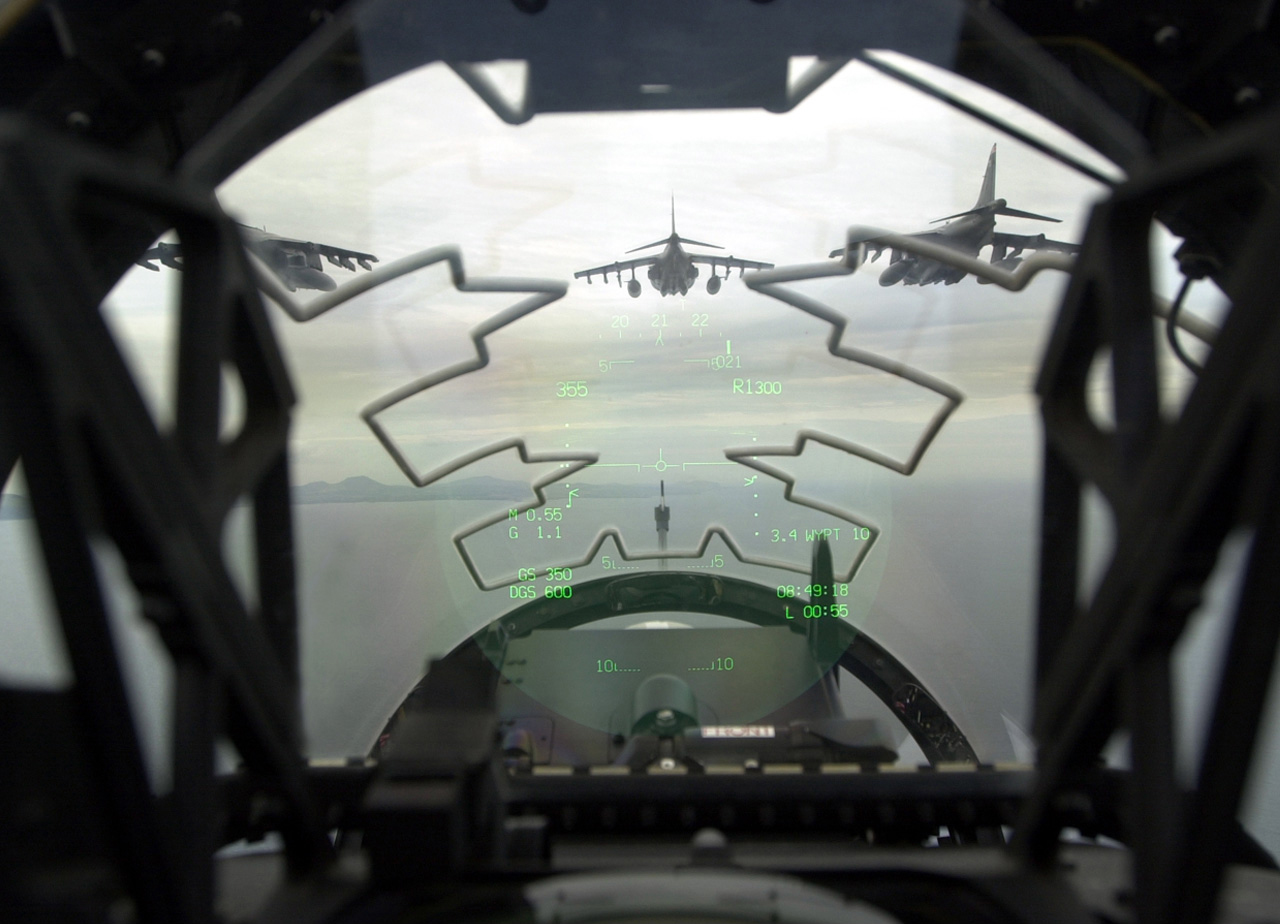
Keep them, they add to the overall feel of the HUD.Moszeusz6Pl wrote:I am not sure about lines on left and right, it doesn't have any purpose so I am thinking about removing it, since in references there are some bars showing, which is not used ingame. Also it's not on all references, so it's that important.
Ye but doing that looses you 11 tickets and a jet for 10mins and one more death on your scoreMoszeusz6Pl wrote:Btw. Do you know that you can destroy Atlantic Conveyor with one Mirage_as run? You need to sacrifice the jets itself, but still it's possible to take it down.
-
Moszeusz6Pl
- Retired PR Developer
- Posts: 939
- Joined: 2010-06-24 13:41
Re: [Menu] New/Improved HUDs (PR:F) [WIP]
I was trying to do it, but I can't find out which font I was using before, and every other I check are giving less transparent result. I will try to find correct one.[R-DEV]Rhino wrote: A-4 HUD looks good, although if you can bring the text back down to its normal transparency level, just leaving the border being solid?
Rocket HUD:
I have made crosshair smaller and dashed circle bigger:

RADAR OFF HUD:

Bomb HUD:
Is HarrierB supposed to be able to lock on target, because I was quite surprised when I hear missile lock when I was flying over Atlanitc Conveyor. I dropped the bomb twice and it perfectly hit target.


AGM HUD
I will make AGM part of HUD same color as rest. It don't look good for me, with this big horizon. I think it would be better if we would have something like in EXOCET HUD.


-
Arc_Shielder
- Retired PR Developer
- Posts: 1621
- Joined: 2010-09-15 06:39
Re: [Menu] New/Improved HUDs (PR:F) [WIP]
Sure, just checking. A couple of spanish told me that might not be it, that's why I asked.Linx_esp wrote:LMAO, of course I didn't make the literal translation (if I would have done so it would be "bloqueado" instead of "fijado")
-
SShadowFox
- Posts: 1123
- Joined: 2012-01-25 21:35
Re: [Menu] New/Improved HUDs (PR:F) [WIP]
Looking good, keep it up.
Why he's not [R-CON]Moszeusz6Pl yet? He's working on the HUD of all the Falklands' planes, I think that he deserves.
Why he's not [R-CON]Moszeusz6Pl yet? He's working on the HUD of all the Falklands' planes, I think that he deserves.
-
Rhino
- Retired PR Developer
- Posts: 47909
- Joined: 2005-12-13 20:00
Re: [Menu] New/Improved HUDs (PR:F) [WIP]
Nice work, a few points however
First of all, your crosshair isn't central as I thought before. Did a quick test and the centre of the screen (where the bullets are aimed towards, well, slightly lower on the harrier since its barrels are on its belly but not the point since at range they will still hit the centreish, so should still be central) is on this red dot here, note how its well above the circle of the crosshair:

Your crosshair should be here on all HUDs

Next the rocket hud, dashes I would bring in more so they are so they are inside the artificial horizon lines, right now just creeping into them, and quite far outside of the main crosshair. Also like the crosshair, not centred to the screen which they should be an also as I said before, they are not really in the same "hard" format as the rest of the HUD, ie, the other lines have really hard edges, where this has very faded edges and is also overall more transparent and as such, looks out of place.
Bomb HUD overall looks good but the bottom circle is a bit pixely right now, think you can up the rez a little? Also would like to see shots of it again, and when flying at angle when you've fixed the central crosshair position but should really have the line connecting to and rotating around the outside of the inner crosshair circle, but not going in if you can do that
But ye, we are also thinking of now is another HUD more like the one the Exocet has, although a bit different. Basically what we are thinking of is something like in this video, from 35secs to 50secs but being able to see the lock boxes: PR 0 85 Top Attack Missiles - YouTube
If you could do something like that it would be best
It may seem that we don't care but we are just careful about how we do our recruiting because we first want to confirm if he's the right kind of guy for the team, with the right attitude, the work is good quality etc as becoming an R-CON, while not a full dev position, leads up to it and just becoming an R-CON, gives you access to a lot of sensitive stuff which people in the past have leaked, or the dev might not be fully interested in PR, or has very different ideas from the rest of the team, or their work is actually something we can't use etc etc.
So far however if we are talking about Moszeusz6Pl again, so far we have only seen good stuff from him and providing he keeps on going this way I don't see any reason why we wouldn't be getting R-CONed any time soon
First of all, your crosshair isn't central as I thought before. Did a quick test and the centre of the screen (where the bullets are aimed towards, well, slightly lower on the harrier since its barrels are on its belly but not the point since at range they will still hit the centreish, so should still be central) is on this red dot here, note how its well above the circle of the crosshair:
Your crosshair should be here on all HUDs
Next the rocket hud, dashes I would bring in more so they are so they are inside the artificial horizon lines, right now just creeping into them, and quite far outside of the main crosshair. Also like the crosshair, not centred to the screen which they should be an also as I said before, they are not really in the same "hard" format as the rest of the HUD, ie, the other lines have really hard edges, where this has very faded edges and is also overall more transparent and as such, looks out of place.
Bomb HUD overall looks good but the bottom circle is a bit pixely right now, think you can up the rez a little? Also would like to see shots of it again, and when flying at angle when you've fixed the central crosshair position but should really have the line connecting to and rotating around the outside of the inner crosshair circle, but not going in if you can do that
Well the big box around the outside doesn't help. I would've ditched that bit, just leaving the big "+" crosshair from the old HUD which you've gotten rid of.Moszeusz6Pl wrote:AGM HUD
I will make AGM part of HUD same color as rest. It don't look good for me, with this big horizon. I think it would be better if we would have something like in EXOCET HUD.
But ye, we are also thinking of now is another HUD more like the one the Exocet has, although a bit different. Basically what we are thinking of is something like in this video, from 35secs to 50secs but being able to see the lock boxes: PR 0 85 Top Attack Missiles - YouTube
If you could do something like that it would be best
Well a few reasons really, although nothing Moszeusz6Pl has done wrong, but we first of all, we haven't seen any of his work first hand yet, which we would need to do first and have someone review it fully, more than just though screenshots but looking at the textures, code and trying it out ingame etc, and we also like to keep an eye on people for some time to see how they progress, take feedback etc.SShadowFox wrote:Why he's not [R-CON]Moszeusz6Pl yet? He's working on the HUD of all the Falklands' planes, I think that he deserves.
It may seem that we don't care but we are just careful about how we do our recruiting because we first want to confirm if he's the right kind of guy for the team, with the right attitude, the work is good quality etc as becoming an R-CON, while not a full dev position, leads up to it and just becoming an R-CON, gives you access to a lot of sensitive stuff which people in the past have leaked, or the dev might not be fully interested in PR, or has very different ideas from the rest of the team, or their work is actually something we can't use etc etc.
So far however if we are talking about Moszeusz6Pl again, so far we have only seen good stuff from him and providing he keeps on going this way I don't see any reason why we wouldn't be getting R-CONed any time soon
-
Moszeusz6Pl
- Retired PR Developer
- Posts: 939
- Joined: 2010-06-24 13:41
Re: [Menu] New/Improved HUDs (PR:F) [WIP]
You are right about crosshair wasn't centered, I had recalculated it few times and tested it in short range, but it looked fine. Have changed it.
I have made dashed circle smaller. I didn't made it solid yet, since it will make transparent again after scaling, so I will make it solid, after it have right size.

Forgot to post how AA HUD looks like, so there is screenshoot:

I have changed bombmarker texture from 16x256 to 32x512 and this is how it look now:


IMO it looks a bit worse, since its scaled to 16x256, while taking 4 times more RAM.
I was looking at compasses in references and couldn't figure out, which value is north. I think it's 36, but I'am not sure if it isn't 00.
Also tested this Harrier_B and it's locking on Atlantic Conveyor and hitting it even if I dropped bombs to the side, from quite high altitude, so no way it's a dumb bomb.
I have made dashed circle smaller. I didn't made it solid yet, since it will make transparent again after scaling, so I will make it solid, after it have right size.
Forgot to post how AA HUD looks like, so there is screenshoot:
I have changed bombmarker texture from 16x256 to 32x512 and this is how it look now:
IMO it looks a bit worse, since its scaled to 16x256, while taking 4 times more RAM.
I was looking at compasses in references and couldn't figure out, which value is north. I think it's 36, but I'am not sure if it isn't 00.
Also tested this Harrier_B and it's locking on Atlantic Conveyor and hitting it even if I dropped bombs to the side, from quite high altitude, so no way it's a dumb bomb.
-
Rhino
- Retired PR Developer
- Posts: 47909
- Joined: 2005-12-13 20:00
Re: [Menu] New/Improved HUDs (PR:F) [WIP]
Rocket HUD dashes are a good size now, and the AA HUD looks good too
And ye, from your screens, old bomb HUD size is better, and the dot connection etc looks good
And ye, either 36 (360) or 0 should be north
And ye, the gr3b has 2x Paveway II 1000lb Laser Guided Bombs (LGBs), its the gr3a which has the 500lb, Mk82 GPBs. Unfortunately no way of stopping the British harrier's LGBs from locking onto the AC in its current setup.
And ye, from your screens, old bomb HUD size is better, and the dot connection etc looks good
And ye, either 36 (360) or 0 should be north
And ye, the gr3b has 2x Paveway II 1000lb Laser Guided Bombs (LGBs), its the gr3a which has the 500lb, Mk82 GPBs. Unfortunately no way of stopping the British harrier's LGBs from locking onto the AC in its current setup.
-
Moszeusz6Pl
- Retired PR Developer
- Posts: 939
- Joined: 2010-06-24 13:41
Re: [Menu] New/Improved HUDs (PR:F) [WIP]
I made rocket HUD more solid, and new compass.


So I think I completed all HUDs except Exocet and ATGM, to which I want to add some more details, because they look a bit too empty right now. I will add some more text, which is in videos that you and Glimmerman posted.
So I think I completed all HUDs except Exocet and ATGM, to which I want to add some more details, because they look a bit too empty right now. I will add some more text, which is in videos that you and Glimmerman posted.
-
Navo
- Posts: 1389
- Joined: 2011-05-22 14:34
Re: [Menu] New/Improved HUDs (PR:F) [WIP]
I think it would be a nice touch to let the bomb HUD have 'CCIP' or 'CCRP'in the bottom right corner.
Last edited by Navo on 2013-01-29 23:22, edited 1 time in total.
-
Moszeusz6Pl
- Retired PR Developer
- Posts: 939
- Joined: 2010-06-24 13:41
-
Rhino
- Retired PR Developer
- Posts: 47909
- Joined: 2005-12-13 20:00
Re: [Menu] New/Improved HUDs (PR:F) [WIP]
Looking good
Constantly computed impact point - Wikipedia, the free encyclopedia
Dunno what CCRP means but don't think we should add it, since it doesn't even work either
Constantly computed impact point - Wikipedia, the free encyclopedia
Dunno what CCRP means but don't think we should add it, since it doesn't even work either
-
Jafar Ironclad
- Retired PR Developer
- Posts: 2203
- Joined: 2008-11-26 00:45
Re: [Menu] New/Improved HUDs (PR:F) [WIP]
Continuously Calculated Release Point. Basically you mark the spot you want to hit using your targeting pod/systems, fly towards it, and hold the pickle. It calculates and updates the correct release position your plane must be at to strike the target, and automatically drops the bomb once you reach it.
Yeah, we wouldn't be able to get either targeting mode to work, really.
Yeah, we wouldn't be able to get either targeting mode to work, really.
-
Rabbit
- Posts: 7818
- Joined: 2006-12-17 15:14
Re: [Menu] New/Improved HUDs (PR:F) [WIP]
Is that what the who laser designation system in bf2 is supposed to do but sucks at doing, like how the box doesn't really track with targets?'[R-DEV wrote:Rhino;1859364']Looking good
Constantly computed impact point - Wikipedia, the free encyclopedia
Dunno what CCRP means but don't think we should add it, since it doesn't even work either

AfSoccer "I just don't see the natural talent."

-
Navo
- Posts: 1389
- Joined: 2011-05-22 14:34
Re: [Menu] New/Improved HUDs (PR:F) [WIP]
However, this looks like CCIP.'[R-DEV wrote:Rhino;1859364']Looking good
Constantly computed impact point - Wikipedia, the free encyclopedia
Dunno what CCRP means but don't think we should add it, since it doesn't even work either
-
Rhino
- Retired PR Developer
- Posts: 47909
- Joined: 2005-12-13 20:00
Re: [Menu] New/Improved HUDs (PR:F) [WIP]
[quote=""'[R-DEV"]Jafar Ironclad;1859372']Continuously Calculated Release Point...[/quote]
Ye same thing, different name.
[quote="Navo""]However, this looks like CCIP.[/quote]
Ye but that's because the real HUD is CCIP, so we just have the same format as it, but without it actually working as a CCIP HUD
Ye same thing, different name.
[quote="Navo""]However, this looks like CCIP.[/quote]
Ye but that's because the real HUD is CCIP, so we just have the same format as it, but without it actually working as a CCIP HUD
-
SShadowFox
- Posts: 1123
- Joined: 2012-01-25 21:35
Re: [Menu] New/Improved HUDs (PR:F) [WIP]
Actually, the CCIP tells you where the bomb will hit if you drop it at an instant, in the other hand, the CCRP will calculate your distance, speed, angle and altitude to the target you selected and will release at the time it should be released to get a nice hit, well, I think that's how it works.[R-DEV]Rhino wrote:Ye same thing, different name.

Last edited by SShadowFox on 2013-01-31 12:02, edited 1 time in total.