
I'm attaching a YouTube clip of a graphical problem I'm experiencing in both BF2 and PR. I run BF2 through Origin.
BF2 Black Cross Stitch Splotches - YouTube
My computer is a Dell Inspiron N5110 with a Intel Core i5-2450M cpu. 6 mb of memory. Direct X 11. Windows 7 Home Premium 64 bit. Graphics are Intel HD Graphics Family.
There is a patchwork of black cross-stitch-like splotches at a certain distance from me in every direction.
Has anyone seen this before?
My computer runs both BF2 and PR very well on high settings other than in this regard.
Thanks for any help you can offer,
cryptofcolumbus
Graphical "cross stitch" effect.
-
Psyrus
- Retired PR Developer
- Posts: 3841
- Joined: 2006-06-19 17:10
Re: Graphical "cross stitch" effect.
Any chance it's related to these threads, which showed up in a search for "black spots terrain" in the support section?
https://www.realitymod.com/forum/f27-pr ... spots.html
https://www.realitymod.com/forum/f27-pr ... spots.html
https://www.realitymod.com/forum/f27-pr ... ectly.html
https://www.realitymod.com/forum/f27-pr ... spots.html
https://www.realitymod.com/forum/f27-pr ... spots.html
https://www.realitymod.com/forum/f26-pr ... holes.html
https://www.realitymod.com/forum/f27-pr ... spots.html
https://www.realitymod.com/forum/f27-pr ... spots.html
https://www.realitymod.com/forum/f27-pr ... ectly.html
https://www.realitymod.com/forum/f27-pr ... spots.html
https://www.realitymod.com/forum/f27-pr ... spots.html
https://www.realitymod.com/forum/f26-pr ... holes.html
-
SnipeHunt
- Posts: 801
- Joined: 2009-02-02 15:35
Re: Graphical "cross stitch" effect.
Looks like the ATI card issue?
there is this:
[quote=""AfterDune"]
Like this? http://i859.photobucket.com/albums/ab15 ... roblem.jpg
If so, do you have an ATI card?
If so, go to your CCC and enable Catalyst AI. [/quote]
or this:
[quote="Valleyforge3946""]11.3 usually works the best. Double check Catalyst AI is enabled. Almost always the prob.[/quote]
there is this:
[quote=""AfterDune"]
Like this? http://i859.photobucket.com/albums/ab15 ... roblem.jpg
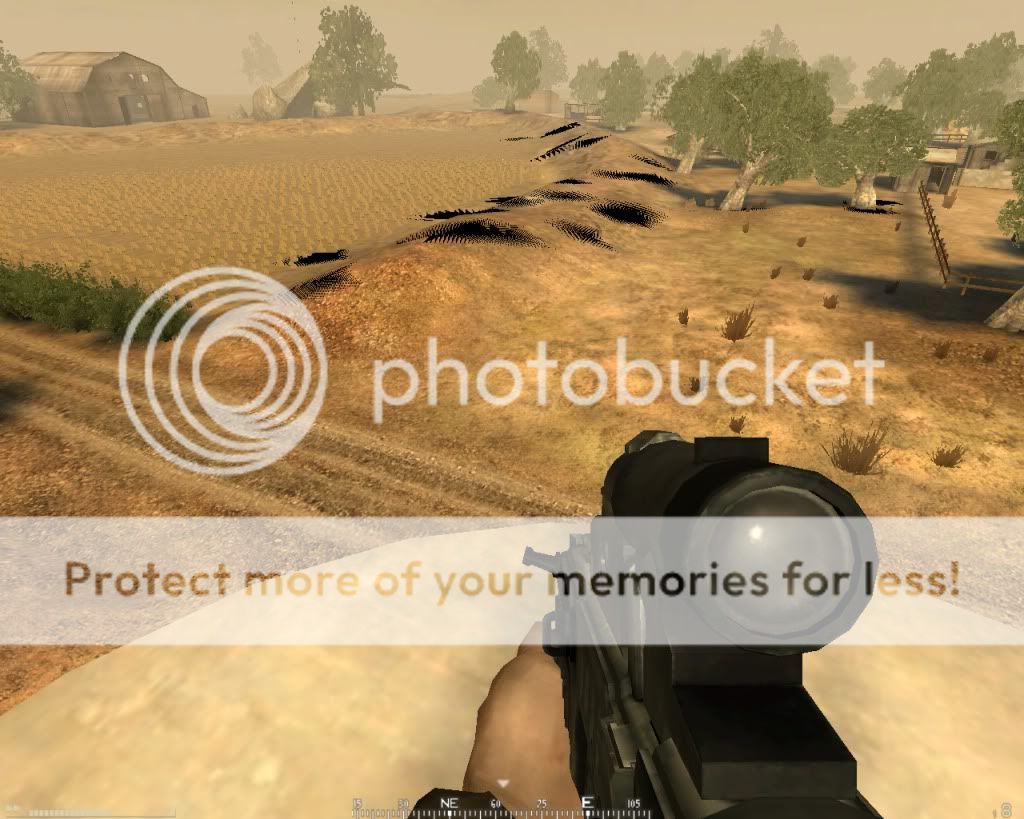
If so, do you have an ATI card?
If so, go to your CCC and enable Catalyst AI. [/quote]
or this:
or maybe this:[R-DEV]AfterDune wrote:You have an ATI card? Enable Catalyst AI in Catalyst Control Center.
If that doesn't help, install an earlier version of CCC.
Make sure to patch BF2 to 1.5, once you've installed 1.41. And after all that's done, install PR.
[quote="Valleyforge3946""]11.3 usually works the best. Double check Catalyst AI is enabled. Almost always the prob.[/quote]
Last edited by SnipeHunt on 2013-03-12 16:33, edited 1 time in total.
Reason: ninja'd by psyrus
Reason: ninja'd by psyrus
Best line yet...
Me: "Hey APC, Can I get a ride to squad 6?"
Unknown: "This APC ain't no Taxi!"
Me: "Hey APC, Can I get a ride to squad 6?"
Unknown: "This APC ain't no Taxi!"
-
Blondey
- Posts: 143
- Joined: 2012-04-23 12:10
Re: Graphical "cross stitch" effect.
Yeah, i used to have these black dots, because i had an ATI graphics card. Easiest option is just buying a new graphics card (That's what i did)
Or do alot of research on how to get rid of the black dots (effort)
Or do alot of research on how to get rid of the black dots (effort)


-
Psyrus
- Retired PR Developer
- Posts: 3841
- Joined: 2006-06-19 17:10
Re: Graphical "cross stitch" effect.
FYI I'm running an ATI card [HD5870] and have no such issues. My Intel HD3000 laptop also did not have this issue.
This is solvable.
This is solvable.