The Launcher and Updater

Project Reality announcements and development highlights.
Locked
AncientMan
Retired PR Developer
Posts: 5111
Joined: 2007-05-22 07:42

The Launcher and Updater

Post by AncientMan »

This week has been pretty busy with updates from the team already, but seeing as everyone has been talking about the launcher and updater (it was decoded from the encoded changelog), it's probably about that time to reveal it.

The launcher (and the updater which is built into it) is probably one of the biggest features v1.0 will bring. This is because it completely changes the way you launch the game, and it allows us to deploy updates at a much, much quicker rate. To demonstrate everything, I recorded this video, which works through the main things the launcher and updater offer.
So now that you've watched the video (I apologise for my microphone), hopefully you've got a lot better understanding of what everything is. But let me go through it again in a bit more detail.

When you download v1.0, you will be downloading a single ".iso" file, which for those who know, is essentially a DVD image. You then mount, burn or extract this in order to install PR. For those who don't know how to use .iso files, don't worry, we'll be providing plenty of instructions on how to use the .iso file, so it'll be as painless as possible. You then run the autorun application, which provides a quick and easy method to launch the installer, or launch the game if it's already installed.
Image
The installer is just like previous PR installers, however it's a single install, no need to run multiple installers one after the other! So, there should be much less problems, and there's less human interaction required. By the way, v1.0 will only have a full install method, there will not be a patch method from v0.98. This is because literally every single file in PR has been modified in one way or another, and there would be no way to reset everything ready for updates with the new updater. Not to worry though, once this initial install is done, you should be able to use the updater from here on out to get new versions.

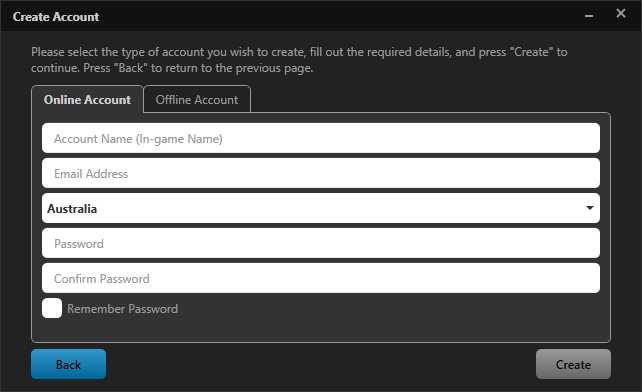
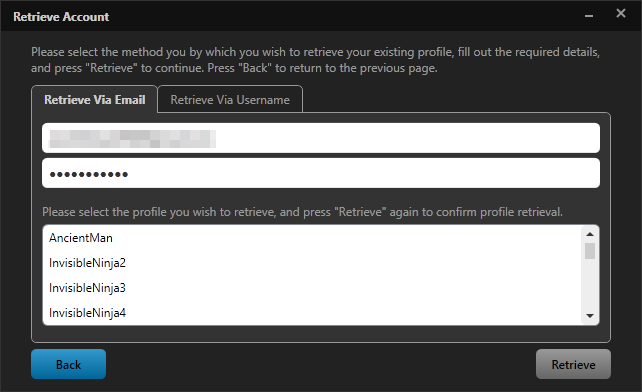
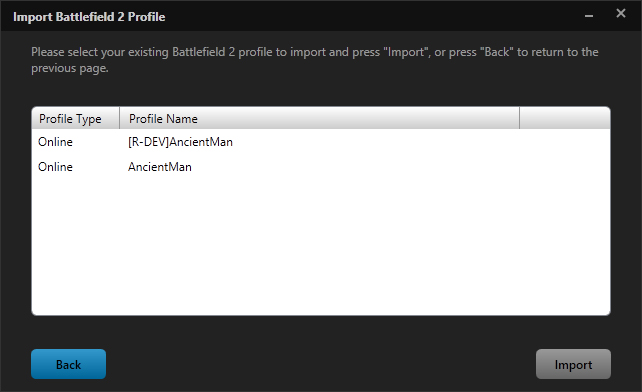
Anyway, once everything is installed, you then have to sort out some Project Reality specific profiles. So, before, profiles were BF2 profiles, read out of Documents/Battlefield 2/Profiles. No longer in 1.0! Profiles are now read from Documents/ProjectReality/Profiles, and this allows us to customize settings and provide unique PR settings without affecting other mods and vanilla BF2. So no more grey crosshair when you go and play other mods!
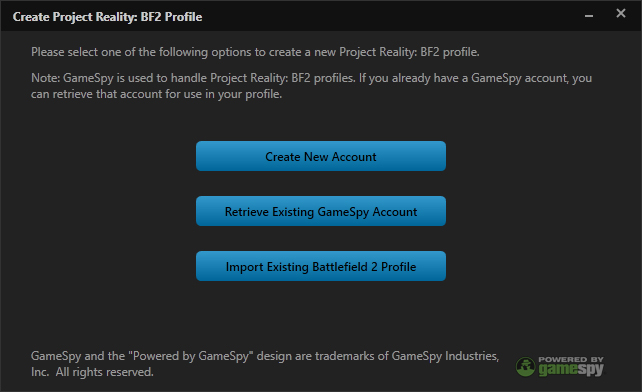
Image Image Image Image
Profiles and accounts all use GameSpy, just like BF2 does, and how it all works is the exact same as it is in BF2. The only difference is you no longer need to provide a unique email address when creating a new GameSpy account. GameSpy supports multiple accounts linked to a single email address, and the new login system supports this. When retrieving an account via email, you will be presented with a list of accounts linked to this email address, so it's a much friendlier experience.

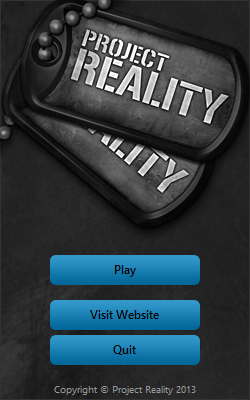
Once you've sorted out your profiles, you then get to the main launcher. This is where all the action happens, and you will not be able to skip this when launching PR. You will always have to launch the launcher, and press play. The background image here was done by [R-DEV]Chuc, and is totally badass.
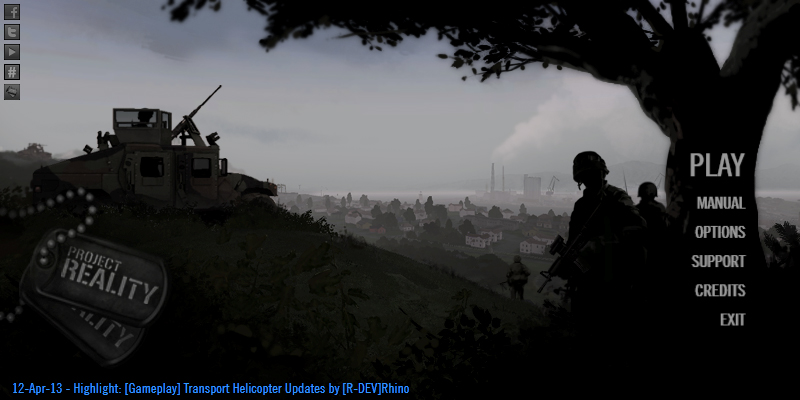
Image
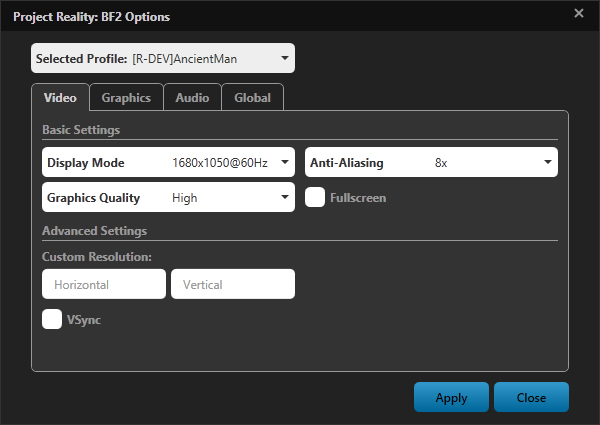
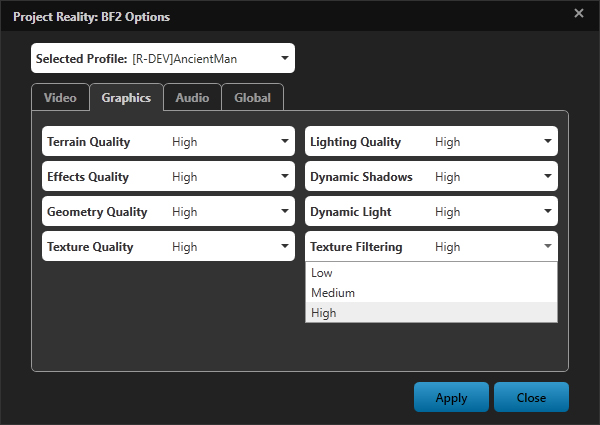
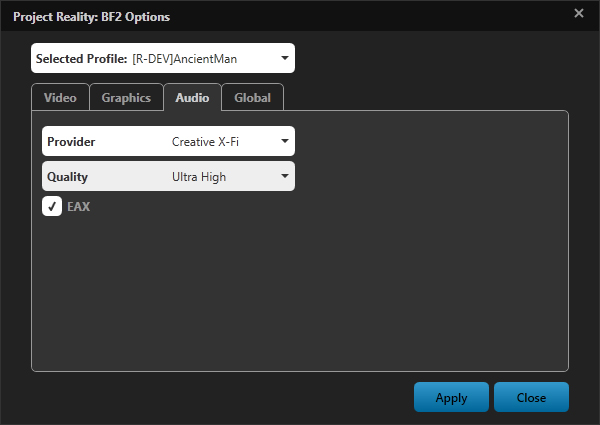
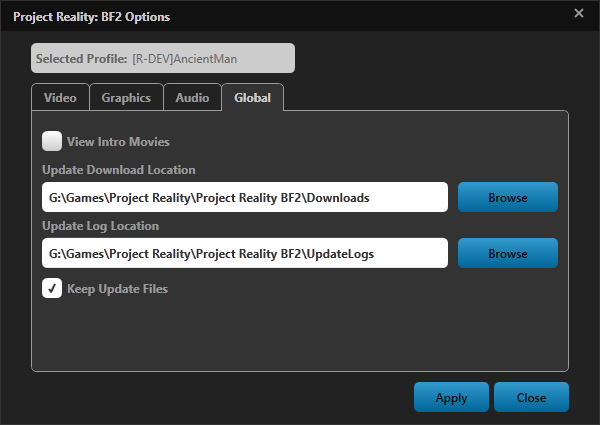
The options menu is a very important part of the new launcher. The video options, and part of the audio options, are all contained here, and they are no longer in the main menu. This is because it gives us a lot more control over how these are configured, and seeing as you couldn't change them anyway while playing the game, it shouldn't be too much of a loss. Things like the volume and voip audio sliders that you can change while ingame are still in the main menu, so you shouldn't be too worried about not being able to change this stuff while ingame.
Image Image Image Image
You will notice in the options menu, that there's several "new" options like fullscreen, custom resolution, and being able to skip the intro movies. These replace the shortcut parameters that everyone used to use (+fullscreen, +szx, +szy, +restart), and provides a nice UI to change everything, and allows you to configure these on a per profile basis. Do note, that you will no longer be able to use these parameters with the new launcher, the only way to configure these is in the new options menu.

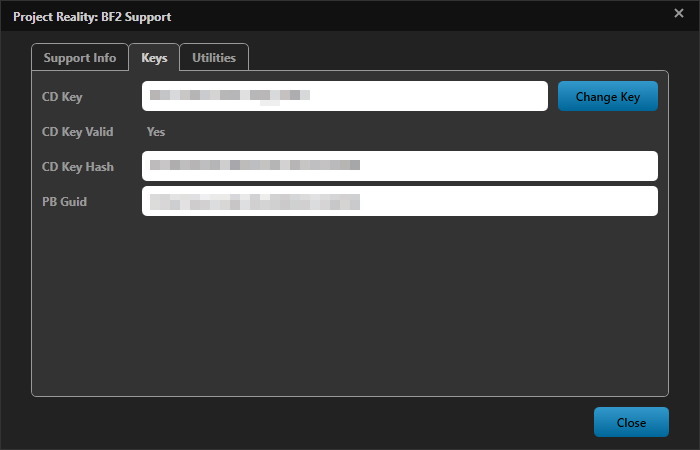
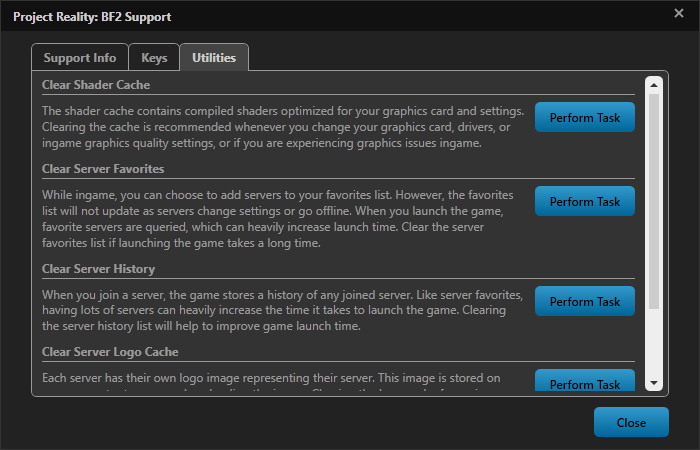
In the support menu, you'll be able to get support information which will be extremely helpful when posting support threads in the forums. This, along with error logs, and dialog messages, can all be copied and pasted into the forums, and are wrapped in code tags to make things all nice and well formatted.
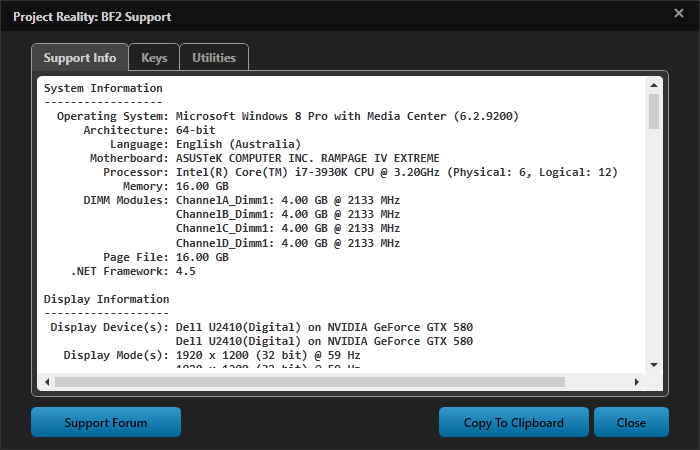
Image Image Image
You can also easily change your CD Key, which should help with issues where your CD Key somehow because invalid and causes you to crash while connecting to servers. You can also easily verify your CD Key is valid, which can also be useful in tracking down issues. Don't worry, this is all verified directly with the GameSpy servers, and there's nothing dodgy going on, it's all the exact same methods BF2 uses for verifying your CD Key.

So, one of the cool new features about the new profile system, is the ability to have multiple profiles each with unique prefixes. Not only this, but you can have multiple profiles using the same account, which allows you to set up things such as different video/audio settings, but still use the same account name as displayed ingame. You can set it up to always use a profile to skip the whole login page, which can save a couple of clicks, which everyone should like.

Now if you thought the launcher was pretty cool, the updater is even better. One of the main problems we have with development is the ability to push out updates. We don't want to release too many installers, as it's a pain to download and install them, and we'll piss everyone off and people will leave. But then we run into the problem of making individual versions, but all the developers want their stuff in it, and development times lengthen as we want to get everything in. So, then we run into issues with months (years in 1.0's case) of development time, and people leaving due to lack of updates.
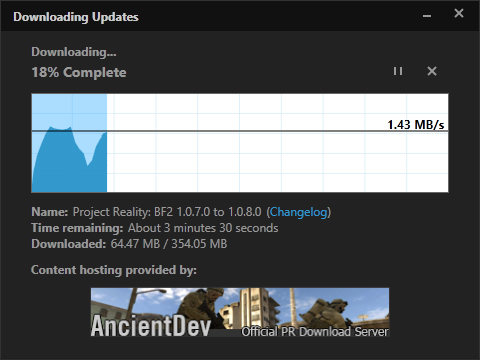
Image Image
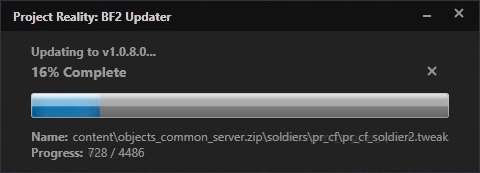
So, the updater was made to solve all these issues. Because it's completely automated, there shouldn't be too many issues with pushing out updates frequently, there's no user interaction required (apart from obviously launching the game). Because we can release updates whenever, developers also don't get pissed off when they make feature X, but it's not pushed to the public until months (years) later, and as a result they are more active and features get done quicker. So, our plan with v1.0, is push bug fixes almost immediately, and push features (or small groups of features) basically whenever they're done and tested. The end result should be everyone being happy, both the public and developers alike.

Another really badass feature of the updater is the filesize. Now, this isn't demonstrated well in the video (because 1.0.8.0 contained a tonne of changes), but updates we push to the public should be extremely small. This is done through updating files inside the zip archives the mod uses directly (instead of providing the entire zip archive to download again, which is extremely useless and a waste of download time), as well as using BSDiff for binary modification. To provide an example of this, say we changed the texture paths in a .bundledmesh (a model file). Now, usually, we're just changing a couple of strings in the file, or maybe a couple of vertices were changed. With BSDiff, instead of having to download the entire 4 MB mesh file again, you only download say 5 KB, the changed strings for example. This is then applied directly inside the zip archive, so instead of downloading the entire 1.12 GB objects_vehicles_client.zip file, you only need to download 5 KB. Pretty, pretty badass.

Now, the problem with the whole update method, is it relies that you're applying updates over the top of unmodified files. This is why we now have file verification inside the launcher. It essentially replaces server side MD5 checks, and it should be a much nicer method than randomly getting disconnected from a game, just to be greeted by some weird and random MD5tool error. So, be very, very careful if you go about modifying PR files, because you could mess up your game, and you'll be forced to reinstall everything again. Always create backups first!
Image
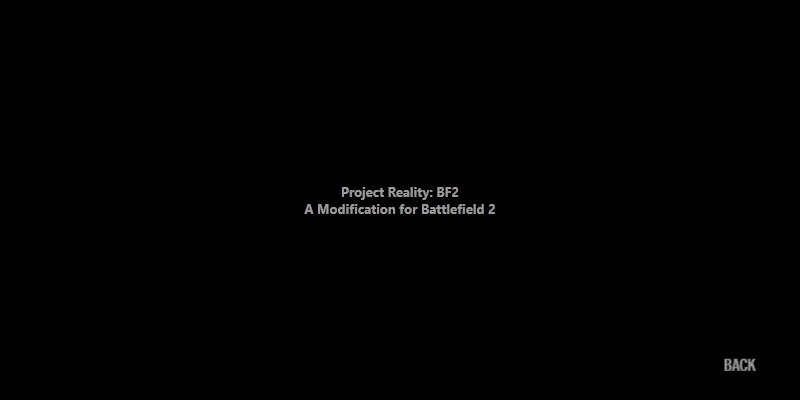
Onto the credits. The credits in the main menu were very, very limited in what they could do, and they were usually always out of date (or half the time they don't even display properly). So, I shifted the credits to the launcher, and this allows us to update them whenever the team changes (the credits are loaded from the internets ;) ). You'll probably notice a few names missing from the credits, which is because not everyone has contacted me with their details to be included in them. Hopefully though before we release everyone is there and credited for what they did. Also, the music is another badass track made specifically for the credits by [R-DEV]Alkali, he's done a real awesome job on the soundtrack for v1.0.

And that's about it. This has been my project for a bit over a year now, mixed in between University and real life (and other PR tasks). I'm quite happy with how it's turned out so far, and hopefully it'll hold up when the public gets their hands on it. Let me know what you think, and I hope you appreciate the effort and thought that's gone into each and every little detail (yes, even those little rounded corners on buttons took time :p )
Last edited by Mineral on 2018-05-30 11:33, edited 1 time in total.
Image
rodrigoma
Posts: 1537
Joined: 2012-03-22 21:21

Re: The Launcher and Updater

Post by rodrigoma »

sweeeet :-P
Pronck
Posts: 1778
Joined: 2009-09-30 17:07

Re: The Launcher and Updater

Post by Pronck »

Nice, but when you click High on Graphics will everything become high? Because when I click the High option in BF2 only textures are high quality and the rest will stay on the medium level....
We are staying up!
Onil
Posts: 1232
Joined: 2007-08-19 09:50

Re: The Launcher and Updater

Post by Onil »

Awesome!!

Can we pretty please get the launcher background as a desktop background in big resolution in the meantime? It looks really great.

Keep up the good work ;)
Image
AncientMan
Retired PR Developer
Posts: 5111
Joined: 2007-05-22 07:42

Re: The Launcher and Updater

Post by AncientMan »

B.Pronk(NL) wrote:Nice, but when you click High on Graphics will everything become high? Because when I click the High option in BF2 only textures are high quality and the rest will stay on the medium level....
Yes, there's many little things like this that aren't demonstrated in the video. Switching to Low/Medium/High will affect all settings as expected, unless your computer does not support it. Because, on 32 bit machines without large address awareness, you will not be able to select High Textures, and certain settings are restricted to a minimum of Medium, to help to reduce exploits with people running on Low settings to gain an advantage.
Image
Rezza
Posts: 2309
Joined: 2008-04-06 20:53

Re: The Launcher and Updater

Post by Rezza »

Great i am amazed!
Image
lucky.BOY
Posts: 1438
Joined: 2010-03-03 13:25

Re: The Launcher and Updater

Post by lucky.BOY »

Great! Any news about further mumble integration?
Psyrus
Retired PR Developer
Posts: 3841
Joined: 2006-06-19 17:10

Re: The Launcher and Updater

Post by Psyrus »

Faaantastic :D
Unhealed
Posts: 365
Joined: 2012-09-15 16:33

Re: The Launcher and Updater

Post by Unhealed »

Amazing work. PR looks so professional now, the launcher reminds Skyrim launcher, except PR launcher is better.
Almost every day something new, you guys are spoiling us. :)
Also I personally dislike font used in credits, it's just looks out of place compared to the awesome launcher font.
Last edited by Unhealed on 2013-04-13 10:12, edited 1 time in total.
Conman51
Posts: 2628
Joined: 2008-05-03 00:27

Re: The Launcher and Updater

Post by Conman51 »

I remember a few months ago there were pics for an installer/ updater.

Many people guessed that mumble would be integrated into it. Will your launcher have a shortcut for mumble?

Great work BTW.
"It's not the size of the dog in the fight, it's the size of the fight in the dog."
-Mark Twain


Image
Jolly
Posts: 1542
Joined: 2011-07-17 11:02

Post by Jolly »

This is nice, like FH2! Love u ancient! And chuc! And who ever contribute it!


Sent from my iPad using Tapatalk HD
Jolly, you such a retard.
Deathtrap
Posts: 29
Joined: 2009-08-03 01:02

Re: The Launcher and Updater

Post by Deathtrap »

It looks nice, and easy :D
Matzejo
Posts: 22
Joined: 2010-01-21 14:31

Re: The Launcher and Updater

Post by Matzejo »

looks great, best future for pr so far!!
ComradeHX
Posts: 3294
Joined: 2009-06-23 17:58

Re: The Launcher and Updater

Post by ComradeHX »

Looks great.

Why blue text instead of grey?
Psyko
Posts: 4466
Joined: 2008-01-03 13:34

Re: The Launcher and Updater

Post by Psyko »

that looks really professional. when you consider what a botch skyrim's UI was, and how much better yours is, you could easily get a high up UI job in a studio at this stage. congrats AM.

I would say though with EA's lack of support and bad publicity, now is probably the most opportune time to request the BF2 source code so project reality can be standalone, or do whatever negotiating is necessary. you'll never get something unless you ask for it.
sukkizzzz
Posts: 32
Joined: 2009-12-29 16:46

Re: The Launcher and Updater

Post by sukkizzzz »

Keep up the great work!
Any updates coming for PR Mumble? Installed Windows 8 for my "gaming rig" and I noticed theres no fix to get overlay working or atleast none of them havent worked out so far.
Image
Myru
Posts: 137
Joined: 2009-01-29 12:53

Re: The Launcher and Updater

Post by Myru »

Conman51 wrote: Many people guessed that mumble would be integrated into it. Will your launcher have a shortcut for mumble?
I'm also pretty curious if the DEVs found a way to integrate pr-mumble into the launcher or mod itself, rather than there being a shortcut to start mumble separately, so it entirely replaces the ingame VoIP.

The launcher itself looks really nice and user-friendly - great work!
DavviZ
Posts: 111
Joined: 2009-05-03 16:32

Re: The Launcher and Updater

Post by DavviZ »

Looks very proffesional. Love the "always use this profile" thing!
Locked

Return to “Announcements & Highlights”