[?] Roadsign textures?

Making or wanting help making your own asset? Check in here
Post Reply
BlakeJr
Retired PR Developer
Posts: 3400
Joined: 2004-09-12 12:04

[?] Roadsign textures?

Post by BlakeJr »

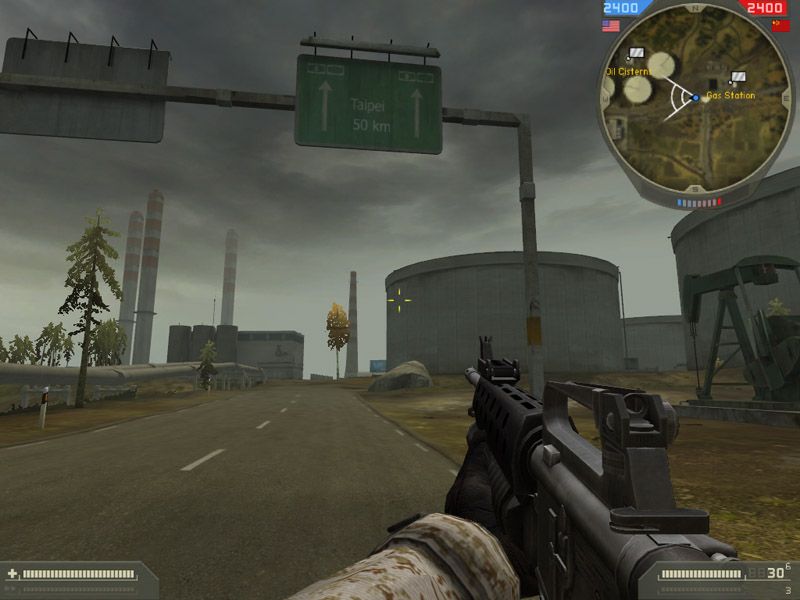
Been looking around for those textures but can't see to find them anywhere in the zip files.
I think I found the meshes for them but I couldn't see if there where any references to any specific texturefile. :/

I know where to find the ones with a camel on it but those are not the ones I'm talking about but the "big" signs! :lol:

They do work like the billboard textures, right?
Image
{ pretty sig removed construction on new one has not begun }
... yet ...
Griffon2-6
Posts: 2487
Joined: 2006-05-26 04:21

Post by Griffon2-6 »

I'm not sure I know what you're talking about. "Big" roadsigns? Do you mean the billboards? Give me an example of what one says.
.:XDR:.FRIJJ
Retired PR Developer
Posts: 212
Joined: 2006-05-17 13:47

Post by .:XDR:.FRIJJ »

Yep they do mate, load the dds file into PS and tinker with it. I am not sure of where it is situated ...i think.... common/industrial/signs/textures i think he he

Then in your map edit the init.con to direct to your custom textures. Give me a shout if you need a more in-depth tutorial on adding custom textures.
BlakeJr
Retired PR Developer
Posts: 3400
Joined: 2004-09-12 12:04

Post by BlakeJr »

'[R-CON wrote:. :X DR:.FRIJJ']Yep they do mate, load the dds file into PS and tinker with it. I am not sure of where it is situated ...i think.... common/industrial/signs/textures i think he he

Then in your map edit the init.con to direct to your custom textures. Give me a shout if you need a more in-depth tutorial on adding custom textures.
What I really need is a more indepth tutorial in locating the textures....
I can't find your path in my zip files... Me --->
Image
What I have found is this "Objects_client.zip\staticobjects\common\com_objects"
In there there are 3 folders called "billboard_highway_01" to "..._03"
Those folders have the meshes but where the heck are the textures???

Making a billboard is easy once you find it; common_ch_billb_c.dds
That's easy enough. But the bloody highwaysigns, or as I call them, roadsigns are nowhere to be found...


Thanks for your help
Image
Image
{ pretty sig removed construction on new one has not begun }
... yet ...
ali-tom
Retired PR Developer
Posts: 137
Joined: 2006-01-27 10:41

Post by ali-tom »

Maby i can help, hope thats what you looking for.

object: staticobjects/common/roads/traffic_oversign

Image

textures: staticobjects/common/roads/textures/road_signs_c.dds
Guerra norte
Posts: 1666
Joined: 2006-07-19 17:37

Post by Guerra norte »

'[R-DEV wrote:ali-tom']Maby i can help, hope thats what you looking for.

object: staticobjects/common/roads/traffic_oversign

Image

textures: staticobjects/common/roads/textures/road_signs_c.dds
WTF?!?!? IS JABAL GETTING A MAKE OVER OR HAVE I COMPLEATLY MISSED THAT PLACE?????? I LOVE JABAL!
.:XDR:.FRIJJ
Retired PR Developer
Posts: 212
Joined: 2006-05-17 13:47

Post by .:XDR:.FRIJJ »

nice one, at the mo i am in the process of generating lightmaps so i am limited to just browsing the web, if i do anything else editor goes into a spaz hehe So i am glad someone else pointed you in the right direction :)
BlakeJr
Retired PR Developer
Posts: 3400
Joined: 2004-09-12 12:04

Post by BlakeJr »

'[R-DEV wrote:ali-tom']Maby i can help, hope thats what you looking for.

object: staticobjects/common/roads/traffic_oversign

Image

textures: staticobjects/common/roads/textures/road_signs_c.dds
That is exactly what I was looking for! Thanks a million!
Image
{ pretty sig removed construction on new one has not begun }
... yet ...
Griffon2-6
Posts: 2487
Joined: 2006-05-26 04:21

Post by Griffon2-6 »

Hey, Blake, I didn't know that was what you were looking for, but now that I know, can you do one for me? I need one with Chinese text, as my highway looks unnatural without a roadsign like that.
BlakeJr
Retired PR Developer
Posts: 3400
Joined: 2004-09-12 12:04

Post by BlakeJr »

Griffon2-6 wrote:Hey, Blake, I didn't know that was what you were looking for, but now that I know, can you do one for me? I need one with Chinese text, as my highway looks unnatural without a roadsign like that.
I probably can, I just need to figure out how the signs work.
Also, please know that my Chinese is a bit rusty.... to say the least ;)
Image
{ pretty sig removed construction on new one has not begun }
... yet ...
Griffon2-6
Posts: 2487
Joined: 2006-05-26 04:21

Post by Griffon2-6 »

Lol. I will provide you with JPEGs of the text you need to put on, and the layout. I hope you can help, that Taiwan flag you did for me was excellent.
BlakeJr
Retired PR Developer
Posts: 3400
Joined: 2004-09-12 12:04

Post by BlakeJr »

Griffon2-6 wrote:Lol. I will provide you with JPEGs of the text you need to put on, and the layout. I hope you can help, that Taiwan flag you did for me was excellent.
Thanks! :mrgreen:
Let's see what I can do with your jpegs then :)
Just drop them in a PM and I'll get to work on it.

You wouldn't happen to know any good chinese fonts would you?
Not that I would know what I type but it'll look like chinese to us westerners anyway! :lol:
Image
{ pretty sig removed construction on new one has not begun }
... yet ...
Griffon2-6
Posts: 2487
Joined: 2006-05-26 04:21

Post by Griffon2-6 »

Why? What do you want to say? I'll type it for you. You probably need the Chinese 16 bit characters viewer if you want to see them in text. To get the installer for a Chinese character viewer, go to a Chinese text site, like http://www.sina.com.cn. Then you'll get a pop-up to install it.

For the road sign, I will PM you the JPEGs tomorrow or the day after, I have some stuff to do tomorrow, so I don't know if I'll have time. It's basically going to say:

Taipei

500m

(Forward arrow on the right)
This one will be called Taipei.jpg

Then another one is going to say:

Tainan

25 km

(the "stay on this lane" arrow below it, you know, the fat short one)
This one will be called Tainan.jpg

Oh, and there might be another two, except it's going to mark an airbase, so it'd be nice if you changed the background color to white. It'll go something like:

Republic of China Air Force 9th North Squadron Base (Will be 8 times shorter in Chinese)

Restricted Area

Authorized Personnel Only

Trespassers Will Be Eaten

Then the other one:

Republic of China Army 13th North Division HQ

Restricted Area

Authorized Personnel Only

Trespassers Will Be Squashed
-
I hope this isn't too much trouble, I really appreciate your help.

Last edited by Griffon2-6 on 2006-10-30 01:54, edited 1 time in total.
BlakeJr
Retired PR Developer
Posts: 3400
Joined: 2004-09-12 12:04

Post by BlakeJr »

Do you want all of those as "traffic signs"?
Not really too much work, IF I can pull it off.... ;)

I feel very limited in what I can do with the traffic signs as there is just one big texture for all the signs. Each of the 3 signs use a different part of the texture.
Right now I can change the text on a sign but can't really put that text where I want it on the sign itself.

A demonstration perhaps?
Image

This is just me experimenting, trying to get my sign working in game, and well, it does. It looks like shite but it works.

:-D
Image
{ pretty sig removed construction on new one has not begun }
... yet ...
Griffon2-6
Posts: 2487
Joined: 2006-05-26 04:21

Post by Griffon2-6 »

I see, just like the flags right? I will PM you the JPEGs soon.

What you have there is good, that's what I was looking for, except the Taipei part will be in Chinese.

The "Military Base" signs will have a white background instead of a green one, if possible, and it won't have any other icons on it.

Thanks Blake.

EDIT: I also made a change to file names. Now the jpegs will just be the line of text, and then the English translation underneath, felt no need to type "Restricted Area" twice.
Last edited by Griffon2-6 on 2006-10-30 21:27, edited 1 time in total.
Dylan
Posts: 3798
Joined: 2006-05-29 00:41

Post by Dylan »

Looks good Blake.
Post Reply

Return to “PR:BF2 Community Modding”