Learning Jet CAS / Training Mode

General discussion of the Project Reality: BF2 modification.
Heskey
Posts: 1509
Joined: 2007-02-18 03:30

Learning Jet CAS / Training Mode

Post by Heskey »

Hi all,

The 3+ years I've spent on PR have largely been as a ground pounder for the teamwork aspect. In all these years, I've barely flown jets.

From co-op, I can take off and land no problem. General flying and orientation isn't a problem either, but I've pretty much 0 experience with CAS, bombing, or dogfighting.

Also, I don't know what hardware is best to fly with? I see mixed opinions on using mouse/keyboard, joystick, or joypad, or any combination of the above.

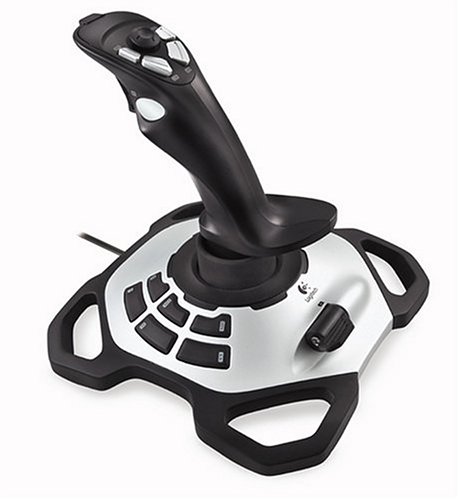
I have a Logitech Extreme 3D Pro that I bought years ago; mostly for the ability to set a throttle using the throttle stick, and I imagine it's easier to just pull back on a stick to loop-the-loop, rather than keep dragging the mouse from top-to-bottom of the mouse mat.

I've just plugged it back in, and from flying round on Co-op, have made the following set-up:

Image

As you can see, I've used every button available. Some could be switched out though if needs be.

Ideally, I'd love to be able to use the 8-directional HAT switch for free look, but have no idea how to set that up. I downloaded 'Key2Joy' but can't get my head around how it works. It would also leave me having to find new keys for Afterburner and Flares, certainly.

For anyone who's willing to reply, here's some questions whilst you're at it:

Q1.) How do you tighten the turning circle? Although every plane handles differently, are the mechanics the same? Logic would suggest that reducing throttle and not using afterburner would tighten the turning circle (ala Battlefield 3), but from what I gather in Co-op, I seem to turn tighter when going as fast as possible?

Q2.) Does every plane handle similarly when landing? I.E. 40% throttle to drop speed to 900-1000, then 50-60% to maintain speed on approach, then cut throttle, hit runway and taxi reverse at 300- to apply brake?

Q3.) Is there a jet guide anywhere that lists the names and maps of each jet, and what weapon load outs they have? I'm not a military hardware buff, and can't name all planes (Only MiGs, SU-34s, A-10s, Typhoons, Frogfoots), or categorically state which plane has what load out, which ammo is best for each engagement, and what kind of engagement each plane is suited for (bombing, dogfighting, CAS etc).

Q4.) What are the best techniques for getting enemy jets off your tail? I have always sucked at this, but from a thread in the Tales from the Frontlines 'Aircraft' sub-forum, there seems to be a widely held view that in PR, you're pretty much dead if you get an enemy jet on your tail, as it's impossible to outmanoeuvre them unless they're incompetent - is this true?

If anyone would be willing to tutor me, I'd be willing to learn! I just want to spice up my PR experience from time to time.

Thanks! :)
Last edited by Heskey on 2013-07-21 02:16, edited 2 times in total.
L4gi
Posts: 2101
Joined: 2008-09-19 21:41

Post by L4gi »

Not all the jets handle the same. For most, having a speed of 700ish will be perfect, on others like the tornado, you need much less.

Theres not that many active jet pilots like back in the say, but from what we have at the moment id say your best bet is to talk to viirusiiseli.
Ca6e
Posts: 231
Joined: 2008-12-08 12:40

Re: Learning Jet CAS / Training Mode

Post by Ca6e »

As I know, for migs and f-16 is landing speed around 850, u just approach the runway with 1000 and 100m before just drop speed to around 850, and gently put your nose up and throtle in reverse.

For A10 i think is around 550-650 the same procedure, only u need drop speed a litle bit closer to a runaway, so that your nose do not pull down too soon.

So my figures are, fighter jets around 800-850. Close airs support jets (frog a-10) around 550-650.

And some advice, i fly with keys, so when i try to keep speed stady around 850, i use afterburner, i hold it down, so its faster way to throtle up if u see your nose is geting pulled down.

If i have some time i ll try to make some video of landing procedure.

And haskey, u forget to put "look back" buttons, its very helpfull hehe :D
L4gi
Posts: 2101
Joined: 2008-09-19 21:41

Post by L4gi »

Try to land tornado in those speeds...
PLODDITHANLEY
Posts: 3608
Joined: 2009-05-02 19:44

Re: Learning Jet CAS / Training Mode

Post by PLODDITHANLEY »

That joystick has a particular way to be set up to BF2 did you manage ok?
It's also got the twisting motion as another function?
40mmrain
Posts: 1271
Joined: 2011-08-17 05:23

Re: Learning Jet CAS / Training Mode

Post by 40mmrain »

the sub stick should handle all camera control besides chase cam, bound the up to look up and down to weapon 1 or whatever and you can roll it around like an analog. It's very smooth and easy to chase enemy jets with.

For loadouts there are three classifications of jets as 0.98.

Fighter; 2 long range radar based air to air missiles, 4 short range air to air infrared based missiles, a cannon, and 2 laser guided bombs
Fighter bomber; 4 short range air to air radar based, cannon, 4 laser guided bombs, 4 TV/laser guided Air to surface missiles
Close air support; 2 short IR air to air radar based, cannon, 2 rocket pods, 4 laser guided missiles, 2 laser guided bombs

im still working out how to get enemy jets off me to be honest. I usually just hit the burners and dump flares, and call for friendly jets to help out, or going high and turning hard. Sometimes flying a foot off the ground through hard to terrain can work as a desperation measure.
Last edited by 40mmrain on 2013-07-21 07:57, edited 3 times in total.
L4gi
Posts: 2101
Joined: 2008-09-19 21:41

Post by L4gi »

Unless youre in a J10 against a frogfoot or something, its virtually impossible to shake off a competent pilot.
Jolly
Posts: 1542
Joined: 2011-07-17 11:02

Re: Learning Jet CAS / Training Mode

Post by Jolly »

Actually, it's 3 bombs and 3 AGMs on fighter-bomber.


Current jets fight is just first seem, first kill.
U can barely do nothing if fighter's on ur tail(when he has missiles)and u didnt aware of that first.

Good pilots are good at using GUN.
Jolly, you such a retard.
Heskey
Posts: 1509
Joined: 2007-02-18 03:30

Re: Learning Jet CAS / Training Mode

Post by Heskey »

Ca6e wrote:If i have some time i ll try to make some video of landing procedure.
It's okay mate, I've already seen this by SpearHead, but thanks anyway =]
Ca6e wrote:And haskey, u forget to put "look back" buttons, its very helpfull hehe :D
I don't have any more stick room, but may remove enter/exit & parachute. Chances are when I need those buttons I'll be throwing the stick out of the way to get back on my keyboard ASAP.
PLODDITHANLEY wrote:That joystick has a particular way to be set up to BF2 did you manage ok?
How do you mean? The only thing I can't do by default is set the HAT switch to freelook.
PLODDITHANLEY wrote:It's also got the twisting motion as another function?
Ah yes I forgot to mention, as well as pitching forward, backwards, banking left and right, I can also 'twist' left and right which allow me to taxi. Tell you what though, pushing this stick forward and twisting left/right does make your hand ache!
L4gi wrote:Unless youre in a J10 against a frogfoot or something, its virtually impossible to shake off a competent pilot.
So there's no "dogfighting" as such, and I shouldn't be ashamed if I'm no top-gun?
40mmrain wrote:the sub stick should handle all camera control besides chase cam, bound the up to look up and down to weapon 1 or whatever and you can roll it around like an analog. It's very smooth and easy to chase enemy jets with.
Good idea, I'll give that a try now, and bind afterburner/flare over the enter/exit & parachute buttons. Think I'll have to get rid of squad map for cycle camera.

Thanks for the replies so far guys.

Does anyone have an answer for the turning circle question? It is a confusing one. Some more questions here:

Q5.) Laser-guided missles are Air-to-Ground and require a SL's laze, right?

Q6.) Where is the map transparency setting for PR so I can have the map up whilst stalking the clouds?

Q7.) And lastly, how do you make an additional keybinding in Mumble for squad chat? I can add/remove but the data field just says 'Parent'. There's nothing that actually says the squad-to-squad buttons do their function (though I know they do).
Last edited by Heskey on 2013-07-21 09:02, edited 2 times in total.
40mmrain
Posts: 1271
Joined: 2011-08-17 05:23

Re: Learning Jet CAS / Training Mode

Post by 40mmrain »

Laser denotes whether it can lock onto a laze set by a GTLD or UAV
TV means that the weapon can be guided by the pilot/co-pilot manually

LAser weapons can be used as "dumb weapons" because theyll drop or just fly straight and blow up when they hit the ground. Firing missiles with no lock is generally not used, that's what rockets are for. Dropping laser guided bombs as gravity bombs can be effective if youre skilled.
Moszeusz6Pl
Retired PR Developer
Posts: 939
Joined: 2010-06-24 13:41

Re: Learning Jet CAS / Training Mode

Post by Moszeusz6Pl »

Q6.) You can't change transparency of map in PR, it's not vanilla.
Q7.) You can't make alternative keybinds in mumble used in 0.98. You can just change current ones.

Image
nAyo
Posts: 571
Joined: 2008-10-29 22:07

Re: Learning Jet CAS / Training Mode

Post by nAyo »

As jolly said, I think 70% of the time it's about who sees the other one first, which is quite sad.. But there are some tactics though

If you're in a fighter, a way to escape a jet on your tail is to climb straight up while popping something like one flare a second not to be locked. Doing so will help you run away from your enemy since the higher you fly the faster you go, but the less manoeuvrable. After ~4000 alt you start losing control and stalling, so it's risky to go too high on a map like Qinling for example where you have only 8 seconds before you start bleeding out.

If you're in a bomber (A10, frog) then going up high won't help you much since those jets are super slow, so in dogfight it's more about trying to stay away from your enemy's HUD so he can't lock/canon you, so if you have a good 3D environment awareness (implying you know where about the enemy jet is in relation to you) you can flee by maybe turning in a certain direction.
If chased by a fighter you can use your slowness as a good advantage if you manage to have it in your sight after it overpasses you.
If chased by another same-type bomber then it's impossible to run away if the pilot is good. That's why it is a key to always look around with 7, 8 and 9 to see the other one before ; if you don't do it you'll always lose!

And everyone already said everything you need, the only thing I insist on is not to try the tornado in a real game :p It has its own very specific way of landing it. If you're interested in trying it I'll tell you : you have to keep an approach speed of 850 the whole time during the approach and keep it until you're ~50m away from the runway, then you start slowing down by holding S while you keep the nose up (it is very important to keep it completely up if you don't want to crash) until you touch the ground.
Last edited by nAyo on 2013-07-21 13:25, edited 1 time in total.
Image
"I, for one, am not a dictator. I'm the Supreme Leader" - Master
Heskey
Posts: 1509
Joined: 2007-02-18 03:30

Re: Learning Jet CAS / Training Mode

Post by Heskey »

[quote=""'[R-DEV"]Moszeusz6Pl;1920164']Q6.) You can't change transparency of map in PR, it's not vanilla.[/quote]

Fair enough - I do remember you used to be able to, probably back in 0.7 or whenever it was that Quinling first came out. I remember doing it, and old threads I was reading last night referenced it also.
[R-DEV]Moszeusz6Pl wrote:Q7.) You can't make alternative keybinds in mumble used in 0.98. You can just change current ones.
Ah no worries then, thanks!

[quote="nAyo""]And everyone already said everything you need, the only thing I insist on is not to try the tornado in a real game :p It has its own very specific way of landing it. If you're interested in trying it I'll tell you : you have to keep an approach speed of 850 the whole time during the approach and keep it until you're ~50m away from the runway, then you start slowing down by holding S while you keep the nose up (it is very important to keep it completely up if you don't want to crash) until you touch the ground.[/quote]

It's a shame that the Training mode no longer exists, and that Quinling INF is the only map available on Co-op! =[
nAyo
Posts: 571
Joined: 2008-10-29 22:07

Re: Learning Jet CAS / Training Mode

Post by nAyo »

You can create a local server to try everything on it. And you need to enable the RCON DEBUG to be able to spawn your own vehicles yourself instead of waiting 20 minutes for a jet.

To do that, open this file with a notepad : Battlefield 2/mods/pr/python/game/realityconfig_local.py
Find the line C['PRDEBUG_ALL'] = 0 and change the 0 into a 1.

Code: Select all

C['PRDEBUG_ALL'] = 1
Then you can start a local server, put the map you want, and type in the chat rcon debug to enable it and you can spawn vehicles with the command

Code: Select all

rcon spawner [faction]_[type]_[name]
For example

Code: Select all

rcon spawner us_jet_f16
Image
"I, for one, am not a dictator. I'm the Supreme Leader" - Master
CR8Z
Posts: 413
Joined: 2008-08-30 06:27

Post by CR8Z »

For tighter turns, feather the burner and add rudder. You should turn your rudder into your turn. I.e., left turn = left rudder.

A good evasive maneuver to try is the "split S". Also, try and locate some friendly ground units that might have AA capability, and lure your aggressor to them.

Sent from my SCH-I545 using Tapatalk 4 Beta
Heskey
Posts: 1509
Joined: 2007-02-18 03:30

Re: Learning Jet CAS / Training Mode

Post by Heskey »

nAyo wrote:You can create a local server to try everything on it.
Thanks nAyo, I'll probably do that another time though!

With the thread feedback so far, this is now how my joystick setup looks:

Image

Using the HAT switch to roll around views like that is great!

I've tried to do some dogfighting on Kashan Co-op, the first tests didn't go well. Mostly though because I keep changing the bindings and haven't got used to them yet - such as pressing 'look up' when meaning to press flares, and then getting killed by AA (least I think it was AA).

Q9.) What's the difference between AIM-9 and AIM-120, aside from the ammo count and reticule size?
OldGoat5
Posts: 150
Joined: 2007-08-24 02:54

Re: Learning Jet CAS / Training Mode

Post by OldGoat5 »

Aim 9 is shortrange anti air missle, aim 120 is longer range. IRL flares don't work to counter aim120s since they use radar and not IR to lock. Aim 120 in Pr is for shooting targets that are farther away. Aim 9 is for when they are really close.
L4gi
Posts: 2101
Joined: 2008-09-19 21:41

Post by L4gi »

Aim9 is best for everything
nAyo
Posts: 571
Joined: 2008-10-29 22:07

Re: Learning Jet CAS / Training Mode

Post by nAyo »

Aim-120 gives you the ability to spot jets at the limit of the view distance since the HUD picks up the signature if the jet goes through your sight, and displays either a cross for friendlies or obviously the green lock square for enemy. So it can be handy for when you want to identify a jet.

I am wondering, why do you use a joystick? is it because you find it handier and more practical, or do you just think it's better for flying like you said for turns and loops etc? I fly with mouse/keyboard and it's not a problem to keep pushing the mouse up to put the nose up for example instead of just pushing a joystick, it's about what you've been used to but it's not really "better" to fly with a joystick in my opinion. You should try mouse and kb if you haven't already, I personaly think it's better because of the mouse's accuracy compared to the joystick's :p
Last edited by nAyo on 2013-07-21 17:11, edited 3 times in total.
Image
"I, for one, am not a dictator. I'm the Supreme Leader" - Master
Heskey
Posts: 1509
Joined: 2007-02-18 03:30

Re: Learning Jet CAS / Training Mode

Post by Heskey »

Thanks for the AIM answers guys..

nAyo, I use the joystick for 2 reasons:

1.) Ability to Throttle
2.) Easy to just hold back for pitching (but probably not too important if 'dog fighting' isn't really a part of the game.

I might try mouse/keyboard, but what bindings and sensitivity settings to use? Some people fly with just the keyboard, but I wouldn't know how to bind that!
Post Reply

Return to “PR:BF2 General Discussion”