Error 1324

Help and support regarding PR:BF2 installation and in-game issues
Post Reply
Cifyra
Posts: 13
Joined: 2012-08-21 01:31

Error 1324

Post by Cifyra »

Hi,

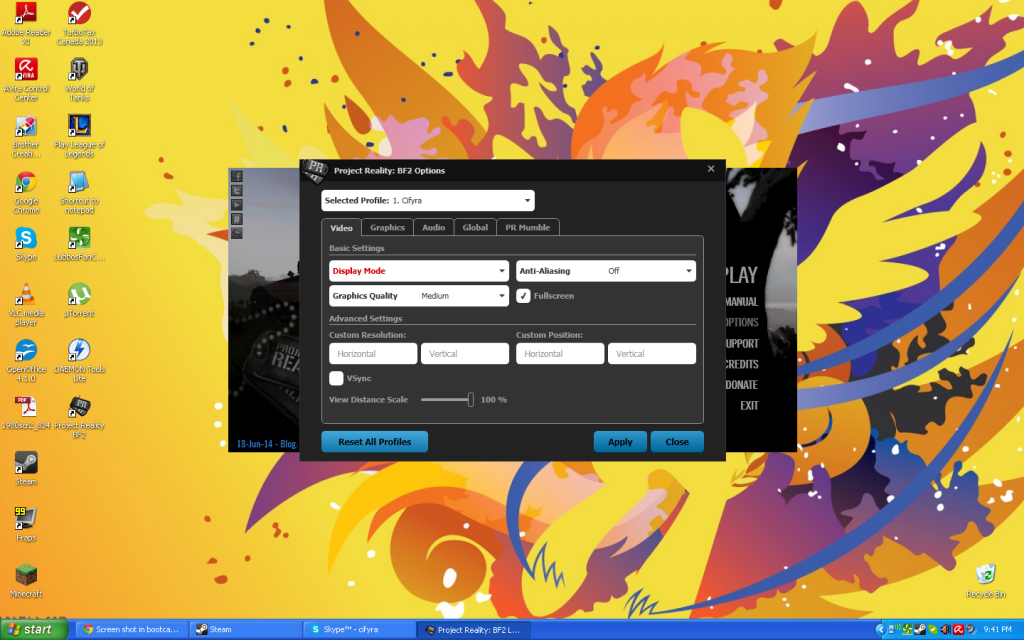
I'm on Windows XP 32bit on 1st Gen Macbook Pro bootcamp. I tried to run PR to see how far I can get with everything set on low graphics. However, I cannot boot up Project Reality. When I go to options in the launcher, Display Mode is in red text and there are no options in the drop down menu. When I try to launch the game an error pops up,

Launch Error 1324: The Selected display mode is not supported.

I also got the following crash once, not sure if it's related. Do you guys have any idea what's going on? Thanks.

Code: Select all

Project Reality Log File
prlauncher.exe started at: 2013-08-29T16:03:11

Critical Error: An unhandled exception has occured. Details are as follows:

Value cannot be null.
Parameter name: v

Further details can be found in the following file:

[url]C:\Program Files\Steam\steamapps\common\Battlefield 2\mods\pr\bin\prlauncher.log[/url]

Please report this error to the Project Reality Team, and include the log file in your report.

[url=https://www.realitymod.com/forum/f27-pr-bf2-support]Visit Support Forum[/url]

 > System.ArgumentNullException: Value cannot be null.
Parameter name: v
   at System.Windows.PresentationSource.CriticalFromVisual(DependencyObject v, Boolean enable2DTo3DTransition)
   at Reality.UI.Data.Dpi...()
   at System.Windows.Threading.ExceptionWrapper.InternalRealCall(Delegate callback, Object args, Int32 numArgs)
   at MS.Internal.Threading.ExceptionFilterHelper.TryCatchWhen(Object source, Delegate method, Object args, Int32 numArgs, Delegate catchHandler)
MaSSive
Posts: 4502
Joined: 2011-02-19 15:02

Re: Error 1324

Post by MaSSive »

I think its missing Visual Studio 2012.

Visual C++ Redistributable for Visual Studio 2012
Image
CATA4TW!

"People never lie so much as before an election, during a war, or after a hunt."
"God has a special providence for fools, drunks, and the United States of America."
― Otto von Bismarck
Cifyra
Posts: 13
Joined: 2012-08-21 01:31

Re: Error 1324

Post by Cifyra »

Didn't work :(
Walther[RUS]
Posts: 15
Joined: 2008-08-15 06:25

Post by Walther[RUS] »

to solve this problem we need to update the PR . encountered this problem with the users windows 7 and 8

Sent from my A701 using Tapatalk 4
Image
zloyrash
Posts: 408
Joined: 2009-11-08 10:25

Re: Error 1324

Post by zloyrash »

This problem starts with new versions of PR1.0
First versions and Pr1.0beta was OK.
Image
Walther[RUS]
Posts: 15
Joined: 2008-08-15 06:25

Re: Error 1324

Post by Walther[RUS] »

Help! We need a new patch for the game. Looks more likely not solve the problem!
Image
Devastation2.0
Posts: 32
Joined: 2013-08-26 21:29

Re: Error 1324

Post by Devastation2.0 »

I have the same error :\
MaSSive
Posts: 4502
Joined: 2011-02-19 15:02

Re: Error 1324

Post by MaSSive »

Start PR launcher go to Support menu, and post support info tab contents here.

Also post PRLauncher.log conent here.
Image
CATA4TW!

"People never lie so much as before an election, during a war, or after a hunt."
"God has a special providence for fools, drunks, and the United States of America."
― Otto von Bismarck
Devastation2.0
Posts: 32
Joined: 2013-08-26 21:29

Re: Error 1324

Post by Devastation2.0 »

Found a fix:

Open C:\Users\NAME\Documents\ProjectReality - Now right click on "Profiles" - Go to properties and un-tick read-only.

Now open up your 1.0 Launcher and go to your options, and select "reset profiles to default" or whatever it says.

Worked for me :)
The1astReaper
Posts: 5
Joined: 2013-05-22 07:15

Re: Error 1324

Post by The1astReaper »

I FIXED IT! I was recently encountering the same issue described here. When ever i went to load up the game it would give me error 1324 need to reset display ect. so i went into the options and clicked reset profile and tried again, this seems to have worked, i am about to try and put my settings back in the options and see how it goes.
The1astReaper
Posts: 5
Joined: 2013-05-22 07:15

Re: Error 1324

Post by The1astReaper »

and after reseting video and sound settings to normal the problem seems to have gone
Cifyra
Posts: 13
Joined: 2012-08-21 01:31

Re: Error 1324

Post by Cifyra »

Code: Select all

System Information
------------------
  Operating System: Microsoft Windows XP Home Edition (5.1.2600)
   Current Culture: English (United States)
       Motherboard: Apple Inc. Mac-F42C89C8
         Processor: Intel Pentium III Xeon processor (Physical: 2, Logical: 2)
            Memory: 2.00 GB
      DIMM Modules: DIMM0: 1024.00 MB @ 667 MHz
                    DIMM1: 1024.00 MB @ 667 MHz
         Page File: 19.52 MB
    .NET Framework: Unknown

Display Information
-------------------
 Display Device(s): 
   Display Mode(s): 
    Driver Version: 6.14.11.6763 (167.63)
    Display Memory: 512.00 MB
     Multisampling: 2, 4, 8
               DPI: 96 (100%)

Audio Information
-----------------
  Primary Playback: Realtek HD Audio output
 Primary Recording: Realtek HD Audio Input
  Open AL Renderer: Software
               EAX: True
           EAX 1.0: False
           EAX 2.0: True
           EAX 3.0: False
           EAX 4.0: False
           EAX 5.0: False
             X-RAM: False

Disk Information
----------------
      Install Path: C:\Program Files\Steam\steamapps\common\Battlefield 2
                    Free: 3.90 GB, Total: 126.11 GB, FS: NTFS, SSD: False
          Mod Path: C:\Program Files\Steam\steamapps\common\Battlefield 2\mods\pr
                    Free: 3.90 GB, Total: 126.11 GB, FS: NTFS, SSD: False
     Profiles Path: C:\Documents and Settings\Ryan\My Documents\ProjectReality\Profiles
                    Free: 3.90 GB, Total: 126.11 GB, FS: NTFS, SSD: False
    Update DL Path: C:\Documents and Settings\Ryan\Local Settings\Application Data\Project Reality\Project Reality BF2\Downloads
                    Free: 3.90 GB, Total: 126.11 GB, FS: NTFS, SSD: False
   Update Log Path: C:\Documents and Settings\Ryan\Local Settings\Application Data\Project Reality\Project Reality BF2\UpdateLogs
                    Free: 3.90 GB, Total: 126.11 GB, FS: NTFS, SSD: False

Game Information
----------------
    Installed Mods: bf2, pr, xpack
       Current Mod: pr
       BF2 Version: BF2 1.5
        PR Version: 1.2.0.0
          Language: english
   Debug Available: False
     Large Address: False
Supported Hardware: None

Profile Information
-------------------
      Profile 0001: Cifyra
              Type: Online
        View Intro: True
        Fullscreen: True
      Display Mode: 800x600@60Hz
Display Mode Valid: False
   Graphics Scheme: Medium
     Multisampling: Off
             VSync: False
   Terrain Quality: Low
   Effects Quality: Medium
  Geometry Quality: Low
   Texture Quality: Medium
  Lighting Quality: Low
   Dynamic Shadows: Medium
    Dynamic Lights: Medium
 Texture Filtering: Medium
    Audio Provider: Software
    Provider Valid: True
     Audio Quality: Medium
               EAX: True

Code: Select all

Project Reality Log File
PRLauncher.exe started at: 2014-07-11T21:01:43

Critical Error: An unhandled exception has occured. Details are as follows:

Object reference not set to an instance of an object.

Further details can be found in the following file:

[url]C:\Program Files\Steam\SteamApps\common\Battlefield 2\mods\pr\bin\PRLauncher.log[/url]

Please report this error to the Project Reality Team, and include the log file in your report.

[url=https://www.realitymod.com/forum/f27-pr-bf2-support]Visit Support Forum[/url]

 > System.NullReferenceException: Object reference not set to an instance of an object.
   at PRLauncher.WPF.ViewModel.OptionsWindowViewModel.set_SelectedProfile(KeyValuePair`2 value)
   at PRLauncher.WPF.ViewModel.OptionsWindowViewModel..()
   at System.Threading.ThreadHelper.ThreadStart_Context(Object state)
   at System.Threading.ExecutionContext.Run(ExecutionContext executionContext, ContextCallback callback, Object state, Boolean ignoreSyncCtx)
   at System.Threading.ExecutionContext.Run(ExecutionContext executionContext, ContextCallback callback, Object state)
   at System.Threading.ThreadHelper.ThreadStart()
Unticked "Read Only" but still didn't work after clicking "reset all profiles"

Image
Last edited by Cifyra on 2014-07-12 02:01, edited 1 time in total.
Post Reply

Return to “PR:BF2 Support”