
I can see squad and local chat icons, but can't hear anyone talking.
-
HazyChestNutz
- Posts: 21
- Joined: 2013-07-07 18:49
I can see squad and local chat icons, but can't hear anyone talking.
How to fix this? I can't hear anyone talking even though I can see the squad and local chat icons on the left side pop up. My game volume is fine and my project mumble settings are fine. help
-
Jamesfredette
- Posts: 10
- Joined: 2013-08-14 05:47
Re: I can see squad and local chat icons, but can't hear anyone talking.
I have no idea...you might wanna talk to the mods about it..they could be of help on this issue.
-
MaSSive
- Posts: 4502
- Joined: 2011-02-19 15:02
Re: I can see squad and local chat icons, but can't hear anyone talking.
Are you sure about the settings?
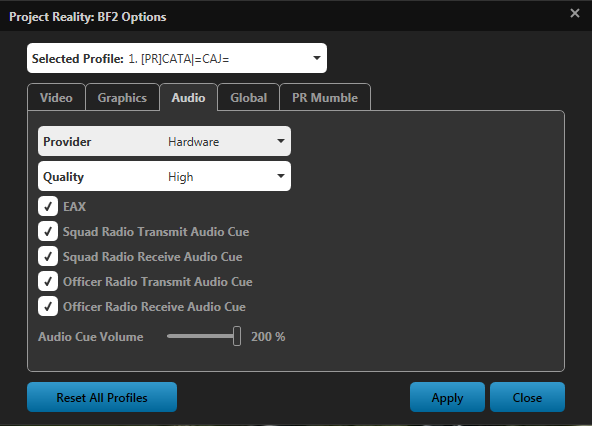
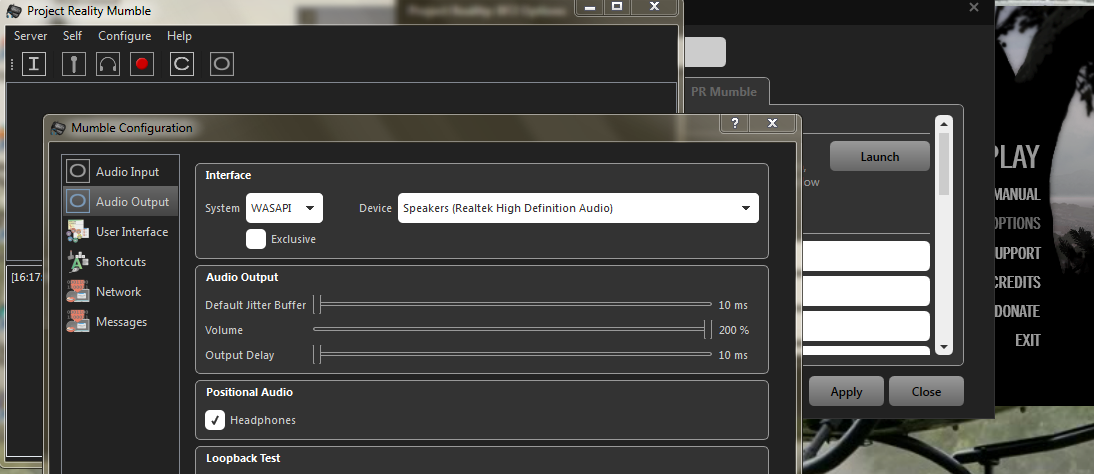
Check to make sure PRMumble.exe is running while you play, and go to mods/PR/bin/ and set all applications to run as administrator by right clicking to it, going to compatibility tab and ticking the box that say run this program as administrator.
While game is running ALT+TAB to desktop, start task manager and search for PRMumble.exe in the processes list.
DO you hear Audio cues? Static radio noise when you see these icons?
Post you Support info tab content, and PRLauncher.log here.
Also do this
Check to make sure PRMumble.exe is running while you play, and go to mods/PR/bin/ and set all applications to run as administrator by right clicking to it, going to compatibility tab and ticking the box that say run this program as administrator.
While game is running ALT+TAB to desktop, start task manager and search for PRMumble.exe in the processes list.
DO you hear Audio cues? Static radio noise when you see these icons?
Post you Support info tab content, and PRLauncher.log here.
Also do this
Code: Select all
Win + R ( or RUN ) > %localappdata% > one step back and open Roaming folder > locate and open Mumble folder > find Console.txt open it and copy its contents and paste it here in /code tags
CATA4TW!
"People never lie so much as before an election, during a war, or after a hunt."
"God has a special providence for fools, drunks, and the United States of America."
― Otto von Bismarck
― Otto von Bismarck
-
HazyChestNutz
- Posts: 21
- Joined: 2013-07-07 18:49
Re: I can see squad and local chat icons, but can't hear anyone talking.
Code: Select all
System Information
------------------
  Operating System: Microsoft? Windows Vista? Home Premium  (6.0.6002)
      Architecture: 64-bit
          Language: English (Canada)
       Motherboard: PEGATRON CORPORATION VIOLET
         Processor: AMD Phenom(tm) 8550 Triple-Core Processor (Physical: 3, Logical: 3)
            Memory: 6.00 GB
      DIMM Modules: DIMM0: 1024.00 MB @ 800 MHz
                    DIMM1: 1024.00 MB @ 800 MHz
                    DIMM2: 2.00 GB @ 800 MHz
                    DIMM3: 2.00 GB @ 800 MHz
         Page File: 6.19 GB
    .NET Framework: 4.5

Display Information
-------------------
 Display Device(s): Generic PnP Monitor on AMD Radeon HD 6700 Series
   Display Mode(s): 1920 x 1080 (32 bit) @ 60 Hz
    Driver Version: 8.14.01.6304
    Display Memory: 1024.00 MB
     Multisampling: 2, 4, 8
               DPI: 96 (100%)

Audio Information
-----------------
  Primary Playback: 1 - Digital Display Audio (AMD
 Primary Recording: Microphone (5- USB Audio Device
               EAX: True
           EAX 1.0: False
           EAX 2.0: True
           EAX 3.0: False
           EAX 4.0: False
           EAX 5.0: False
             X-RAM: False

Disk Information
----------------
      Install Path: C:\Program Files (x86)\Steam\steamapps\common\Battlefield 2
                    Free: 15.30 GB, Total: 582.81 GB, NTFS
          Mod Path: C:\Program Files (x86)\Steam\steamapps\common\Battlefield 2\mods\pr
                    Free: 15.30 GB, Total: 582.81 GB, NTFS
     Profiles Path: C:\Users\A6724c-b\Documents\ProjectReality\Profiles
                    Free: 15.30 GB, Total: 582.81 GB, NTFS
    Update DL Path: C:\Users\A6724c-b\AppData\Local\Project Reality\Project Reality BF2\Downloads
                    Free: 15.30 GB, Total: 582.81 GB, NTFS
   Update Log Path: C:\Users\A6724c-b\AppData\Local\Project Reality\Project Reality BF2\UpdateLogs
                    Free: 15.30 GB, Total: 582.81 GB, NTFS

Game Information
----------------
      CD Key Valid: True
    Installed Mods: bf2, pr, xpack
       Current Mod: pr
       BF2 Version: BF2 1.5
        PR Version: 1.0.36.0
          Language: english
   Debug Available: False
     Large Address: True
Supported Hardware: None

Profile Information
-------------------
      Profile 0001: HazyChestNutz
              Type: Online
 Last Used Profile: True
        View Intro: False
        Fullscreen: True
      Display Mode: 1920x1080@60Hz
Display Mode Valid: True
   Graphics Scheme: Custom
     Multisampling: 4x
             VSync: False
   Terrain Quality: Low
   Effects Quality: Low
  Geometry Quality: Low
   Texture Quality: Medium
  Lighting Quality: Low
   Dynamic Shadows: Low
    Dynamic Lights: Low
 Texture Filtering: Low
    Audio Provider: Hardware
    Provider Valid: True
     Audio Quality: High
               EAX: True
Everything was fine, I played PR since it came out and all of a sudden just a couple of days ago, I can't hear anyone talking on their mics.
Where can I find the PRLauncher.log? and the console.txt is slow, not responding so I won't be able to copy and paste.
-
MaSSive
- Posts: 4502
- Joined: 2011-02-19 15:02
Re: I can see squad and local chat icons, but can't hear anyone talking.
Do you actually use that digital audio output, or you use 3,5' connectors on the back panel for speakers? If not you need to set to default the one you really use. Do that in Windows sound control panel, and in PR Mumble settings.Audio Information ----------------- Primary Playback: 1 - Digital Display Audio (AMD
Console.txt is probably grown large due to errors, its safe to delete it, it'll make new one.
PR launcher.log is where PRLauncher.exe is in /mods/pr/bin/
CATA4TW!
"People never lie so much as before an election, during a war, or after a hunt."
"God has a special providence for fools, drunks, and the United States of America."
― Otto von Bismarck
― Otto von Bismarck
-
HazyChestNutz
- Posts: 21
- Joined: 2013-07-07 18:49
Re: I can see squad and local chat icons, but can't hear anyone talking.
Code: Select all
<W>2013-08-31 12:41:21.610 DirectSound: Disabled as WASAPI is available
<W>2013-08-31 12:41:21.616 CELT bitstream 8000000b from C:/Program Files (x86)/Steam/steamapps/common/Battlefield 2/mods/pr/bin/PRMumble/celt0.0.7.0.dll
<W>2013-08-31 12:41:21.621 CELT bitstream 80000010 from C:/Program Files (x86)/Steam/steamapps/common/Battlefield 2/mods/pr/bin/PRMumble/celt0.0.11.0.dll
<W>2013-08-31 12:41:21.622 Locale is "en_CA" (System: "en_CA")
<W>2013-08-31 12:41:21.656 Database SQLite: "3.7.7.1"
<W>2013-08-31 12:41:21.657 Overlay mumble_ol.dll failed to load
<W>2013-08-31 12:41:21.657 Overlay: Listening on "\\.\pipe\MumbleOverlayPipe"
<W>2013-08-31 12:41:21.897 GlobalShortcutWin: No LowLevelHooksTimeout registry key found.
<W>2013-08-31 12:41:21.960 QMetaObject::invokeMethod: No such method MainWindow::setupView(bool)
<W>2013-08-31 12:41:21.960 QMetaObject::invokeMethod: No such method MainWindow::updateTrayIcon()
<W>2013-08-31 12:41:21.967 AudioInput: 40000 bits/s, 48000 hz, 480 sample
<W>2013-08-31 12:41:21.980 WASAPIInput: Latencies 100000 30000 => 100000
<W>2013-08-31 12:41:21.980 WASAPIOutput: Latencies 100000 30000 => 100000
<W>2013-08-31 12:41:22.005 Adding device {6f1d2b60-d5a0-11cf-bfc7-444553540000} Mouse Mouse:5
<W>2013-08-31 12:41:22.006 Adding device {6f1d2b61-d5a0-11cf-bfc7-444553540000} Keyboard Keyboard:127
<W>2013-08-31 12:41:22.017 OpenSSL Support: 1 (OpenSSL 1.0.0d 8 Feb 2011)
<W>2013-08-31 12:41:22.142 WASAPIInput: Stream Latency 58050 (882)
<W>2013-08-31 12:41:22.143 ServerHandler: QOS2 loaded
<W>2013-08-31 12:41:22.148 Adding device {a0e2f790-5b4e-11df-8001-444553540000} Micr Micr:1024
<W>2013-08-31 12:41:22.150 WASAPIOutput: Stream Latency 106666 (960)
<W>2013-08-31 12:41:22.150 WASAPIOutput: Periods 10000us 3000us (latency 10666us)
<W>2013-08-31 12:41:22.150 AudioInput: Initialized mixer for 1 channel 44100 hz mic and 0 channel 48000 hz echo
<W>2013-08-31 12:41:22.150 WASAPIOutput: Buffer is 20000us (1)
<W>2013-08-31 12:41:22.151 AudioOutput: Initialized 2 channel 48000 hz mixer
<W>2013-08-31 12:41:22.251 Adding device {a0eeb760-5b4e-11df-8003-444553540000} Micr Micr:1280
<W>2013-08-31 12:41:22.295 Adding device {a0f10150-5b4e-11df-8005-444553540000} Micr Micr:256
<W>2013-08-31 12:41:22.350 Adding device {b9d93f30-b85c-11e1-8001-444553540000} SUPERGATE USB Keyboard Mouse SUPERGATE USB Keyboard Mouse:573
<W>2013-08-31 12:41:22.363 Adding device {b9da0280-b85c-11e1-8002-444553540000} SUPERGATE USB Keyboard Mouse SUPERGATE USB Keyboard Mouse:3
<W>2013-08-31 12:44:41.560 DirectSound: Disabled as WASAPI is available
<W>2013-08-31 12:44:41.566 CELT bitstream 8000000b from C:/Program Files (x86)/Steam/steamapps/common/Battlefield 2/mods/pr/bin/PRMumble/celt0.0.7.0.dll
<W>2013-08-31 12:44:41.571 CELT bitstream 80000010 from C:/Program Files (x86)/Steam/steamapps/common/Battlefield 2/mods/pr/bin/PRMumble/celt0.0.11.0.dll
<W>2013-08-31 12:44:41.572 Locale is "en_CA" (System: "en_CA")
<W>2013-08-31 12:44:41.608 Database SQLite: "3.7.7.1"
<W>2013-08-31 12:44:41.608 Overlay mumble_ol.dll failed to load
<W>2013-08-31 12:44:41.608 Overlay: Listening on "\\.\pipe\MumbleOverlayPipe"
<W>2013-08-31 12:44:41.829 GlobalShortcutWin: No LowLevelHooksTimeout registry key found.
<W>2013-08-31 12:44:41.907 QMetaObject::invokeMethod: No such method MainWindow::setupView(bool)
<W>2013-08-31 12:44:41.907 QMetaObject::invokeMethod: No such method MainWindow::activateWindow()
<W>2013-08-31 12:44:41.914 AudioInput: 40000 bits/s, 48000 hz, 480 sample
<W>2013-08-31 12:44:41.921 WASAPIInput: Latencies 100000 30000 => 100000
<W>2013-08-31 12:44:41.921 WASAPIOutput: Latencies 100000 30000 => 100000
<W>2013-08-31 12:44:41.956 WASAPIInput: Stream Latency 58050 (882)
<W>2013-08-31 12:44:41.956 AudioInput: Initialized mixer for 1 channel 44100 hz mic and 0 channel 48000 hz echo
<W>2013-08-31 12:44:41.957 Adding device {6f1d2b60-d5a0-11cf-bfc7-444553540000} Mouse Mouse:5
<W>2013-08-31 12:44:41.958 Adding device {6f1d2b61-d5a0-11cf-bfc7-444553540000} Keyboard Keyboard:127
<W>2013-08-31 12:44:41.974 WASAPIOutput: Stream Latency 106666 (960)
<W>2013-08-31 12:44:41.974 WASAPIOutput: Periods 10000us 3000us (latency 10666us)
<W>2013-08-31 12:44:41.974 WASAPIOutput: Buffer is 20000us (1)
<W>2013-08-31 12:44:41.976 AudioOutput: Initialized 2 channel 48000 hz mixer
<W>2013-08-31 12:44:42.033 Adding device {a0e2f790-5b4e-11df-8001-444553540000} Micr Micr:1024
<W>2013-08-31 12:44:42.129 Adding device {a0eeb760-5b4e-11df-8003-444553540000} Micr Micr:1280
<W>2013-08-31 12:44:42.164 Adding device {a0f10150-5b4e-11df-8005-444553540000} Micr Micr:256
<W>2013-08-31 12:44:42.208 Adding device {b9d93f30-b85c-11e1-8001-444553540000} SUPERGATE USB Keyboard Mouse SUPERGATE USB Keyboard Mouse:573
<W>2013-08-31 12:44:42.219 Adding device {b9da0280-b85c-11e1-8002-444553540000} SUPERGATE USB Keyboard Mouse SUPERGATE USB Keyboard Mouse:3
<W>2013-08-31 12:45:16.478 AudioInput: 40000 bits/s, 48000 hz, 480 sample
<W>2013-08-31 12:45:16.479 WASAPIInput: Latencies 100000 30000 => 100000
<W>2013-08-31 12:45:16.480 WASAPIOutput: Latencies 100000 30000 => 100000
<W>2013-08-31 12:45:16.494 WASAPIInput: Stream Latency 58050 (882)
<W>2013-08-31 12:45:16.495 AudioInput: Initialized mixer for 1 channel 44100 hz mic and 0 channel 48000 hz echo
<W>2013-08-31 12:45:16.508 WASAPIOutput: Stream Latency 106666 (960)
<W>2013-08-31 12:45:16.508 WASAPIOutput: Periods 10000us 3000us (latency 10666us)
<W>2013-08-31 12:45:16.508 WASAPIOutput: Buffer is 20000us (1)
<W>2013-08-31 12:45:16.508 AudioOutput: Initialized 2 channel 48000 hz mixer
<W>2013-08-31 12:45:17.558 AudioInput: 40000 bits/s, 48000 hz, 480 sample
<W>2013-08-31 12:45:17.560 WASAPIInput: Latencies 100000 30000 => 100000
<W>2013-08-31 12:45:17.561 WASAPIOutput: Latencies 100000 30000 => 100000
<W>2013-08-31 12:45:17.572 WASAPIInput: Stream Latency 58050 (882)
<W>2013-08-31 12:45:17.573 AudioInput: Initialized mixer for 1 channel 44100 hz mic and 0 channel 48000 hz echo
<W>2013-08-31 12:45:17.586 WASAPIOutput: Stream Latency 106666 (960)
<W>2013-08-31 12:45:17.586 WASAPIOutput: Periods 10000us 3000us (latency 10666us)
<W>2013-08-31 12:45:17.586 WASAPIOutput: Buffer is 20000us (1)
<W>2013-08-31 12:45:17.586 AudioOutput: Initialized 2 channel 48000 hz mixer
<W>2013-08-31 12:45:18.107 AudioInput: 40000 bits/s, 48000 hz, 480 sample
<W>2013-08-31 12:45:18.108 WASAPIInput: Latencies 100000 30000 => 100000
<W>2013-08-31 12:45:18.109 WASAPIOutput: Latencies 100000 30000 => 100000
<W>2013-08-31 12:45:18.131 WASAPIInput: Stream Latency 58050 (882)
<W>2013-08-31 12:45:18.132 AudioInput: Initialized mixer for 1 channel 44100 hz mic and 0 channel 48000 hz echo
<W>2013-08-31 12:45:18.142 WASAPIOutput: Stream Latency 106666 (960)
<W>2013-08-31 12:45:18.142 WASAPIOutput: Periods 10000us 3000us (latency 10666us)
<W>2013-08-31 12:45:18.142 WASAPIOutput: Buffer is 20000us (1)
<W>2013-08-31 12:45:18.142 AudioOutput: Initialized 2 channel 48000 hz mixer
Also, I've reinstalled PR last night and it still doesn't work
http://imgur.com/CDhqMM0
-
HazyChestNutz
- Posts: 21
- Joined: 2013-07-07 18:49
Re: I can see squad and local chat icons, but can't hear anyone talking.
can someone please help?
-
MaSSive
- Posts: 4502
- Joined: 2011-02-19 15:02
Re: I can see squad and local chat icons, but can't hear anyone talking.
Please see this thread regarding connectivity issues, and router troubleshooting.
https://www.realitymod.com/forum/f27-pr ... ost-2.html
Its possible that your router is blocking some of the features of PRMumble.
Can you tell me how do you connect to internet and whats your router model/make?
https://www.realitymod.com/forum/f27-pr ... ost-2.html
Its possible that your router is blocking some of the features of PRMumble.
Can you tell me how do you connect to internet and whats your router model/make?
CATA4TW!
"People never lie so much as before an election, during a war, or after a hunt."
"God has a special providence for fools, drunks, and the United States of America."
― Otto von Bismarck
― Otto von Bismarck
-
ConscriptVirus
- Posts: 489
- Joined: 2006-12-18 04:02
Re: I can see squad and local chat icons, but can't hear anyone talking.
The plus and minus sign on the numpad controls mumble volume. Maybe try hitting the plus sign a few times?

"These things we do that others may live"
-
HazyChestNutz
- Posts: 21
- Joined: 2013-07-07 18:49
Re: I can see squad and local chat icons, but can't hear anyone talking.
Ethernet cable'[R-COM wrote:MaSSive;1944500']Please see this thread regarding connectivity issues, and router troubleshooting.
https://www.realitymod.com/forum/f27-pr ... ost-2.html
Its possible that your router is blocking some of the features of PRMumble.
Can you tell me how do you connect to internet and whats your router model/make?
D-Link DIR-615 Wireless N Router.
And hitting the plus and minus signs dont work also
-
matty1053
- Posts: 2007
- Joined: 2013-07-03 00:17
Re: I can see squad and local chat icons, but can't hear anyone talking.
See what your firewall says. If I were you, test it to LOW setting on your router.
It worked for my modem router. Medium Blocked all VOIP applications for some reason. I put it on low, and it worked fine.
It worked for my modem router. Medium Blocked all VOIP applications for some reason. I put it on low, and it worked fine.
-
HazyChestNutz
- Posts: 21
- Joined: 2013-07-07 18:49
Re: I can see squad and local chat icons, but can't hear anyone talking.
how to do that?matty1053 wrote:See what your firewall says. If I were you, test it to LOW setting on your router.
It worked for my modem router. Medium Blocked all VOIP applications for some reason. I put it on low, and it worked fine.
-
MaSSive
- Posts: 4502
- Joined: 2011-02-19 15:02
Re: I can see squad and local chat icons, but can't hear anyone talking.
HazyChestNutz wrote:Ethernet cable
D-Link DIR-615 Wireless N Router.
And hitting the plus and minus signs dont work also
Port Forwarding the Dlink DIR-615 Router for Battlefield 2
Note that there are several version of this router, see which one is yours. One on the link is without version number.
CATA4TW!
"People never lie so much as before an election, during a war, or after a hunt."
"God has a special providence for fools, drunks, and the United States of America."
― Otto von Bismarck
― Otto von Bismarck
-
matty1053
- Posts: 2007
- Joined: 2013-07-03 00:17
Re: I can see squad and local chat icons, but can't hear anyone talking.
You have to go on your routers home page in a way.HazyChestNutz wrote:how to do that?
Usually it is:
10.0.0.1 or 192.168.1.1
If it asks for user name and pass..
User name usually is: admin
Password is usually: password
You should have a tab for "firewall", try to lower it if it has a option.
DETROIT TIGERS

-
HazyChestNutz
- Posts: 21
- Joined: 2013-07-07 18:49
Re: I can see squad and local chat icons, but can't hear anyone talking.
when i do what the page says and press save settings, it says IP Adress for Name1 should be within LAN Subnet. what does that mean?'[R-COM wrote:MaSSive;1944612']Port Forwarding the Dlink DIR-615 Router for Battlefield 2
Note that there are several version of this router, see which one is yours. One on the link is without version number.
-
MaSSive
- Posts: 4502
- Joined: 2011-02-19 15:02
Re: I can see squad and local chat icons, but can't hear anyone talking.
It means your doing it wrong. Probably missed something that requires input or wrote wrong IP out of your subnet range eg 192.168.1.1 is your router, then your PPC must be in same subnet with mask 255.255.255.0 or 192.168.1.100.
If its 10.0.1.0 your router, then you should be in its range > 10.0.1.100 where 100 is assigned by DHCP from your router and there is a range of available addresses. Consult your router manual, or call ISP if you dont know what youre doing.
If its 10.0.1.0 your router, then you should be in its range > 10.0.1.100 where 100 is assigned by DHCP from your router and there is a range of available addresses. Consult your router manual, or call ISP if you dont know what youre doing.
CATA4TW!
"People never lie so much as before an election, during a war, or after a hunt."
"God has a special providence for fools, drunks, and the United States of America."
― Otto von Bismarck
― Otto von Bismarck
-
HazyChestNutz
- Posts: 21
- Joined: 2013-07-07 18:49
Re: I can see squad and local chat icons, but can't hear anyone talking.
Is there anyway way to fix this?
-
MaSSive
- Posts: 4502
- Joined: 2011-02-19 15:02
Re: I can see squad and local chat icons, but can't hear anyone talking.
Shizz, find your own local IP adress.
Easiest way Win + R ( or Run from start menu ) > then type "cmd" ( without quotes ) > press Enter ( return ) > type ipconfig /all
See which is the IPV4 adress > that's the solution
Looks like this

Note that this will work if you have a static IP adress in your local subnet, if that adress changes, port forwarding will not work.
If you do not want to fiddle with port forwarding, then just go to Security/Firewall page and turn everything off, then test and see if it works. Its a security risk, and I will not be held responsible for any damage or lose of data.
Easiest way Win + R ( or Run from start menu ) > then type "cmd" ( without quotes ) > press Enter ( return ) > type ipconfig /all
See which is the IPV4 adress > that's the solution
Looks like this
Note that this will work if you have a static IP adress in your local subnet, if that adress changes, port forwarding will not work.
If you do not want to fiddle with port forwarding, then just go to Security/Firewall page and turn everything off, then test and see if it works. Its a security risk, and I will not be held responsible for any damage or lose of data.
CATA4TW!
"People never lie so much as before an election, during a war, or after a hunt."
"God has a special providence for fools, drunks, and the United States of America."
― Otto von Bismarck
― Otto von Bismarck
-
HazyChestNutz
- Posts: 21
- Joined: 2013-07-07 18:49
Re: I can see squad and local chat icons, but can't hear anyone talking.
Went on this morning, it's working again. Don't know how, didn't port foward or anything, but thank god its working. But thanks guys for the help