
Last night was my first night playing PR 1.0. I was rather excited to get back into it when, I realized that no-one could hear me. Turns out, my PR:Mumble won't connect to the server (mostly). Seen here:
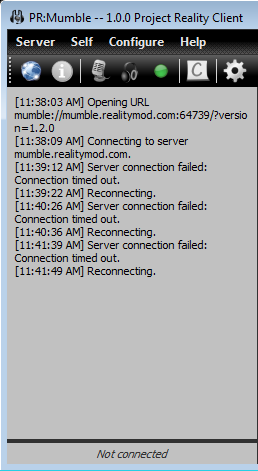
I thought at first it may have to do with my Firewall, Or blocked ports or something. But I opened port: 64739 for TCP & UDP connection. didn't help. I also set mumble.realitymod.com to the Firewalls content filter whitelist (as well as the IP's it directs to. Ping Results).
Interestingly though, when I use the prmumble.exe from my mods/pr/bin/PRMumble/ folder. It connects to something.


But of course this only works when not running PR1.0.
I've tried setting it to run in xp sp3 mode, running it as and as not administrator. I've tried using proxies, and turning off every practical firewall block. Disables my Anti-virus. Nothing is working to get it to connect. I had the vanilla version of mumble installed and it connected to other servers. and the PR version can detect the public servers when I go to connect, but just not the PR one. Does anyone have any ideas?
And this:
Code: Select all
System Information
------------------
  Operating System: Microsoft Windows 7 Home Premium  (6.1.7601)
      Architecture: 64-bit
          Language: English (United States)
       Motherboard: Gigabyte Technology Co., Ltd. GA-990FXA-UD3
         Processor: AMD FX(tm)-8120 Eight-Core Processor            (Physical: 4, Logical: 8)
            Memory: 16.00 GB
      DIMM Modules: A0: 4.00 GB @ 1600 MHz
                    A1: 4.00 GB @ 1600 MHz
                    A2: 4.00 GB @ 1600 MHz
                    A3: 4.00 GB @ 1600 MHz
         Page File: 15.98 GB
    .NET Framework: 4.0

Display Information
-------------------
 Display Device(s): Generic PnP Monitor on AMD Radeon HD 6800 Series
                    Generic PnP Monitor on AMD Radeon HD 6800 Series
   Display Mode(s): 1920 x 1080 (32 bit) @ 60 Hz
                    1920 x 1080 (32 bit) @ 60 Hz
    Driver Version: 9.12.0.0
    Display Memory: 2.00 GB
     Multisampling: 2, 4, 8
               DPI: 96 (100%)

Audio Information
-----------------
  Primary Playback: Speakers (G510 Gaming Keyboard)
 Primary Recording: Microphone (G510 Gaming Keyboar
               EAX: True
           EAX 1.0: False
           EAX 2.0: True
           EAX 3.0: False
           EAX 4.0: False
           EAX 5.0: False
             X-RAM: False

Disk Information
----------------
      Install Path: F:\Program Files\Steam\steamapps\common\Battlefield 2
                    Free: 31.50 GB, Total: 238.47 GB, NTFS
          Mod Path: F:\Program Files\Steam\steamapps\common\Battlefield 2\mods\pr
                    Free: 31.50 GB, Total: 238.47 GB, NTFS
     Profiles Path: C:\Users\<username>\Documents\ProjectReality\Profiles
                    Free: 10.06 GB, Total: 83.84 GB, NTFS
    Update DL Path: C:\Users\<username>\AppData\Local\Project Reality\Project Reality BF2\Downloads
                    Free: 10.06 GB, Total: 83.84 GB, NTFS
   Update Log Path: C:\Users\<username>\AppData\Local\Project Reality\Project Reality BF2\UpdateLogs
                    Free: 10.06 GB, Total: 83.84 GB, NTFS

Game Information
----------------
      CD Key Valid: True
    Installed Mods: bf2, pr, xpack
       Current Mod: pr
       BF2 Version: BF2 1.5
        PR Version: 1.0.36.0
          Language: english
   Debug Available: False
     Large Address: True
Supported Hardware: None

Profile Information
-------------------
      Profile 0001: |TG|Shoomfie
              Type: Online
 Last Used Profile: True
        View Intro: True
        Fullscreen: True
      Display Mode: 1680x1050@60Hz
Display Mode Valid: True
   Graphics Scheme: High
     Multisampling: Off
             VSync: False
   Terrain Quality: High
   Effects Quality: High
  Geometry Quality: High
   Texture Quality: High
  Lighting Quality: High
   Dynamic Shadows: High
    Dynamic Lights: High
 Texture Filtering: High
    Audio Provider: Hardware
    Provider Valid: True
     Audio Quality: High
EAX: TrueP.S. I uninstalled the vanilla mumble, and re-installed the PR:Mumble twice.

 :
:

