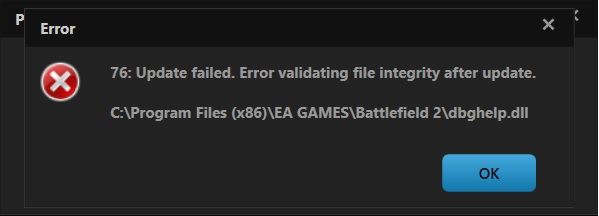
Can anyone help me out with this?
Much regards
MickCoffee - An enthusiastic "to be" PR Player.

That being said, you could try this, in descending order of required time/effort:In some cases, dbghelp.dll errors could indicate a registry problem, a virus or malware issue or even a hardware failure.
3. Uninstall vanilla BF2, reboot, and reinstall vanilla BF2.'paratrooper[BG wrote:;1728150']i find the dbghelp and delete it,and download the new dll from the web site you give[edit: for you MickCoffee, use the link above] ,im gonna try now and see what gonna happen....im gonna edit my post later,and tell you if there any change.
SOLVED....this is strange but my problem was mumble 1.0, i watch all unninstall in mumble i and saw the dbghelp.dll disaappear, in uninstaling(directory on mumble folders and files was in D:\Games\Battlefield2 ) same direction as game,after uninstall mumble dbghelp.dll was automaticly removed, instaled mumble in other directory than game and problem was solved, played 3 hours without problem, thats my solution for md5tool mismatch: dbghelp.dll (len=2048 )
so if any have instaled mumble in battlefield2 directory uninstall the mumble from there and set it in other direction.
That seemed to do the trick LITOralis.nMd. Thank you very much for the help, it is much appreciated. I'll see you on the battlefield!'[R-COM wrote:LITOralis.nMd;1951222']That being said, you could try this, in descending order of required time/effort:
1. I'll upload the file to dropbox, you can download it and place in correct location.
https://www.dropbox.com/s/jatkf4te8r366tf/dbghelp.dll
If after you do that , you get more file verification errors, let us know.