
Invalid CD key issue
-
AttackingJoe
- Posts: 7
- Joined: 2013-09-02 04:11
Invalid CD key issue
I have a copy of Battlefield 2 complete edition From amazon's download service. When I try to join a server I get an invlaid cd key message. I've tried using the bf2cdkeyfixer tool with no sucess and I've tried doing a fresh install of bf2 and pr with no sucess. Does anyone have any suggestions?
-
Microwaife
- Posts: 627
- Joined: 2011-03-17 11:46

-
AttackingJoe
- Posts: 7
- Joined: 2013-09-02 04:11
Re: Invlaid CD key issue
the cd key works for normal bf2.Microwaife wrote:Maybe you can write amazon support and see what they have to say...
-
IINoddyII
- Retired PR Developer
- Posts: 2268
- Joined: 2008-02-06 03:12
Re: Invlaid CD key issue
ooops.. nvm missed your post above
Can you copy the support details from the launcher here ?
Can you copy the support details from the launcher here ?
-
AttackingJoe
- Posts: 7
- Joined: 2013-09-02 04:11
Re: Invlaid CD key issue
System Information
------------------
Operating System: Microsoft Windows 7 Professional (6.1.7601)
Architecture: 64-bit
Language: English (United States)
Motherboard: ASRock 970 Extreme3
Processor: AMD FX(tm)-8120 Eight-Core Processor (Physical: 4, Logical:
Memory: 16.00 GB
DIMM Modules: A1_DIMM0: 8.00 GB @ 800 MHz
A1_DIMM1: 8.00 GB @ 800 MHz
Page File: 15.98 GB
.NET Framework: 4.0
Display Information
-------------------
Display Device(s): HP 2009 Series Wide LCD Monitor on AMD Radeon HD 7700 Series
Generic PnP Monitor on AMD Radeon HD 7700 Series
Display Mode(s): 1600 x 900 (32 bit) @ 60 Hz
1280 x 1024 (32 bit) @ 60 Hz
Driver Version: 9.12.0.0
Display Memory: 1024.00 MB
Multisampling: 2, 4, 8
DPI: 96 (100%)
Audio Information
-----------------
Primary Playback: Speakers (Realtek High Definiti
Primary Recording: FrontMic (Realtek High Definiti
EAX: True
EAX 1.0: False
EAX 2.0: True
EAX 3.0: False
EAX 4.0: False
EAX 5.0: False
X-RAM: False
Disk Information
----------------
Install Path: X:\Programs\Battlefield 2
Free: 208.52 GB, Total: 931.51 GB, NTFS
Mod Path: X:\Programs\Battlefield 2\mods\pr
Free: 208.52 GB, Total: 931.51 GB, NTFS
Profiles Path: C:\Users\James\Documents\ProjectReality\Profiles
Free: 12.41 GB, Total: 222.22 GB, NTFS
Update DL Path: C:\Users\James\AppData\Local\Project Reality\Project Reality BF2\Downloads
Free: 12.41 GB, Total: 222.22 GB, NTFS
Update Log Path: C:\Users\James\AppData\Local\Project Reality\Project Reality BF2\UpdateLogs
Free: 12.41 GB, Total: 222.22 GB, NTFS
Game Information
----------------
CD Key Valid: False
Installed Mods: bf2, pr, xpack
Current Mod: pr
BF2 Version: BF2 1.5
PR Version: 1.0.36.0
Language: english
Debug Available: False
Large Address: True
Supported Hardware: None
Profile Information
-------------------
Profile 0001: AttackingJoe
Type: Online
Last Used Profile: True
View Intro: True
Fullscreen: True
Display Mode: 1600x900@60Hz
Display Mode Valid: True
Graphics Scheme: High
Multisampling: 8x
VSync: False
Terrain Quality: High
Effects Quality: High
Geometry Quality: High
Texture Quality: High
Lighting Quality: High
Dynamic Shadows: High
Dynamic Lights: High
Texture Filtering: High
Audio Provider: Software
Provider Valid: True
Audio Quality: Low
EAX: True
------------------
Operating System: Microsoft Windows 7 Professional (6.1.7601)
Architecture: 64-bit
Language: English (United States)
Motherboard: ASRock 970 Extreme3
Processor: AMD FX(tm)-8120 Eight-Core Processor (Physical: 4, Logical:
Memory: 16.00 GB
DIMM Modules: A1_DIMM0: 8.00 GB @ 800 MHz
A1_DIMM1: 8.00 GB @ 800 MHz
Page File: 15.98 GB
.NET Framework: 4.0
Display Information
-------------------
Display Device(s): HP 2009 Series Wide LCD Monitor on AMD Radeon HD 7700 Series
Generic PnP Monitor on AMD Radeon HD 7700 Series
Display Mode(s): 1600 x 900 (32 bit) @ 60 Hz
1280 x 1024 (32 bit) @ 60 Hz
Driver Version: 9.12.0.0
Display Memory: 1024.00 MB
Multisampling: 2, 4, 8
DPI: 96 (100%)
Audio Information
-----------------
Primary Playback: Speakers (Realtek High Definiti
Primary Recording: FrontMic (Realtek High Definiti
EAX: True
EAX 1.0: False
EAX 2.0: True
EAX 3.0: False
EAX 4.0: False
EAX 5.0: False
X-RAM: False
Disk Information
----------------
Install Path: X:\Programs\Battlefield 2
Free: 208.52 GB, Total: 931.51 GB, NTFS
Mod Path: X:\Programs\Battlefield 2\mods\pr
Free: 208.52 GB, Total: 931.51 GB, NTFS
Profiles Path: C:\Users\James\Documents\ProjectReality\Profiles
Free: 12.41 GB, Total: 222.22 GB, NTFS
Update DL Path: C:\Users\James\AppData\Local\Project Reality\Project Reality BF2\Downloads
Free: 12.41 GB, Total: 222.22 GB, NTFS
Update Log Path: C:\Users\James\AppData\Local\Project Reality\Project Reality BF2\UpdateLogs
Free: 12.41 GB, Total: 222.22 GB, NTFS
Game Information
----------------
CD Key Valid: False
Installed Mods: bf2, pr, xpack
Current Mod: pr
BF2 Version: BF2 1.5
PR Version: 1.0.36.0
Language: english
Debug Available: False
Large Address: True
Supported Hardware: None
Profile Information
-------------------
Profile 0001: AttackingJoe
Type: Online
Last Used Profile: True
View Intro: True
Fullscreen: True
Display Mode: 1600x900@60Hz
Display Mode Valid: True
Graphics Scheme: High
Multisampling: 8x
VSync: False
Terrain Quality: High
Effects Quality: High
Geometry Quality: High
Texture Quality: High
Lighting Quality: High
Dynamic Shadows: High
Dynamic Lights: High
Texture Filtering: High
Audio Provider: Software
Provider Valid: True
Audio Quality: Low
EAX: True
-
IINoddyII
- Retired PR Developer
- Posts: 2268
- Joined: 2008-02-06 03:12
Re: Invlaid CD key issue
Can you confirm you are able to join a punkbuster enabled server in vBF2 ?Game Information
----------------
CD Key Valid: False
-
AttackingJoe
- Posts: 7
- Joined: 2013-09-02 04:11
Re: Invlaid CD key issue
Yes I can.[R-MOD]IINoddyII wrote:Can you confirm you are able to join a punkbuster enabled server in vBF2 ?
-
IINoddyII
- Retired PR Developer
- Posts: 2268
- Joined: 2008-02-06 03:12
Re: Invlaid CD key issue
ok...
If you've looked at the sticky thread and tried the alternate way of updating your key...
try this fix https://www.realitymod.com/forum/f370-p ... r-fix.html
If you've looked at the sticky thread and tried the alternate way of updating your key...
try this fix https://www.realitymod.com/forum/f370-p ... r-fix.html
-
MaSSive
- Posts: 4502
- Joined: 2011-02-19 15:02
Re: Invalid CD key issue
Try doing it manually. And follow instructions but for 64bit system.* The path for 64bit versions of Windows (Vista x64 and XP x64 editions) is different:
HKEY_LOCAL_MACHINE\SOFTWARE\Wow6432Node\Electronic Arts\EA Games\Battlefield 2\ergc
The rest of the guide is not affected.
https://www.realitymod.com/forum/f27-pr ... valid.html

CATA4TW!
"People never lie so much as before an election, during a war, or after a hunt."
"God has a special providence for fools, drunks, and the United States of America."
― Otto von Bismarck
― Otto von Bismarck
-
AttackingJoe
- Posts: 7
- Joined: 2013-09-02 04:11
Re: Invalid CD key issue
My ergc folder is in battlefield 2 special forces instead of regular battlefield 2. Will this cause an issue?MaSSive wrote:Try doing it manually. And follow instructions but for 64bit system.
https://www.realitymod.com/forum/f27-pr ... valid.html
-
MaSSive
- Posts: 4502
- Joined: 2011-02-19 15:02
Re: Invalid CD key issue
So you dont have ergc folder under Battlefield 2?
PLEASE READ THIS CAREFULLY AND DONT MISS ANY STEP OR YOU WILL CAUSE DAMAGE TO YOUR REGISTRY!
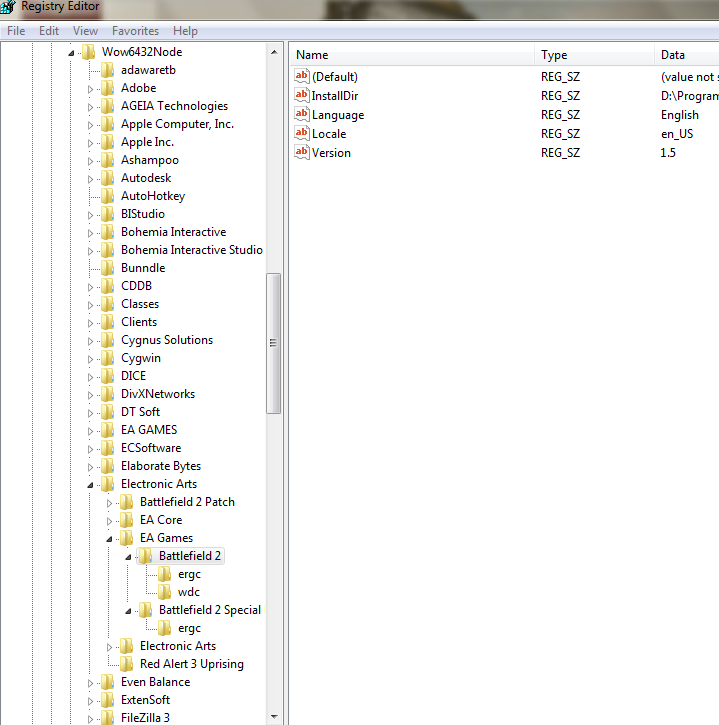
Does ergc folder in Special folder has two values? Or just one "Default"?
In case it has only one, that's then only the key for SF. For some reason you're missing a key for BF2.
Follow these steps but first of all follow the steps in previous guide on how to backup and restore your registry.
1 ) BACKUP!!!
2) Open regedit and find key
3) Right click on Battlefield 2 folder and select New > Key
4) You will see new folder created under Batlefiled 2 with name New Key#1 , so type in that folder name box "ergc" ( no quotes ) and confirm its creation
5) Click on newly created ergc folder/key and youll see one entry named Default, of type REG_SZ, and Value ( not set )
6) Right click on that entry and select modify data, and then input in the Value data fieild
Once done with input, press OK, and close registry editor.
7) Reboot, and try running BF2 first, and then try PR.
Note that your BF2 CD key must be inserted without any spaces or slashes, and X9392 must be before it in the Value data field. Of course your BF2 CD key must be original and not banned for this to work for online play.
I will not be held responsible if you cause damage to your PC or software, by improper operation or mishandling, and failing to follow these instructions.
PLEASE READ THIS CAREFULLY AND DONT MISS ANY STEP OR YOU WILL CAUSE DAMAGE TO YOUR REGISTRY!
Does ergc folder in Special folder has two values? Or just one "Default"?
In case it has only one, that's then only the key for SF. For some reason you're missing a key for BF2.
Follow these steps but first of all follow the steps in previous guide on how to backup and restore your registry.
1 ) BACKUP!!!
2) Open regedit and find key
Code: Select all
[b]HKEY_LOCAL_MACHINE\SOFTWARE[color=Red]\Wow6432Node\[/color]Electronic Arts\EA Games\Battlefield 2\[/b]4) You will see new folder created under Batlefiled 2 with name New Key#1 , so type in that folder name box "ergc" ( no quotes ) and confirm its creation
5) Click on newly created ergc folder/key and youll see one entry named Default, of type REG_SZ, and Value ( not set )
6) Right click on that entry and select modify data, and then input in the Value data fieild
Code: Select all
[color=SeaGreen]x9392FOLLOWEDBYYOURBF2CDKEYWITHOUTSPACESORSLAHES[/color]7) Reboot, and try running BF2 first, and then try PR.
Note that your BF2 CD key must be inserted without any spaces or slashes, and X9392 must be before it in the Value data field. Of course your BF2 CD key must be original and not banned for this to work for online play.
I will not be held responsible if you cause damage to your PC or software, by improper operation or mishandling, and failing to follow these instructions.
Last edited by MaSSive on 2013-09-02 16:51, edited 7 times in total.
CATA4TW!
"People never lie so much as before an election, during a war, or after a hunt."
"God has a special providence for fools, drunks, and the United States of America."
― Otto von Bismarck
― Otto von Bismarck
-
AttackingJoe
- Posts: 7
- Joined: 2013-09-02 04:11
Re: Invalid CD key issue
Just one default.MaSSive wrote:So you dont have ergc folder under Battlefield 2?
Does ergc folder in Special folder has two values? Or just one "Default"?
-
MaSSive
- Posts: 4502
- Joined: 2011-02-19 15:02
Re: Invalid CD key issue
Right, see the post above and post-back results.
CATA4TW!
"People never lie so much as before an election, during a war, or after a hunt."
"God has a special providence for fools, drunks, and the United States of America."
― Otto von Bismarck
― Otto von Bismarck
-
AttackingJoe
- Posts: 7
- Joined: 2013-09-02 04:11
Re: Invalid CD key issue
No sucess. still get an invlaid cd key error.
-
MaSSive
- Posts: 4502
- Joined: 2011-02-19 15:02
Re: Invalid CD key issue
Well then you should contact Amazon if that's where you bought your copy of the game. Also undo the changes you've done in the registry ( dont restore backup ) but just delete the key/folder ergc in Battlefield 2 folder under the registry path shown above.
You might try after that to uninstall and reinstall Battlefield 2 again, and follow the official guide on how to do it properly.
I assume you've got BF2 updated to 1.5?
You might try after that to uninstall and reinstall Battlefield 2 again, and follow the official guide on how to do it properly.
I assume you've got BF2 updated to 1.5?
CATA4TW!
"People never lie so much as before an election, during a war, or after a hunt."
"God has a special providence for fools, drunks, and the United States of America."
― Otto von Bismarck
― Otto von Bismarck
-
viirusiiseli
- Posts: 1171
- Joined: 2012-02-29 23:53
Re: Invalid CD key issue
Didn't read the thread other than you saying you tried all the stuff posted before. If you're still lurking this thread do this.AttackingJoe wrote:No sucess. still get an invlaid cd key error.
Different CD keys seem to not work with certain ways of typing it into the registry.
There are 4 ways to type it.
YOURBF2CDKEYHERE
YOUR-BF2C-DKEY-HERE
x9392YOURBF2CDKEYHERE
x9392YOUR-BF2C-DKEY-HERE
My CD key only works with x9392 and dashes so everyone suggesting you don't need dashes is BS. Sometimes you apparently do.