
I'm trying to import the map to my mod, and currently I have a problems with grenade effects, on ground impact.
I know that the problem is in the material interaction, but I can't find the ground material for the map. Yes, I'm new to map modding ))
How to find the ground material?
-
Meloonileuka
- Posts: 14
- Joined: 2010-08-02 22:52
Re: How to find the ground material?
Hi!
Do you have checked this?
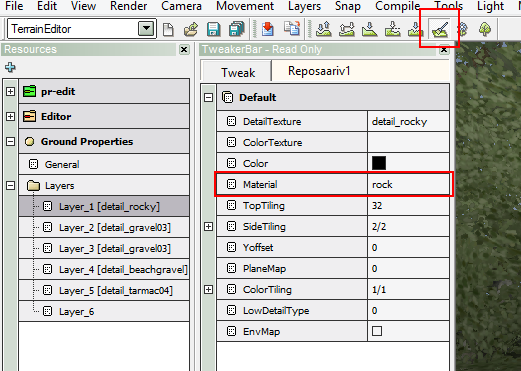
Do you have checked this?
-
MaxP
- Posts: 117
- Joined: 2008-09-08 19:18
Re: How to find the ground material?
Hi. When I select one of the layers, there is no material defined.Meloonileuka wrote:Hi!
Do you have checked this?
I'm trying to import "Fall of tobruk" map, here is the picture:

-
Rhino
- Retired PR Developer
- Posts: 47909
- Joined: 2005-12-13 20:00
Re: How to find the ground material?
Do you have permission from the FH2 team to use and modify their map?

-
Meloonileuka
- Posts: 14
- Joined: 2010-08-02 22:52
Re: How to find the ground material?
You're missing files. e.g. this folder levels/fall_of_tobruk/editor, and i don't know how to create a new editor folder without original files (colormaps, detailmaps, gameplayobjects.con etc.) and maybe other files missing.
and you need permission from the FH2 team.
and you need permission from the FH2 team.
-
MaxP
- Posts: 117
- Joined: 2008-09-08 19:18
Re: How to find the ground material?
I only need permission if I'm going to share the modified content to someone, and I think it will never happens  This is only for private purposes, maximum - for two players at LAN.
But, of course, I understand your worries.
Anyway, thank you all very much.
This is only for private purposes, maximum - for two players at LAN.But, of course, I understand your worries.
Anyway, thank you all very much.
-
Rhino
- Retired PR Developer
- Posts: 47909
- Joined: 2005-12-13 20:00
Re: How to find the ground material?
without the groundproperties.con file there is no easy way to find out the ground material of a map unfortunately. Could try asking the FH2 team?
-
MaxP
- Posts: 117
- Joined: 2008-09-08 19:18
Re: How to find the ground material?
I'll try, but I'm almost sure that I can find it later with "reverse-engineering" method[R-DEV]Rhino wrote:without the groundproperties.con file there is no easy way to find out the ground material of a map unfortunately. Could try asking the FH2 team?
- by searching for proper effects on material collisions.-
Mineral

- Retired PR Developer
- Posts: 8534
- Joined: 2012-01-02 12:37
- Location: Belgium

-
Ason

- PR:BF2 Developer
- Posts: 1755
- Joined: 2012-10-22 10:29
Re: How to find the ground material?
Why don't you just set new materials? All you need to do is set materials that fit the detail textures and then paint a little bit with every layer, if you don't have the original color textures just use something similar and paint on places that you don't see that much. Then resave everything that has to do with terrain (terraindata is most important I guess, but might aswell check everything). After that the map will have materials and I guess there should be no problems with effects?
Last edited by Ason on 2015-11-30 22:28, edited 1 time in total.

-
MaxP
- Posts: 117
- Joined: 2008-09-08 19:18
Re: How to find the ground material?
I've tried, but something goes wrong.[R-DEV]Ason wrote:Why don't you just set new materials? All you need to do is set materials that fit the detail textures and then paint a little bit with every layer, if you don't have the original color textures just use something similar and paint on places that you don't see that much. Then resave everything that has to do with terrain (terraindata is most important I guess, but might aswell check everything). After that the map will have materials and I guess there should be no problems with effects?
So I:
- select Layer 1 and set the sand material, then the detail texture too
- click somewhere on the terrain in the detail paint mode - but nothing happens
https://www.dropbox.com/s/zq8wly2sn4if0 ... r.jpg?dl=0

- click Save, and save "as is"
https://www.dropbox.com/s/qfrdj88s8qrhwdm/Save.jpg?dl=0

- select "package this level"
- delete all from the map folder, except Info, server.zip and client.zip
- load the level ingame and see the black ground texture, and still no full effects.
-
Ason
- PR:BF2 Developer
- Posts: 1755
- Joined: 2012-10-22 10:29
Re: How to find the ground material?
I will try to list the things you need to do, I have never done it before but it might work.
First of all make backup of packed map, then extract both server.zip and client.zip in level folder.
1. Open map in editor, select "terrain editor" in dropdown box and then paint tool, scroll down in tweaker bar and select layer 1.
2. If layer 1 has detail texture grass, select a color texture that looks like grass (Not that important as we just want to edit materials, also afaik detail textures should already be set but no color textures) And set the material to grass in the dropdown box.
3.on the right side, set brush size to 5-10 and strenght to 100. scroll down to "paint mode" and select "Both" and "Texture" then paint on the edge of the map where you won't see it anyway.(ground will be black but doesn't matter)
4.Repeat point 2-3 with all layers.
5. Save all (check all terrain boxes)
6. Add new terraindata.raw to client.zip of original packed map.
7.Try packed map ingame.
I'm not sure this will work but worth a shot.
First of all make backup of packed map, then extract both server.zip and client.zip in level folder.
1. Open map in editor, select "terrain editor" in dropdown box and then paint tool, scroll down in tweaker bar and select layer 1.
2. If layer 1 has detail texture grass, select a color texture that looks like grass (Not that important as we just want to edit materials, also afaik detail textures should already be set but no color textures) And set the material to grass in the dropdown box.
3.on the right side, set brush size to 5-10 and strenght to 100. scroll down to "paint mode" and select "Both" and "Texture" then paint on the edge of the map where you won't see it anyway.(ground will be black but doesn't matter)
4.Repeat point 2-3 with all layers.
5. Save all (check all terrain boxes)
6. Add new terraindata.raw to client.zip of original packed map.
7.Try packed map ingame.
I'm not sure this will work but worth a shot.
-
MaxP
- Posts: 117
- Joined: 2008-09-08 19:18
Re: How to find the ground material?
What if the editor says that I need an uncompressed texture? I've tried to convert dds to 32-bit tga and pack it near the original one, but with no luck.'[R-DEV wrote:Ason;2109745']
3.on the right side, set brush size to 5-10 and strenght to 100. scroll down to "paint mode" and select "Both" and "Texture" then paint on the edge of the map where you won't see it anyway.(ground will be black but doesn't matter)
-
Ason
- PR:BF2 Developer
- Posts: 1755
- Joined: 2012-10-22 10:29
Re: How to find the ground material?
Are you using custom textures? If so they should be saved as .dds 32bit A8R8G8B8 512x512. And you need to add them to the editor by clicking the blue plus sign when you have the list of color textures open.MaxP wrote:What if the editor says that I need an uncompressed texture? I've tried to convert dds to 32-bit tga and pack it near the original one, but with no luck.
Or try to use vbf2 textures.
On your previous picture you didn't select color texture. You need to press the emtpy field to the right of "color texture" to see the list of textures. (Please send a pic of the editor + error message if it happens again)
If it still doesn't work you might want to follow the first two steps in this tutorial:
https://www.realitymod.com/forum/f189-m ... files.html
And then try to resave new materials when you have the textures done..
But tbh if I was you I would try to make a small map by following this list of tutorials and then try to edit other maps.. It's much easier to edit other maps when you know how to create maps.
https://www.realitymod.com/forum/f189-m ... rs-up.html
-
MaxP
- Posts: 117
- Joined: 2008-09-08 19:18
Re: How to find the ground material?
No matter what textures are used. I've tried it step by step, but there is the same problem.[R-DEV]Ason wrote:Are you using custom textures?
When I select Color texture (converted to dds ARGB888
 , the editor still says that it needs an uncompressed texture - when I trying to paint the layer.
The editor also cannot import 512x512 bmp.
So what kind of texture it needs?
P.S. Also I can't see layers properties for any map (including vbf2 ones) - it's just blank, with black color defined. Is it normal?
Last edited by MaxP on 2015-12-05 02:38, edited 2 times in total.