SoloWing;2112295 wrote:SweetFX 2.0 + Reshade + GEM 0.52 + Ambient Occlusion via NvidiaInspector + Little adjust gamma via Nvidia control panel =
SoloWing, I find your config, based on those screenshots, the best I've seen so far...
Would you please share your exact SweetFX 2.0 + Reshade + GEM 0.52 files and config.
Thank you in advance
PR Graphic Enhancement Mod [UPDATE2022]
-
Valmont
- Posts: 159
- Joined: 2014-10-21 13:43
Re: PR Graphic Enhancement Mod
-
SoloWing
- Posts: 40
- Joined: 2013-03-21 02:09
Re: PR Graphic Enhancement Mod
I didn't change nor modify anything. I just mixed them up. I'll guide you how to do it;Valmont wrote: SoloWing, I find your config, based on those screenshots, the best I've seen so far...
Would you please share your exact SweetFX 2.0 + Reshade + GEM 0.52 files and config.
Thank you in advance
1. Download SweetFX from here.
2. Extract it anywhere, use "ReShade Setup.exe" to install. Press "select game" and add "PRBF2.exe" from your PR directory and select "Direct 3D 9". After that check the word "success" and close the box(do not run it)).
3. Now, download this preset, rename it "SweetFX_Settings.txt", find and open "SweetFX folder" in PR directory, and replace the original "SweetFX_Settings.txt" with it.(I used The Witcher 3's preset because it was only preset file I had on my computer and I was little bit lazy to find something others. Anyway this will make the colors little deeper. I found GEM 0.52 alone is overly bright, so I tried SweetFX to neutralize those brightness. It was a pure experimental attempt but I satisfied at the result.)
4. Download Reshade Framework. Extract "Reshade folder" only and place it to PR directory.
5. Download this file, extract "ReShade32.dll" only, rename it "d3d9.dll" and drop it to PR directory. This file will make SweetFX and ReShade work together.
6. Install GEM 0.52(overwrite reshade.fx)
If you want make the colors much deeper, turn down gamma little bit on your graphic card control panel.
If the game doesn't work or you don't like the result, delete MasterEffect/Reshade/Sweetfx folders and d3d9.dll/Reshade.fx/Sweet.fx/Mastereffect.h files.


Last edited by SoloWing on 2015-12-29 11:57, edited 17 times in total.
-
Valmont
- Posts: 159
- Joined: 2014-10-21 13:43
Re: PR Graphic Enhancement Mod
Thank you for such detailed guide Solowing.SoloWing wrote:I didn't change nor modify anything. I just mixed them up. I'll guide you how to do it;
1. Download SweetFX from here.
2. Extract it anywhere, use "ReShade Setup.exe" to install. Press "select game" and add "PRBF2.exe" from your PR directory and select "Direct 3D 9". After that check the word "success" and close the box(do not run it)).
3. Now, download this preset, rename it "SweetFX_Settings.txt", find and open "SweetFX folder" in PR directory, and replace the original "SweetFX_Settings.txt" with it.(I used The Witcher 3's preset because it was only preset file I had on my computer and I was little bit lazy to find something others. Anyway this will make the colors little deeper. I found GEM 0.52 alone is overly bright, so I tried SweetFX to neutralize those brightness. It was a pure experimental attempt but I satisfied at the result.)
4. Download Reshade Framework. Extract "Reshade folder" only and place it to PR directory.
5. Download this file, extract "ReShade32.dll" only, rename it "d3d9.dll" and drop it to PR directory. This file will make SweetFX and ReShade work together.
6. Install GEM 0.52(overwrite reshade.fx)
If you want make the colors much deeper, turn down gamma little bit on your graphic card control panel.
If the game doesn't work or you don't like the result, delete MasterEffect/Reshade/Sweetfx folders and d3d9.dll/Reshade.fx/Sweet.fx/Mastereffect.h files.
Sadly d3d9.dll makes PR not starting just black screen, it used to work before but maybe a Win10 update or Driver Update broke it. The weird thing is that I have a Nvidia Geforce 750M and Intel 4000 and it works if I force the Intel GPU but it does not work with nvidia for some reason and Intel is way too slow to be playable.
BUT... I did that Ambient Occlusion via NvidiaInspector that you did and it made my game much much better... almost like it was with SweetFX and Reshade alone and no fps lost on my side.
I plan on getting a new PC mid 2016 just for Squad and hopefully SweetFX and Reshade will work again on that setup.
Keep up making our favourite game look prettier and prettier bro.
-
RENEGADO
- Posts: 117
- Joined: 2015-03-01 13:07
 Re: PR Graphic Enhancement Mod
I had to create my own preset, yours for some reason makes my game drop too many FPS, around 20 here on my computer.
-
Tackleberry86
- Posts: 102
- Joined: 2015-02-12 03:52
Re: PR Graphic Enhancement Mod
Well those screenshots looked pretty nice so i gave it a try....well, let me put it this way, i think i'm too old for those gamma changes...terrible headache after 5 mins 
but still great work mate, thumbs up!!!
but still great work mate, thumbs up!!!
-
ConscriptVirus
- Posts: 489
- Joined: 2006-12-18 04:02
Re: PR Graphic Enhancement Mod
Anyone with Win10 have this working for them? I just get a black screen right now. =/

"These things we do that others may live"
-
meloncrab
- Posts: 1
- Joined: 2010-12-25 11:18
Re: PR Graphic Enhancement Mod
I'm on Windows 8.1 and the reshade makes my game incredibely blurry all of a sudden. Tried completely reinstalling and google to no avail.
Edit: in the ReShade.txt file I changed the three "MipLevels = 5" values to 1. Fixed it.
Edit: in the ReShade.txt file I changed the three "MipLevels = 5" values to 1. Fixed it.
Last edited by meloncrab on 2016-05-19 23:19, edited 1 time in total.
-
MAVEN
- Posts: 98
- Joined: 2016-07-12 21:29
Re: PR Graphic Enhancement Mod
A HUGE Thank You to both thread author and everyone involved for making this small modification which not only enhanced the PR game but helped me make my own.
I played with the settings for a while and made almost a complete overhaul of the version posted by thread author, then named my preset Real Dust.
I posted a thread on the forums, it's awaiting moderation. As soon it's available you can go and grab DL links and more screenshots, until then, here's a few thumbnail screens to give you an idea:
P.S. It's up - https://www.realitymod.com/forum/f10-pr ... ty-a2.html


I played with the settings for a while and made almost a complete overhaul of the version posted by thread author, then named my preset Real Dust.
I posted a thread on the forums, it's awaiting moderation. As soon it's available you can go and grab DL links and more screenshots, until then, here's a few thumbnail screens to give you an idea:
P.S. It's up - https://www.realitymod.com/forum/f10-pr ... ty-a2.html
Last edited by MAVEN on 2016-07-13 11:21, edited 1 time in total.
-
iglotruck
- Posts: 190
- Joined: 2015-12-14 20:46
Re: PR Graphic Enhancement Mod
Those are some really cool shots, but personally I don't think I would enjoy playing with those settings. Aren't you struggling to actually see stuff?
-
MAVEN
- Posts: 98
- Joined: 2016-07-12 21:29
Re: PR Graphic Enhancement Mod
Thanks.
Truth be told it does seem like it would be hard to see anything, and in some occasions it is difficult (Fallujah west sky or distance) but in most cases it actually helps you get immersed. It takes some time getting used to it, but once you adapt you are fully aware unlike with standard vanilla bf2 graphics where you see it as cartoonish and colorful.
The reason why I used REINHARD filter setting and balanced it is because it limits how bright white can be (there's no pure white in the mod, only slight tones of gray) and contrasts dark tones. The preset is also balanced to use a filter that can bring more colors in and tone down the bloom, in archive there's instructions.
The bloom effect might be overdone on some maps but overall for city/forest maps it is very nice, specially if you take cover in a building and look down your scope.
I also increased sharpening filter to make the image more clear.
It's still in testing as I haven't gotten to play on all maps. Any input is welcome Though I suggest you wait to test it yourself.
Here's few more screen thumbnails showcasing darker parts of maps (Kokan, Merlin, and 3rd one is Merlin too I think):


I haven't gotten time to test everything fully and make proper screens though.
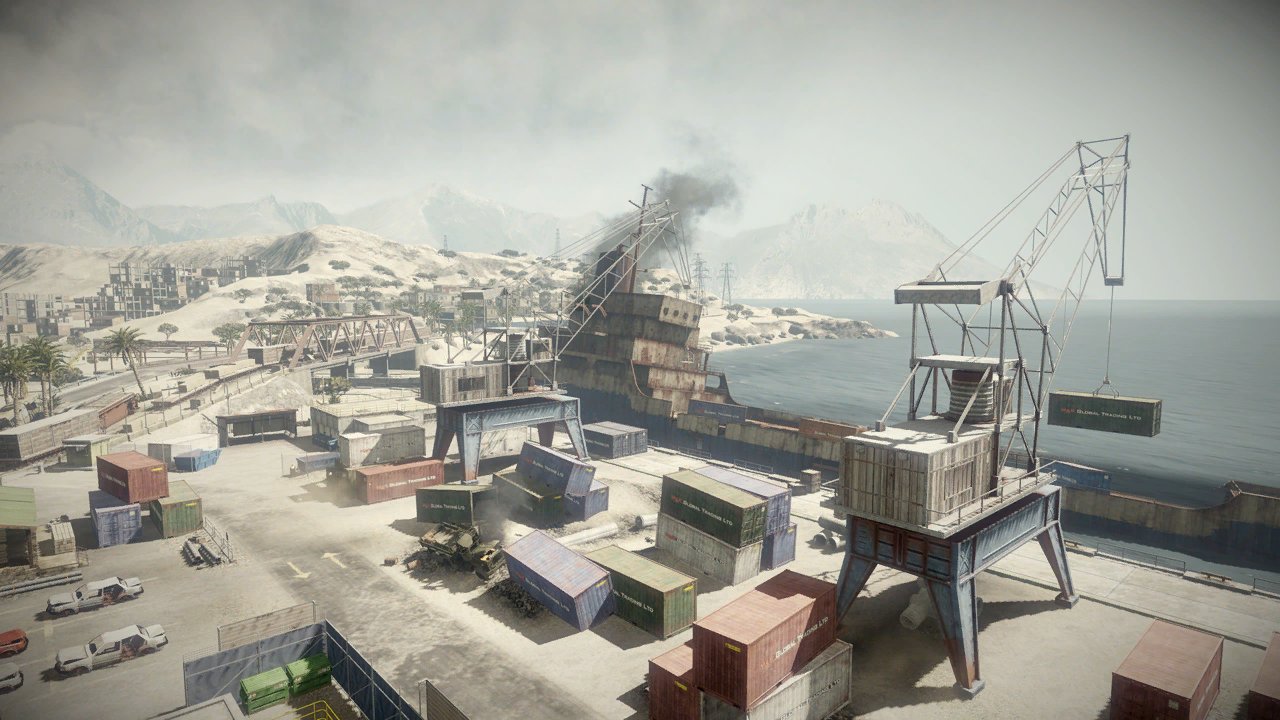
P.S. Here's some photos of actual mid-east hotspots for comparison:


BF3

BF BC2
Truth be told it does seem like it would be hard to see anything, and in some occasions it is difficult (Fallujah west sky or distance) but in most cases it actually helps you get immersed. It takes some time getting used to it, but once you adapt you are fully aware unlike with standard vanilla bf2 graphics where you see it as cartoonish and colorful.
The reason why I used REINHARD filter setting and balanced it is because it limits how bright white can be (there's no pure white in the mod, only slight tones of gray) and contrasts dark tones. The preset is also balanced to use a filter that can bring more colors in and tone down the bloom, in archive there's instructions.
The bloom effect might be overdone on some maps but overall for city/forest maps it is very nice, specially if you take cover in a building and look down your scope.
I also increased sharpening filter to make the image more clear.
It's still in testing as I haven't gotten to play on all maps. Any input is welcome
Though I suggest you wait to test it yourself.Here's few more screen thumbnails showcasing darker parts of maps (Kokan, Merlin, and 3rd one is Merlin too I think):
I haven't gotten time to test everything fully and make proper screens though.
P.S. Here's some photos of actual mid-east hotspots for comparison:
BF3
BF BC2
Last edited by MAVEN on 2016-07-13 01:27, edited 1 time in total.
-
obpmgmua
- Posts: 397
- Joined: 2013-05-19 20:51
Re: PR Graphic Enhancement Mod
Will these enhancements work with a GTX460 at 1440p?
P.S. I haven't upgraded in 5 years and dont plan too, unless the videogame industry gives me a reason too.
P.S. I haven't upgraded in 5 years and dont plan too, unless the videogame industry gives me a reason too.
If you want Spawnable RPGs and SVDs for Insurgent team
Sign Here ______________________
Sign Here ______________________
-
MAVEN
- Posts: 98
- Joined: 2016-07-12 21:29
Re: PR Graphic Enhancement Mod
You can play this mod (ReShade) and any preset of it on your GPU. It's not that it requires something overly specific. The mods posted on the forums are lightweight and don't even impact performance. ReShade for GTA5 may impact your FPS a lot though.obpmgmua wrote:Will these enhancements work with a GTX460 at 1440p?
P.S. I haven't upgraded in 5 years and dont plan too, unless the videogame industry gives me a reason too.
Last I checked it requires Shader 3.0 and up, support for SSAO, HBAO, HDR16, SMAA and other newer techniques. Your GPU covers all that and has dx11 + Shader 5.0 support.
For newer games you may want to upgrade though as in not to cover graphic features but performance of your card. It has low buffer size and texture counter, ram (dunno which opne you got) of 1gb ddr5 is enough for games on medium to some even high settings.
PR was based on BF2 which is from 2005, I doubt anyone has problems running that

-
IAmNotMatthew
- Posts: 18
- Joined: 2016-06-25 17:15
Re: PR Graphic Enhancement Mod
Even though this was published 3 years ago, it's still a beautiful mod, gives a decent look to this game to this day.
-
wretchedegg
- Posts: 42
- Joined: 2013-03-27 17:24
Re: PR Graphic Enhancement Mod
I'm running a GTX 960M on Windows 10 and I can't get PR to start. I only get the black screen. I've already tried reinstalling driver settings and nothing works.
-
MAVEN
- Posts: 98
- Joined: 2016-07-12 21:29
Re: PR Graphic Enhancement Mod
Battlefield 2 is an old game that used copyprotection and has no support past win7. Even though PR is now standalone problems remain.wretchedegg wrote:I'm running a GTX 960M on Windows 10 and I can't get PR to start. I only get the black screen. I've already tried reinstalling driver settings and nothing works.
Run the mod under win7 or better win XP compatibility. Windows 10 is a bad choice anyway, no wonder it's free.
P.S. Windows 10 is EXTREMELY aggressive with software like games, it constantly scans your files and ram for "illegal stuff" and may block you if it detects you actually want to use some advanced non-corporate tools like Open Source bundles.
-
wretchedegg
- Posts: 42
- Joined: 2013-03-27 17:24
Re: PR Graphic Enhancement Mod
Thanks but running in compatibility mode broke the game completely. SoloWing got it to work with Win10 and a 960. I'll ask him.MAVEN wrote: Run the mod under win7 or better win XP compatibility. Windows 10 is a bad choice anyway, no wonder it's free.
.
-
IAmNotMatthew
- Posts: 18
- Joined: 2016-06-25 17:15
Re: PR Graphic Enhancement Mod
Not quite true, I'm running PR:BF2 and I have Win 10 OS. Runs fine, no crashes or anything.MAVEN wrote:Battlefield 2 is an old game that used copyprotection and has no support past win7. Even though PR is now standalone problems remain.
Run the mod under win7 or better win XP compatibility. Windows 10 is a bad choice anyway, no wonder it's free.
P.S. Windows 10 is EXTREMELY aggressive with software like games, it constantly scans your files and ram for "illegal stuff" and may block you if it detects you actually want to use some advanced non-corporate tools like Open Source bundles.
-
G3340
- Posts: 1
- Joined: 2015-08-21 18:20
Re: PR Graphic Enhancement Mod
After I have installed the mods. I manage to open the launch and press play. But it enters the classic black screen for 2 seconds and CTD. Does anyone know the solution for this problem?
-
CaptainSmallz
- Posts: 1
- Joined: 2016-08-08 06:17
Re: PR Graphic Enhancement Mod
I don't think I'll upgrade to Windows 10 if PR won't run easily on it.

CLUTCH CAVALRY 414 "Elephant Riders"
Microsoft Windows 7 Enterprise 64-bit; ASUSTeK Computer INC. M3A32-MVP DELUXE; AMD Phenom 8650 Triple-Core Processor; NVIDIA GeForce GT 520; 4GB Corsair Dominator DDR2 RAM; 2x Acer X193W 1440x900 (32 bit) @ 60 Hz
-
SAM609
- Posts: 185
- Joined: 2012-09-04 05:40
Re: PR Graphic Enhancement Mod
New PR_GEM0.6 preset is out !!  this is probably the last one ever made by me ! I've spend a lot of time on the new dynamic 3d-LUT for this one ! it is basically a super complex color grading method that controls both the color correction and gamma/brightness level based on the screen's overall brightness ! that means you will see different color correction on bright maps and dark maps with a single preset !
Update #0.6 :
#Updated main injector to ReShade 2.0.2.1108
#Back to using latest Framework version
#New dynamic 3d-LUT color correction (based on BF4)
#New adaptive sharpenening
#Alt+Tab crash bug Fixed
this is probably the last one ever made by me ! I've spend a lot of time on the new dynamic 3d-LUT for this one ! it is basically a super complex color grading method that controls both the color correction and gamma/brightness level based on the screen's overall brightness ! that means you will see different color correction on bright maps and dark maps with a single preset ! Update #0.6 :
#Updated main injector to ReShade 2.0.2.1108
#Back to using latest Framework version
#New dynamic 3d-LUT color correction (based on BF4)
#New adaptive sharpenening
#Alt+Tab crash bug Fixed
SAM609 wrote:ScreenShots from PR_GEM0.6