
Right, I am a little stuck on what the hell sort of RAM I need right now for my current PC (I cannot afford to do a FULL PC upgrade quite yet, so having to slowly upgrade my current one)
My RAM currently is only 1GB, so needless to say, the computing is running like a sack of sh*t!
Here are my full specs if you need them:
OS: Windows 7 Professional 64-bit SP1
CPU: Intel Core 2 Quad Q6600 @ 2.40GHz
RAM: 1.00GB Single-Channel DDR2 @ 332MHz (5-5-5-15)
Motherboard: Dixon Philips G33T-AM (Socket 775)
Graphics: NVIDIA GeForce 8600GS (Gigabyte)
Storage: 74GB Western Digital WDC SATA & 596GB Toshiba 2.5" HDD
Any sort of help would be greatly appreciated, as I am not entirely sure what size RAM my current motherboard is able to take, and being only single channel, I also have no clue.. As I say, I'm only currently running 1GB, so desperately need to upgrade! Just unsure if I need 4GB (1x4GB) or (2x2GB) etc...
Cheers guys!
RAM Help?!
-
Golding
- Posts: 16
- Joined: 2015-05-26 10:16
RAM Help?!
"Though I fly through the valley of death, I shall fear no evil, for I am at 80,000ft and climbing..." - ex SR-71 Operating Base - Kadena, Japan
Point towards enemy... - Instructions printed on a US Claymore Mine
Point towards enemy... - Instructions printed on a US Claymore Mine
-
MaSSive
- Posts: 4502
- Joined: 2011-02-19 15:02
Re: RAM Help?!
Well thats quite rare mainboard but I was able to identify its chipset.
Can you confirm it has 4 RAM slots as in 4 slots for RAM sticks?
Here is some info.
G33T-AM Motherboard Specifications.
CPU
Processor Support Socket LGA 775
* Intel Core 2 Quad, Core 2 Duo (Dual Core).
Chipset
Northbridge ? Intel G33 Express
Southbridge ? Intel ICH9
FSB
1333/1066/800 MHz
Integrated Graphics
Intel (GMA 3100)
Memory
4 x 240-pin DDR2 DIMM slots Supports Dual Channel DDR2 800/667 MHz non-ECC, un-buffered memory (Max 8GB)
Expansion Slots
1 x PCI Express x16
1 x PCI Express x1
2 x PCI
Storage
6 x SATAII 3Gb/s connectors
Audio
Realtek ALC888 ? High Definition
Ethernet
Intel 82566xx (Gigabit)
Rear Panel
1 x VGA Port
1 x RJ45 LAN Port
1 x IEEE 1394 port
6 x USB 2.0 ports
1 x Parallel port
1 x Serial port
1 x Audio I/O ? in/out, microphone-in
Internal
3 x USB headers
1 x 4-pin CPU Fan connector
1 x 3-pin Rear System Fan connector
1 x 4-pin ATX 12V Power connector
1 x 24-pin ATX Power connector
1 x Clear CMOS jumper
1 x Front Audio header
1 x Front Panel header
1 x Floppy header
BIOS
Form Factor
Micro-ATX
_____________________________________________________________________
Based on this you can get up to 8GB of DDR2-800 RAM and can have dual chanel active. How will you pull this out is up to you, but I may suggest getting at least 4GB of DDR2-800 ( 2x2GB paired sticks ) or 8GB DDR2-800 ( 2x4GB paired sticks ) but any combo will do. Be it 4x1GB sticks, 4x2GB, 2x2GB, 2x4GB... just make sure they are the same make/model/frequency/timings, as we say paired.
I see you are running 64bit OS with 1GB of DDR667 RAM, and thats quite bad. For systems with less than 4GB of RAM you should use a 32bit OS.
Nevertheless if you ar egoing to upgrade your RAM at least 4GB is required, and remember it has to be at least two sticks of DDR2-800 and it has to be paired.
Here is a link from Amazon for reference
https://www.amazon.co.uk/G-Skill-PC2-64 ... 777&sr=1-2
Note that after purchasing this you would have to ditch that stick of RAM you own not to cause incompatibility.
Can you confirm it has 4 RAM slots as in 4 slots for RAM sticks?
Here is some info.
G33T-AM Motherboard Specifications.
CPU
Processor Support Socket LGA 775
* Intel Core 2 Quad, Core 2 Duo (Dual Core).
Chipset
Northbridge ? Intel G33 Express
Southbridge ? Intel ICH9
FSB
1333/1066/800 MHz
Integrated Graphics
Intel (GMA 3100)
Memory
4 x 240-pin DDR2 DIMM slots Supports Dual Channel DDR2 800/667 MHz non-ECC, un-buffered memory (Max 8GB)
Expansion Slots
1 x PCI Express x16
1 x PCI Express x1
2 x PCI
Storage
6 x SATAII 3Gb/s connectors
Audio
Realtek ALC888 ? High Definition
Ethernet
Intel 82566xx (Gigabit)
Rear Panel
1 x VGA Port
1 x RJ45 LAN Port
1 x IEEE 1394 port
6 x USB 2.0 ports
1 x Parallel port
1 x Serial port
1 x Audio I/O ? in/out, microphone-in
Internal
3 x USB headers
1 x 4-pin CPU Fan connector
1 x 3-pin Rear System Fan connector
1 x 4-pin ATX 12V Power connector
1 x 24-pin ATX Power connector
1 x Clear CMOS jumper
1 x Front Audio header
1 x Front Panel header
1 x Floppy header
BIOS
Form Factor
Micro-ATX
_____________________________________________________________________
Based on this you can get up to 8GB of DDR2-800 RAM and can have dual chanel active. How will you pull this out is up to you, but I may suggest getting at least 4GB of DDR2-800 ( 2x2GB paired sticks ) or 8GB DDR2-800 ( 2x4GB paired sticks ) but any combo will do. Be it 4x1GB sticks, 4x2GB, 2x2GB, 2x4GB... just make sure they are the same make/model/frequency/timings, as we say paired.
I see you are running 64bit OS with 1GB of DDR667 RAM, and thats quite bad. For systems with less than 4GB of RAM you should use a 32bit OS.
Nevertheless if you ar egoing to upgrade your RAM at least 4GB is required, and remember it has to be at least two sticks of DDR2-800 and it has to be paired.
Here is a link from Amazon for reference
https://www.amazon.co.uk/G-Skill-PC2-64 ... 777&sr=1-2
Note that after purchasing this you would have to ditch that stick of RAM you own not to cause incompatibility.
Last edited by MaSSive on 2016-08-01 16:48, edited 2 times in total.

CATA4TW!
"People never lie so much as before an election, during a war, or after a hunt."
"God has a special providence for fools, drunks, and the United States of America."
― Otto von Bismarck
― Otto von Bismarck
-
Golding
- Posts: 16
- Joined: 2015-05-26 10:16
Re: RAM Help?!
Yeah, it's the old internals off my old PC that I transferred to my new case, so upgrading things slowly as we go.. Admittedly, installing a 64bit OS was probably not one of my best ideas, but it was the only install disc I had laying around at home, so upgrading the RAM it is!MaSSive wrote:Well thats quite rare mainboard but I was able to identify its chipset.
Can you confirm it has 4 RAM slots as in 4 slots for RAM sticks?
Here is some info.
G33T-AM Motherboard Specifications.
CPU
Processor Support Socket LGA 775
* Intel Core 2 Quad, Core 2 Duo (Dual Core).
Chipset
Northbridge ? Intel G33 Express
Southbridge ? Intel ICH9
FSB
1333/1066/800 MHz
Integrated Graphics
Intel (GMA 3100)
Memory
4 x 240-pin DDR2 DIMM slots Supports Dual Channel DDR2 800/667 MHz non-ECC, un-buffered memory (Max 8GB)
Expansion Slots
1 x PCI Express x16
1 x PCI Express x1
2 x PCI
Storage
6 x SATAII 3Gb/s connectors
Audio
Realtek ALC888 ? High Definition
Ethernet
Intel 82566xx (Gigabit)
Rear Panel
1 x VGA Port
1 x RJ45 LAN Port
1 x IEEE 1394 port
6 x USB 2.0 ports
1 x Parallel port
1 x Serial port
1 x Audio I/O ? in/out, microphone-in
Internal
3 x USB headers
1 x 4-pin CPU Fan connector
1 x 3-pin Rear System Fan connector
1 x 4-pin ATX 12V Power connector
1 x 24-pin ATX Power connector
1 x Clear CMOS jumper
1 x Front Audio header
1 x Front Panel header
1 x Floppy header
BIOS
Form Factor
Micro-ATX
_____________________________________________________________________
Based on this you can get up to 8GB of DDR2-800 RAM and can have dual chanel active. How will you pull this out is up to you, but I may suggest getting at least 4GB of DDR2-800 ( 2x2GB paired sticks ) or 8GB DDR2-800 ( 2x4GB paired sticks ) but any combo will do. Be it 4x1GB sticks, 4x2GB, 2x2GB, 2x4GB... just make sure they are the same make/model/frequency/timings, as we say paired.
I see you are running 64bit OS with 1GB of DDR667 RAM, and thats quite bad. For systems with less than 4GB of RAM you should use a 32bit OS.
Nevertheless if you ar egoing to upgrade your RAM at least 4GB is required, and remember it has to be at least two sticks of DDR2-800 and it has to be paired.
Here is a link from Amazon for reference
https://www.amazon.co.uk/G-Skill-PC2-64 ... 777&sr=1-2
Note that after purchasing this you would have to ditch that stick of RAM you own not to cause incompatibility.
However, currently with my 1GB of RAM (2x512MB) if I put them in dual channel (yes, they are both the same sticks) and try to boot my computer, I get nothing, won't even reach BIOS. Monitor won't recognize the computer booting at all. Stick it back into single channel, and it boots fine no problems at all.. Could it be that 1GB in dual channel just isn't man enough?
& yes. It does have 4 DIMM slots

"Though I fly through the valley of death, I shall fear no evil, for I am at 80,000ft and climbing..." - ex SR-71 Operating Base - Kadena, Japan
Point towards enemy... - Instructions printed on a US Claymore Mine
Point towards enemy... - Instructions printed on a US Claymore Mine
-
MaSSive
- Posts: 4502
- Joined: 2011-02-19 15:02
Re: RAM Help?!
I know that some older boards required to have RAM stick at first DIMM slot close to CPU. It also depends on chipset/BIOS support for dual sided RAM sticks. The worst bit of all is that some of the slots are dead.
I have no way of checking that because there is no compatibility list anywhere for that board, so you are going to have to test that and see if those slots are not dead. Try with just one stick on each slot. If it wont start without stick in first slot close to CPU I told you what that means. It must be there.
Anyways I told you what to do now its up to you. If you cant handle it find a tech guy in the neighbourhood to help you.
Also note that I suspect that it doesnt support 4GB or larger RAM sticks, so take precaution when buying.
Forgot the BIOS setting for dual channel. Some boards used to have a setting for that. Look it up in your BIOS. Should say Single Channel or Dual Channel, if not try to reset CMOS and then try with sticks in dual channel mode.
I have no way of checking that because there is no compatibility list anywhere for that board, so you are going to have to test that and see if those slots are not dead. Try with just one stick on each slot. If it wont start without stick in first slot close to CPU I told you what that means. It must be there.
Anyways I told you what to do now its up to you. If you cant handle it find a tech guy in the neighbourhood to help you.
Also note that I suspect that it doesnt support 4GB or larger RAM sticks, so take precaution when buying.
Forgot the BIOS setting for dual channel. Some boards used to have a setting for that. Look it up in your BIOS. Should say Single Channel or Dual Channel, if not try to reset CMOS and then try with sticks in dual channel mode.
CATA4TW!
"People never lie so much as before an election, during a war, or after a hunt."
"God has a special providence for fools, drunks, and the United States of America."
― Otto von Bismarck
― Otto von Bismarck
-
PLODDITHANLEY
- Posts: 3608
- Joined: 2009-05-02 19:44
Re: RAM Help?!
You don't think it'd be worth getting 4 X 2GB sticks if he can find then cheap enough? Or 3 X 2GB I think 4Gb can be limiting nowadays?

-
MaSSive
- Posts: 4502
- Joined: 2011-02-19 15:02
Re: RAM Help?!
For that machine I think 4GB is quite enough. He can get whatever he wants, but first must check if slots are not dead because he said that for some reason RAM he currenty have doesnt work in dual channel config.
CATA4TW!
"People never lie so much as before an election, during a war, or after a hunt."
"God has a special providence for fools, drunks, and the United States of America."
― Otto von Bismarck
― Otto von Bismarck
-
Golding
- Posts: 16
- Joined: 2015-05-26 10:16
Re: RAM Help?!
Yeah, currently 512MB sticks don't work in dual channel config, so need to see if it's just the size of the RAM that won't allow it, or of the slots are dead.. So 4GB will be fine for now, otherwise it'll be a new motherboard as and when I can afford it and new CPU, so will sort things out as and when
On a bit of a tangent, would a MSI Radeon HD 6590 OC run PR on Medium to High no problems? Looking at reviews, it seems to be miles better than my OEM NVIDIA card I currently have, and for ?30 second hand, was a bargain!
On a bit of a tangent, would a MSI Radeon HD 6590 OC run PR on Medium to High no problems? Looking at reviews, it seems to be miles better than my OEM NVIDIA card I currently have, and for ?30 second hand, was a bargain!
"Though I fly through the valley of death, I shall fear no evil, for I am at 80,000ft and climbing..." - ex SR-71 Operating Base - Kadena, Japan
Point towards enemy... - Instructions printed on a US Claymore Mine
Point towards enemy... - Instructions printed on a US Claymore Mine
-
MaSSive
- Posts: 4502
- Joined: 2011-02-19 15:02
Re: RAM Help?!
I have it, its a monster. Well mine is Twin Frozr II, but it doesnt matter really. For 30 its a no brainer. Just ask if it wasnt mining bitcoins. Those are weared out pretty much.
Also they are dual slot and generate a lot of heat. make sure you got space in the case and proper cooling. If things get too hot remove the side of a case.
Card Dimension(mm) 275*110*38mm
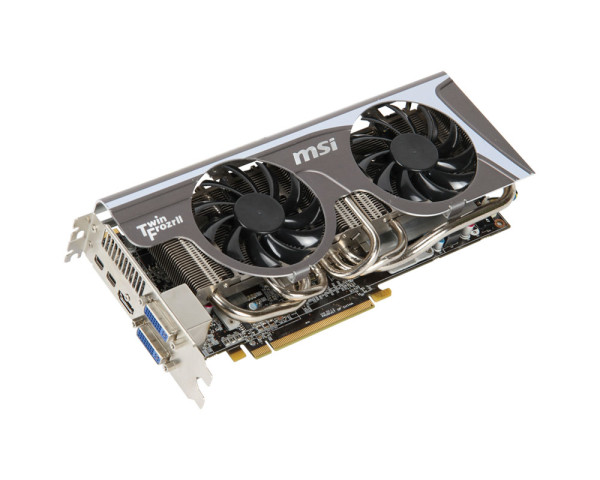
Also this is a must along with it.
https://gaming.msi.com/features/afterburner
Use the latest Crimson driver from AMD site and dont bother instlaling Plays.tv and Rapt. I find it useless if you dnt own at least HD7870.
PR doesnt mind much about the graphics, its the CPU thats important. I guess you should be fine with FPS with that setup.
Also they are dual slot and generate a lot of heat. make sure you got space in the case and proper cooling. If things get too hot remove the side of a case.
Card Dimension(mm) 275*110*38mm
Also this is a must along with it.
https://gaming.msi.com/features/afterburner
Use the latest Crimson driver from AMD site and dont bother instlaling Plays.tv and Rapt. I find it useless if you dnt own at least HD7870.
PR doesnt mind much about the graphics, its the CPU thats important. I guess you should be fine with FPS with that setup.
Last edited by MaSSive on 2016-08-02 22:11, edited 2 times in total.
CATA4TW!
"People never lie so much as before an election, during a war, or after a hunt."
"God has a special providence for fools, drunks, and the United States of America."
― Otto von Bismarck
― Otto von Bismarck
-
Golding
- Posts: 16
- Joined: 2015-05-26 10:16
RAM Help?!
Yeah. I'm wanting the RAM upgrade, because PR was running very awesome with the OEM card, and I think the RAM was bottlenecking the PC, so yeah.. That's the exact same card I've just bought!! Well the one I've bought is a Twin Frozr III, is that any different to the Twin Frozr II?
Also. My case is the Zalman Z11 Plus, so should have plenty of room and fairly adequate cooling? If not, ill have to get a 140mm fan to go at the bottom as a pull towards the card

Also. My case is the Zalman Z11 Plus, so should have plenty of room and fairly adequate cooling? If not, ill have to get a 140mm fan to go at the bottom as a pull towards the card
Last edited by Golding on 2016-08-02 22:38, edited 2 times in total.
"Though I fly through the valley of death, I shall fear no evil, for I am at 80,000ft and climbing..." - ex SR-71 Operating Base - Kadena, Japan
Point towards enemy... - Instructions printed on a US Claymore Mine
Point towards enemy... - Instructions printed on a US Claymore Mine
-
MaSSive
- Posts: 4502
- Joined: 2011-02-19 15:02
Re: RAM Help?!
The difference is 40Mhz in GPU core clock and 200 Mhz in VRAM clock, mine runs at 810/5000Mhz, that one is 850/5200Mhz but expect higher temperatures. And dont try to OC at all that one is pretty high with clocks. IN terms of OC you might want to do that with CPU and turn off speedstep/C1E/C6 ( power saving ) so you dont get stuttering.
Besides clocks its maybe few fps here and there but its generally the same card.
Mine runs cool when not under load but hits 65 when under workload. Fans can be loud. Also note that these temps are because I have side of the case removed so more airflow. And because I have some ancient case that I stubbornly keep so airflow is a problem.
Also note that you will need 2x6 PCIex GPU power connectors and at least 500W PSU.
The case would be fine I guess.
Besides clocks its maybe few fps here and there but its generally the same card.
Mine runs cool when not under load but hits 65 when under workload. Fans can be loud. Also note that these temps are because I have side of the case removed so more airflow. And because I have some ancient case that I stubbornly keep so airflow is a problem.
Also note that you will need 2x6 PCIex GPU power connectors and at least 500W PSU.
The case would be fine I guess.
Last edited by MaSSive on 2016-08-02 23:46, edited 1 time in total.
CATA4TW!
"People never lie so much as before an election, during a war, or after a hunt."
"God has a special providence for fools, drunks, and the United States of America."
― Otto von Bismarck
― Otto von Bismarck
-
Golding
- Posts: 16
- Joined: 2015-05-26 10:16
Alright, awesome thank you! The power supply I have is a 750W so should be fine, hopefully!
So your saying not to bother OC'ing the card? That's fine then, just wanted a different card for an upgrade, haha!
Sent from my iPhone using Tapatalk
So your saying not to bother OC'ing the card? That's fine then, just wanted a different card for an upgrade, haha!
Sent from my iPhone using Tapatalk
"Though I fly through the valley of death, I shall fear no evil, for I am at 80,000ft and climbing..." - ex SR-71 Operating Base - Kadena, Japan
Point towards enemy... - Instructions printed on a US Claymore Mine
Point towards enemy... - Instructions printed on a US Claymore Mine
-
Golding
- Posts: 16
- Joined: 2015-05-26 10:16
Just a quick update! Managed to get my RAM working in dual config. Hurrah!
So now that's working, I get finally get all four RAM sticks in and working! (Yay!)
Sent from my iPhone using Tapatalk
So now that's working, I get finally get all four RAM sticks in and working! (Yay!)
Sent from my iPhone using Tapatalk
"Though I fly through the valley of death, I shall fear no evil, for I am at 80,000ft and climbing..." - ex SR-71 Operating Base - Kadena, Japan
Point towards enemy... - Instructions printed on a US Claymore Mine
Point towards enemy... - Instructions printed on a US Claymore Mine
-
MaSSive
- Posts: 4502
- Joined: 2011-02-19 15:02
Re: RAM Help?!
Good news. Now go get them new new parts and get some frags in PR.
CATA4TW!
"People never lie so much as before an election, during a war, or after a hunt."
"God has a special providence for fools, drunks, and the United States of America."
― Otto von Bismarck
― Otto von Bismarck
-
Golding
- Posts: 16
- Joined: 2015-05-26 10:16
Re: RAM Help?!
Well, installed my 8GB of RAM that arrived yesterday, reinstalled Windows into 64 bit, and holy ****! Everything is so quick is unreal!
Just got to wait on my new graphics card now which should be delivered either today or Monday
Just got to wait on my new graphics card now which should be delivered either today or Monday
"Though I fly through the valley of death, I shall fear no evil, for I am at 80,000ft and climbing..." - ex SR-71 Operating Base - Kadena, Japan
Point towards enemy... - Instructions printed on a US Claymore Mine
Point towards enemy... - Instructions printed on a US Claymore Mine