[Help!] Bf2 editor help

Making or wanting help making your own asset? Check in here
Post Reply
HughJass
Posts: 2599
Joined: 2007-10-14 03:55

[Help!] Bf2 editor help

Post by HughJass »

NEW QUESTION SCROLL DOWN


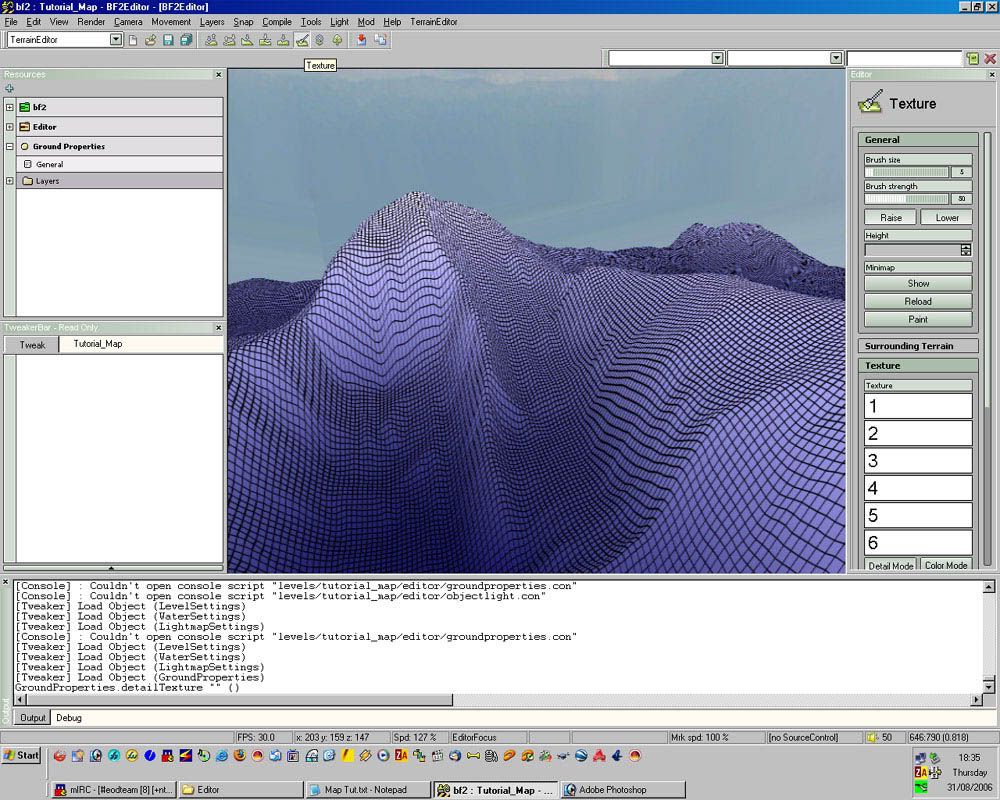
I just started to go trough a tutorial and I cant find the "layer 1-6" things.

my screen:

Image

tutorial screen:

Image


link to the tutorial:

Creating A Map For Begginers - (very Image Heavy) - Official BF Editor Forums
Last edited by HughJass on 2008-02-03 05:41, edited 1 time in total.
Reason: new question :)
Image
Ragni<RangersPL>
Posts: 1319
Joined: 2007-08-13 10:44

Post by Ragni<RangersPL> »

Image
ImageRANGERS LEAD THE WAY!!!
:29_slaps: Do not post stupid suggestions just because you had a bad round in PR :fryingpan
ice_killer
Posts: 2361
Joined: 2007-02-15 16:20

Post by ice_killer »

hehe you think he is blind :mrgreen: and then on the +
I7 980X, REX3, Dominator GT 12G, 4X XFXHD6970 2G yes Quadfire , SSD 3x Raptors 2X 1.2 KW :mrgreen:
Ragni<RangersPL>
Posts: 1319
Joined: 2007-08-13 10:44

Post by Ragni<RangersPL> »

Well... he didn't noticed the following part in the tutorial :D
Switch to "Terrain Editor" and choose the "Texture" button.
(It's right above the picture from the tutorial, the one he posted)
ImageRANGERS LEAD THE WAY!!!
:29_slaps: Do not post stupid suggestions just because you had a bad round in PR :fryingpan
HughJass
Posts: 2599
Joined: 2007-10-14 03:55

Post by HughJass »

NEW QUESTION:

WTFAX? Why is this a checker board. I am doing the same thing that they told me in the TUT but i am doing it with a 1024 and scale 4 map.

Image
Last edited by HughJass on 2008-02-03 05:39, edited 1 time in total.
Image
HughJass
Posts: 2599
Joined: 2007-10-14 03:55

Post by HughJass »

help? i cant get past this step! D:
Image
Rhino
Retired PR Developer
Posts: 47909
Joined: 2005-12-13 20:00

Post by Rhino »

I suggest you try reading the tuts more throughly... check the box in the texture editor bar too the right, where it has paint mode, with 3 buttons under it being detail, colour and both, with detail clicked on at the mo, click on both then try painting again... again it says this all in the tut and if it didnt, I probably wouldnt know it...
Image
HughJass
Posts: 2599
Joined: 2007-10-14 03:55

Post by HughJass »

Thanks rihno, i am blind :mrgreen:

Another Q, where can i find the type of "docks" the fishing village has in qwai?
Image
Nickbond592
Retired PR Developer
Posts: 2713
Joined: 2007-01-30 18:16

Post by Nickbond592 »

try the folder buildings after clicking on the folder static objects.
Image


Smeg: Fuzz commands a lot and promotes good teamwork, db flips vehicles, Bosco is an all-round nub, Outlawz is an SP whore, Nickbond is a friggin ninja and Rhino gets kicked for being a n00b.
HughJass
Posts: 2599
Joined: 2007-10-14 03:55

Post by HughJass »

Nickbond592 wrote:try the folder buildings after clicking on the folder static objects.
i looked and looked can't find anything
Image
LekyIRL
Posts: 1345
Joined: 2007-06-23 16:34

Post by LekyIRL »

Keep searching :-P
Image
[R-MOD]Dunehunter-Freedom? This...is...The PR Forum! *kicks LekyIRL down the well on Basrah*
Ragni<RangersPL>
Posts: 1319
Joined: 2007-08-13 10:44

Post by Ragni<RangersPL> »

HughJass wrote:i looked and looked can't find anything
You need to change the mode of your editor from "terrain editor" to "level editor".
ImageRANGERS LEAD THE WAY!!!
:29_slaps: Do not post stupid suggestions just because you had a bad round in PR :fryingpan
HughJass
Posts: 2599
Joined: 2007-10-14 03:55

Post by HughJass »

Ragni<RangersPL> wrote:You need to change the mode of your editor from "terrain editor" to "level editor".
:\ wow. um i have placed object before, didn't you see my thread on the map im making?
Image
Ragni<RangersPL>
Posts: 1319
Joined: 2007-08-13 10:44

Post by Ragni<RangersPL> »

OK, nevermind :|
ImageRANGERS LEAD THE WAY!!!
:29_slaps: Do not post stupid suggestions just because you had a bad round in PR :fryingpan
Post Reply

Return to “PR:BF2 Community Modding”