I think its a Mod related probleme... i'm pretty sure. But in a way or an other, that dont stop me from playing. And i realise i only got those bug when playing Kashan Desert... All other map dont make me have the bug but they are all smaller than K-D.
Battlefield 2 Engine is becames older every day... if i remember good when BF2 was released... the most powerfull card on market was the 6800GT so give him some chance... Im sure just running P.R. is giving hard time to the engine...
Now I played for 3 hours and not a single problem!
Yeah I have a 8800GT, I dont know but it was strange and enoying!
Deadfast: Iam just a gamer not a hacker....even that I know that you can do stuff I dont! Honestly I think PB suck so very bad, I have played on servers amongst people having aimbots, no fog, trough walls and so on....but do you think they get kicked ohhh no. Not until the server admins throw them out! But me honesty it self, I´m beeing thrown out by the ¤%&@@€ f PB! And since I could play for an hour yesterday without beeing kicked I knew something was messed up with the mf PB.
Afaik GeForce 8xxx + DX9 = big z-fighting. I would suggest you to complain directly to nvidia.
Curretntly PR has a problem with that flickering, there is a solution to that but it won't really work with 8xxx cards, everything is so much worse with them. So contact nvidia's support, maybe they'll give you a fix or something.
Btw I'm not going to upgrade my 7600gt to 8800 anymore for that particular reason.
I've had problems with textures since 0.5, but I think it's usually from overheating. Recently on Op Archer I got this. Both landscape and insurgent clothes showed what looks like a typical "editor" texture. I asked others and atleast one other guy got the clothes. Two screens coming up.
You do not have the required permissions to view the files attached to this post.
I had similar issues once. Clearing shader cahce correced it. Cache folders are found in "My Documents\Battlefield 2\mods" (if I recall correctly). Clear the both, bf2\cache AND pr\cache.
paco wrote:I've had problems with textures since 0.5, but I think it's usually from overheating. Recently on Op Archer I got this. Both landscape and insurgent clothes showed what looks like a typical "editor" texture. I asked others and atleast one other guy got the clothes. Two screens coming up.
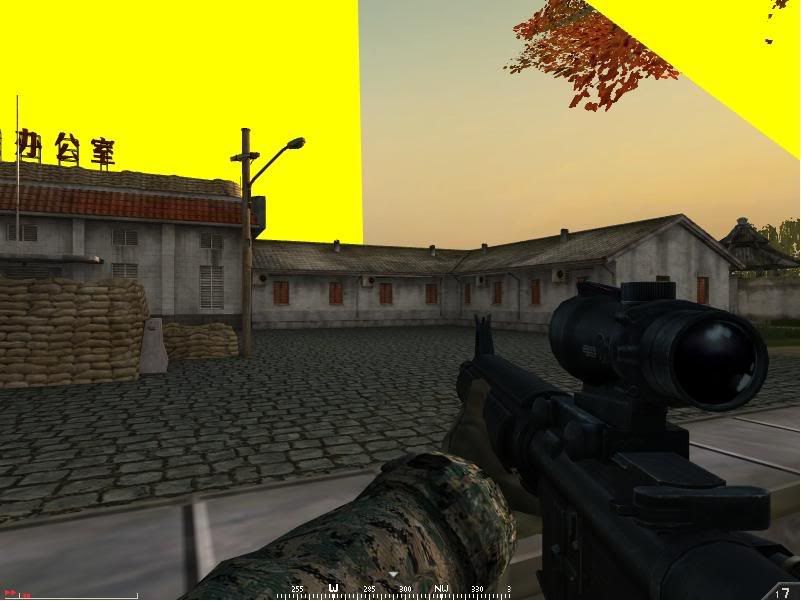
Im having a similar problem, only i get yellow "ribbons" between solid objects every so often, usually when theres many objects nearby. Also, a yellow flickering appears.
Thats a picture of the flickering, i havent captured a picture of the "ribbons". My GC is the newest driver.
paco wrote:I've had problems with textures since 0.5, but I think it's usually from overheating. Recently on Op Archer I got this. Both landscape and insurgent clothes showed what looks like a typical "editor" texture. I asked others and atleast one other guy got the clothes. Two screens coming up.
Looks like you have a real problem there paco!
Do as devnull said but also empty your drawers on those magic stamps!
Anyway I don´t get kicked anymore since Deadfast hooked me up with his gamelogicinit.con file. Thanks!
But as Mosquill said, I still have the flickering and "some" sandbags are melted? On Al Basra for example!
GasseG wrote:Looks like you have a real problem there paco!
Do as devnull said but also empty your drawers on those magic stamps!
Anyway I don´t get kicked anymore since Deadfast hooked me up with his gamelogicinit.con file. Thanks!
But as Mosquill said, I still have the flickering and "some" sandbags are melted? On Al Basra for example!
I have that sandbag bug since 0.5. Think the solution is to delete 'My Documents\Battlefield 2\mods\bf2\cache' folder, but I'm always too lazy to check if that works.
I had the same problems before. Easy fix. Install Driver cleaner. remove both video and audio drivers with driver cleaner, install the newest drivers to both audio/video.
My game was fixed by only deleting the audio drivers and getting new ones. I have Creative audigy 2. Obviously a driver collision with video/audio.
SOCOMWarrior552 wrote:Im having a similar problem, only i get yellow "ribbons" between solid objects every so often, usually when theres many objects nearby. Also, a yellow flickering appears.
Thats a picture of the flickering, i havent captured a picture of the "ribbons". My GC is the newest driver.
I dont have probleme like those... And i suggest you to check you're Graphic Processor Unit... I'm pretty sure is about to die...If its not already
 ).
).