
*** This solution is deprecated with the new BF2 v1.5 patch. It is not needed as the patch already contains this fix.
I found this fix.
I tested it and it work's! PB dose not kick you or anything I have not had 1 crash since I
tested on my 4 computers with 32 bit & 64 bit.
Thank you for making this a Sticky.
I found a fix for the "memory .dll error" that kicks some of us out to desktop every 2 or 3
map loads on certain servers, some more than others but from what I have been reading
this is a problem for a lot of people running Vista, myself included.
The problem is that the BF2.exe is trying to use more memory than it is allowed to, this
fix enables the BF2.exe to use more than it's current limit of 2gb (physical and PF
together) for the second or two it needs it during certain map loads.
Here you go
(You'll need to be an Administrator)
First, you'll need to grab and install Visual Studio C++ Express
from Microsoft.
It's free so don't worry.
Once installed, you'll need to update it, also make sure u have latest game
patch installed.
Backup the bf2.exe file, just in case.
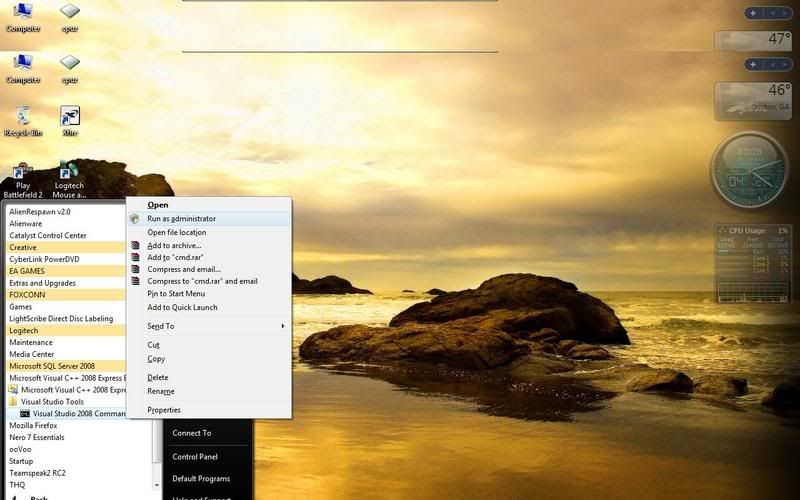
Now, click
Start ->Visual C++ 2005 Express Edition ->Visual Studio Tools ->Visual Studio 2005
Command Prompt
http://img.photobucket.com/albums/v448/sopdelta/C1.jpg
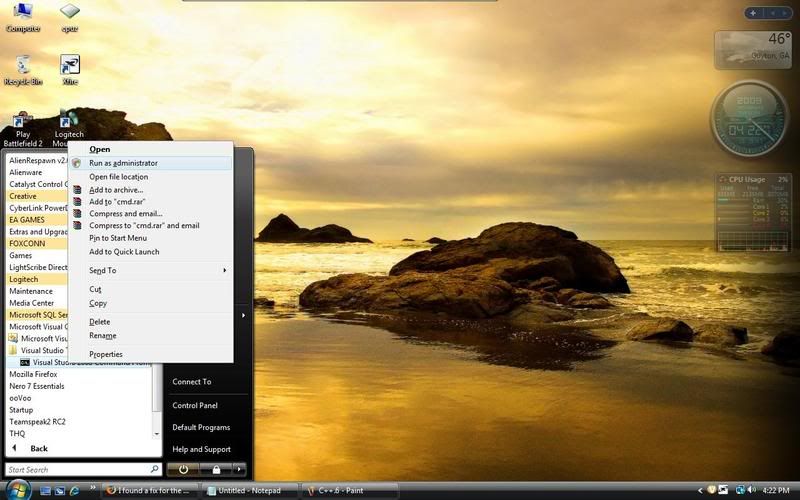
(Don't left click on VS 2005 command prompt though, right click on it and then click "Run as Administrator"
**If you don't run it as Administrator the fix will not work**
Then, once the black Command Prompt box is open, navigate to your battlefield 2
directory.
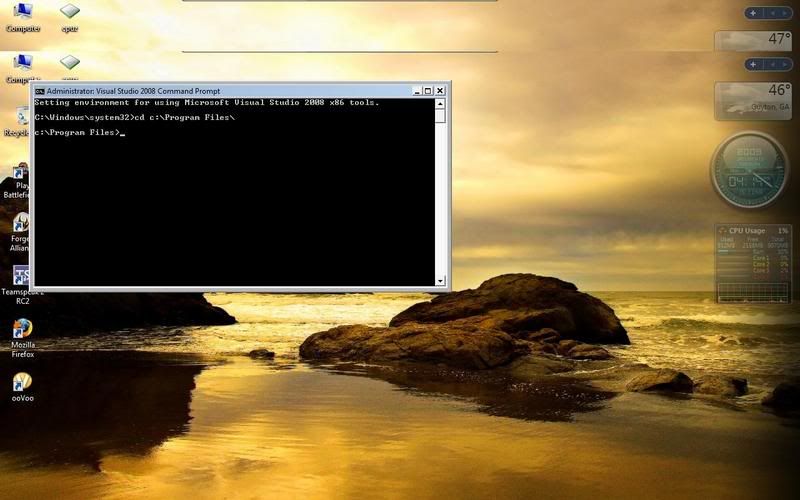
If you don't know how to navigate in DOS, follow this:
http://img.photobucket.com/albums/v448/sopdelta/C2.jpg
In Vista 32: cd c:\Program Files\ (Hit ENTER) **or** In Vista 64: cd c:\Program Files (x86)\ (Hit ENTER)
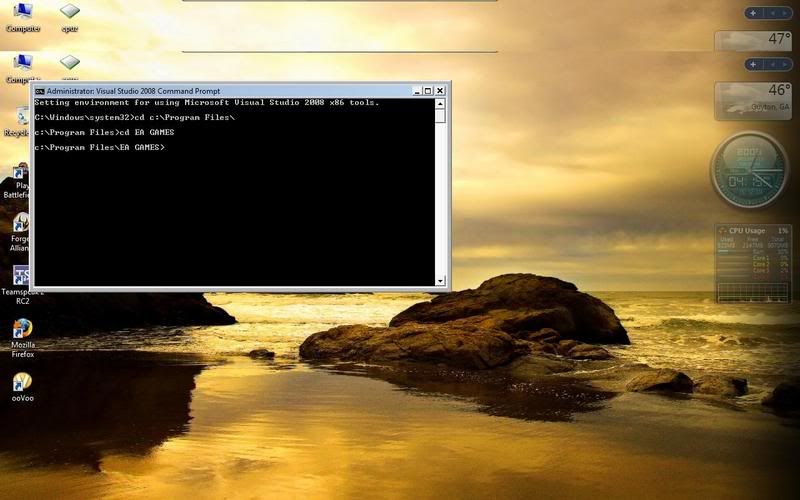
http://img.photobucket.com/albums/v448/sopdelta/C3.jpg
then usually it's "cd EA GAMES" (Hit ENTER)
http://img.photobucket.com/albums/v448/sopdelta/C3.jpg
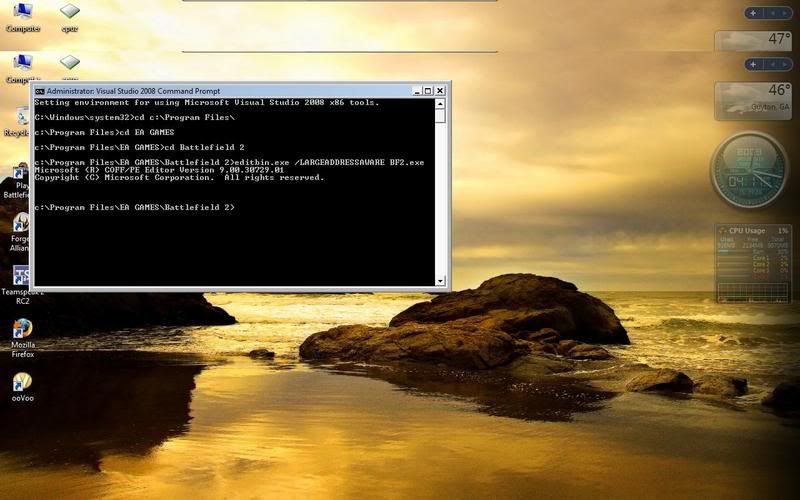
then "cd Battlefield 2" (Hit ENTER)
NOW WRITE THIS
http://img.photobucket.com/albums/v448/sopdelta/C5.jpg
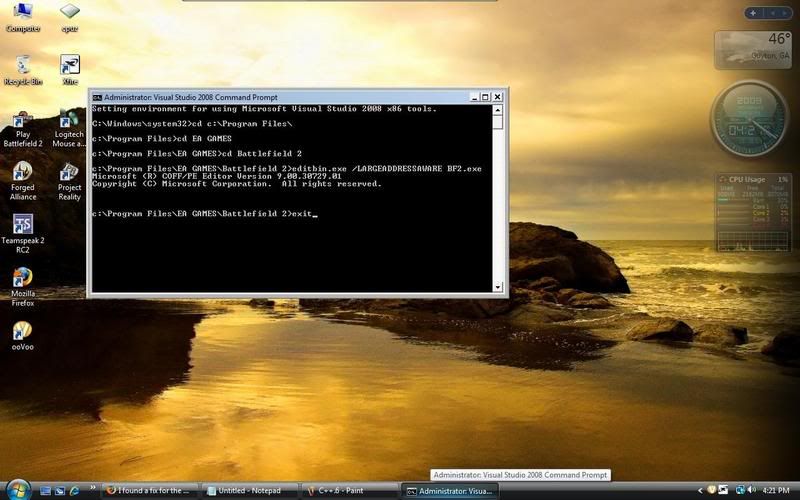
editbin.exe /LARGEADDRESSAWARE BF2.exe (Hit ENTER)
It should then come up with a "Microsoft copyright or trademark" type thingy, this means
it was successful.
Type "exit" and (Hit ENTER), and it's fixed for 64-bit users.
http://img.photobucket.com/albums/v448/sopdelta/C6.jpg
64 bit Vista users can now restart and play, but 32 bit Vista users follow the next step...
In a command prompt and once again **Run your command prompt "As Administrator"**
http://img.photobucket.com/albums/v448/sopdelta/C7.jpg
Type this command:
BCDEDIT /set increaseuserva 2900 ENTER
Now exit out of that box, restart and you're done!
http://img.photobucket.com/albums/v448/sopdelta/C9.jpg
Edited ATI card users will want to uninstall Visual Studio C++ Express from Microsoft after they complete this fix.
ATI Drivers will not update with Visual Studio C++ Express from Microsoft you can still do the fix just uninstall the program after words.
I found a fix for the "memory .dll error" for vista 32 & 64 bit user's.
-
R.J.Travis
- Posts: 707
- Joined: 2007-12-09 21:27
I found a fix for the "memory .dll error" for vista 32 & 64 bit user's.
Last edited by AncientMan on 2009-09-06 15:29, edited 7 times in total.
Reason: Deprecated...
Reason: Deprecated...
-
R.J.Travis
- Posts: 707
- Joined: 2007-12-09 21:27
Re: I found a fix for the "memory .dll error" for vista 32 & 64 bit user's.
No PB will not kick you if you follow what it says i tested it on 4 computers & 20 public servers.
-
R.J.Travis
- Posts: 707
- Joined: 2007-12-09 21:27
Re: I found a fix for the "memory .dll error" for vista 32 & 64 bit user's.
It truly took me only 5m to do it was really easy.
-
Sutaki
- Posts: 1
- Joined: 2008-05-21 00:29
Re: I found a fix for the "memory .dll error" for vista 32 & 64 bit user's.
I'm doing it with the 2008 version (9.0) and i can do everything up until that editbin.exe thing it tells me "'editbin.exe' is not recognized as an internal or external command, operable program or batch file." Help please!
-
R.J.Travis
- Posts: 707
- Joined: 2007-12-09 21:27
Re: I found a fix for the "memory .dll error" for vista 32 & 64 bit user's.
editbin.exe /LARGEADDRESSAWARE BF2.exeSutaki wrote:I'm doing it with the 2008 version (9.0) and i can do everything up until that editbin.exe thing it tells me "'editbin.exe' is not recognized as an internal or external command, operable program or batch file." Help please!
type it just like that should work
-
Mora
- Posts: 2933
- Joined: 2007-08-21 12:37
Re: I found a fix for the "memory .dll error" for vista 32 & 64 bit user's.
Can you not just upload the edited exe? it would be allot easier.


-
Hetzer
- Posts: 32
- Joined: 2008-05-25 22:01
Re: I found a fix for the "memory .dll error" for vista 32 & 64 bit user's.
R.J.Travis wrote:I found this in the PR forums under a name that did not tell the people what it fixed.
I tested it and it work's!!!! PB dose not kick you or anything I have not had 1 crash since I tested on my 4 computers with 32 bit & 64 bit.
you should re wright this and make it a sticky please.
I found a fix for the "memory .dll error" that kicks some of us out to desktop every 2 or 3 map loads on certain servers, some more than others but from what I have been reading this is a problem for a lot of people running Vista, myself included.
The problem is that the BF2.exe is trying to use more memory than it is allowed to, this fix enables the BF2.exe to use more than it's current limit of 2gb (physical and PF together) for the second or two it needs it during certain map loads.
Here you go
(You'll need to be an Administrator)
First, you'll need to grab and install Visual Studio C++ Express from Microsoft.
It's free so don't worry.
Once installed, you'll need to update it, also make sure u have latest game
patch installed.
Backup the bf2.exe file, just in case.
Now, click
Start ->Visual C++ 2005 Express Edition ->Visual Studio Tools ->Visual Studio 2005 Command Prompt
(dont left click on VS 2005 command prompt though, right click on it and then click "Run as Administrator"
**If you dont run it as Administrator the fix will not work**
Then, once the black Command Prompt box is open, navigate to your battlefield 2 directory.
If you don't know how to navigate in DOS, follow this:
In Vista 32: cd c:\Program Files\ ENTER **or** In Vista 64: cd c:\Program Files (x86)\ ENTER
then usually it's "cd EA GAMES" ENTER
then "cd Battlefield 2" ENTER
NOW WRITE THIS
editbin.exe /LARGEADDRESSAWARE BF2.exe hit ENTER
It should then come up with a "Microsoft copyright or trademark" type thingy, this means it was successful.
Type "exit" and hit ENTER, and it's fixed!
64 bit Vista users can now restart and play, 32 bit Vista users follow the next step...
In a command prompt and once again **Run your command prompt "As Administrator"**
Type this command:
BCDEDIT /set increaseuserva 2900 ENTER
Now exit out of that box, restart and you're done!
Ok, I've executed this fix (went without any of the problems mentioned above) and will report back with my findings once I've run the game. I'm hoping it'll stop the broken net connection problem I'm having, if that is memory related as I suspect.
If it works I'll post the exe for others to try.
-
Hetzer
- Posts: 32
- Joined: 2008-05-25 22:01
Re: I found a fix for the "memory .dll error" for vista 32 & 64 bit user's.
I made it through two maps without a hitch (no loss of conn), but CTD on the loading-bar for Sunset City.
The conn might be a coincidence or it might haved fixed that, I won't know until further testing (playing actually, who am I kidding :mrgreen .
.
The CTD I can live with, I'm always able to get back in before everyone has deployed. It's the loss of conn that drives me up the wall, so fingers crossed this has at least had a positive influence on that (not holding my breath of course, it's a bit of a long shot).
The conn might be a coincidence or it might haved fixed that, I won't know until further testing (playing actually, who am I kidding :mrgreen
.The CTD I can live with, I'm always able to get back in before everyone has deployed. It's the loss of conn that drives me up the wall, so fingers crossed this has at least had a positive influence on that (not holding my breath of course, it's a bit of a long shot).
-
Hetzer
- Posts: 32
- Joined: 2008-05-25 22:01
Re: I found a fix for the "memory .dll error" for vista 32 & 64 bit user's.
Next session, got one map played, CTD on second (loading bar).
Third session, about five minutes into the game and got a PB kick "BF.exe mismatch".
Still no conn problem. I'm going to swap the exe back and see if the conn problem returns.
Third session, about five minutes into the game and got a PB kick "BF.exe mismatch".
Still no conn problem. I'm going to swap the exe back and see if the conn problem returns.
-
Hetzer
- Posts: 32
- Joined: 2008-05-25 22:01
Re: I found a fix for the "memory .dll error" for vista 32 & 64 bit user's.
Batch-file modded exe put back in, got one near lost-conn, then on the next map got a sudden CTD just as I fired a grenade (a few KB of texture too much?).
I've never put up with this much frustration from a game before, and I think I've reached the point where no matter how good the game is (and PR is excellent) the enjoyment playing it no longer outweighs the frustration engendered by the crippling bugs in the source-code.
It's about right though...find a truly excellent game but can't play it reliably, while all the **** runs as sweet as a nut.
Anyway, for what it's worth, I gave this supposed 'fix' a good go. It doesn't work, or at least not on my rig.
I've never put up with this much frustration from a game before, and I think I've reached the point where no matter how good the game is (and PR is excellent) the enjoyment playing it no longer outweighs the frustration engendered by the crippling bugs in the source-code.
It's about right though...find a truly excellent game but can't play it reliably, while all the **** runs as sweet as a nut.
Anyway, for what it's worth, I gave this supposed 'fix' a good go. It doesn't work, or at least not on my rig.
-
Masaq
- Retired PR Developer
- Posts: 10043
- Joined: 2006-09-23 16:29
Re: I found a fix for the "memory .dll error" for vista 32 & 64 bit user's.
At what point on the loading bar are you guys crashing out? Objects, Textures, Sounds? Is it always the same place? Do provide some more details...
"That's how it starts, Mas, with that warm happy feeling inside. Pretty soon you're rocking in the corner, a full grown dog addict, wondering where your next St Bernand is coming from..." - IAJTHOMAS
"Did they say what he's angry about?" asked Annette Mitchell, 77, of the district, stranded after seeing a double feature of "Piranha 3D" and "The Last Exorcism." - Washington Post
-
Hetzer
- Posts: 32
- Joined: 2008-05-25 22:01
Re: I found a fix for the "memory .dll error" for vista 32 & 64 bit user's.
[R-MOD]Masaq wrote:At what point on the loading bar are you guys crashing out? Objects, Textures, Sounds? Is it always the same place? Do provide some more details...
It happens at various places on the bar for me. So far there's nothing consistent about any of my crashes. Map-loading CTD, in-game CTD, Lost internet connection and PB kick (PB kicks seem to have been eradicated with the batch-file fix, but came back with the dll fix).
-
R.J.Travis
- Posts: 707
- Joined: 2007-12-09 21:27
Re: I found a fix for the "memory .dll error" for vista 32 & 64 bit user's.
Hetzer your having problem not related to the fix this fixes the "memory .dll error" not random CTD and CI so maybe you have a bad copy of the game.
-
Hetzer
- Posts: 32
- Joined: 2008-05-25 22:01
Re: I found a fix for the "memory .dll error" for vista 32 & 64 bit user's.
I sometimes get the box on the desktop that says "memory dll error, could not be allocated" (or something like that) when the game CTDs from a map load or from within a game. I was hoping the other issue (lost conn) would be connected to the same memory leak and the dll fix would make everything magically ok.R.J.Travis wrote:Hetzer your having problem not related to the fix this fixes the "memory .dll error" not random CTD and CI so maybe you have a bad copy of the game.
The batch-file fix worked a treat, the dll one didn't. C'est la vie.
-
R.J.Travis
- Posts: 707
- Joined: 2007-12-09 21:27
Re: I found a fix for the "memory .dll error" for vista 32 & 64 bit user's.
Justed uninstall ed my bf2v fully and re did this fix works again this is a fix for this error 100%
-
Hetzer
- Posts: 32
- Joined: 2008-05-25 22:01
Re: I found a fix for the "memory .dll error" for vista 32 & 64 bit user's.
Well, I guess it works for some, not for others.R.J.Travis wrote:Justed uninstall ed my bf2v fully and re did this fix works again this is a fix for this error 100%
I've had to give up on this game; I play for enjoyment, not for enraging frustration. I've been suffering too much of the latter, and it says a lot for the mod that I lasted so long. It wouldn't be so bad if it hadn't of cost me £30, but I've learned my lesson...I will never buy an EA game again. Should have taken more notice of their abysmal reputation, but there you go.
Fantastic mod guys, top marks for that. I've enjoyed the hell out of what I've managed to play of it. I'll re-visit some time down the line when newer drivers and Vista updates have been released and see if I have any better luck. Until then...
-
fubar++
- Posts: 248
- Joined: 2007-07-08 17:04
Re: I found a fix for the "memory .dll error" for vista 32 & 64 bit user's.
This fix gives MD5 sum mismatch for BF2.exe on Punkbuster enabled server (using XP x64 thou'). It also didn't bring any help for my rig (CTDs, freezing, BSODs, not sure if memory related)
-
R.J.Travis
- Posts: 707
- Joined: 2007-12-09 21:27
Re: I found a fix for the "memory .dll error" for vista 32 & 64 bit user's.
This fix won't work for XP its as stated a Vista 64/32bit fix.
Last edited by R.J.Travis on 2009-04-19 19:39, edited 1 time in total.