

[Help!] Vista with BF2 Editor
-
M_Striker
- Posts: 513
- Joined: 2008-05-31 00:36
[Help!] Vista with BF2 Editor
I was just wondering, who here has Vista and maps/mods with the editor? Is Vista really bad with the editor? If any of you have Vista and mod could you tell me how bad it is? thanks
-
Cyrax-Sektor
- Posts: 1030
- Joined: 2007-10-15 21:12
Re: Vista with BF2 Editor
Vista Home Premium 32-bit on an HP laptop with external monitor running 1280x1024.
Very few problems. There's always that little message when you close the Editor asking if you want to see the .dmp file, but your map is just fine. I'm using it right now to make a map, and have very few problems.
Very few problems.
There's always that little message when you close the Editor asking if you want to see the .dmp file, but your map is just fine. I'm using it right now to make a map, and have very few problems.

-
Scot
- Posts: 9270
- Joined: 2008-01-20 19:45

-
aanersiieaaoa
- Posts: 35
- Joined: 2007-07-20 18:13
Re: Vista with BF2 Editor
listen, to say that vista is bad with the bf2 editor is rubbish, you just have to set the os to run it.M_Striker wrote:I was just wondering, who here has Vista and maps/mods with the editor? Is Vista really bad with the editor? If any of you have Vista and mod could you tell me how bad it is? thanks
find your bf2editor.exe right click it then click properties. Then click on the compatibility or which ever one has those options, then look for a dropdown box that has a list of operating system names. (note it should be disabled at the time so you have to enable it by checking the check box above it.) then click the dropdown box and set it on "Windows XP SP2" then hit OK and start it and all problems will be solved.

-
M_Striker
- Posts: 513
- Joined: 2008-05-31 00:36
Re: [Help!] Vista with BF2 Editor
Ok thanks, and just one question cause i didn't want to bump any threads... when selecting everything in the modmanager, box, when it all loads, you get alot of Red warnings right?
Almost every vehicle message was red with an error...
Almost every vehicle message was red with an error...
-
Cyrax-Sektor
- Posts: 1030
- Joined: 2007-10-15 21:12
Re: [Help!] Vista with BF2 Editor
Yep, those red warnings are standard, and I've experienced no problems when I saw them.M_Striker wrote:Ok thanks, and just one question cause i didn't want to bump any threads... when selecting everything in the modmanager, box, when it all loads, you get alot of Red warnings right?
Almost every vehicle message was red with an error...
-
M_Striker
- Posts: 513
- Joined: 2008-05-31 00:36
Re: [Help!] Vista with BF2 Editor
ill just make this thread my help thread now lol, everytime i quit the bf2 editor, i get an error.. i mean i dunno what it means but it says <file description> has stopped working. everytime i quit the editor, once ive loaded my 1024 size map? Is it the size? when i started creating a terrain and i loaded the terrain at 1024 the editor crashed.. how do i fix this? I obviously dont want to go at 256 size map Thanks.
Edit: how do i test my map btw? I cant run Project reality EDIT, because it says i cant run PR with the BF2 exe?
Thanks.Edit: how do i test my map btw? I cant run Project reality EDIT, because it says i cant run PR with the BF2 exe?
Last edited by M_Striker on 2008-08-01 17:36, edited 2 times in total.
-
Cyrax-Sektor
- Posts: 1030
- Joined: 2007-10-15 21:12
Re: [Help!] Vista with BF2 Editor
Close error: There are two, and both cause no harm to the map, game or Editor, from what I've experienced.
Dmp file error: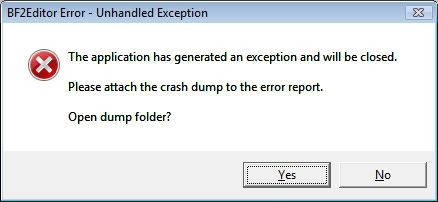
Stopped working error: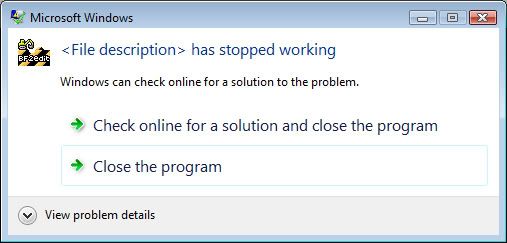
^^ Both of these errors show up after closing the Editor. Everything still works fine tho, so no sweat.
Map size: I haven't done 1024 with scale 1 or above, so I can't tell you how to fix that on experience. My current map is 512 with scale of 2, thus I get a 1024 size square map to work on. Plenty of room to work with with that set up. Also, have a low-res size of 512.
Dmp file error:
Stopped working error:
^^ Both of these errors show up after closing the Editor. Everything still works fine tho, so no sweat.
Map size: I haven't done 1024 with scale 1 or above, so I can't tell you how to fix that on experience. My current map is 512 with scale of 2, thus I get a 1024 size square map to work on. Plenty of room to work with with that set up. Also, have a low-res size of 512.
-
M_Striker
- Posts: 513
- Joined: 2008-05-31 00:36
Re: [Help!] Vista with BF2 Editor
thanks, but how do i delete a map, and how do i test my map? Thanks again.
-
Rhino
- Retired PR Developer
- Posts: 47909
- Joined: 2005-12-13 20:00
Re: [Help!] Vista with BF2 Editor
your going to get no where asking so many questions and not looking for the answers yourself...M_Striker wrote:thanks, but how do i delete a map, and how do i test my map? Thanks again.
Official BF Editor Forums (Powered by Invision Power Board)
the search function on thous forums has everything you need to know.
