
I am read a tut on mapping and this is prob a dumb question but anywho...
How do i enable surrounding terrain? Like it says to do in this tut https://www.realitymod.com/forum/f189-modding-tutorials/8543-tutorial-making-terrain-bf2-pr-map-warning-56kers.html
[Question] enable surrounding terrain?
-
Tonnie
- Retired PR Developer
- Posts: 2014
- Joined: 2007-07-31 14:59
[Question] enable surrounding terrain?
HangMan: BF2 Editor, it has very strict limitations memory wise, and crashes all the time. Its like a girl. Treat it with respect and take it slow and you'll get places. Rush and get ahead of yourself and it will turn around and punch you in the mouth
-
EOD_Security-2252
- Posts: 804
- Joined: 2008-06-10 23:08
Re: enable surrounding terrain?
Woah, something I know that you don't.
Anyway, just click on the gray area around the sides of your terrain. Also, when in the Terrain Editor mode, you'll see the little "Surrounding terrain" tab on the right side. Expand it, any tiles that are green are enabled, while gray ones aren't.
Anyway, just click on the gray area around the sides of your terrain. Also, when in the Terrain Editor mode, you'll see the little "Surrounding terrain" tab on the right side. Expand it, any tiles that are green are enabled, while gray ones aren't.
Informally retired modder - Projects: Artillery Shell IED,PSC Faction
-
Tonnie
- Retired PR Developer
- Posts: 2014
- Joined: 2007-07-31 14:59
Re: enable surrounding terrain?
cool it worked thx...
Now for the next problem.
I followed the tut as i said before but now i have this problem
Once i use the T Paint it paint my map like this.
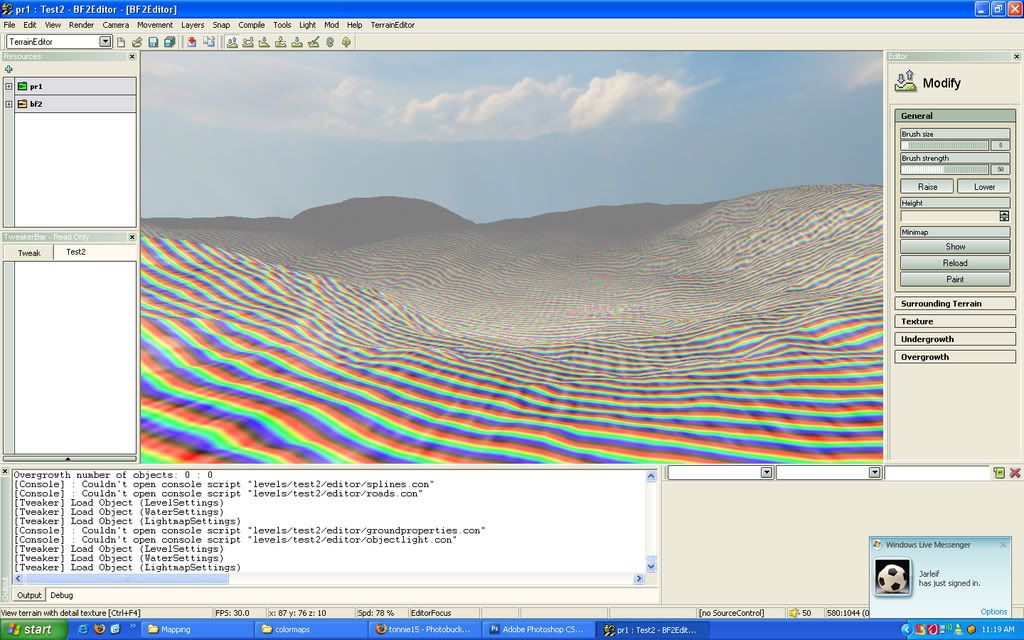
Now i dont understand why it has all thos bright colored lines:S
Now for the next problem.
I followed the tut as i said before but now i have this problem
Once i use the T Paint it paint my map like this.
Now i dont understand why it has all thos bright colored lines:S
HangMan: BF2 Editor, it has very strict limitations memory wise, and crashes all the time. Its like a girl. Treat it with respect and take it slow and you'll get places. Rush and get ahead of yourself and it will turn around and punch you in the mouth
-
OkitaMakoto
- Retired PR Developer
- Posts: 9368
- Joined: 2006-05-25 20:57
Re: enable surrounding terrain?
Did you tell Tpaint to paint your surrounding terrain as well?
Did you follow the directions perfectly? You should delete your old colormaps, detailmaps and lowdetailmaps folders that are found in your maps directory.
And then run tpaint from within your maps folder[pr_edit/test2/bf2_tpaint]. Its also best to run your surrounding terraina s well, just to get it out of the way...
Then place the three folders it generates[it put them in pr_edit/levels/test2/bf2_tpaint... put those three folders into test2/editor after deleting the ones it has in there.
Then load your map, and set your first three textures, then save all your terrain options[all checked]
Then reload the map. Should work. I just did this myself last night...
Did you follow the directions perfectly? You should delete your old colormaps, detailmaps and lowdetailmaps folders that are found in your maps directory.
And then run tpaint from within your maps folder[pr_edit/test2/bf2_tpaint]. Its also best to run your surrounding terraina s well, just to get it out of the way...
Then place the three folders it generates[it put them in pr_edit/levels/test2/bf2_tpaint... put those three folders into test2/editor after deleting the ones it has in there.
Then load your map, and set your first three textures, then save all your terrain options[all checked]
Then reload the map. Should work. I just did this myself last night...