
Windows Vista Users - Troubleshooting Guide for PR
-
fuzzhead
- Retired PR Developer
- Posts: 7463
- Joined: 2005-08-15 00:42
Windows Vista Users - Troubleshooting Guide for PR
This thread will be used as a guide to help those who are having problems launching/running PR in Windows Vista. If you have any useful tips or guides to add, please do and I will compiled them all.
-
fuzzhead
- Retired PR Developer
- Posts: 7463
- Joined: 2005-08-15 00:42
Re: Windows Vista Users - Troubleshooting Guide for PR
- bf2.exe does not exist. Please check your working directory! The system cannot find the file specified!
- I have Windows XP/Vista:
Open properties of your Project Reality desktop shortcut - Right click on the shortcut, select Properties.
Focus on the line called "Start in" (the 2nd writable line from the top).
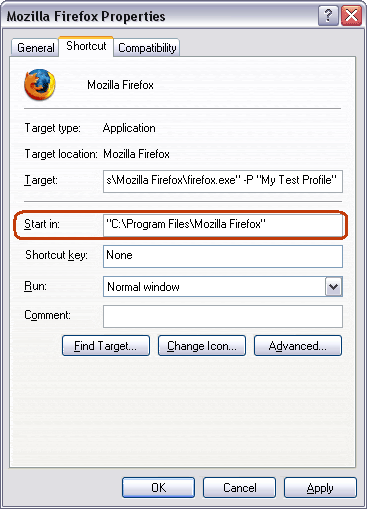
- the highlighted line is the one we need to check
Basically, the line should look like:
*SOMETHING*\Battlefield 2\
*SOMETHING* stands for whatever folders you have before the actual BF2 folder. Therefore, if you didn't change the default installation path during the BF2 installation, the line will look like:
C:\Program Files\EA GAMES\Battlefield 2\
Once you change the line to what I've said above, simply hit OK and start up the game.
Windows Vista Users MUST run BF2/PR as administrator (this is not a default setting). To do this:
- Open properties of your Project Reality shortcut.
- In one of the tabs tick Run as an administrator.
- If the box above is gray for whatever reason, simply launch the game by right-click on the shortcut and selecting Run as admin. - WARNING! You must run Project Reality by running PR.exe, not BF2.exe.
Press ALT+F4 and update your shortcuts!
- Make sure your PR shortcut is setup correctly and you are starting PR with pr.exe and not bf2.exe.
Open properties of your Project Reality shortcut - Right click on the shortcut, select Properties.
Now focus on the first writable line from the top, which is called "Target" in the English version of Windows (both XP and Vista).
The line should look something like:
C:\Program Files\EA GAMES\Battlefield 2\mods\pr\pr.exe + parameters
In case you installed BF2 into a different directory than default, ensure that your shortcut is pointing to INSTALLPATH\Battlefield 2\bf2.exe. You can simply edit the target line to correspond to your custom install path (keep everything else (parameters) the same).
Now it's time to take care of the another writable line underneath the "Target" one. It's called "Start in".
Make sure it looks like:
*SOMETHING*\Battlefield 2\
For Windows Vista, you will need to open up the PR shortcut's properties again and switch over to "Compatibility" tab.
Focus on the bottom of the window, specifically on the "Privilege Level" part.
Tick the box left of the "Run this program as an administrator" option. - the box mentioned above is gray (non-selectable):
This occurs when UAC is turned off, in which case the EXE will be run as an administrator as default, and thus you can just start pr.exe up normally. Just to be safe, launch the game by right clicking on the PR shortcut and selecting "Run as administrator". - None of the above worked:
Try the unofficial BAT Scripts launcher I have made a while ago.
- I have Windows XP/Vista:
Last edited by fuzzhead on 2008-07-11 23:37, edited 1 time in total.
-
Psyrus
- Retired PR Developer
- Posts: 3841
- Joined: 2006-06-19 17:10
Re: Windows Vista Users - Troubleshooting Guide for PR
I believe this occurs when UAC is turned off, in which case the EXE will be run as an administrator as default, and thus you can just start pr.exe up normally; I tried it today and it worked for 3 hours with no kicks.'[R-DEV wrote:fuzzhead;722837']
- the box mentioned above is gray (non-selectable):
I have no idea why it happens, but simply try to launch the game by right clicking on the PR shortcut and selecting "Run as administrator".
-
fuzzhead
- Retired PR Developer
- Posts: 7463
- Joined: 2005-08-15 00:42
Re: Windows Vista Users - Troubleshooting Guide for PR
thanks, added
-
Jason42881
- Posts: 1
- Joined: 2008-07-28 20:29
Re: Windows Vista Users - Troubleshooting Guide for PR
OK, so when I right click on the PR shortcut or the actuall exe file windows explorer crashes. Anyone else have this or know how to fix it. I have uninstalled and re installed and restarted and it happenes every time so I can't get to the run as admin nor can I fix my shortcut start in path.
-
andyjay123
- Posts: 6
- Joined: 2008-08-01 23:19
Re: Windows Vista Users - Troubleshooting Guide for PR
This may not be a Vista bug, but when I installed PR, I couldn't see any levels/maps. I installed the map pack thing and I still cant see any. But they are in the "levels" folder...
Whats wrong with it? ;[
Whats wrong with it? ;[
-
Cyrax-Sektor
- Posts: 1030
- Joined: 2007-10-15 21:12

-
andyjay123
- Posts: 6
- Joined: 2008-08-01 23:19
Re: Windows Vista Users - Troubleshooting Guide for PR
Lol this was the first section I came to for helpCyrax-Sektor wrote:^^ Check your original thread andy.https://www.realitymod.com/forum/f26-pr ... layer.html

Then I noticed the other section lol

-
A.English
- Posts: 29
- Joined: 2007-11-15 10:43
Re: Windows Vista Users - Troubleshooting Guide for PR
see i should of came here fist, now its too late i unistalled it.. again, and now cnt put it bk cos my disk is gone retarted and not working GODDAMMIT. could get my other pc bk but its slow. =( 
-
jOHNNYdOUBE
- Posts: 637
- Joined: 2007-09-13 21:28
-
-Sauso-
- Posts: 250
- Joined: 2008-08-25 06:02
Re: Windows Vista Users - Troubleshooting Guide for PR
anyone know why my core file won't even open?lol...i click on it......then 2 seconds later i see it flash on my task bar...then nothing.
-
SnipingCoward
- Posts: 2326
- Joined: 2007-12-31 22:40
Re: Windows Vista Users - Troubleshooting Guide for PR
do you have vista and uca is activated? then uac is blocking that application and waiting for you confirmation but failed at showing you the dialog where you can allow the program
try to alt-tab to the missing confirmation window for it will not appear in the task bar
try to alt-tab to the missing confirmation window for it will not appear in the task bar
Got a PROBLEM? Check this: PR:BF2 Installation Guide
Got a common QUESTION? check here first: PR:BF2 FAQ, MUMBLE FAQ
"Hello, IT! ... Yes, have you tried turning it on and off again?"
Got a common QUESTION? check here first: PR:BF2 FAQ, MUMBLE FAQ
"Hello, IT! ... Yes, have you tried turning it on and off again?"
-
Objurium
- Posts: 33
- Joined: 2007-09-26 05:39
Re: Windows Vista Users - Troubleshooting Guide for PR
How does one go about disabling UAC?
-
Cyrax-Sektor
- Posts: 1030
- Joined: 2007-10-15 21:12
Re: Windows Vista Users - Troubleshooting Guide for PR
Control Panel > User Accounts > On the left sidebar, there should be something about User Account Control. > Disable UAC. Enjoy PR.Objurium wrote:How does one go about disabling UAC?

-
maschhur
- Posts: 3
- Joined: 2008-08-30 12:34
Re: Windows Vista Users - Troubleshooting Guide for PR
my friend has got vista home premium..every time he try to join a server it chrash and send him back to desktop...can you pls hlp =( i meen he can play bf2 without problems *btw hate vista -.-*
he have a dual core 2.4 ghz 3 gb ddr ram gforce x8500
he have a dual core 2.4 ghz 3 gb ddr ram gforce x8500
-
maschhur
- Posts: 3
- Joined: 2008-08-30 12:34
Re: Windows Vista Users - Troubleshooting Guide for PR
my friend has got vista home premium..every time he try to join a server it chrash and send him back to desktop...can you pls hlp =( i meen he can play bf2 without problems *btw hate vista -.-*
he have a dual core 2.4 ghz 3 gb ddr ram gforce x8500
he have a dual core 2.4 ghz 3 gb ddr ram gforce x8500
-
maschhur
- Posts: 3
- Joined: 2008-08-30 12:34
Re: Windows Vista Users - Troubleshooting Guide for PR
sorry for tripple Oo post i thougt the messages dindnt aarrive -.-
-
Irish Freedom
- Posts: 140
- Joined: 2008-03-12 21:34
Re: Windows Vista Users - Troubleshooting Guide for PR
I have been having the same problem; i have vista home premium, and whenever I click "deploy" (the new equivalent for Join Server) it crashes and takes me back to my desktop! Sorry i can't provide a solution: CAN SOMEONE ELSE??maschhur wrote:sorry for tripple Oo post i thougt the messages dindnt aarrive -.-
-
{9thInf} Archer
- Posts: 9
- Joined: 2008-08-30 23:16
Crash upon deployment
I have the same problem. Crashes to desktop upon deployment.
-
TJ-XRL
- Posts: 110
- Joined: 2008-08-16 23:39
Re: Windows Vista Users - Troubleshooting Guide for PR
i got that problem all u need too do is wait it tkes 5 too 10 min too open-Sauso- wrote:anyone know why my core file won't even open?lol...i click on it......then 2 seconds later i see it flash on my task bar...then nothing.