Following the previous troubleshooting guide focused on general game launching problems, I have written this one. It's focused on those who cannot join any multiplayer server thanks to the error you see above.
As many mistakenly think, this error is mostly not caused by illegal copy of the game. If you are so unlucky to end up with this error your Windows registry key containing your game CD-key is damaged.
The usual recommended fix for this problem is complete reinstall of the game. Even though it will fix the problem it's not necessary to go that far. All you have to do is edit a single value in your registry.
-----------------------------------------------------------------------------------------------------
Alternative method...
Instructions:
Press Windows key + R (or alternatively go to Start > Run)
Write the following into the opened window: regedit and hit ENTER
Create a registry backup in case something goes wrong (see Restore registry section for instructions on how to restore):
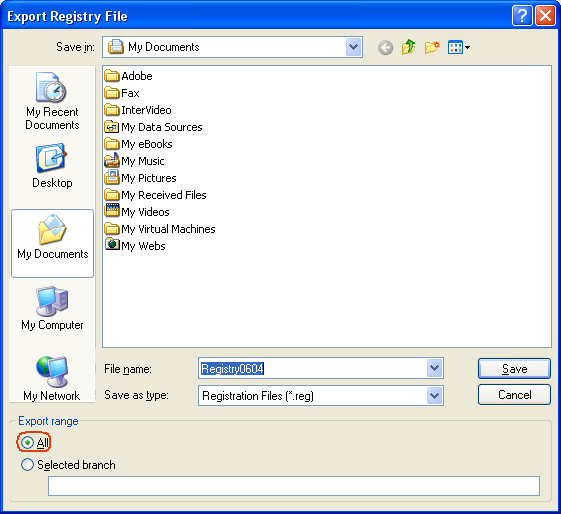
File > Export... > select All in Export Range (see below for image) > name it, select a location and Save
Browse through the keys (key is the "folder" you can see in tree to the left of the window) to: *HKEY_LOCAL_MACHINE\SOFTWARE\Electronic Arts\EA Games\Battlefield 2\ergc (you can always see where you are located on the bottom of the registry editor window)
If you have followed the path specified above you should be able to see a registry value called (Default) in the right part of the window
Double-click on the value to open its editor
Delete everything after x9392 (first 5 digits)
Now enter your CD-key (behind the x9392) without dashes or spaces
If your CD-key would be ABCD-0123-EFGH-4567-IJKL you would write it as ABCD0123EFGH4567IJKL
Then the complete line would look like: x9392ABCD0123EFGH4567IJKL
Once you're done entering the code simply click on OK, close the registry editor window and you should be all set to play the game again
* The path for 64bit versions of Windows (Vista x64 and XP x64 editions) is different: HKEY_LOCAL_MACHINE\SOFTWARE\Wow6432Node\Electronic Arts\EA Games\Battlefield 2\ergc
The rest of the guide is not affected.
Subsection: Restore registry aka something went wrong and now my Windows is messed up...
First of all, don't panic.
If you were following the instructions closely and you still have the registry backup then the fix can't be easier:
Locate the registry backup file (*.reg)
Double-click on the file
Confirm registry import and all overwrite prompts
You registry will be restored to their previous state (before changing the registry value, so you have to retry to make the game work)
Disclaimer:
I, nor anybody else, hold any responsibility for any possible hardware or software damage (how unlikely that might be) caused by following these instructions.
Last edited by Deadfast on 2011-03-28 06:15, edited 4 times in total.
I made a thread on this, First of all I run BF2(Original), Been playin for 3 years now, and it has FH2 characteristics (username screen is brown isnstead of yellow, the little quick play button on the bottom right corner has a blank sqare over it, etc) and when i have the server lists, all bf2 servers, it says CD KEY INVALID, SO: i did the regedit thing, cd key thing is still there, i re-installed bf2 1.41 patch...AND this happened after FH2 and all of its files(which i assume isnt true yet what im going thru) Any ideas?
My mate had that invalid cd key problem, and I've pointed him to download bfkeychanger (google) and enter his legit key in the keychanger. It was a 1 min solution and worked right away.
I don't even know where my key is. It's a second one, someone got my first one somehow and I had to buy it again, and now I can't find my second.
There is no way on vista you can find that registry to see what it currently is? If I can't find it, I don't know what my cd key is, and I'm not buying a third...
Ok, I didn't see the 64 bit changed. So is your key code somewhere with in all those numbers and letters in ergc?
I only get the Invalid CD-Key thing when I am using a user account (the main computer account) on my computer that is not the account BF2 was installed on originally. It is a weird problem...
There was a LOT of **** after the first 5 digits, I hope deleting all of it doesn't muck anything up.
Anyway, followed the guide, gonna try it out now.
ZOCOM Squad Leader/Heavy Weapons Specialist ZOCOM is a 3 man team, looking for team play with eachother, and other people. If you see the ZOCOM squad ingame, and you've got VOIP and wanna pitch in to the squad, join up.
"For me, love is knowing your target, putting them in your targeting reticle, and together achieving a singular purpose... against statistically long odds." - HK-47
I just played on a server, this randomly didnt come up for once. I left to find another and it's back again yet I haven't changed one thing, I never even quit the game.
Well I have something weird so I hope someone will help me. My problem is this:
When Ive installed 1st time pr and all, it was ok and I was playing on server. But when Ive exited the game and wanted to play again after while Ive cannot. It wroted me about invalid cd-key (I have original) so Ive tried your solutions. It was helpfull but only for time when I was again playing. For better view when I will turn off BF2PR I need to change my cd-key to play again. And yes its really everytime I turn of BF2PR so any help?
Last edited by Redfox on 2008-10-05 10:03, edited 1 time in total.
Im having the same problem im i followed the guide and its saying error writing the new contents information im running vista 32 bit i really need help i was playing pr when this happened
I have a bit of a problem, my cd key in the registry does not have the x9293 bit at the start, just the key. I tried adding it in but it never worked. Don't know what to do, any ideas?