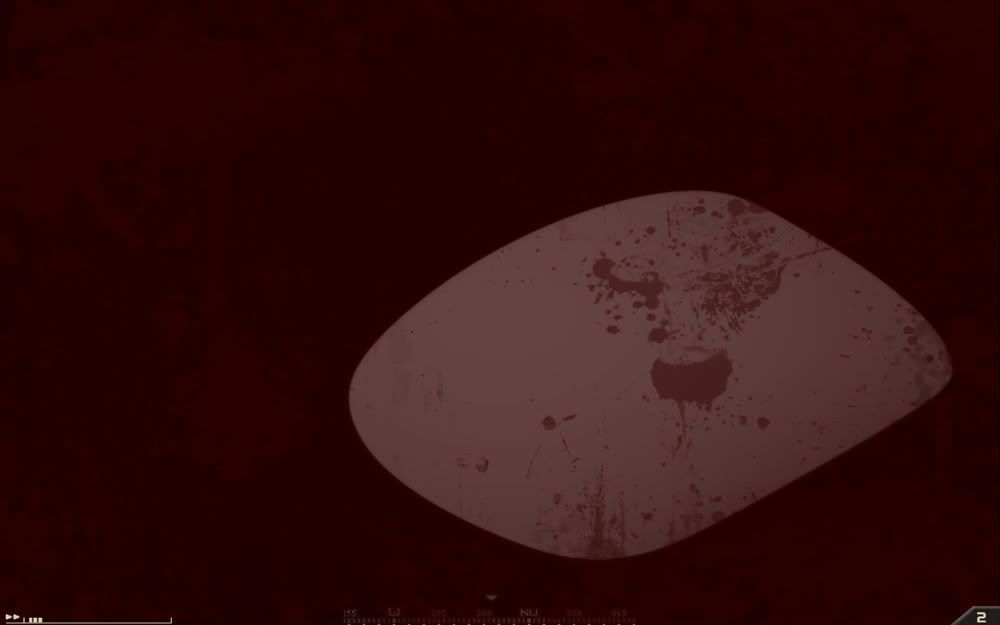
MAJOR graphical bug

If you find a bug within PR:BF2 (including PRSP), please report it here.
tanky
Posts: 202
Joined: 2008-03-29 13:12

MAJOR graphical bug

Post by tanky »

I did search but could not find anything on this, but appologies if its been raised before.

I just upgraded my GPU to a 4870x2 coz its an absolute beast ;)

but, since i have had it, the 'wounded' (black and white blury vision screen just before red screen of death) is completely black with some white blury dots...so i am totally blind when only wounded!

this is very annoying and is very off-putting when it seems i am at a great disadvantage in a fire fight compared to others.

Has anyone seen this or knows how to fix it?

many thanks!

my specs:

-Evga 780i SLI DDR2 mobo
-Q9450 @ 3.2
-8GB Dominator 1066 RAM (@1066)
-ATI 4870x2 2GB
-1010w OCZ psu
-Vista64
Last edited by tanky on 2008-11-09 22:50, edited 1 time in total.
Nouniquenicks
Posts: 33
Joined: 2008-04-12 15:18

Re: MAJOR graphical bug

Post by Nouniquenicks »

tanky wrote:I did search but could not find anything on this, but appologies if its been raised before.

I just upgraded my GPU to a 4870x2 coz its an absolute beast ;)

but, since i have had it, the 'wounded' (black and white blury vision screen just before red screen of death) is completely black with some white blury dots...so i am totally blind when only wounded!

this is very annoying and is very off-putting when it seems i am at a great disadvantage in a fire fight compared to others.

Has anyone seen this or knows how to fix it?

many thanks!

my specs:

-Evga 780i SLI DDR2 mobo
-Q9450 @ 3.2
-8GB Dominator 1066 RAM (@1066)
-ATI 4870x2 2GB
-1010w OCZ psu
-Vista64

I've got the exact opposite problem as you. I hear coughing and stuff, but I only get the red outline thing, I've never gone B&W since a few weeks ago, I haven't changed any settings or anything.
Chuc
Retired PR Developer
Posts: 7016
Joined: 2007-02-11 03:14

Re: MAJOR graphical bug

Post by Chuc »

Take a screenshot please.
Image
Personal Folio - http://www.studioash.net
jOHNNYdOUBE
Posts: 637
Joined: 2007-09-13 21:28

Re: MAJOR graphical bug

Post by jOHNNYdOUBE »

That happens with my twin 3870's, just a dark screem with white bubbles floating around.
Get a screenshot later.
tanky
Posts: 202
Joined: 2008-03-29 13:12

Re: MAJOR graphical bug

Post by tanky »

[R-DEV]Chuc wrote:Take a screenshot please.
sorry iv been really pushed for time recently but i managed to get this screeny this morning before work:

Image

it does not remain static but the white blob grows, shrinks and moves a bit like the oil from a lava lamp, sometimes disappearing all together just leaving a black screen. But as you can see this is complete blindness. Also it does not fade in i dont think, rather it just pops onto the screen when my health reaches that threshold for the B&W screen to appear.

I hope this helps? If you need any more info pls ask, I would love to see this fixed! :)

many thanks!
jOHNNYdOUBE
Posts: 637
Joined: 2007-09-13 21:28

Re: MAJOR graphical bug

Post by jOHNNYdOUBE »

THAT's it.......

The blob i always get.

It sucks.
McBumLuv
Posts: 3563
Joined: 2008-08-31 02:48

Re: MAJOR graphical bug

Post by McBumLuv »

Thats heaven calling :D :D :D
Image

Image

Image
tanky
Posts: 202
Joined: 2008-03-29 13:12

Re: MAJOR graphical bug

Post by tanky »

McLuv wrote:Thats heaven calling :D :D :D
Im an atheist, so that should definitely not be on my screen then lol! ;)
Last edited by tanky on 2008-11-13 21:33, edited 1 time in total.
Rico11b
Posts: 900
Joined: 2006-05-23 20:36

Re: MAJOR graphical bug

Post by Rico11b »

That's what you lips say, but in your heart of hearts you know better.

You can lie to me all ya want, but you can't lie to yourself no matter how hard you try. You think you can, but you can't.


As far as your other "minor" issue... did you delete your cache after adding the new extra card/s? You could also uninstall vBF2 and PR. Delete EA games folders and anything having to do with vBF2/PR. Clean up the drive, and install from scratch. Don't forget to install latest 1.41 patch, then install PR.8. It's a little time consuming I know, but it usually helps me when things start acting weird.

If all else fails, you could try praying.
tanky
Posts: 202
Joined: 2008-03-29 13:12

Re: MAJOR graphical bug

Post by tanky »

Rico11b wrote:That's what you lips say, but in your heart of hearts you know better.

You can lie to me all ya want, but you can't lie to yourself no matter how hard you try. You think you can, but you can't.


As far as your other "minor" issue... did you delete your cache after adding the new extra card/s? You could also uninstall vBF2 and PR. Delete EA games folders and anything having to do with vBF2/PR. Clean up the drive, and install from scratch. Don't forget to install latest 1.41 patch, then install PR.8. It's a little time consuming I know, but it usually helps me when things start acting weird.

If all else fails, you could try praying.
lol nope im still atheist ;)

as for "minor"...I am completely blind when others are not! I would defo say this is major! :)

which cache are you refering to?
tbh i highly doubt its anything other than shitty ATI drivers...I havnt played a game yet that doesnt have some form of graphical "quirk" with this card. Honestly ATI coders are ****. Now I remember why I stuck with Nvidia all these years...unfortunately tho im sure ATI are not going to release an update to fix a mod issue...so its left to the PR devs who can hopefully show ATI how its done! :)

There has been a new catalyst driver release yestrday so i will try it over the wknd and see if it makes a difference.

Rico11b
Posts: 900
Joined: 2006-05-23 20:36

Re: MAJOR graphical bug

Post by Rico11b »

Lol,

The cache in your BF2 folder under your profile. Which is in My Documents.

What I meant when I said "minor" was the issue of you claiming atheist status. Your graphics issue is minor when compared to that :) But I will pray for you.

Anywho,
Try those things and see if it helps any at all. After all it can't hurt, and it doesn't cost anything but a little time on your part.

New drivers huh? I may go download them tomorrow ;)
Aranykai
Posts: 59
Joined: 2008-11-02 02:49

Re: MAJOR graphical bug

Post by Aranykai »

tanky wrote: tbh i highly doubt its anything other than shitty ATI drivers...I havnt played a game yet that doesnt have some form of graphical "quirk" with this card. Honestly ATI coders are ****. Now I remember why I stuck with Nvidia all these years...unfortunately tho im sure ATI are not going to release an update to fix a mod issue...so its left to the PR devs who can hopefully show ATI how its done! :)

There has been a new catalyst driver release yestrday so i will try it over the wknd and see if it makes a difference.
Try turning off Catalyst AI in the control center. This will disable the internal crossfire function of the card and make it behave as a single core 4870, eliminating most issues with older games that are troublesome with crossfire/SLI systems.
Image
7thID| Aranykai - 7thID.net
Image
" Honestly its not so much the weapon you have but how you use it that should matter." - [R-DEV]CAS_117"
jOHNNYdOUBE
Posts: 637
Joined: 2007-09-13 21:28

Re: MAJOR graphical bug

Post by jOHNNYdOUBE »

I have two HD3870 in crossfire.
I always use battlefield cleaner
Will turning off Catalyst AI work in this case without turning off crossfire?
I am installing catalyst 8.11 tomorrow.
Aranykai
Posts: 59
Joined: 2008-11-02 02:49

Re: MAJOR graphical bug

Post by Aranykai »

jOHNNYdOUBE wrote:I have two HD3870 in crossfire.
I always use battlefield cleaner
Will turning off Catalyst AI work in this case without turning off crossfire?
I am installing catalyst 8.11 tomorrow.
No, in this case, the whole point is to turn off crossfire. He has an X2 card, so he can only disable it via Catalyst AI. You on the other hand should probably just disable crossfire.
Image
7thID| Aranykai - 7thID.net
Image
" Honestly its not so much the weapon you have but how you use it that should matter." - [R-DEV]CAS_117"
tanky
Posts: 202
Joined: 2008-03-29 13:12

Re: MAJOR graphical bug

Post by tanky »

cool cheers for the tips guys i will will give these points a go when i get some time, and will let you know the results :)
ice_killer
Posts: 2361
Joined: 2007-02-15 16:20

Re: MAJOR graphical bug

Post by ice_killer »

lol i have that too, there is a fix,


dont get shot :mrgreen:


edit: what brand do you have ? ASUS ?
Last edited by ice_killer on 2008-11-16 13:51, edited 1 time in total.
I7 980X, REX3, Dominator GT 12G, 4X XFXHD6970 2G yes Quadfire , SSD 3x Raptors 2X 1.2 KW :mrgreen:
tanky
Posts: 202
Joined: 2008-03-29 13:12

Re: MAJOR graphical bug

Post by tanky »

[R-CON]ice_killer wrote:lol i have that too, there is a fix,


dont get shot :mrgreen:


edit: what brand do you have ? ASUS ?
Lol I try not to get shot! ;)

what brand of GPU do you mean? in that case it is a 'HIS 4870x2'...

if MOBO...then I have an 'EVGA 780i'
CodeC.Seven
Posts: 303
Joined: 2007-11-24 01:57

Re: MAJOR graphical bug

Post by CodeC.Seven »

cool effect :D better than any lava lamp :D
-Sig removed-
jOHNNYdOUBE
Posts: 637
Joined: 2007-09-13 21:28

Re: MAJOR graphical bug

Post by jOHNNYdOUBE »

I am not turning off CROSSFIRE.
No way, i just water cooled both cards, both hard drives and the cpu.
And threw an extra radiator out the window so the water is at 8C, cards at 19C, and hard drives at 13C.
Cards cranked up to 860 MHZ clock, and 1200 MHZ memory. CPU at 4.06Ghz. 4 gig ram at 1081.
Gaming in U.S.A. Northeast in winter.
No.
Must be another way.
What if i turn AI up from standard to advanced?
I really like my 320FPS.

Even FH2 acts like a lava lamp, also.
Aranykai
Posts: 59
Joined: 2008-11-02 02:49

Re: MAJOR graphical bug

Post by Aranykai »

jOHNNYdOUBE wrote:I am not turning off CROSSFIRE.
No way, i just water cooled both cards, both hard drives and the cpu.
And threw an extra radiator out the window so the water is at 8C, cards at 19C, and hard drives at 13C.
Cards cranked up to 860 MHZ clock, and 1200 MHZ memory. CPU at 4.06Ghz. 4 gig ram at 1081.
Gaming in U.S.A. Northeast in winter.
No.
Must be another way.
What if i turn AI up from standard to advanced?
I really like my 320FPS.

Even FH2 acts like a lava lamp, also.
If you would rather wave your e-penis than actually play, have fun then. Your monitor probably only has a 60herts refresh rate, so any fps above that is irrelevant.
You would probably be the one to put nitrous oxide in your car before you upgrade your brakes too...
Image
7thID| Aranykai - 7thID.net
Image
" Honestly its not so much the weapon you have but how you use it that should matter." - [R-DEV]CAS_117"
Locked

Return to “PR:BF2 Bugs”