[Help] lightmap bug

Making or wanting help making your own asset? Check in here
Post Reply
Psyko
Posts: 4466
Joined: 2008-01-03 13:34

[Help] lightmap bug

Post by Psyko »

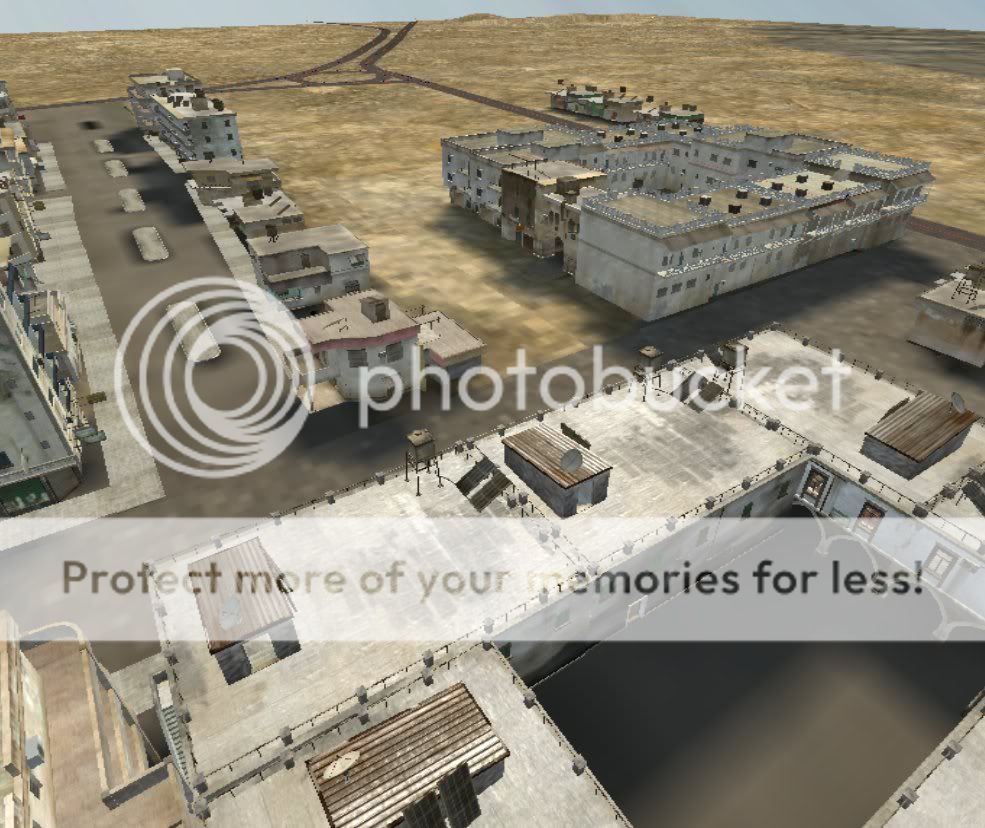
I exited out of lightmapping after some of the buildings were done.

the result; a quarter of the terrain's elevation was flattened out in a square shape, the shadows on the earth from the buildings remain when i load up an old version (up to the current version) of the map.

Anyone know which files i have to delete? i can remake my mountains, but there are still shadows on the ground from where the hills cast the shade.

its almost like the editor has a current setting of some type. hopefully a mapper with more knowlage can help me.

its just one of those stupid things with the editor. i'f tried deleting the light maps folder but it only got rid of the light mapping on the buildings. and i dont want to delete the ground lightmaps for fear of losing all the terrain detail that i painted by hand.

Please please please help, i have put a lot of time into my map and i dont want to lose my progress!!! :sad:

How do you reset lightmapping?
Last edited by Psyko on 2009-02-13 15:31, edited 2 times in total.
azreal64
Posts: 188
Joined: 2008-02-10 20:21

Re: [Help] lightmap bug

Post by azreal64 »

you delete the lightmap files. goto your_map>lightmaps>objects and delete everything in that folder but the lightmap.tai file which will clear your object lightmaps. as for terrain lightmaps create a new map, same size and copy its blank terrain lightmaps over
Retired Forgotten Hope 2 Developer
Psyko
Posts: 4466
Joined: 2008-01-03 13:34

Re: [Help] lightmap bug

Post by Psyko »

azreal64 wrote:you delete the lightmap files. goto your_map>lightmaps>objects and delete everything in that folder but the lightmap.tai file which will clear your object lightmaps. as for terrain lightmaps create a new map, same size and copy its blank terrain lightmaps over
thank you very much for your advice mate.
Wilkinson
Posts: 1916
Joined: 2008-08-18 21:55

Re: [Help] lightmap bug

Post by Wilkinson »

Yeah this helps thanks. But you dont need to make a new terrain i think for the terrain light maps. Just delete everything in the folder But the Obj folder
Image
Image
Psyko
Posts: 4466
Joined: 2008-01-03 13:34

Re: [Help] lightmap bug

Post by Psyko »

Tried out your advice, and this is what i got. whenever i lift a building, there is still lightmapping underneath it, am i missing somthing really simple here?

(example: the ugly looking pavement at the bottom of the road, top left corner.)

Image
Rhino
Retired PR Developer
Posts: 47909
Joined: 2005-12-13 20:00

Re: [Help] lightmap bug

Post by Rhino »

you need to re-render your terrain light maps for them to update?
HughJass
Posts: 2599
Joined: 2007-10-14 03:55

Re: [Help] lightmap bug

Post by HughJass »

there is supposed to be "shadows" under lightmapped buildings...
Image
CodeRedFox
Retired PR Developer
Posts: 5919
Joined: 2005-11-08 00:47

Re: [Help] lightmap bug

Post by CodeRedFox »

Make sure not to use the skip functions, I forget the wording right now.
Image
"apcs, like dogs can't look up" - Dr2B Rudd
D|ehard
Posts: 107
Joined: 2008-11-17 02:56

Re: [Help] lightmap bug

Post by D|ehard »

I found that after you move the object. Then you save and reopen it the shadow is under the new object :mrgreen:

Or delete it and replace it.
Wilkinson
Posts: 1916
Joined: 2008-08-18 21:55

Re: [Help] lightmap bug

Post by Wilkinson »

Nice Compound. well i went into my lightmap folder deleted every TERRAIN LIGHT MAP. (Thats everything not in the objects folder. worked out for me.
Image
Image
D|ehard
Posts: 107
Joined: 2008-11-17 02:56

Re: [Help] lightmap bug

Post by D|ehard »

What Wilk said. Delete every thing, but ur TAI file :)
Psyko
Posts: 4466
Joined: 2008-01-03 13:34

Re: [Help] lightmap bug

Post by Psyko »

[R-DEV]Rhino wrote:you need to re-render your terrain light maps for them to update?
just as simple as that? i make changes and the previous lightmaps will be done away with and new ones will totally overwrite them?

thanks everyone.
Rhino
Retired PR Developer
Posts: 47909
Joined: 2005-12-13 20:00

Re: [Help] lightmap bug

Post by Rhino »

Psykogundam wrote:just as simple as that? i make changes and the previous lightmaps will be done away with and new ones will totally overwrite them?

thanks everyone.
all lightmaps are, are pre-calculated light so that the player dose not need to render the light on the fly while playing the game apart from a few dynamic objects such as players, vehicles etc.

As its pre-calculated, if you change anything on your map such as moving a building or w/e, you will need to re-calculate the lightmaps to update them so that all of them are correct.

This is why its best to leave the lightmaps to more or less the last thing you do on the map before its done, otherwise your constantly updating your lightmaps to every change. Just render your terrain on medium lightmaps to get an idea on how its going to look, and maybe render a few buildings to test settings etc but apart from that, leave the bulk of it till the end.
Psyko
Posts: 4466
Joined: 2008-01-03 13:34

Re: [Help] lightmap bug

Post by Psyko »

[R-DEV]Rhino wrote:This is why its best to leave the lightmaps to more or less the last thing you do on the map
this i knew, but i was impetuous and wanted to see what would happen.

unfortunatly, "what happened" was, half of my elevation being flattened and a buttload of confusion.

thanks for the advice, as always i appresiate your info
Post Reply

Return to “PR:BF2 Community Modding”