
[HELP] Invalid access to Memory Error

Making or wanting help making your own asset? Check in here
Post Reply
llPANCHOll
Posts: 233
Joined: 2007-11-12 21:37

[HELP] Invalid access to Memory Error

Post by llPANCHOll »

System Specs

Gateway FX6800-01e
Processor: Core i7 920 @ 2.67GHx
Memory 3.00 GB
Windows Vista 64 bit

I am using 3dsMax 9 32bit, it was installed on my older CoreII system with 32bit XP and 4 GB RAM..

I know that Vista is Hungry for RAM and am planning to upgrade to 6 GB soon, but I'm not sure that is the problem..

I am running it in compatabillity mode for XP sp2 and as Administrator..
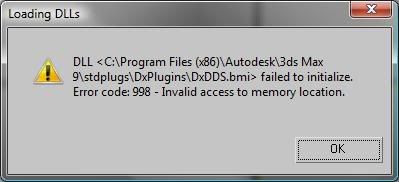
I get this error message when starting up 3dsMax
Image

and as a result it seems to be running in some "Barebones Mode" (the best way I can describe it) the image disapears as you press the top mouse button to move the page around and then reappears when you start to move your mouse, and manipulating objects is oddly minimized, you can only see the object you are manipulating noting else.

Image
Z-trooper
Retired PR Developer
Posts: 4166
Joined: 2007-05-08 14:18

Re: [HELP] Invalid access to Memory Error

Post by Z-trooper »

It must be a problem with windows-max communication. I don't even have that much RAM and I have no problem running max, even with over a million verticies in the scene.
Image
"Without geometry, life is pointless"
llPANCHOll
Posts: 233
Joined: 2007-11-12 21:37

Re: [HELP] Invalid access to Memory Error

Post by llPANCHOll »

[FIXED] Ticked Disable desktop composition box in the Compatibillity Tab
this fixed my issues regarding moving the objects around on the screen..

As far as the textures go, it appears it is a vista problem fixed with SP2
DDS is a Direct X Shader texture format. If you don't use DDS textures, don't worry about it. If you do, here you can dl and reinstall the dds plugin. That might fix the bug.
Do we use DDS textures in the making of objects for PR?? If not I wont bother upgrading to SP2
Image
Post Reply

Return to “PR:BF2 Community Modding”