
I found a fix for the "memory .dll error" for vista 32 & 64 bit user's.
-
fubar++
- Posts: 248
- Joined: 2007-07-08 17:04
Re: I found a fix for the "memory .dll error" for vista 32 & 64 bit user's.
That may happen. Anyways my problems are solved as they weren't memory related.
-
HannesFury
- Posts: 39
- Joined: 2009-03-27 14:32
 Re: I found a fix for the "memory .dll error" for vista 32 & 64 bit user's.
Mora wrote:Can you not just upload the edited exe? it would be allot easier.
i second that, if what we need is a changed BF2.exe.
this is very complicated... but kudos anyway for posting. i have trouble also running Battlefield 2 itself.
I will try this anyway, whats in it is worth the hassle, i hope! only played the single player
-
HannesFury
- Posts: 39
- Joined: 2009-03-27 14:32
Re: I found a fix for the "memory .dll error" for vista 32 & 64 bit user's.
ok i've got a problem... I installed "Microsoft Visual C++ 2008 Express Edition with SP1"
will that work, aaaand how do i find this command prompt? *confused*
thanks.
will that work, aaaand how do i find this command prompt? *confused*
thanks.
-
LeChuckle
- Posts: 664
- Joined: 2007-02-09 13:53
Re: I found a fix for the "memory .dll error" for vista 32 & 64 bit user's.
Start -> microsoft visual blablabla express -> tools -> there it is
-
Gracler
- Posts: 947
- Joined: 2009-03-22 05:16
Re: I found a fix for the "memory .dll error" for vista 32 & 64 bit user's.
Nice find Travis... thanks alot!.R.J.Travis wrote:
I found a fix for the "memory .dll error" that kicks some of us out to desktop every 2 or 3 map loads on certain servers, some more than others but from what I have been reading this is a problem for a lot of people running Vista, myself included.
The problem is that the BF2.exe is trying to use more memory than it is allowed to, this fix enables the BF2.exe to use more than it's current limit of 2gb (physical and PF together) for the second or two it needs it during certain map loads.
Im running win Vista x64 and had that memory bug on almost every new map after 1 had been loaded.
Have'nt had the memory crash once after i used this fix and Punkbuster is'nt any problem either.
I still Crash To Desktop randomly though but like you said that is a different story and proberly got something to do with corrupt textures or unexpected happenings that make it bug out.
Atleast now i can go to next map, without the need of a client restart.

-
HannesFury
- Posts: 39
- Joined: 2009-03-27 14:32
Re: I found a fix for the "memory .dll error" for vista 32 & 64 bit user's.
but the problem is that there is no such folder in my start menu... can i access is elsewhere?LeChuck wrote:Start -> microsoft visual blablabla express -> tools -> there it is
-
Gracler
- Posts: 947
- Joined: 2009-03-22 05:16
Re: I found a fix for the "memory .dll error" for vista 32 & 64 bit user's.
HannesFury wrote:but the problem is that there is no such folder in my start menu... can i access is elsewhere?
Well it was right where it was supposed to be for me..
I downloaded the Visual C++ Express from here
http://www.microsoft.com/express/vc/
then in the start menu its in (like travis mentioned)
Programs \
Visual C++ 2008 Express Edition \
Visual Studio Tools \
Visual Studio 2008 Command Prompt.exe
-
HannesFury
- Posts: 39
- Joined: 2009-03-27 14:32
Re: I found a fix for the "memory .dll error" for vista 32 & 64 bit user's.
i reinstaled a couple of times and finally it appeared.
i did this fix, all the steps successfully, but no change to the problem. i think the problem is in BF2 itself and/or the connection in fact, i dont get this error when i use another connection at another place ("place B"). the demo does works at place B, but not when i use it at place A where i live.
i did this fix, all the steps successfully, but no change to the problem. i think the problem is in BF2 itself and/or the connection in fact, i dont get this error when i use another connection at another place ("place B"). the demo does works at place B, but not when i use it at place A where i live.
-
Soppa
- Posts: 360
- Joined: 2009-02-23 14:24
Re: I found a fix for the "memory .dll error" for vista 32 & 64 bit user's.
If you got MD5 sum mismatch, try this workaround:https://www.realitymod.com/forum/f362-o ... =vista+2gbfubar++ wrote:This fix gives MD5 sum mismatch for BF2.exe on Punkbuster enabled server (using XP x64 thou'). It also didn't bring any help for my rig (CTDs, freezing, BSODs, not sure if memory related)
-
-
shark000.shark000
- Posts: 1
- Joined: 2009-04-02 18:36
 Re: I found a fix for the "memory .dll error" for vista 32 & 64 bit user's.
Hi... I did it step by step, but when I wrote editbin.exe... It replyed : LINK : fatal error LNK1104 cannot open file "BF2.exe"
I checked the name in my folder and it´s correct... I don´t have any other idea.
I checked the name in my folder and it´s correct... I don´t have any other idea.
-
PlixPlaxPlox
- Posts: 1
- Joined: 2009-04-02 15:15
Re: I found a fix for the "memory .dll error" for vista 32 & 64 bit user's.
It give me LINK : fatal error LNK1104 cannot open file "BF2.exe" too, dunno does that mather coz im doing that ''fix'' right now. well i try to continue and see what happens.
And my game might shut down in middle of the game... Any suggestions what might cause that?
Btw i tested after doing that fix, i did few test and it dint work.
And my game might shut down in middle of the game... Any suggestions what might cause that?
Btw i tested after doing that fix, i did few test and it dint work.
Last edited by PlixPlaxPlox on 2009-04-03 11:24, edited 2 times in total.
-
Owen
- Posts: 21
- Joined: 2009-04-07 23:17
Re: I found a fix for the "memory .dll error" for vista 32 & 64 bit user's.
That took a whole 2 Minutes, Cheers mate!
-
MrCloud
- Posts: 1
- Joined: 2009-04-18 22:40
Re: I found a fix for the "memory .dll error" for vista 32 & 64 bit user's.
I have the same problem as a few other people. Here is a sceen shot of proof... 

-
R.J.Travis
- Posts: 707
- Joined: 2007-12-09 21:27
Re: I found a fix for the "memory .dll error" for vista 32 & 64 bit user's.
I updated the thread with step by step photos.
I'm sorry I did not reply sooner as it Seems this sticky is not the most up to date as my other none sticky (:\
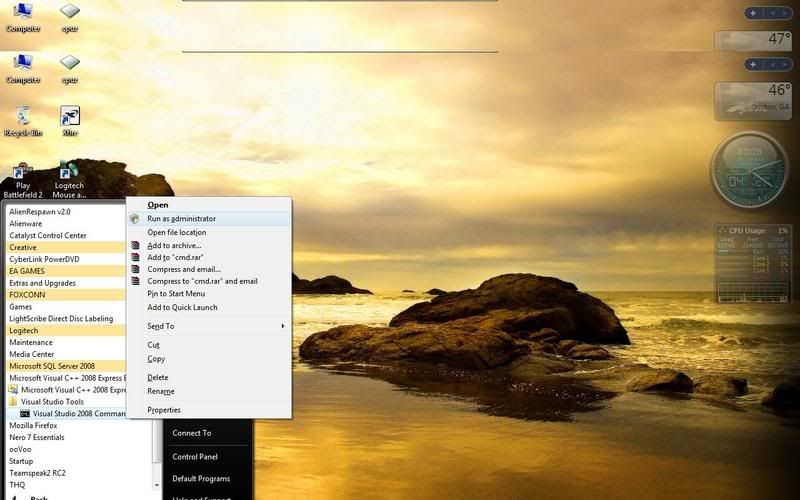
Anyways back to your problems You are not running the game as a Administrator you need to right click and scroll over to Run as a Administrator it will not work if you don't do this.
I had people in the other thread with the same problem when they ran the program as a Administrator the right way it worked for them.
(Don't left click on VS 2005 command prompt though, right click on it and then click "Run as Administrator"
**If you don't run it as Administrator the fix will not work**
Start ->Visual C++ 2005 Express Edition ->Visual Studio Tools ->Visual Studio 2005
Command Prompt
http://img.photobucket.com/albums/v448/sopdelta/C1.jpg
I'm sorry I did not reply sooner as it Seems this sticky is not the most up to date as my other none sticky (:\
Anyways back to your problems You are not running the game as a Administrator you need to right click and scroll over to Run as a Administrator it will not work if you don't do this.
I had people in the other thread with the same problem when they ran the program as a Administrator the right way it worked for them.
(Don't left click on VS 2005 command prompt though, right click on it and then click "Run as Administrator"
**If you don't run it as Administrator the fix will not work**
Start ->Visual C++ 2005 Express Edition ->Visual Studio Tools ->Visual Studio 2005
Command Prompt
http://img.photobucket.com/albums/v448/sopdelta/C1.jpg
Last edited by R.J.Travis on 2009-04-19 19:44, edited 3 times in total.
Twisted Helix: Yep you were the one tester that was of ultimate value.
-
MaverickCowboy
- Posts: 16
- Joined: 2009-04-20 20:52
Re: I found a fix for the "memory .dll error" for vista 32 & 64 bit user's.
the C++ link on windows site is broken. anyone have the ZIP?
-
R.J.Travis
- Posts: 707
- Joined: 2007-12-09 21:27
Re: I found a fix for the "memory .dll error" for vista 32 & 64 bit user's.
Sorry I fixed it I forgot to add the (Link).MaverickCowboy wrote:the C++ link on windows site is broken. anyone have the ZIP?
Twisted Helix: Yep you were the one tester that was of ultimate value.
-
Brokenspin3
- Posts: 1
- Joined: 2009-04-22 17:21
Re: I found a fix for the "memory .dll error" for vista 32 & 64 bit user's.
This "problem fixer" is a joke, i just followed his steps and it ended up that i had to uninstall everything (Bf2 Bf2 SF and PR). now that i have installed it again, it still doesn't work. I have 32vista and i did has he said you should.
But even now afterwards it dosn't work, so it seams no more BF for me until i Reinstall my computer. Gr8 work man. Should had said risks and possible errors, SUCH as your bf will not work again. I even uninstalled that Visual C++ edition thingy. It still doesn't connect to the bf or PR server. Cant even log into the game.
A Simple bull**** if u ask me
//Brokenspine
But even now afterwards it dosn't work, so it seams no more BF for me until i Reinstall my computer. Gr8 work man. Should had said risks and possible errors, SUCH as your bf will not work again. I even uninstalled that Visual C++ edition thingy. It still doesn't connect to the bf or PR server. Cant even log into the game.
A Simple bull**** if u ask me
//Brokenspine
-
Anderson29
- Posts: 891
- Joined: 2005-12-19 04:44
Re: I found a fix for the "memory .dll error" for vista 32 & 64 bit user's.
wow...welcome to the forums.....
in-game name : Anderson2981
steam : Anderson2981
steam : Anderson2981
-
HannesFury
- Posts: 39
- Joined: 2009-03-27 14:32
Re: I found a fix for the "memory .dll error" for vista 32 & 64 bit user's.
Hey guys. I managed to do all the steps successfully but unfortunately with no result.
The same dll error appears
Can you other people play via Hamachi? for me, hamachi bypasses this issue!
the hamachi network is called PRSP FUN and the password is: madmike
so welcome there fellow DLL-friends!
The same dll error appears
Can you other people play via Hamachi? for me, hamachi bypasses this issue!
the hamachi network is called PRSP FUN and the password is: madmike
so welcome there fellow DLL-friends!
Last edited by HannesFury on 2009-04-23 00:34, edited 1 time in total.
Reason: fingers like a giant monster
Reason: fingers like a giant monster
-
LithiumFox
- Posts: 2334
- Joined: 2007-07-08 18:25
Re: I found a fix for the "memory .dll error" for vista 32 & 64 bit user's.
Brokenspin3 wrote:This "problem fixer" is a joke, i just followed his steps and it ended up that i had to uninstall everything (Bf2 Bf2 SF and PR). now that i have installed it again, it still doesn't work. I have 32vista and i did has he said you should.
But even now afterwards it dosn't work, so it seams no more BF for me until i Reinstall my computer. Gr8 work man. Should had said risks and possible errors, SUCH as your bf will not work again. I even uninstalled that Visual C++ edition thingy. It still doesn't connect to the bf or PR server. Cant even log into the game.
A Simple bull**** if u ask me
//Brokenspine
Well this simple bull**** has allowed me to play countless rounds....
Oh, btw, changing ANY exe value is a risk.... i mean, it's kind of one of those things that people don't normall do, so you would think LOGICALLY that a risk would be tied into there....
besides i thought he did say that... or maybe that was just my logic...
also, somewhere on the forum they had it up for download, so you didn't have to change it yourself and risk it...
EDIT: Another thing, I love how your first post is "THis is Bull****".....
*thinks* wait... wasn't that my first post? XD
[url=http://www.realitymod.com/forum/f112-pr-bf2-tales-front/91678-universal-teamwork-oriented-player-tag.html]